
[vim/vim] [discuss] Popup Window API design. (#4063)

Linwei
This is not an issue, but I have no idea how to attach images in vim_dev group. So forgive me create this post in the issues and it can be closed immediately.
The human readable page is here:
https://github.com/skywind3000/vim-proposal/blob/master/popup_window.md
Popup Window API Proposal
Problem
Vim has already got some builtin popup-widgets for certain usage, like completion menu or balloon. But users and plugin authors are still asking for more:
- 3379: Support Floating Window
- 2948: balloon_show doesn't display the balloon
- 2352: Call to balloon_show() doesn't show the balloon in the terminal
- 3811: Feature Request: Trigger balloon via keyboard at cursor position
In Vim conf 2018, Bram claimed that he has plan for this already:
Popup Windows:
Use for a notification:
- Asynchronously show window with text “build done”.
- Remove after a few seconds.
Use for picking an item:
- Show window where each line is an item
- Let user pick an item
- A bit like confirm() but much nicer
Summary, there are two types of popup window: interactive and non-interactive.
For non-interactive popup windows, people want to use them to:
- Display the documentation for a function:

- Display linting errors or warnings:
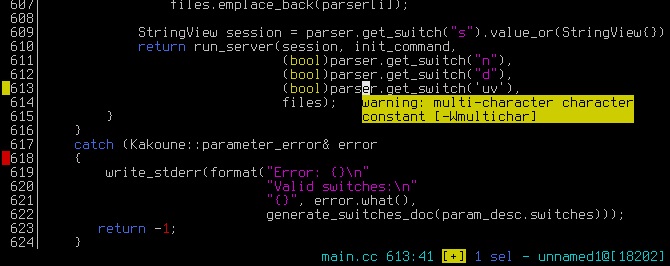
- Preview a portion of file (can be used to preview grep results in quickfix):

- Display funny help for newbies (like paperclip assistent in office 2000):

For interactive popup windows, people want to use them to:
- pick an item:

- display a nice popup menu:

- cmd line completion:

- use fuzzy finder in a popup window:

There are too many popup-related widgets for certain usage, designing one by one is nearly impossible.
Implementing a neovim's floating window will take too much time (it is working in progress for almost 2-years and still not merge to master).
Can we implement the popup window in a simple and adaptive way ? Is this possible to unify all their needs and simplify API design ?
The following parts of this article will introduce an overlay mechanism similar to Emacs's text overlay which is the backend of various popup windows in Emacs.
API Scope
Popup windows will draw into an overlay layer, A popup will remain after creation until an erase function is called. Everything in the overlay will not interfere vim's states, people can continue editing or using vim commands no matter there is a popup window or not.
So, the APIs are only designed for drawing a popup window and has nothing to do with user input. Dialogs like yes/no box and confirm box require user input, can be simulated with following steps:
function! Dialog_YesNo(...)

    while not_quit

       draw/update the popup window

       get input from getchar()

    endwhile

    erase the popup window

endfunc
Popup window APIs is not responsible for any interactive functionalities. Instead of implementing a complex widget/event system (which is too complex), it is sane to let user to handle the input by getchar().
There can be a popup.vim script contains some predefined popup windows/dialogs and will be shipped with vim itself. User can use the primitive APIs and getchar() to implement other complex dialogs like a popup fuzzy finder or a command line history completion box.
Overlay Buffer
The overlay buffer is a character matrix with the same size of the screen:
|\     |\

| \    | \

|  \   |  \

|   \  |   \

|   |  |   |

| 1 |  | 2 |   <---- Observer

|   |  |   |

|   /  |   /

|  /   |  /

| /    | /

|/     |/


^      ^

|      |

|   Overlay Buffer (M rows and N columns)

|

Ground Vim UI (M rows and N columns)
Similar to Video Buffer (0xb8000) in x86's text mode, the overlay buffer is a 2D array of characters and attributes. Change the content of the 2D array will change the text in the screen.
The overlay buffer is invisible by default and can be enabled by:
set guioptions+=o
Every existent text rendering code in both Vim & GVim needs to be updated to support this overlay buffer, once it finished, we can use it to build powerful popup windows.
There are also some basic APIs for overlay buffer:
- add a text string with position and attribute.
- erase a rectangle of text.
- command
redrawoverlayto update the overlay (it uses double buffer to prevent flicker).
With these primitive APIs, user can draw what ever they like on the overlay buffer.
Overlay Panes
Overlay panes is an abstraction of the popup windows, it consists of:
- position and size
- z order (for overlapping calculation)
- background color
- border styles
- lines of text and text-properties
There can be multiple panes at the same time, the panes can be manipulated by:
pane_create(int row, int col, int width, int height, ...);

pane_destroy(int pane_id);

pane_update(int pane_id, ...);

pane_move(int pane_id, int new_row, int new_col, int new_width, int new_height);

pane_show(int pane_id, bool show_hide);
(PS: they are provided as both C-apis and vim functions).
The life cycle of a pane is between pane_create and pane_destroy.
The (row, col) is using screen coordinate system, and there can be some functions to convert window based coordinate system to screen coordinate system. If you want to display a popup balloon right above your cursor, you can use them to calculate the position.
Finally, there is a function to render the pane list into the overlay buffer:
pane_flush();If you create some panes, the overlay buffer will not change until pane_flush().
Popup Windows
All the common popup windows are implemented in popup.vim script, they will use panes to display a popup window and getchar() to provide interactive functionalities.
There are some predefined popup windows:
- Popup_Message(): display a "build complete" message and hide after a few seconds.
- Popup_LinterHint(): display a message right above cursor and hide if cursor moves outside current
<cword>. - Popup_Menu(): display a menu (use
getchar()to receive user input) and quit after user select an item. - Popup_YesNo(): display a
yes/nobox and return the result after user made a selection. - ...
- and so on.
User or plugin authors can use the high level APIs provided by popup.vim or design their own popup window by utilizing lower level pane APIs or overlay APIs.
Summary
It is complex to design an event system or NeoVim's floating window, and nearly impossible to implement every type of popup window for certain usage.
To unify and simplify the interface, this proposal suggests to provide an overlay mechanism with some primitive APIs to:
- render a popup window (pane)
- erase a popup window
- update a popup window
And let user handle input themself by getchar(). At last, makes it possible to enable users to create various popup windows with different styles and functionalities.
—
You are receiving this because you are subscribed to this thread.
Reply to this email directly, view it on GitHub
Prabir Shrestha
Few more things I would like to add.
- It would also be good to see if we can come up with a different richer ui for GUI. For example embedding bold, italic, images and markdown texts, hr would be useful. Might be allow the user to set html and use the OS webview?
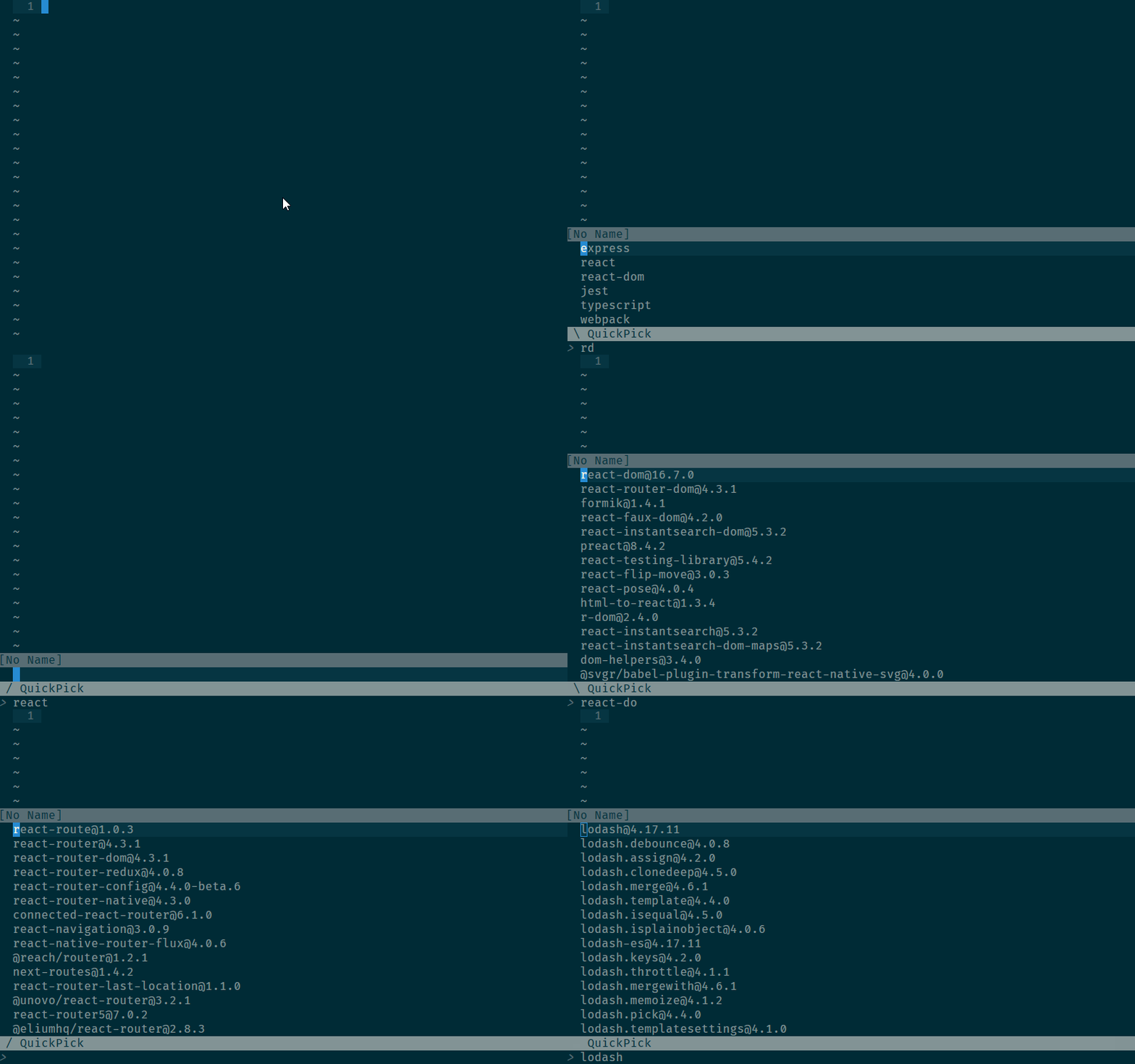
- As for flush would be good to have an api that allows us to optimize re-renders. I'm working on creating a fast async quickpick with vimscript only that can support fuzzy finder and to make it look responsive I need to draw a spinner which only takes one char but because I'm calling redraw everything is getting redrawn. (If anyone knows how too force redraw statusline only let me know, that would also solve this issue).
Francisco Lopes
@skywind3000: you may correct this statement:
it is working in progress for almost 2-years and still not merge to master
—
Linwei
Possible implementation for GVim and Vim:
For Windows, create a layered child window on the top of textarea. Layered Window can use a color key to control transparent area. No need to update most of GVim code.
For terminal, ncurses has overlapping windows and panels. I don't know if they can be used because I haven't programmed in ncurses.
Epheien
Currently, nvim support floating window!
Vim need some features against it.
年糕小豆汤
- It would also be good to see if we can come up with a different richer ui for GUI. For example embedding bold, italic, images and markdown texts, hr would be useful. Might be allow the user to set html and use the OS webview?
webview is crazy great
Linwei
@iamcco @prabirshrestha Webview is too big for vim, GVim needs to include at least 20MB dynamic libraries to support webview. You can check the binary size of cef or electron.
The webview can be implemented in a separated process, and attach to GVim's main window.
Prabir Shrestha
By webview I mean the OS default browser that is for Mac it would be safari and windows IE. Not sure about Linux. But if it isn’t portable then not worth it. Or if one could make a markdown renderer that would also be great.
Marco Trosi
I think it is very important that the implementation is super simple (KISS) and NOT super feature rich. We need only the basic overlay with just the proposed controls and new highlight groups and then the users are free to use it for various stuff. There will be many new ideas, you'll see.
Epheien
Prefer text ui, not webview.
neovim's floating window is awesome feature!
Boris Staletic
For the plugin writers' sanity sake, we should really try to make our implementation's API as close to neovim's as possible. Though, that's a little hard at the moment, considering that neovim's documentation isn't available just yet.
Björn Linse
@bstaletic I'm working on it here https://github.com/neovim/neovim/pull/9669/files, though I need adjust the script to show the indented text in nvim_open_win() correctly, so currently that part can be read here.
Linwei

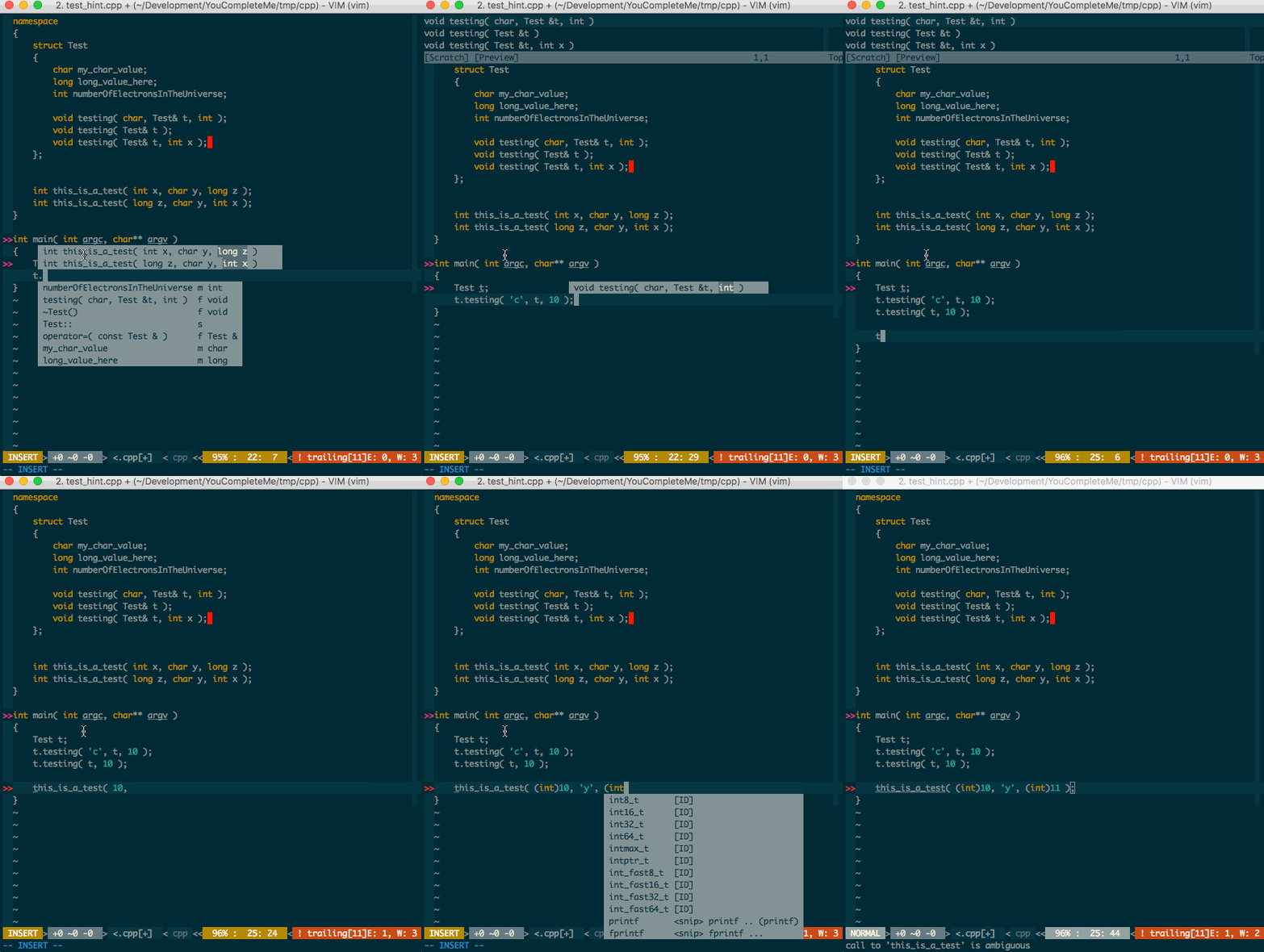
Boris Staletic
That RFC has been updated in my vim fork: https://github.com/bstaletic/vim/tree/current_argument_update
Qiming zhao
Highlight support is great, like this:
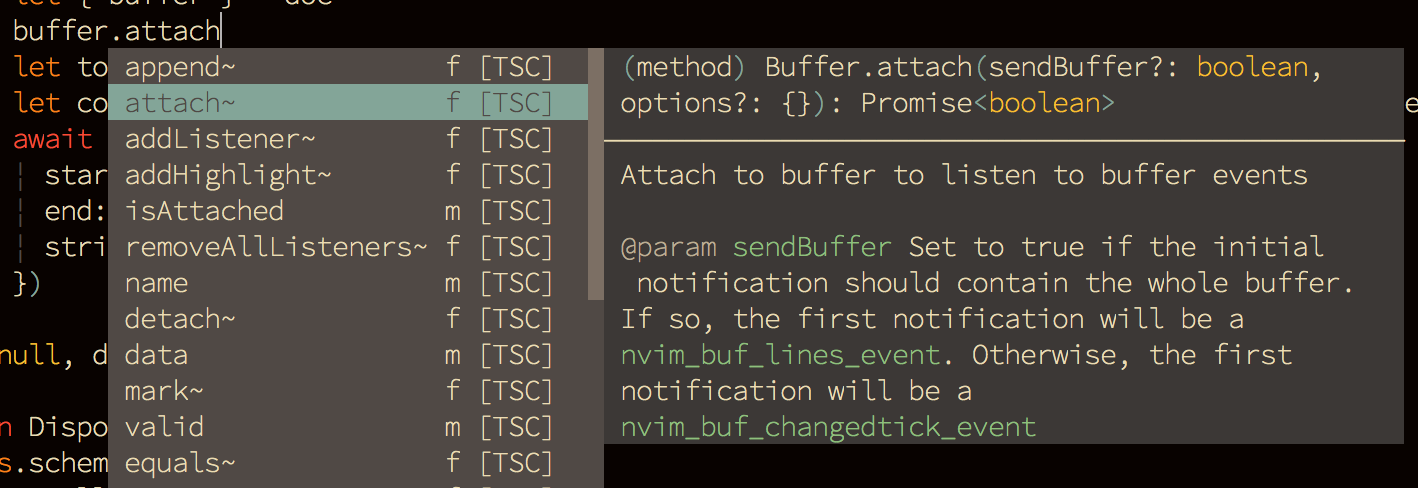
One of reasons that I don't like balloon is that doesn't allow highlight.
Paul Jolly
As part of https://github.com/myitcv/govim I'd like to see development in this area. govim is backed by gopls, an LSP server. So we have lots of rich information some users might like to be surfaced.
One of the key use cases is signature help. That is, when the user is in the middle of typing an expression that represents a function/method call, signature help reminds them of the function/method's signature, which parameter they are currently providing etc.
Some users will prefer this sort of detail in the status line.
Others, particularly those perhaps more used to things like VSCode, will appreciate the option of a balloon-like presentation of the signature help immediately above/below the relevant position.
Highlighting support would be a bonus, not least because it can be used to show the current parameter. (Highlighting support in balloons would also be useful too)
@brammool - what are your thoughts on this space in general?
Francisco Lopes
@myitcv reminder that you have all that available in neovim master/nightly, with coc.nvim making use of it for quite a while already. I find the govim's approach regarding adopting Vim8-only late remote API instead of NeoVim's one (and producing/using a wrapper over it for Vim8) kinda... strange. Is it worth it? I see even @Shougo preferring the latest approach with his plugins, even despite he being the original author of Vim's remote API implementation, if I recall correctly.
I think the remote API feature is one hard-to-borrow idea if you simply dismiss implementing it in a compatible way, and since NeoVim took the lead, I've seen many authors leveraging its remote API before Vim came with its own, unrelated one, that's of no use for the already existing remote plugins in NeoVim-land. Reason why I hardly see any Vim8-only remote plugin around.
Paul Jolly
@oblitum - I'd be happy to continue the conversation about govim, Neovim vs Vim8, different APIs etc in an issue over at https://github.com/myitcv/govim. I don't think this thread is the best place for that discussion.
Bram Moolenaar
I have added a detailed design in patch 8.1.1329. Feel free to comment.
Ben Jackson
Regarding the API, i'm a strong believer in "write the usage code first", i.e. you can't really know if the API works without some practical code which uses it. Bram, if you have a toy or POC implementation of the proposed API, i am more than willing to rewrite our my RFC demo to use it and let you know how it goes ? But on the face of it, your proposed API does seem to be a superset of what i proposed in that RFC.
In my original proposal i said this(;
hint_pum_set( {arg} ) = set the contents of the hint menu
For some reason i recall that i wanted to set the text, then display it separately. Maybe this was just implementation convenience, but perhaps it would make sense to allow popup_create which does all of what popup_show does, but doesn't actually show it ? This might be YAGNI, though.
Boris Staletic
For some reason i recall that i wanted to set the text, then display it separately.
I guess that was your idea at some point, but you also scrapped it and didn't end up using it in the actual code for the RFC mentioned, because you also had:
hint_pum_show( {arg} ) = set the contents and show the hint menu
Your branch didn't use hint_pum_set() at all by the time I took over the branch to rebase it onto, at the time, latest changes to the upstream vim.
Ben Jackson
OK then, carry on... :)
Twisted Pair in my Hair
Your paperclip design is awesome!
Bram Moolenaar
I was wondering about mouse clicks. We can probably do this:
A mouse click arrives as . The coordinates are in
v:mouse_popup_col and v:mouse_popup_row. The top-left screen cell of the
popup is col 1, row 1 (not counting the border).
Bram Moolenaar
See a discussion about using a buffer instead of a List of lines: https://groups.google.com/forum/#!topic/vim_dev/6RXkRnhpMNM
Epheien
I think, it's better to merge floating window feature from neovim.
Floating window is more generic than popup.
Linwei
@epheien I am afraid that merging is nearly impossible, because the ui backends is totally different between vim and neovim. If vim wants to merge neovim's floating window, the detachable ui mechanism in neovim must get merged first, which equivalent to merge entire neovim to vim.
Nearly impossible.
Linwei
https://github.com/vim/vim/blob/957f85d54ebd5a3bd0d930de9603190f0876f977/runtime/doc/popup.txt
This is totally beyond my expectation, cool.
The only question I really care about is: is it possible to block all the vim's event loop while a popup is visible ??
Like a dialog box in Win32, when a dialog box is created, the parent window will be paused until the dialog box get closed. It is useful while waiting user to make some choice or settings (like open a file).
There is a filter-callback in the api document, If create a dialog box in INSERT mode, I don't want to user input any text to current buffer while the dialog box is visible, can I use the filter-callback to achieve this ??
Bram Moolenaar
> I think, it's better to merge floating window feature from neovim.
> Floating window is more generic than popup.
it supports fewer features than what the proposal for the popup window
currently has.
--
I learned the customs and mannerisms of engineers by observing them, much the
way Jane Goodall learned about the great apes, but without the hassle of
grooming.
(Scott Adams - The Dilbert principle)
/// Bram Moolenaar -- Br...@Moolenaar.net -- http://www.Moolenaar.net \\\
/// sponsor Vim, vote for features -- http://www.Vim.org/sponsor/ \\\
\\\ an exciting new programming language -- http://www.Zimbu.org ///
\\\ help me help AIDS victims -- http://ICCF-Holland.org ///
Bram Moolenaar
> https://github.com/vim/vim/blob/957f85d54ebd5a3bd0d930de9603190f0876f977/runtime/doc/popup.txt
>
> This is totally beyond my expectation, cool.
>
> The only question I really care about is: is it possible to block all the vim's event loop while a popup is visible ??
>
> Like a `dialog box` in Win32, when a dialog box is created, the parent
> window will be paused until the dialog box get closed. It is useful
> while waiting user to make some choice or settings (like open a file).
>
> There is a `filter-callback` in the api document, If create a dialog
> box in INSERT mode, I don't want to user input any text to current
> buffer while the dialog box is visible, can I use the
> `filter-callback` to achieve this ??
--
It's totally unfair to suggest - as many have - that engineers are socially
inept. Engineers simply have different objectives when it comes to social
interaction.
Boris Staletic
I think, it's better to merge floating window feature from neovim. Floating window is more generic than popup.
Where is that documented?
https://github.com/neovim/neovim/pull/9722/files
Bram Moolenaar
> >> I think, it's better to merge floating window feature from neovim. Floating window is more generic than popup.
>
> > Where is that documented?
>
> https://github.com/neovim/neovim/pull/9722/files
arguments for nvim_open_win(). Where is that?
It also mentions "reconfigure a normal window into a float". Where is
explained how that happens?
Can the floating window be moved by the user? Can it extend (hidden)
outside of the Vim window? Or does it get smaller and text wraps?
What happens if there is more than one floating window? Is that even
possible? If yes, can I create a hundred of them? How are they all
positioned then?
--
A consultant is a person who takes your money and annoys your employees while
tirelessly searching for the best way to extend the consulting contract.
(Scott Adams - The Dilbert principle)
/// Bram Moolenaar -- Br...@Moolenaar.net -- http://www.Moolenaar.net \\\
/// sponsor Vim, vote for features -- http://www.Vim.org/sponsor/ \\\
\\\ an exciting new programming language -- http://www.Zimbu.org ///
\\\ help me help AIDS victims -- http://ICCF-Holland.org ///
—
Christian Brabandt
I guess @bfredl should know.
Bram Moolenaar
I wrote:
> > >> I think, it's better to merge floating window feature from neovim. Floating window is more generic than popup.
> >
> > > Where is that documented?
> >
> > https://github.com/neovim/neovim/pull/9722/files
>
> That's what I already found. It doesn't say much specific, esp. all the
> arguments for nvim_open_win(). Where is that?
At about 1/3 of the file.
> It also mentions "reconfigure a normal window into a float". Where is
> explained how that happens?
> Can the floating window be moved by the user? Can it extend (hidden)
> outside of the Vim window? Or does it get smaller and text wraps?
which only works with the GUI.
> What happens if there is more than one floating window? Is that even
> possible? If yes, can I create a hundred of them? How are they all
> positioned then?
one can't control which one goes on top.
Apparently the floating window behaves like a normal window, one can put
focus in it and edit the text. That's not really what we want with a
popup. It will trigger creeping featurism to add a window manager...
--
hundred-and-one symptoms of being an internet addict:
1. You actually wore a blue ribbon to protest the Communications Decency Act.
/// Bram Moolenaar -- Br...@Moolenaar.net -- http://www.Moolenaar.net \\\
/// sponsor Vim, vote for features -- http://www.Vim.org/sponsor/ \\\
\\\ an exciting new programming language -- http://www.Zimbu.org ///
\\\ help me help AIDS victims -- http://ICCF-Holland.org ///
—
Björn Linse
It also mentions "reconfigure a normal window into a float". Where is explained how that happens? Looks like this actually isn't supported.
This is supported and done by nvim_win_set_config function. It detaches the window from the split layout and displays it as a float.
Apparently the window is truncated.
Depends what "truncated" means. The floating window will be reduced in size to fit the size of the screen, and remain fully functional (unless the screen is really small, so normal windows doesn't render properly anyway).
Strangely there is no priority argument, thus when two windows overlap one can't control which one goes on top.
Yeah this is something we need to add. There is an ordering mechanism internally, but it is not exposed by the API. Currently order can only be changed by focusing the window.
Apparently the floating window behaves like a normal window, one can put focus in it and edit the text. That's not really what we want with a popup. It will trigger creeping featurism to add a window manager...
The rationale for us was rather to reduce the need for special API:s for float features. Text and highlighting can be set with the same mechanisms as for an ordinary window (including preview windows). Existing plugin code that uses a split window to display info (or show a menu, fuzzy search prompt etc) can be extended to support floating windows. Also, it is possible to disable focus support on a per-float basis. I understand if you prefer a different design though.
Bram Moolenaar
> > It also mentions "reconfigure a normal window into a float". Where
> > is explained how that happens? Looks like this actually isn't
> > supported.
>
> This is supported and done by `nvim_win_set_config` function. It
> detaches the window from the split layout and displays it as a float.
> > Apparently the window is truncated.
>
> Depends what "truncated" means. The floating window will be reduced in
> size to fit the size of the screen, and remain fully functional
> (unless the screen is really small, so normal windows doesn't render
> properly anyway).
description, no text it lost or hidden.
> > Strangely there is no priority argument, thus when two windows
> > overlap one can't control which one goes on top.
>
> Yeah this is something we need to add. There is an ordering mechanism
> internally, but it is not exposed by the API. Currently order can only
> be changed by focusing the window.
>
> > Apparently the floating window behaves like a normal window, one can
> > put focus in it and edit the text. That's not really what we want
> > with a popup. It will trigger creeping featurism to add a window
> > manager...
>
> The rationale for us was rather to reduce the need for special API:s
> for float features. Text and highlighting can be set with the same
> mechanisms as for an ordinary window (including preview windows).
> Existing plugin code that uses a split window to display info (or show
> a menu, fuzzy search prompt etc) can be extended to support floating
> windows. Also, it is possible to disable focus support on a per-float
> basis. I understand if you prefer a different design though.
kinds of questions, and probably many commands will need to behave
differently. E.g., what does "split" do? If it actually splits inside
the floating window it's like the floating window is a tabpage.
What does CTRL-W CTRL-W do? It's easy to think of more. Not putting
focus in the floating/popup window makes it easier (but there will still
be lots of things to check, e.g. how options are used).
It's clear that many plugin authors need popup windows, but focusing
them is not needed, and even undesired. So that's what I want to build
(at least now).
A small group of users would like floating windows for editing, toplevel
GUI windows, non-tiling window layout, etc. I think this is what Neovim
is intending to provide, and have popup windows as a side effect.
--
When a fly lands on the ceiling, does it do a half roll or
a half loop?
/// Bram Moolenaar -- Br...@Moolenaar.net -- http://www.Moolenaar.net \\\
/// sponsor Vim, vote for features -- http://www.Vim.org/sponsor/ \\\
\\\ an exciting new programming language -- http://www.Zimbu.org ///
\\\ help me help AIDS victims -- http://ICCF-Holland.org ///
—
Björn Linse
Aha. Can it also be put back?
Yes. <c-w>J and such works.
E.g., what does "split" do? If it actually splits inside the floating window it's like the floating window is a tabpage. What does CTRL-W CTRL-W do? It's e
No. Splits in floats are not allowed, that would be too complex. If split command is invoked, the split will go to the edge of the main screen instead. The floating windows are last in the window list, so <c-w><c-w> will cycle through first all split windows and then all focusable floats.
A small group of users would like floating windows for editing, toplevel GUI windows, non-tiling window layout, etc. I think this is what Neovim is intending to provide, and have popup windows as a side effect.
What nvim currently provides is a low-level but generic API for plugins to use as they see fit. Most plugin use so far use them as temporary popup windows or menus, some by re-purposing existing special spilt windows, as mentioned. It is possible we will add higher level API:s to more conveniently support popular usecases (which in part can determined by observing how the current implementation is used by the community). To say that it is "intended" for the small-group usecases specifically while popular usecases are a "side effect" doesn't make any sense.
Bram Moolenaar
Implementation has started and the design is now in runtime/doc/popup.txt.
Let's close this issue now. If you have ideas or comments regarding popup windows, please open a new issue.
Bram Moolenaar
Closed #4063.
Ben Jackson
In case anyone is interested, here's a prototype implementation of YouCompleteMe using this new API for argument hints. Very much a work in progress:
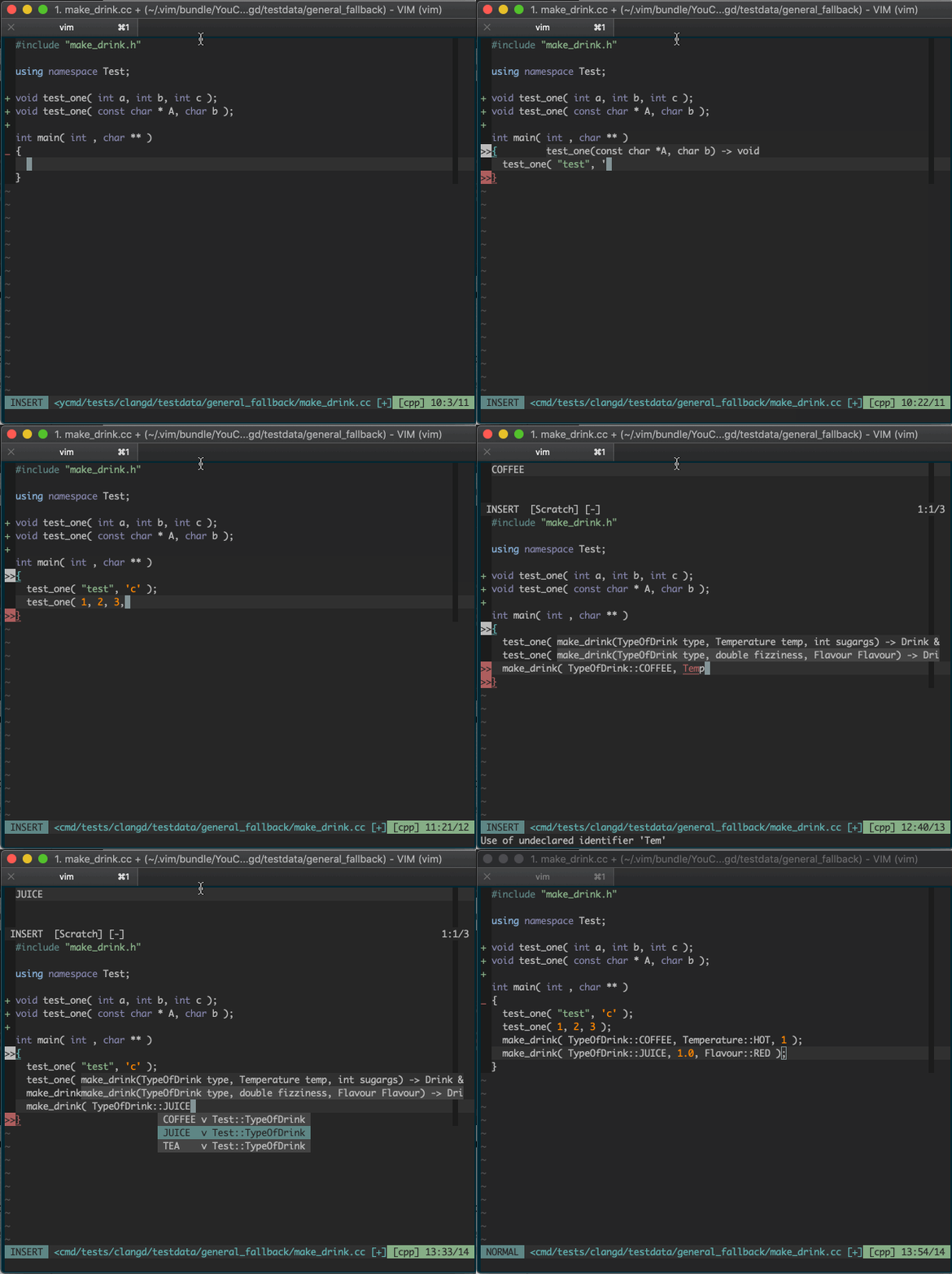
The backend completer clangd.
Linwei
@puremourning awesome !!
Maybe a distinguished background color would be better, It is hard to tell if a text line belongs to ground window or popup window.
Linwei
@brammool I want to simulate a menu bar with popup window:
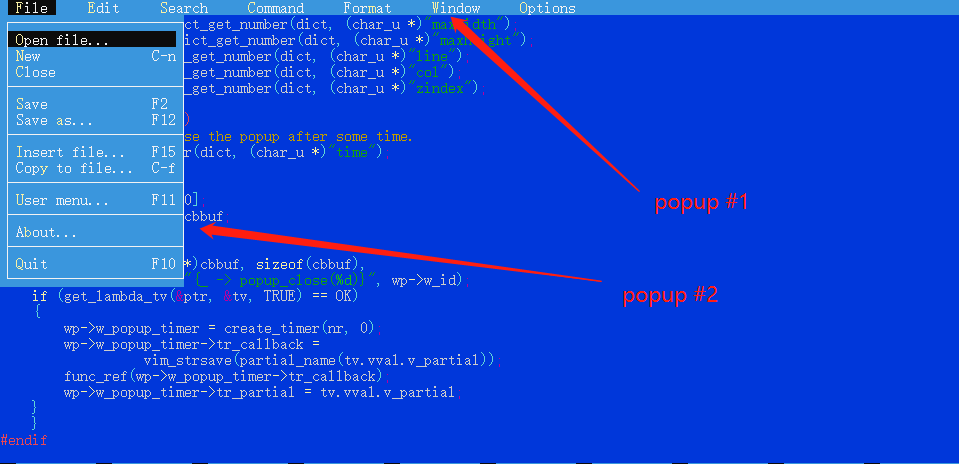
They are hide by default, and then:
- press
SPACE: display the top menu bar - press
f: display the file menu (select an item in menu bar) - press
s: to save current file (select an item in the file menu) - or press
ESCto hide them all.
Questions are:
- can we still have borders ??
- can I reuse buffer id's for them ??
Linwei
I can answer the buffer reuse question myself now, it is totally unnecessary, just use hide/show, during the life cycle, the buffer is always there.
Linwei
two minor issues:
the number isn't disabled in the popup window by default:
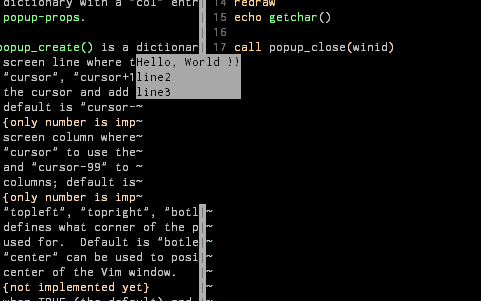
let winid = popup_create(["Hello, World !!", "line2", "line3"], {})
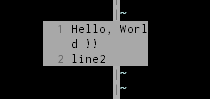
see the line number makes calculating width/height incorrectly. and the first line get wrapped and the third line are not displayed.
Unless I call:
call setwinvar(winid, '&number', 0)
after creation, and it works as expected:
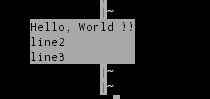
It should be disable by default.
The tilde is visible in non-text area:
reproduct:
let winid = popup_create(["Hello, World !!", "line2", "line3"], {"minheight": 10})
If a popup is created with a minheight larger than the actual size, the annoying tilde sign is visible and the background color is incorrect.
Ben Jackson
@puremourning awesome !!
Maybe a distinguished background color would be better, It is hard to tell if a text line belongs to ground window or popup window.
Well yes. It’s very simple, but UI is all placeholder right now. There are some other options we might want to Disable like ‘signcolumn’. But I will raise or fix those separately
—
You are receiving this because you are subscribed to this thread.
Reply to this email directly, view it on GitHub, or mute the thread.
Linwei
@puremourning , there is a work around:
call setwinvar(winid, '&number', 0)
call setwinvar(winid, '&signcolumn', "no")
Boris Staletic
@skywind3000 You forgot &relativenumber and there might be more.
Paul Jolly
@puremourning - that demo looks fantastic, excellent proof of concept to start with with the signature help. Are you prototyping this on a branch of YCM?
Boris Staletic
Ben Jackson
@myitcv yeah, though the branch has other stuff from my fork, you can the relevant changes in my 'signature-help' YCM branch here: puremourning/YouCompleteMe@yaml...puremourning:signature-help and here: puremourning/ycmd-1@yaml...puremourning:signature-help
Bram Moolenaar
> two minor issues:
>
> #### the `number` isn't disabled in the popup window by default:
>
> ```VimL
> let winid = popup_create(["Hello, World !!", "line2", "line3"], {})
>
> 
>
> see the line number makes calculating width/height incorrectly. and the first line get wrapped and the third line are not displayed.
>
> Unless I call:
>
> call setwinvar(winid, '&number', 0)
>
> after creation, and it works as expected:
>
>
>
> It should be disable by default.
not doing that, but then it crashes (because options are not
initialized). I suppose for popup windows re-using the options of the
current window doesn't work well. Better to start with Vim default
values.
> #### The tilde is visible in non-text area:
>
> 
>
> reproduct:
>
> ```viml
> let winid = popup_create(["Hello, World !!", "line2", "line3"], {"minheight": 10})
> ```
>
> If a popup is created with a `minheight` larger than the actual size, the annoying tilde sign is visible and the background color is incorrect.
I recently fixed the background color (there is a screendump test for
that). So perhaps in a popup window the tilde should just not be used?
Alternatively you can add some empty lines in the buffer. But I suppose
the tilde is not really useful anyway.
--
I started out with nothing, and I still have most of it.
-- Michael Davis -- "Tonight Show"
/// Bram Moolenaar -- Br...@Moolenaar.net -- http://www.Moolenaar.net \\\
/// sponsor Vim, vote for features -- http://www.Vim.org/sponsor/ \\\
\\\ an exciting new programming language -- http://www.Zimbu.org ///
\\\ help me help AIDS victims -- http://ICCF-Holland.org ///
—
Björn Linse
Minor drawing issue: When scrolling a non-current window (i e by using mouse scrollwheel), and popup is displayed on top of it, artefacts of the popup window is visible in the scrolled window. (scrolling current window is not affected).
Linwei
Thanks, since the popup window is local to the current tabpage, is the winid an unique id across tabpages ?
I am simulating a popup menu, text in popup can be changed by setbufline but how to change highlighting ?? When the menu indicator jump from one position to another (press UP/DOWN, CTRL+N/P), highlighting requires to be changed.
Any API for this ??
Now a popup window uses a traditional buffer, how can I apply traditional syntax highlighting on it ??
Björn Linse
Another issue: if a popup window covers a statusline, then statusline will sometimes be drawn on top of the popup window (very frequent with statusline plugin like lightline, with NORC it seems to happen on switching windows).
Bram Moolenaar
> Another issue: if a popup window covers a statusline, then statusline
> will sometimes be drawn on top of the popup window (very frequent with
> statusline plugin like lightline, with NORC it seems to happen on
> switching windows).
Still needs quite a bit of work.
--
The future isn't what it used to be.
/// Bram Moolenaar -- Br...@Moolenaar.net -- http://www.Moolenaar.net \\\
/// sponsor Vim, vote for features -- http://www.Vim.org/sponsor/ \\\
\\\ an exciting new programming language -- http://www.Zimbu.org ///
\\\ help me help AIDS victims -- http://ICCF-Holland.org ///
—
Bram Moolenaar
> Thanks, since the popup window is local to the current tabpage, is the
> winid an unique id across tabpages ?
Popup windows can also be global, they hang around when going through
tab pages.
> I am simulating a popup menu, text in popup can be changed by
> `setbufline` but how to change highlighting ?? When the menu indicator
> jump from one position to another (press UP/DOWN, CTRL+N/P),
> highlighting requires to be changed.
> Any API for this ??
>
> Now a popup window uses a traditional buffer, how can I apply
> traditional syntax highlighting on it ??
call win_execute(winid, 'syntax enable')
--
hundred-and-one symptoms of being an internet addict:
Bram Moolenaar
> @brammool I want to simulate a menu bar with popup window:
>
>
> They are hide by default, and then:
>
> 2. press `f`: display the file menu (select an item in menu bar)
> 3. press `s`: to save current file (select an item in the file menu)
> 4. or press `ESC` to hide them all.
The first trigger would need to be a mapping. The rest can be done with
the popup window filter.
> Questions are:
> 1. can we still have borders ??
> 2. can I reuse buffer id's for them ??
Borders are planned, although I wonder if we should only support
something simple. It's easy to go crazy with this.
The separators need to be part of the buffer text, using text properties
for the highlighting. Once you do this, you could probably also draw
the borders that way, if you want something different from the default.
--
Light travels faster than sound. This is why some people
appear bright until you hear them speak
Andy Massimino
@skywind3000. Aren't menus already supported? E.g. in the termdebug plugin?
Linwei
@andymass I know the old menus displayed by :popup command. they have some limitations:
-
cannot be used in INSERT mode, I need a menu to help me choose snippets in insert mode. (completion menu isn't powerful enough too).
-
In GVim, I can't close the old popup menu with
CTRL+[(I useCTRL+[asESC). -
In terminal vim, I can't choose item with hotkeys (eg.
sis the hotkey for(S)ave).
Boris Staletic
@skywind3000 Check :h creating-menus. That's what @andymass was talking about.
Linwei
@bstaletic I know menus, it was for GVim. GVim uses native win32 menu which can't be closed by CTRL+[ and cannot be used in insert mode.
There is a :popup command to display menus created by :?menu commands in terminal, but it is flaky, don't have borders can't be triggerred by a hotkey.
Linwei
Now a popup window uses a traditional buffer, how can I apply traditional syntax highlighting on it ??
Not implemented yet:
call win_execute(winid, 'syntax enable')
and then ?? how to define the syntax ?? sourcing a syntax file ??
call win_execute(winid, "source /path/to/my_popup_syntax.vim")
or just source a built-in syntax file for snippets ??:
call win_execute(winid, "source /usr/local/share/vim/vim81/syntax/cpp.vim")
Linwei
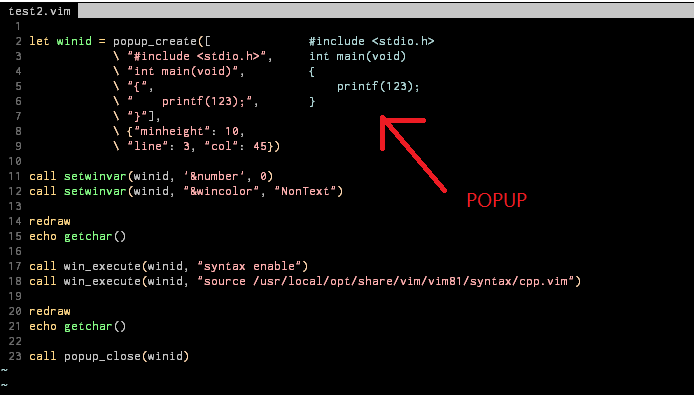
I wrote a test for applying traditional syntax highlighting in a popup window:
let winid = popup_create([
                        \ "#include <stdio.h>",
                        \ "int main(void)",
                        \ "{",
                        \ "    printf(123);",
                        \ "}"],
                        \ {"minheight": 10,
                        \ "line": 3, "col": 45})
call setwinvar(winid, '&number', 0)
call setwinvar(winid, "&wincolor", "NonText")

redraw
echo getchar()
call win_execute(winid, "syntax enable")
call win_execute(winid, "source /usr/local/opt/share/vim/vim81/syntax/cpp.vim")

redraw
echo getchar()
call popup_close(winid)
It works, but my LineNr (modified in my .vimrc) has been changed by cpp.vim:
before sourcing cpp.vim:
after sourcing cpp.vim:
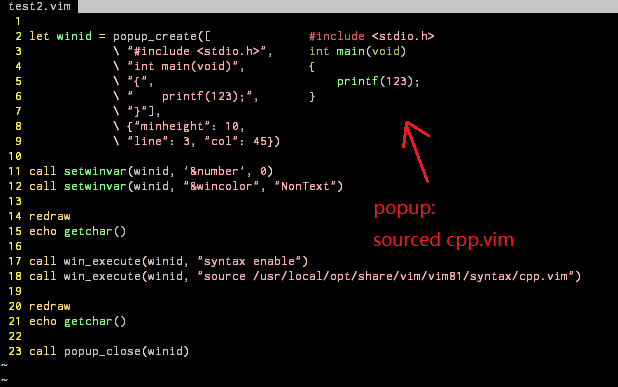
What is unexpected is that the highlighting group of LineNr has been reset, you can see the line number color changed from gray to yellow.
I am using desert256 color scheme, LineNr is yellow by default, and I changed it to gray in my .vimrc:
" tune line numbers
highlight LineNr term=bold cterm=NONE ctermfg=DarkGrey ctermbg=NONE
	\ gui=NONE guifg=#585858 guibg=NONE
But after sourcing "cpp.vim", it seems to be reseted to the origin yellow in desert256 colors cheme.
What I can confirm is that desert256.vim has been called by cpp.vim:
see the output of :scriptnames:
140: ~/.vim/bundles/vim-colorschemes/colors/desert256.vim
141: /usr/local/opt/share/vim/vim81/syntax/cpp.vim
142: /usr/local/opt/share/vim/vim81/syntax/c.vim
143: ~/.vim/bundles/vim-cpp-enhanced-highlight/after/syntax/c.vim
This is what happenning after:
call win_execute(winid, "source /usr/local/share/vim/vim81/syntax/cpp.vim")
I have no idea why "cpp.vim" will resourcing my current color scheme ??
Any work around to prevent this ?
Linwei
For someone who care about highlighting, I wrote another test to demostrate textprop + popup:
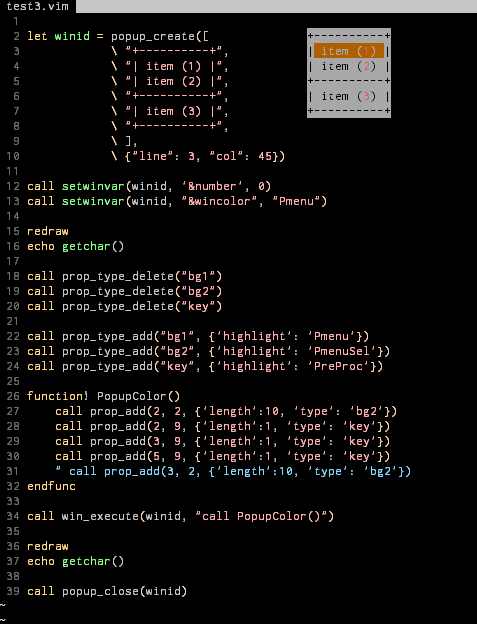
but using textprop on popup is trivial, every time I need change the highlighting, it requires:
- calculate new highlighting rules and call
prop_clearandprop_addin a function - call that function in
win_execute
It would be convenience if there are some functions like setbufline can enable me change the text properties within the popup window directly (without define a function and call it from win_execute).
Linwei
The old syntax highlighting is much easier for me than text properties:
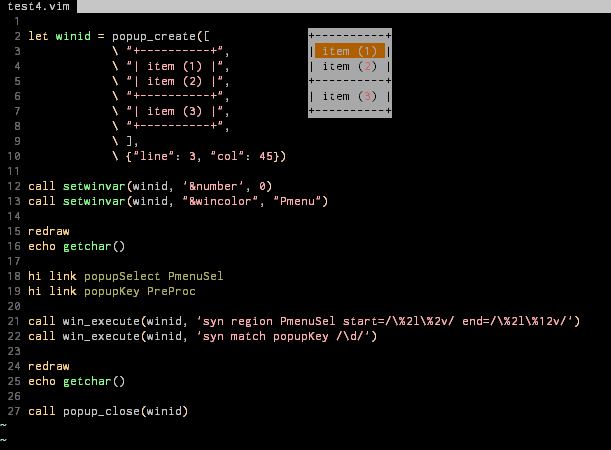
let winid = popup_create([
                        \ "+----------+",
                        \ "| item (1) |",
                        \ "| item (2) |",
                        \ "+----------+",
                        \ "| item (3) |",
                        \ "+----------+",
                        \ ],
                        \ {"line": 3, "col": 45})
call setwinvar(winid, '&number', 0)
call setwinvar(winid, "&wincolor", "Pmenu")

hi link popupSelect PmenuSel
hi link popupKey PreProc

call win_execute(winid, 'syn region PmenuSel start=/\%2l\%2v/ end=/\%2l\%12v/')
call win_execute(winid, 'syn match popupKey /\d/')
redraw
echo getchar()

call popup_close(winid)
Code is very simple. It is good to choose old syntax highlighting over textprop for a popup window.
Yggdroot
It also mentions "reconfigure a normal window into a float". Where > is explained how that happens? Looks like this actually isn't > supported. This is supported and done by
nvim_win_set_configfunction. It detaches the window from the split layout and displays it as a float.
Aha. Can it also be put back?
Apparently the window is truncated. Depends what "truncated" means. The floating window will be reduced in size to fit the size of the screen, and remain fully functional (unless the screen is really small, so normal windows doesn't render properly anyway).
That's what I meant with truncated. "sized to fit" would be a better description, no text it lost or hidden.
Strangely there is no priority argument, thus when two windows > overlap one can't control which one goes on top. Yeah this is something we need to add. There is an ordering mechanism internally, but it is not exposed by the API. Currently order can only be changed by focusing the window. > Apparently the floating window behaves like a normal window, one can > put focus in it and edit the text. That's not really what we want > with a popup. It will trigger creeping featurism to add a window > manager... The rationale for us was rather to reduce the need for special API:s for float features. Text and highlighting can be set with the same mechanisms as for an ordinary window (including preview windows). Existing plugin code that uses a split window to display info (or show a menu, fuzzy search prompt etc) can be extended to support floating windows. Also, it is possible to disable focus support on a per-float basis. I understand if you prefer a different design though.
If it's possible to put focus in a floating window this triggers all kinds of questions, and probably many commands will need to behave differently. E.g., what does "split" do? If it actually splits inside the floating window it's like the floating window is a tabpage. What does CTRL-W CTRL-W do? It's easy to think of more. Not putting focus in the floating/popup window makes it easier (but there will still be lots of things to check, e.g. how options are used).
It's clear that many plugin authors need popup windows, but focusing them is not needed, and even undesired. So that's what I want to build (at least now).
A small group of users would like floating windows for editing, toplevel GUI windows, non-tiling window layout, etc. I think this is what Neovim is intending to provide, and have popup windows as a side effect.
Focusable popup window is much desirable for me. I want to extend my fuzzy finder plugin LeaderF to support popup window, but it seems impossible without focusing, because LeaderF has two modes, when it is in normal mode, it should work as in normal window/buffer. However I can easily extend LeaderF to support float window on neovim. The scope of usage is too narrow for popup window if it can only be used to display something.
So can an option be added to specify whether to support focusing?
—
You are receiving this because you are subscribed to this thread.
Christian Brabandt
but it seems impossible without focusing
please explain why you need focusing.
Yggdroot
but it seems impossible without focusing
please explain why you need focusing.
If you have a try my plugin LeaderF, you will know why. It has a normal mode, for example, if you run command: Leaderf function, then press <tab>, it will switch to normal mode, you can use j, k to navigate the result, and even you can copy something from the result using the copy command.
Björn Linse
Focusing popup seems already possible, though only with a hack:
split
let wid = popup_create("text", {'minwidth': 15, 'minheight': 5})
call win_execute(wid, winnr()."close")
Editing and redrawing works just fine, but wincmds do not (need win_gotoid() to leave the popup window).
Yggdroot
Focusing popup seems already possible, though only with a hack:
split
let wid = popup_create("text", {'minwidth': 15, 'minheight': 5})
call win_execute(wid, winnr()."close")
Editing and redrawing works just fine, but wincmds do not (need
win_gotoid()to leave the popup window).
The hack has some issues, for example, :qa can not quit from vim. If the focus leave the popup window, it can not get back again.
It is best that vim can support focusing.
Björn Linse
Indeed, the point was to show that the design is compatible with focusing, but the wincmd issues would need to be fixed for real usage.
Similarly displaying and interacting with a terminal buffer in a popup window also sort-of works (like neovim float), but there are some drawing glitches and crashes. I think because some of the code checks for "popup" buffer type instead of popup window, which creates issues with special buffer types.
Ben Jackson
I worry that focussable pop ups is the tip of a scope creep iceberg. There were very specific use cases in the original request/rfc and in the plugin author survey.
Overlaying entire windows with complex interactions seems beyond that scope IMO.
E.g. for such things, what makes pop ups better than say splits?
Bram Moolenaar
> > > Now a popup window uses a traditional buffer, how can I apply traditional syntax highlighting on it ??
> >
> > Not implemented yet:
>
>
> call win_execute(winid, "source /path/to/my_popup_syntax.vim")
>
> or just source a built-in syntax file for snippets ??:
>
'syntax' does not work, because setwinvar() blocks autocommands, and
setting up syntax highligting needs autocommands. So the best way is:
call win_execute(winid, "set syntax=python")
I added test for that. And fixed that an unintended side effect was
that 'buftype' got reset.
--
Be thankful to be in a traffic jam, because it means you own a car.
/// Bram Moolenaar -- Br...@Moolenaar.net -- http://www.Moolenaar.net \\\
/// sponsor Vim, vote for features -- http://www.Vim.org/sponsor/ \\\
\\\ an exciting new programming language -- http://www.Zimbu.org ///
\\\ help me help AIDS victims -- http://ICCF-Holland.org ///
—
Bram Moolenaar
> For someone who care about highlighting, I wrote another test to
>
> 
>
> but using `textprop` on `popup` is trivial, every time I need change
> the highlighting, it requires:
>
> `prop_add` in a function
> 2. call that function in `win_execute`
>
> It would be convenience if there are some functions like `setbufline`
> can enable me change the text properties within the popup window
You should get the buffer number of the popup with winbufnr() and pass
it to the "bufnr" argument of prop_add().
--
hundred-and-one symptoms of being an internet addict:
sounds like the ocean wind...the perfect soundtrack for "surfing the net".
Bram Moolenaar
> The old syntax highlighting is much easier for me than text properties:
>
>
> ```viml
> let winid = popup_create([
> \ "+----------+",
> \ "| item (1) |",
> \ "| item (2) |",
> \ "+----------+",
> \ "| item (3) |",
> \ "+----------+",
> \ ],
> \ {"line": 3, "col": 45})
>
> call setwinvar(winid, '&number', 0)
> call setwinvar(winid, "&wincolor", "Pmenu")
>
> hi link popupSelect PmenuSel
> hi link popupKey PreProc
>
> call win_execute(winid, 'syn region PmenuSel start=/\%2l\%2v/ end=/\%2l\%12v/')
> call win_execute(winid, 'syn match popupKey /\d/')
>
> redraw
> echo getchar()
>
> call popup_close(winid)
> ```
>
> Code is very simple. It is good to choose old syntax highlighting over textprop for a popup window.
is completely up to you. You can also mix them.
--
"I don’t know how to make a screenshot" - Richard Stallman, July 2002
(when asked to send a screenshot of his desktop for unix.se)
/// Bram Moolenaar -- Br...@Moolenaar.net -- http://www.Moolenaar.net \\\
/// sponsor Vim, vote for features -- http://www.Vim.org/sponsor/ \\\
\\\ an exciting new programming language -- http://www.Zimbu.org ///
\\\ help me help AIDS victims -- http://ICCF-Holland.org ///
—
You are receiving this because you are subscribed to this thread.
Bram Moolenaar
> > > but it seems impossible without focusing
> >
> > please explain why you need focusing.
>
> If you have a try my plugin
I do not just try out random plugins to see what they do. I assume
others also prefer reading some text you write, perhaps look at a
screenshot or recording, instead of taking the effort and risk of
installing a plugin.
> It has a normal mode, for example, if you run command: `Leaderf
> use `j`, `k` to navigate the result, and even you can copy something
> from the result using the copy command.
yet, but you can read the docs for the planned functionality:
:help popup-filter
--
hundred-and-one symptoms of being an internet addict:
another computer and install a second phone line so the two of you can
chat.
Yggdroot
Anything you cannot do with a popup window filter? It's not implemented yet, but you can read the docs for the planned functionality: :help popup-filter
I have already read all the docs about popup window, and have tried writing some little tests. I think I can understand what popup-filter will do. Unfortunately it can't meet my requirement. It can only work like fzf, which has only one mode.
Anyway, thanks for your great work.
Bram Moolenaar
Bjorn Linse wrote:
> Focusing popup seems already possible, though only with a hack:
>
> ```
> split
> let wid = popup_create("text", {'minwidth': 15, 'minheight': 5})
> call win_execute(wid, winnr()."close")
> ```
>
> Editing and redrawing works just fine, but wincmds do not (need
> `win_gotoid()` to leave the popup window).
fix.
Please watch out for other problems, introducing a new type of window
means having to check all places where the difference might matter.
--
hundred-and-one symptoms of being an internet addict:
instinct is to search for the "back" button.
/// Bram Moolenaar -- Br...@Moolenaar.net -- http://www.Moolenaar.net \\\
/// sponsor Vim, vote for features -- http://www.Vim.org/sponsor/ \\\
\\\ an exciting new programming language -- http://www.Zimbu.org ///
\\\ help me help AIDS victims -- http://ICCF-Holland.org ///
—
Björn Linse
@brammool I think there still will be issues from that a lot of "interactive" features can be activated indirectly via commands, like :normal , feedkeys(), :wincmd and so on. A quick example, call win_execute(popup, "wincmd s") generates weird behavior.
Bram Moolenaar
> @brammool I think there still will be issues from that a lot of
> "interactive" features can be activated indirectly via commands, like
> win_execute(popup, "wincmd s")` generates weird behavior.
You can also mess up a normal window. But Vim should not crash or get
into a bad state. Perhaps CTRL-W commands and feedkeys() should be
disabled, I can't think of a useful application of these in a popup
window. Another way would be to whitelist commands to use in a popup
window, but that's going to be quite a bit of work, since we do want to
allow for useful things.
--
hundred-and-one symptoms of being an internet addict:
nor the address where you live.
/// Bram Moolenaar -- Br...@Moolenaar.net -- http://www.Moolenaar.net \\\
/// sponsor Vim, vote for features -- http://www.Vim.org/sponsor/ \\\
\\\ an exciting new programming language -- http://www.Zimbu.org ///
\\\ help me help AIDS victims -- http://ICCF-Holland.org ///
—
Paul Jolly
@puremourning - how are you finding popup windows for providing signature help?
I'm toying with the idea of adding support to https://github.com/myitcv/govim; wondering whether the ideas you were exploring in https://github.com/puremourning/YouCompleteMe/tree/signature-help are still current?
Thanks
mattn
@Yggdroo you can implement with filter. This is confirm dialog when open new buffer.
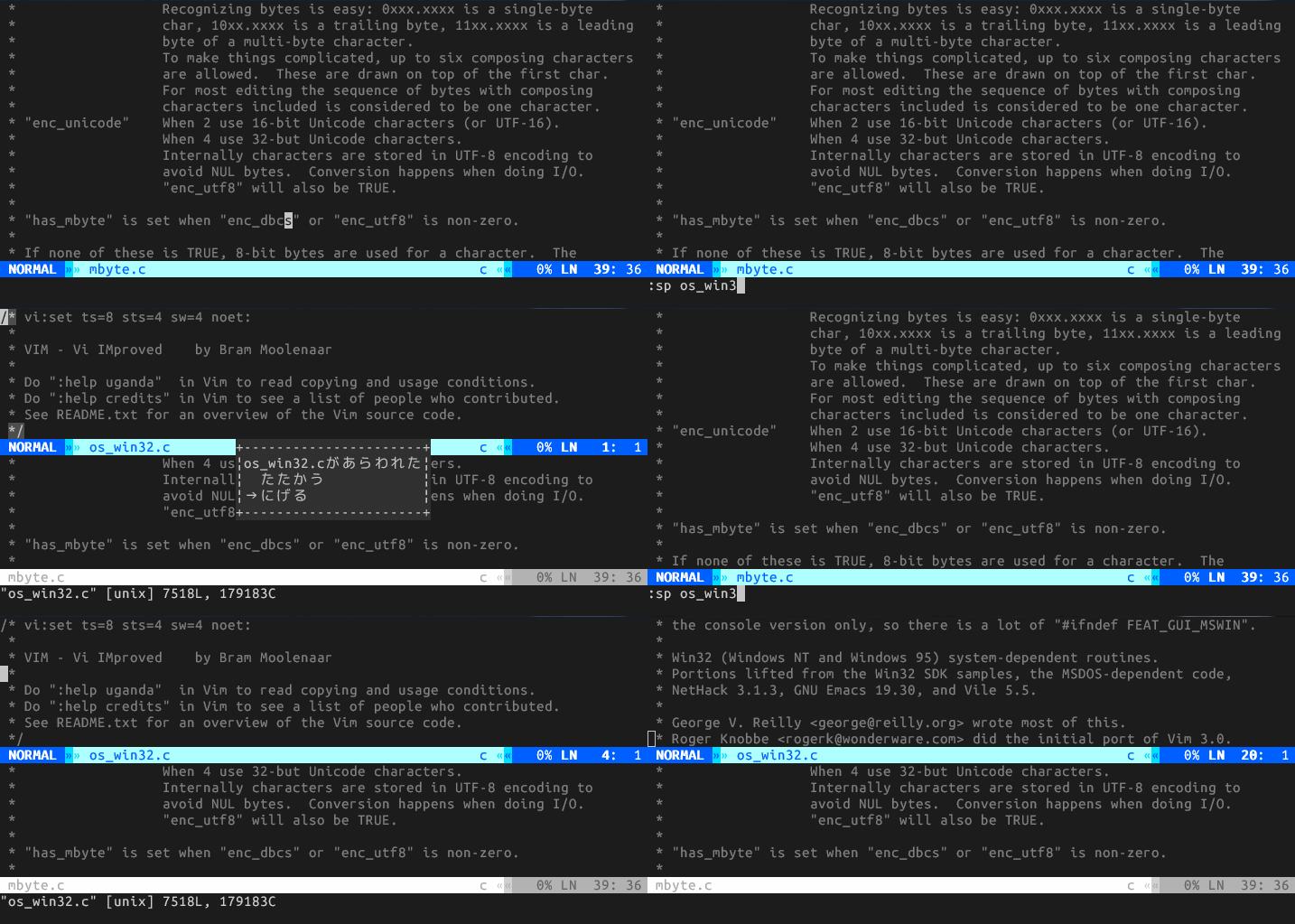
https://github.com/mattn/vimgon-quest-menu
Ben Jackson
@puremourning - how are you finding popup windows for providing signature help?
It's brilliant. I'm already using it every day pretty much.
I susepect that now ycmd uses gopls it would just work with go. I haven't tried it though.
Paul Jolly
Great to hear. It looks like your changes haven't been merged yet, so I assume you're still working off that branch?
Ben Jackson
Yes I am dogfooding.
Ben Jackson
@myitcv as mentioned, YCM just works with gopls (though gopls seems to have a bug identifying the current argument):

Paul Jolly
@puremourning - that looks fantastic!
Francisco Lopes
@puremourning: though gopls seems to have a bug identifying the current argument
This issue doesn't happen when snippet is expanded, which just adds an empty () but leaves the cursor inside. The server doesn't seem prepared to handle signatureHelp with an open parenthesis without a closing one following.
There was a previous relevant issue on saibing/bingo#20, whose development stopped in favor of gopls.
Yggdroot
@Yggdroot you can implement with filter. This is confirm dialog when open new buffer.
I know, this is easy to implement, however, what I need is a window that can get focusing just like neovim's floating window.
mattn
@Yggdroot If using filter, you can make prompt in the popup window.
Linwei
someone would write a readline library for popups?
—
You are receiving this because you are subscribed to this thread.
Prabir Shrestha
Here is another example where we needed to focus popup in order to be able to scroll.
prabirshrestha/vim-lsp#395
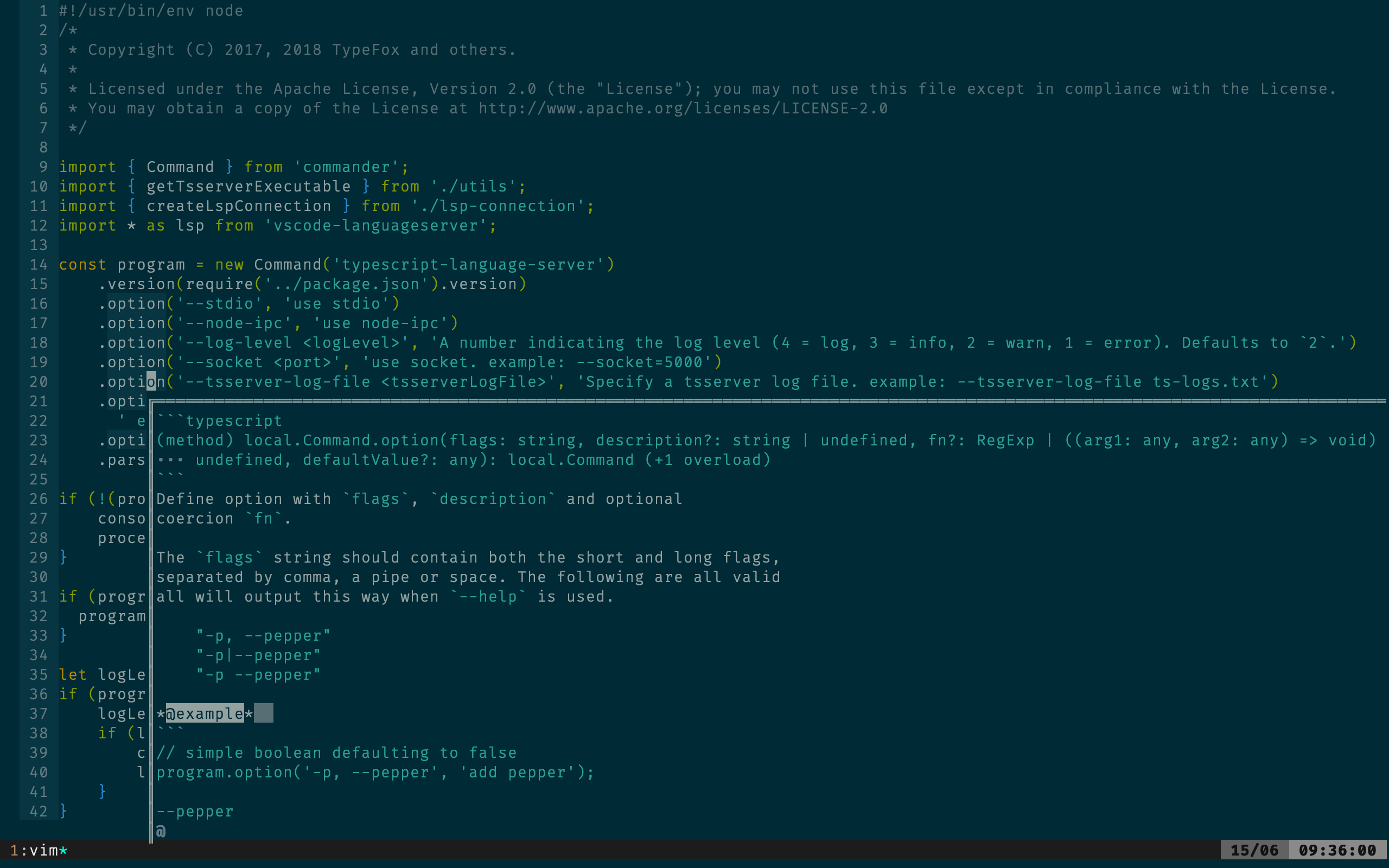
It is using :LspHover to get information of the symbol under the cursor. But the language server provides quite a lot of doc so impossible for me to read the entire docs. There could also be cases where I would actually like to even copy some of the sample docs in popup and paste it in my file.
Let me know if we want to create a new issue for this.
Linwei
Scroll your content by
call win_execute("normal \<c-e>")
call win_execute("normal \<c-y>")
??
blayz3r
This is not an issue, but I have no idea how to attach images in
vim_devgroup. So forgive me create this post in the issues and it can be closed immediately.The human readable page is here:
https://github.com/skywind3000/vim-proposal/blob/master/popup_window.mdPopup Window API Proposal
Problem
Vim has already got some builtin popup-widgets for certain usage, like completion menu or balloon. But users and plugin authors are still asking for more:
* 3379: [Support Floating Window](https://github.com/vim/vim/issues/3379)


* 2948: [balloon_show doesn't display the balloon](https://github.com/vim/vim/issues/2948)


* 2352: [Call to balloon_show() doesn't show the balloon in the terminal](https://github.com/vim/vim/issues/2352)


* 3811: [Feature Request: Trigger balloon via keyboard at cursor position](https://github.com/vim/vim/issues/3811)


* 0234: [Implement argument completion/hints](https://github.com/Valloric/YouCompleteMe/issues/234)


* 2718: [Display function prototype in the cmdline](https://github.com/Valloric/YouCompleteMe/issues/2718)


* [RFC: Signature help/argument hints in a second popup menu](https://groups.google.com/forum/#!searchin/vim_dev/argument$20hints%7Csort:date/vim_dev/YntCTlqdVyc/Me8uwfBpAgAJ)
In Vim conf 2018, Bram claimed that he has plan for this already:
Popup Windows:
Use for a notification:
- Asynchronously show window with text “build done”.
- Remove after a few seconds.
Use for picking an item:
- Show window where each line is an item
- Let user pick an item
- A bit like confirm() but much nicer
Summary, there are two types of popup window: interactive and non-interactive.
For non-interactive popup windows, people want to use them to:
* Display the documentation for a function:
* Display linting errors or warnings:
* Preview a portion of file (can be used to preview grep results in quickfix):
* Display funny help for newbies (like paperclip assistent in office 2000):
For interactive popup windows, people want to use them to:
* pick an item:
* display a nice popup menu:
* cmd line completion:
* use fuzzy finder in a popup window:
There are too many popup-related widgets for certain usage, designing one by one is nearly impossible.
Implementing a neovim's floating window will take too much time (it is working in progress for almost 2-years and still not merge to master).
Can we implement the popup window in a simple and adaptive way ? Is this possible to unify all their needs and simplify API design ?
The following parts of this article will introduce an
overlaymechanism similar to Emacs's text overlay which is the backend of various popup windows in Emacs.API Scope
Popup windows will draw into an overlay layer, A popup will remain after creation until an
erasefunction is called. Everything in the overlay will not interfere vim's states, people can continue editing or using vim commands no matter there is a popup window or not.So, the APIs are only designed for drawing a popup window and has nothing to do with user input. Dialogs like
yes/nobox and confirm box require user input, can be simulated with following steps:function! Dialog_YesNo(...) while not_quit draw/update the popup window get input from getchar() endwhile erase the popup window endfuncPopup window APIs is not responsible for any interactive functionalities. Instead of implementing a complex widget/event system (which is too complex), it is sane to let user to handle the input by
getchar().There can be a
popup.vimscript contains some predefined popup windows/dialogs and will be shipped with vim itself. User can use the primitive APIs andgetchar()to implement other complex dialogs like a popup fuzzy finder or a command line history completion box.Overlay Buffer
The overlay buffer is a character matrix with the same size of the screen:
|\     |\

| \    | \

|  \   |  \

|   \  |   \

|   |  |   |

| 1 |  | 2 |   <---- Observer

|   |  |   |

|   /  |   /

|  /   |  /

| /    | /

|/     |/


^      ^

|      |

|   Overlay Buffer (M rows and N columns)

|

Ground Vim UI (M rows and N columns)
Similar to Video Buffer (0xb8000) in x86's text mode, the overlay buffer is a 2D array of characters and attributes. Change the content of the 2D array will change the text in the screen.
The overlay buffer is invisible by default and can be enabled by:
set guioptions+=oEvery existent text rendering code in both Vim & GVim needs to be updated to support this overlay buffer, once it finished, we can use it to build powerful popup windows.
There are also some basic APIs for overlay buffer:
* add a text string with position and attribute.


* erase a rectangle of text.


* command `redrawoverlay` to update the overlay (it uses double buffer to prevent flicker).
With these primitive APIs, user can draw what ever they like on the overlay buffer.
Overlay Panes
Overlay panes is an abstraction of the popup windows, it consists of:
* position and size


* z order (for overlapping calculation)


* background color


* border styles


* lines of text and text-properties
There can be multiple panes at the same time, the panes can be manipulated by:
pane_create(int row, int col, int width, int height, ...);

pane_destroy(int pane_id);

pane_update(int pane_id, ...);

pane_move(int pane_id, int new_row, int new_col, int new_width, int new_height);

pane_show(int pane_id, bool show_hide);
(PS: they are provided as both C-apis and vim functions).
The life cycle of a pane is between
pane_createandpane_destroy.The (row, col) is using screen coordinate system, and there can be some functions to convert window based coordinate system to screen coordinate system. If you want to display a popup balloon right above your cursor, you can use them to calculate the position.
Finally, there is a function to render the pane list into the overlay buffer:
pane_flush();If you create some panes, the
overlay bufferwill not change untilpane_flush().Popup Windows
All the common popup windows are implemented in
popup.vimscript, they will usepanesto display a popup window andgetchar()to provide interactive functionalities.There are some predefined popup windows:
* Popup_Message(): display a "build complete" message and hide after a few seconds.


* Popup_LinterHint(): display a message right above cursor and hide if cursor moves outside current `<cword>`.


* Popup_Menu(): display a menu (use `getchar()` to receive user input) and quit after user select an item.


* Popup_YesNo(): display a `yes/no` box and return the result after user made a selection.


* ...


* and so on.
User or plugin authors can use the high level APIs provided by
popup.vimor design their own popup window by utilizing lower level pane APIs or overlay APIs.Summary
It is complex to design an event system or NeoVim's floating window, and nearly impossible to implement every type of popup window for certain usage.
To unify and simplify the interface, this proposal suggests to provide an overlay mechanism with some primitive APIs to:
* render a popup window (pane)


* erase a popup window


* update a popup window
And let user handle input themself by
getchar(). At last, makes it possible to enable users to create various popup windows with different styles and functionalities.--
2019/3/2 edit: floating window got merged to master.
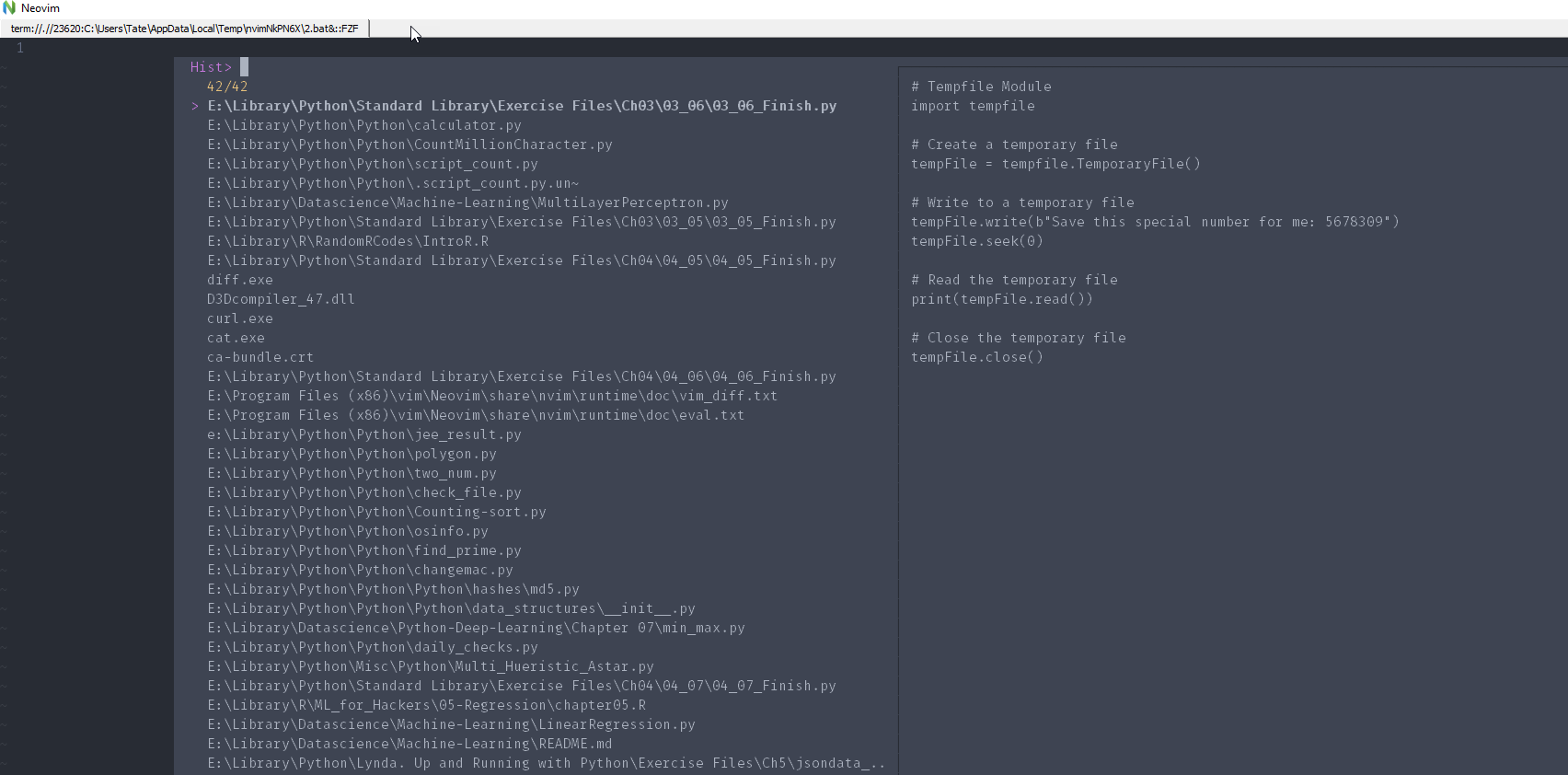
Are we able to have a foating fuzzyfinder (FZF) or grep. Can't seen to figure it out.
e.g junegunn/fzf.vim#786
—
You are receiving this because you are subscribed to this thread.
Marco Trosi
This you have to ask junegunn. It has nothing to do with the popup window implementation
Christian Brabandt
Are we able to have a foating fuzzyfinder (FZF) or grep. Can't seem to figure it out.
Well the infrastructure for that is available. Needs a plugin writer for that, if there is none available yet.
年糕小豆汤
@chrisbra It seems not possible to implement since vim's popup_menu is not a normal buffer.
Christian Brabandt
so what exactly are you missing? that is not possible currently. Please be specific.
年糕小豆汤
@chrisbra what missing is opening terminal in popup_menu
Christian Brabandt
and you need the terminal in a popup window because?