
[vim/vim] Can I use termdebug.vim on Windows ?? (#2882)

Linwei
Tried it on linux, and want to use it on windows. but there is an
E492: Not an editor command: Termdebug
on windows gvim.
The command is still unusable after :packadd termdebug
—
You are receiving this because you are subscribed to this thread.
Reply to this email directly, view it on GitHub
Christian Brabandt
when exactly do you encounter that? You started with vim --clean? do you have termdebug in your local $VIMRUNTIME?
Linwei
I encountered this after packadd termdebug and :Termdebug. Weird, termdebug.vim is not included in gvim_8.0.1806_x86.exe, but included in gvim_8.0.1806_x86.
Linwei
If you decompress gvim_8.0.1806_x86.zip, there is a termdebug.vim located in:
vim80\pack\dist\opt\termdebug
But if vim is installed from the win32 installer, you can't find the termdebug package.
K.Takata
We need to update the filelist in gvim.nsi.
If we can use File /r, the list can be made simpler.
mattn
Vim on Windows support communicating via pty But gdb command provided for Windows doesn't support "new-ui mi" command with pipe. So TermDebug not to work on Windows correctly.
Linwei
But why does https://github.com/cpiger/NeoDebug work on windows while termdebug not ?
—
You are receiving this because you are subscribed to this thread.
Reply to this email directly, view it on GitHub, or mute the thread.
mattn
Because it just use "set new-console on" command. not communicating via tty.
Christian Brabandt
so could we make the termdebug workable on Windows? I don't understand gdb good enough to guess what needs to be changed or what set new-console on does differently.
mattn
set new-console on create new cmd.exe for the target process. This behavior mean that termdebug can't communicate to mi2 interface. it should communicate to gdb prompt directly. I guess.
Linwei
So, Termdebug has three windows: the source window, the gdb console window and the output window. Can we just disable output window on Windows, and redirect the stdout/stdin of debugging process to the gdb console window ?
The output window of gdb-mode in emacs doesn't work on Windows too. But gdb-mode is still useable on window and the program output will be displayed in the gdb console window directly.
Bram Moolenaar
> `set new-console on` create new cmd.exe for the target process. This
> behavior mean that termdebug can't communicate to mi2 interface. it
> should communicate to gdb prompt directly. I guess.
Still, better than not working at all.
Alternatively, perhaps a gdb can be built with the mi2 interface?
--
There can't be a crisis today, my schedule is already full.
/// Bram Moolenaar -- Br...@Moolenaar.net -- http://www.Moolenaar.net \\\
/// sponsor Vim, vote for features -- http://www.Vim.org/sponsor/ \\\
\\\ an exciting new programming language -- http://www.Zimbu.org ///
\\\ help me help AIDS victims -- http://ICCF-Holland.org ///
Bram Moolenaar
> So, Termdebug has three windows: the source window, the gdb console
> window and the output window. Can we just disable output window on
> Windows, and redirect the stdout/stdin of debugging process to the gdb
> console window ?
>
> The output window of `gdb-mode` in emacs doesn't work on Windows too.
> But `gdb-mode` is still useable on window and the program output will
> be displayed in the gdb console window directly.
Vim, since it uses cursor positioning.
--
Did you ever stop to think... and forget to start again?
-- Steven Wright
/// Bram Moolenaar -- Br...@Moolenaar.net -- http://www.Moolenaar.net \\\
/// sponsor Vim, vote for features -- http://www.Vim.org/sponsor/ \\\
\\\ an exciting new programming language -- http://www.Zimbu.org ///
\\\ help me help AIDS victims -- http://ICCF-Holland.org ///
—
Linwei
And can we use a standalone cmd.exe window for the process which is been debugging, just like debugging console applications in visual studio ??
Linwei
NeoDebug can also have a separate console window on Windows:
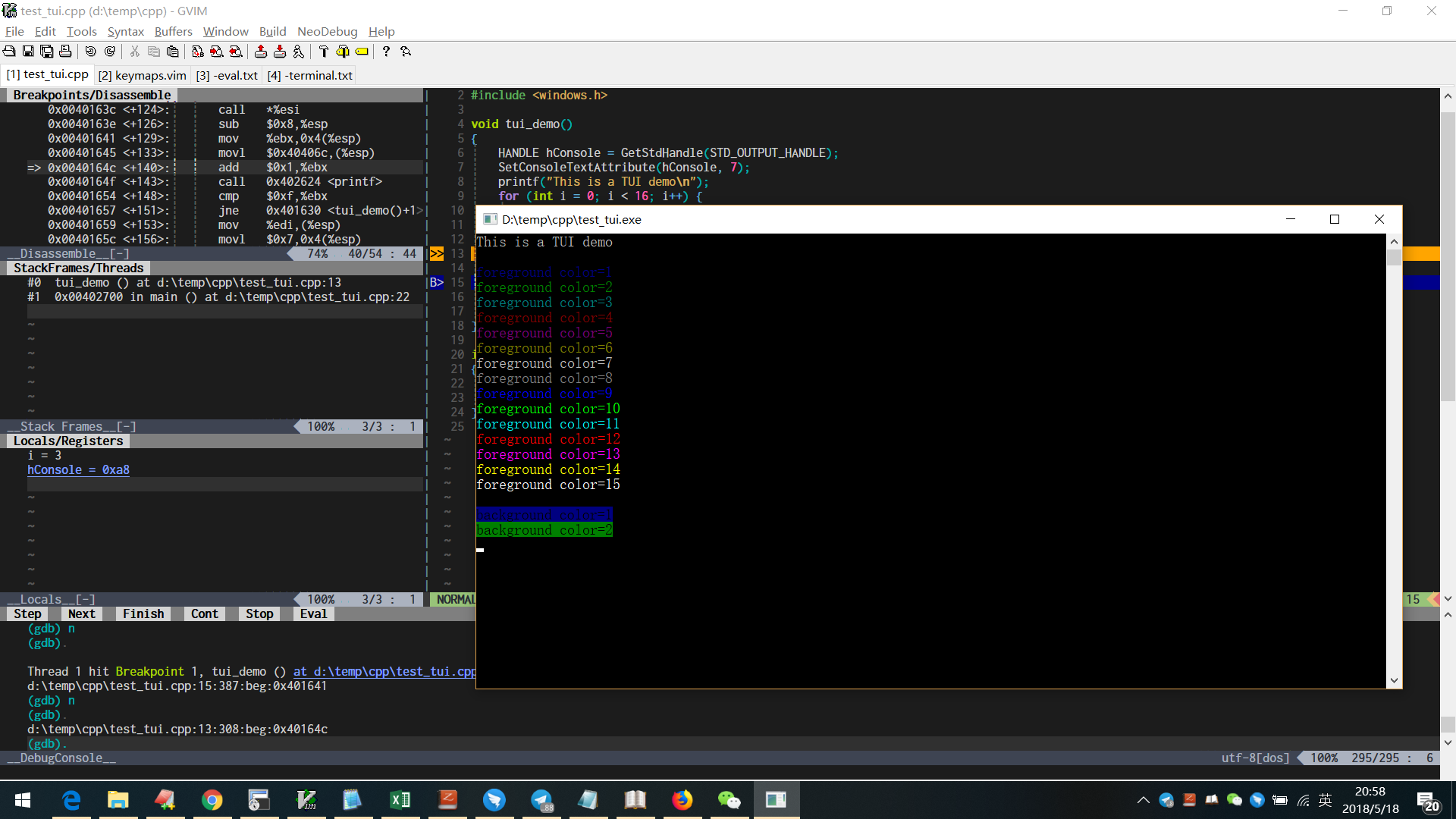
Is this an alternative way to debug TUI programs on windows ??
Bram Moolenaar
> NeoDebug can also have a separate console window on Windows:
>
>
> Is this an alternative way to debug TUI programs on windows ??
(with winpty). I wonder how to start that from gdb on Windows.
AFAIK NeoDebug only uses jobs and channels, not a terminal window.
It's a little bit limited, but it does work on MS-Windows, which the
Terminal debugger can't do (yet).
--
The MS-Windows registry is no more hostile than any other bunch of state
information... that is held in a binary format... a format that nobody
understands... and is replicated and cached in a complex and largely
undocumented way... and contains large amounts of duplicate and obfuscated
information... (Ben Peterson)
/// Bram Moolenaar -- Br...@Moolenaar.net -- http://www.Moolenaar.net \\\
/// sponsor Vim, vote for features -- http://www.Vim.org/sponsor/ \\\
\\\ an exciting new programming language -- http://www.Zimbu.org ///
\\\ help me help AIDS victims -- http://ICCF-Holland.org ///
—
Linwei
GDB has a set new-console on windows, similar to tty command on linux:
set new-console onIn this mode GDB will start the debugged program in a new console. The output of the program will be shown in a separate window that will be closed after the program exits.
see the documentation:
http://visualgdb.com/gdbreference/commands/set_new-console
Linwei
And I can use tty command to specify a terminal for NeoDebug:
- start NeoDebug and open a new terminal in vim.
- use bash command
ttyto display the current tty file name. - use
tty /dev/pts/0in NeoDebug - run the process.

See, I can debug my program in a vim terminal.
for more information about tty command in gdb:
https://sourceware.org/gdb/onlinedocs/gdb/Input_002fOutput.html
The only side effect is that I can't find a easy way to fetch tty filename of a terminal buffer. have to type tty command in the terminal.
Linwei
update: tty doesn't work in a vim terminal buffer if the program reads data from stdin.
Linwei
And neodebug is a little bit unstable now, could termdebug.vim emit a set new-console on command automatically on windows, and at least we can debug TUI programs in a separate console window on windows ??
Bram Moolenaar
> And neodebug is a little bit unstable now, could termdebug.vim emit a
> `set new-console on` command automatically on windows, and at least we
> can debug TUI programs in a separate console window on windows ??
is still missing in MS-Windows gdb builds, right? Not sure if it would
be possible, since it also requires a tty.
NeoDebug uses another UI mode, which is much more complicated to use.
--
Corn oil comes from corn and olive oil comes from olives, so where
does baby oil come from?
/// Bram Moolenaar -- Br...@Moolenaar.net -- http://www.Moolenaar.net \\\
/// sponsor Vim, vote for features -- http://www.Vim.org/sponsor/ \\\
\\\ an exciting new programming language -- http://www.Zimbu.org ///
\\\ help me help AIDS victims -- http://ICCF-Holland.org ///
—
mattn
but the "new-ui" command is still missing in MS-Windows gdb builds, right?
Yes, it doesn't work on Windows. also passing named pipe also not work. new-ui mi con or new-ui mi CONOUT$ are not work too.
Linwei
I have tested set new-console on with termdebug.vim on windows, in spite of some error messages, it seems work:
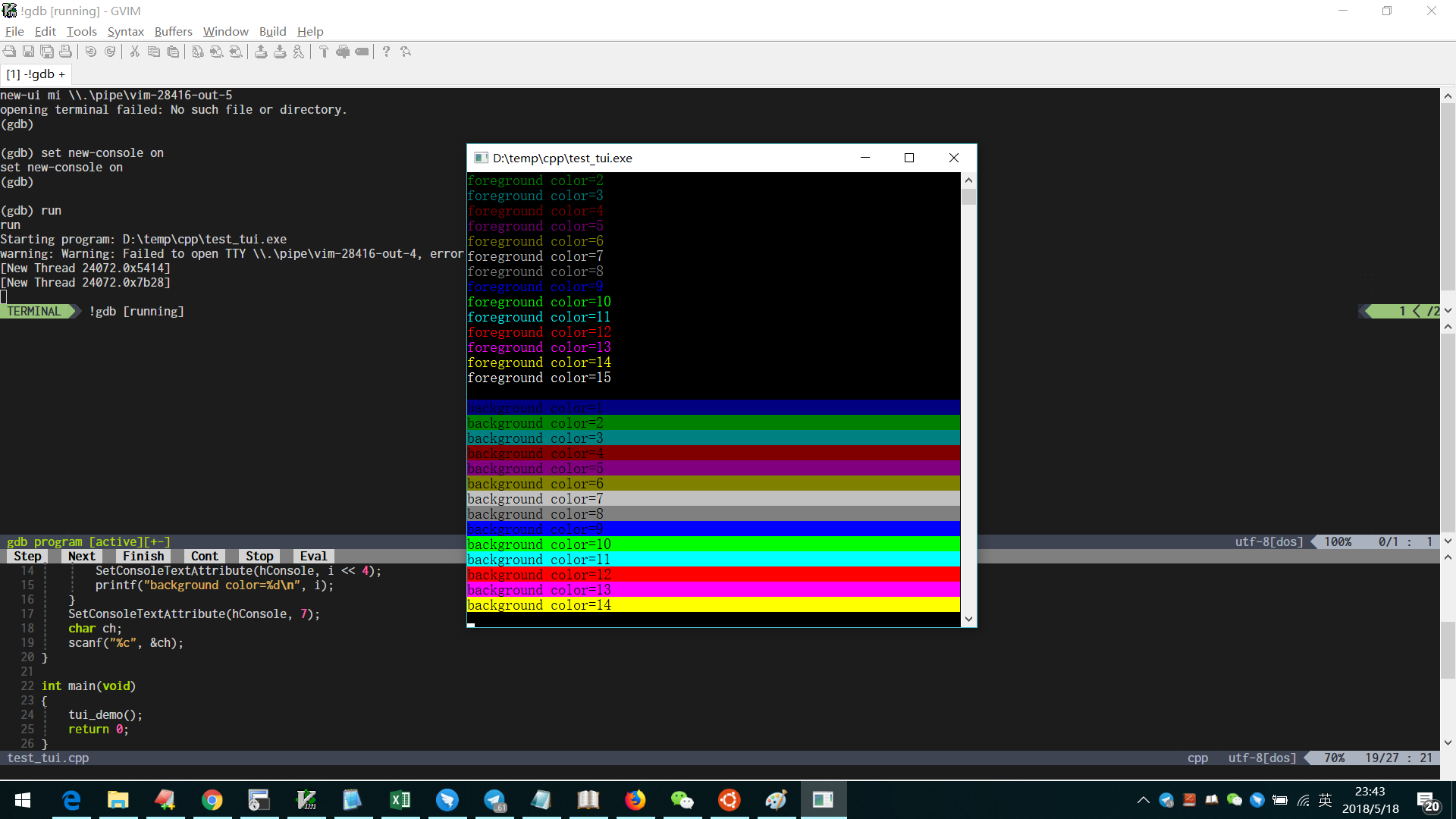
And of course, the "program window" cannot be used, but since we have a separate console window, do we still need "new-ui" and the "program window" on windows ??

Yegappan Lakshmanan
And I can use
ttycommand to specify a terminal for NeoDebug:
- start NeoDebug and open a new terminal in vim.
- use bash command
ttyto display the current tty file name.- use
tty /dev/pts/0in NeoDebug- run the process.
See, I can debug my program in a vim terminal.
for more information about
ttycommand in gdb:
https://sourceware.org/gdb/onlinedocs/gdb/Input_002fOutput.htmlThe only side effect is that I can't find a easy way to fetch tty filename of a terminal buffer. have to type
ttycommand in the terminal.
vim-dev ML
On Fri, May 18, 2018 at 7:48 AM, Linwei <vim-dev...@256bit.org> wrote:
> And I can use tty command to specify a terminal for NeoDebug:
>
> 2. use bash command tty to display the current tty file name.
> 3. use tty /dev/pts/0 in NeoDebug
> 4. run the process.
>
> [image: neodebug2]
> <https://user-images.githubusercontent.com/3035071/40241153-d996d61e-5aec-11e8-8f8d-a2ff99f85622.png>
>
> See, I can debug my program in a vim terminal.
>
> for more information about tty command in gdb:
> https://sourceware.org/gdb/onlinedocs/gdb/Input_002fOutput.html
>
> The only side effect is that I can't find a easy way to fetch tty filename
> of a terminal buffer. have to type tty command in the terminal.
>
>
>
You can use term_start("NONE") to start a terminal without a process running
in the terminal. You can use term_gettty(bufnr("%")) to get the tty for this
terminal. You can then pass this terminal to GDB.
- Yegappan
Bram Moolenaar
> I have tested `set new-console on` with termdebug.vim on windows, in spite of some error messages, it seems work:
>
>
> And of course, the "program window" cannot be used, but since we have
> a separate console window, do we still need "new-ui" and the "program
> window" on windows ??
breakpoint, display the current location, etc? I expect not.
I believe what NeoDebug does is run gdb using a channel, and piping the
I/O using a Vim window. Perhaps it's possible to do something similar
in the Terminal debugger, thus not opening a separate (hidden)
communication window, but setting the interpreter to mi2 and converting
commands to/from it. That's a lot of converting though...
--
FATAL ERROR! SYSTEM HALTED! - Press any key to continue doing nothing.
/// Bram Moolenaar -- Br...@Moolenaar.net -- http://www.Moolenaar.net \\\
/// sponsor Vim, vote for features -- http://www.Vim.org/sponsor/ \\\
\\\ an exciting new programming language -- http://www.Zimbu.org ///
\\\ help me help AIDS victims -- http://ICCF-Holland.org ///
—
You are receiving this because you commented.
Linwei
That’s a reasonable point. And a little pity.
Linwei
Closed #2882.