
[vim/vim] potential issue with xterm-bracketed paste and pasting long string: (Issue #13398)

Christian Brabandt
Steps to reproduce
I have been told, that the following overcomes the xterm-bracketed paste modes and causes it to create the file /tmp/oh which should not happen. Notice, it only hapens with the long random string of spaces that is appended.
I am currently not sure why this is happening, it needs to further investigated.
Run the following command:
perl -le'print "\x3" . (" " x 5_000) . ":,!touch /tmp/oh\n"' | pbcopy
(use xsel or xclip to copy into Linux X11 clipboard/primary selection) and paste into an xterm terminal (to make sure we are using xterm-bracketed paste mode, check the :set t_PS? t_PE? t_BD? t_BS? output).
when pasting from insert mode, it will create the file /tmp/oh which shouldn't happen.
Expected behaviour
buffer content should be pasted into buffer (or into the command line (because of the escape char at the beginning of the string), but shouldn't be executed.
Version of Vim
9.0.2054
Environment
linux
xterm
bash/zsh
Logs and stack traces
No response
—
Reply to this email directly, view it on GitHub.
You are receiving this because you are subscribed to this thread.
D. Ben Knoble
I ran your command and pasted from Normal mode, got some blank lines. No extra file in /tmp.
:set t_PS? t_PE? t_BD?
t_PS <PasteStart> ^[[200~
t_PE <PasteEnd>  ^[[201~
  t_BD=^[[?2004l
	Modifié la dernière fois dans ~/Dotfiles/links/vim/vimrc ligne 375
(t_BS gave E846)
Trying :read !pbpaste gave some empty lines with a C-c in one of them. Neither that nor pasting from insert mode created a file.
Pasting in :terminal pasted the exact string copied (possibly minus the \x3 character), with no issues around C-c/etc.
Pasting in an Ex command line was pretty similar.
$TERM is alacritty, but 'term' is xterm-256color (the line where I set that is ~/.vim/vimrc:375 reported above). macOS with the Z shell. Vim 9.0.1976.
# infocmp xterm-256color
#	Reconstructed via infocmp from file: /Users/Knoble/.terminfo/78/xterm-256color
xterm-256color|xterm with 256 colors and italic,
	am, bce, ccc, km, mc5i, mir, msgr, npc, xenl,
	colors#256, cols#80, it#8, lines#24, pairs#32767,
	acsc=``aaffggiijjkkllmmnnooppqqrrssttuuvvwwxxyyzz{{||}}~~,
	bel=^G, blink=\E[5m, bold=\E[1m, cbt=\E[Z, civis=\E[?25l,
	clear=\E[H\E[2J, cnorm=\E[?12l\E[?25h, cr=^M,
	csr=\E[%i%p1%d;%p2%dr, cub=\E[%p1%dD, cub1=^H,
	cud=\E[%p1%dB, cud1=^J, cuf=\E[%p1%dC, cuf1=\E[C,
	cup=\E[%i%p1%d;%p2%dH, cuu=\E[%p1%dA, cuu1=\E[A,
	cvvis=\E[?12;25h, dch=\E[%p1%dP, dch1=\E[P, dl=\E[%p1%dM,
	dl1=\E[M, ech=\E[%p1%dX, ed=\E[J, el=\E[K, el1=\E[1K,
	flash=\E[?5h$<100/>\E[?5l, home=\E[H, hpa=\E[%i%p1%dG,
	ht=^I, hts=\EH, ich=\E[%p1%d@, il=\E[%p1%dL, il1=\E[L,
	ind=^J, indn=\E[%p1%dS,
	initc=\E]4;%p1%d;rgb\:%p2%{255}%*%{1000}%/%2.2X/%p3%{255}%*%{1000}%/%2.2X/%p4%{255}%*%{1000}%/%2.2X\E\\,
	invis=\E[8m, is2=\E[!p\E[?3;4l\E[4l\E>, kDC=\E[3;2~,
	kEND=\E[1;2F, kHOM=\E[1;2H, kIC=\E[2;2~, kLFT=\E[1;2D,
	kNXT=\E[6;2~, kPRV=\E[5;2~, kRIT=\E[1;2C, kb2=\EOE, kbs=^H,
	kcbt=\E[Z, kcub1=\EOD, kcud1=\EOB, kcuf1=\EOC, kcuu1=\EOA,
	kdch1=\E[3~, kend=\EOF, kent=\EOM, kf1=\EOP, kf10=\E[21~,
	kf11=\E[23~, kf12=\E[24~, kf13=\E[1;2P, kf14=\E[1;2Q,
	kf15=\E[1;2R, kf16=\E[1;2S, kf17=\E[15;2~, kf18=\E[17;2~,
	kf19=\E[18;2~, kf2=\EOQ, kf20=\E[19;2~, kf21=\E[20;2~,
	kf22=\E[21;2~, kf23=\E[23;2~, kf24=\E[24;2~,
	kf25=\E[1;5P, kf26=\E[1;5Q, kf27=\E[1;5R, kf28=\E[1;5S,
	kf29=\E[15;5~, kf3=\EOR, kf30=\E[17;5~, kf31=\E[18;5~,
	kf32=\E[19;5~, kf33=\E[20;5~, kf34=\E[21;5~,
	kf35=\E[23;5~, kf36=\E[24;5~, kf37=\E[1;6P, kf38=\E[1;6Q,
	kf39=\E[1;6R, kf4=\EOS, kf40=\E[1;6S, kf41=\E[15;6~,
	kf42=\E[17;6~, kf43=\E[18;6~, kf44=\E[19;6~,
	kf45=\E[20;6~, kf46=\E[21;6~, kf47=\E[23;6~,
	kf48=\E[24;6~, kf49=\E[1;3P, kf5=\E[15~, kf50=\E[1;3Q,
	kf51=\E[1;3R, kf52=\E[1;3S, kf53=\E[15;3~, kf54=\E[17;3~,
	kf55=\E[18;3~, kf56=\E[19;3~, kf57=\E[20;3~,
	kf58=\E[21;3~, kf59=\E[23;3~, kf6=\E[17~, kf60=\E[24;3~,
	kf61=\E[1;4P, kf62=\E[1;4Q, kf63=\E[1;4R, kf7=\E[18~,
	kf8=\E[19~, kf9=\E[20~, khome=\EOH, kich1=\E[2~,
	kind=\E[1;2B, kmous=\E[M, knp=\E[6~, kpp=\E[5~,
	kri=\E[1;2A, mc0=\E[i, mc4=\E[4i, mc5=\E[5i, meml=\El,
	memu=\Em, op=\E[39;49m, rc=\E8, rev=\E[7m, ri=\EM,
	rin=\E[%p1%dT, ritm=\E[23m, rmacs=\E(B, rmam=\E[?7l,
	rmcup=\E[?1049l, rmir=\E[4l, rmkx=\E[?1l\E>,
	rmm=\E[?1034l, rmso=\E[27m, rmul=\E[24m, rs1=\Ec,
	rs2=\E[!p\E[?3;4l\E[4l\E>, sc=\E7,
	setab=\E[%?%p1%{8}%<%t4%p1%d%e%p1%{16}%<%t10%p1%{8}%-%d%e48;5;%p1%d%;m,
	setaf=\E[%?%p1%{8}%<%t3%p1%d%e%p1%{16}%<%t9%p1%{8}%-%d%e38;5;%p1%d%;m,
	sgr=%?%p9%t\E(0%e\E(B%;\E[0%?%p6%t;1%;%?%p2%t;4%;%?%p1%p3%|%t;7%;%?%p4%t;5%;%?%p7%t;8%;m,
	sgr0=\E(B\E[m, sitm=\E[3m, smacs=\E(0, smam=\E[?7h,
	smcup=\E[?1049h, smir=\E[4h, smkx=\E[?1h\E=,
	smm=\E[?1034h, smso=\E[7m, smul=\E[4m, tbc=\E[3g,
	u6=\E[%i%d;%dR, u7=\E[6n, u8=\E[?1;2c, u9=\E[c,
	vpa=\E[%i%p1%dd,
# cat …/xterm-256color.terminfo
xterm-256color|xterm with 256 colors and italic,
        sitm=\E[3m, ritm=\E[23m,
        use=xterm-256color,
Could the long string be causing a problem with an internal buffer (overrunning the length or something)?
—
Reply to this email directly, view it on GitHub, or unsubscribe.
You are receiving this because you are subscribed to this thread.
Christian Brabandt
Did you try to paste using Shift-Ins I think that is how bracketed paste mode get's active, not sure if :r !pbpaste will reproduce it).
Yes, I think, the long buffer seems to be causing the problem. I can reproduce the initial problem (when it creates the /tmp/oh file) using linux and xterm terminal.
—
Reply to this email directly, view it on GitHub.
You are receiving this because you are subscribed to this thread.
D. Ben Knoble
Interesting. I did not use shift+insert (I'd have to look up how to input that on my keyboard), but I'm pretty sure that pasting with Command+v in the past has been bracketed because it acts like paste was set automatically.
—
Reply to this email directly, view it on GitHub.
You are receiving this because you are subscribed to this thread.
Marius Gedminas
I cannot reproduce with Vim 9.0.2048 in gnome-terminal, after copying with perl ... | xsel and pasting with the middle click (using :set mouse=a to let Vim handle it) or shift-middle click (letting gnome-terminal do the bracketed paste).
Curiously, the pasted text starts with ^C (hex 03) if I use vim's middle-click handling, but some weird unicode ETX character (hex 2403) if I use shift-middle click.
In either case the :,!touch /tmp/oh ends up in the buffer and my /tmp doesn't get any new files.
Pasting with shift+insert results the same as shift-middle click.
Pasting with Ctrl+Shift+V uses the clipboard instead of the selection and thus requires perl ... | xsel -b, then behaves the same as shift-middleclick.
I get the same results both in normal mode and in insert mode.
My paste settings are
t_PS <PasteStart> ^[[200~
t_PE <PasteEnd>  ^[[201~
  t_BD=^[[?2004l
E846: Key code not set: t_BS?
—
Reply to this email directly, view it on GitHub.
You are receiving this because you are subscribed to this thread.
David Leadbeater
Curiously, the pasted text starts with ^C (hex 03) if I use vim's middle-click handling, but some weird unicode ETX character (hex 2403) if I use shift-middle click.
This is likely a terminal specific behaviour, gnome-terminal is replacing the ^C (ASCII ETX) with U+2403 which is a symbol that represents that ASCII character.
In an actual xterm (not something claiming compatibility with it via $TERM), I can reproduce this, however there is a workaround (which I posted on oss-security too):
disallowedPasteControls: BS,DEL,ENQ,EOT,ETX,ESC,NUL
i.e. adding ETX to the default. The quick way to test this for xterm is to run and compare:
perl -le'print "\x3", (" " x 5000), ":!touch /tmp/oh\n\n"' | xsel -i
xterm  -e vim
xterm -xrm 'xterm*disallowedPasteControls: BS,DEL,ENQ,EOT,ETX,ESC,NUL' -e vim
With that resource set via -xrm the ^C on the clipboard will be ignored (replaced with a space).
The proper fix for this issue is likely making terminals that support bracketed paste mode also filter out (more) non-whitespace control characters.
This affects xterm as shown and some other terminals; I am aware of at least kitty and the author is making some changes there. Basically ^C having an effect within bracketed paste mode is somewhat surprising and it would be good defence-in-depth for Vim to just not accept ^C within bracketed paste mode.
(I've only looked at ^C in detail, potentially there could be a further similar issue with Escape itself, this won't apply to xterm as disallowedPasteControls obviously filters Escape by default but it appears some terminals only filter the data pasted within bracketed mode paste for the exact bracketed paste end sequence.)
—
Reply to this email directly, view it on GitHub.
You are receiving this because you are subscribed to this thread.
turistu
That's easily reproducible with xterm in its default config -- and not only with ^C, but also with ^R and all the other insert mode special keys, e.g:
printf '\x12=system("pwd")\r' | /usr/bin/xsel -i
And there's also the problem of insert mode mappings, which IMHO should not be interpreted in the pasted text. And that's not fixable in the terminal emulator, because the mapped keys may not be control characters at all.
Consider the difference between xterm -e vim +'imap q θ' and gvim +'imap q θ' when you paste qqqqqq while in insert mode.
If bracketed-mode were working as promised (= insert the pasted text "literally"), vim would do the same thing as gvim.
—
Reply to this email directly, view it on GitHub, or unsubscribe.
You are receiving this because you are subscribed to this thread.
Christian Brabandt
And there's also the problem of insert mode mappings, which IMHO should not be interpreted in the pasted text. And that's not fixable in the terminal emulator, because the mapped keys may not be control characters at all.
Are you sure you have been using bracketedpaste mode in xterm? Because mappings are intentionally enabled in bracketed paste mode (and the paste option is also set, so indenting etc shouldn't happen):
https://github.com/vim/vim/blob/50f3ec2898a43feaa6add2bc4875754cf9224d5e/src/edit.c#L4397-L4402
—
Reply to this email directly, view it on GitHub.
You are receiving this because you are subscribed to this thread.
turistu
Are you sure you have been using bracketedpaste mode in xterm?
Yes. I have a script(1)-like program which logs both the input and the output.
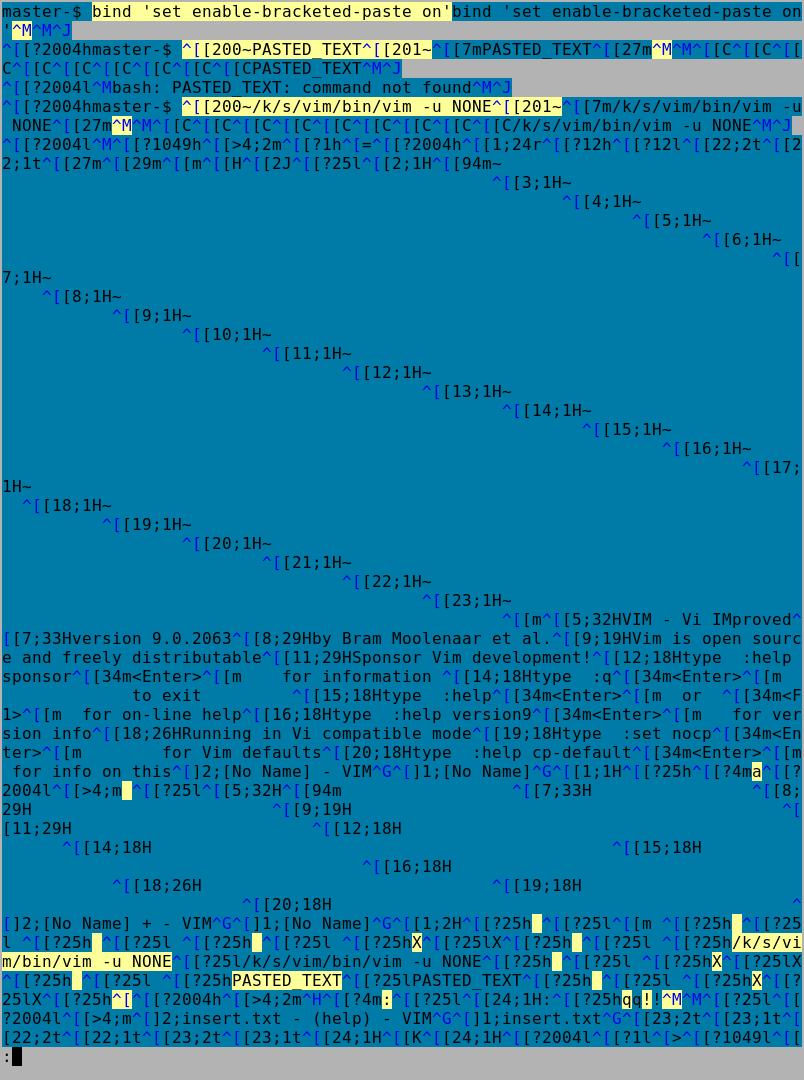
Looks like vim is somehow reversing the enable and disable bracketed-paste escapes.
See the attached picture of the log -- yellow is the input, blue is the output.
See how bash correctly enables bracketed-paste mode just before the prompt with ^[[?2004h and then gets the correctly bracketed ^[[200~PASTED_TEXT^[[201~, while vim seems to do it backwards -- disabling bracketed mode with ^[[?2004l just after I had pressed a to enter insert-mode.
My system is Debian 12, and vim is just compiled from github. The terminal the log was generated on is terminator, installed with apt-get.
—
Reply to this email directly, view it on GitHub.
You are receiving this because you are subscribed to this thread.
K.Takata
(to make sure we are using xterm-bracketed paste mode, check the
:set t_PS? t_PE? t_BD? t_BS?output).
t_BS? should be t_BE?.
@turistu
Interesting. What does :set t_PS? t_PE? t_BE? t_BD? show?
—
Reply to this email directly, view it on GitHub.
You are receiving this because you are subscribed to this thread.
turistu
I think I got it. vim enables the bracketed mode globally upon starting, but since 48c9f3b, it turns it off when entering insert mode is esckeys is off. And esckeys is off if running in compatible mode, which is the default if no ~/.vimrc is found, or if it set explicitly with set compatible in ~/.vimrc. I hope I got all that right.
So the morality: is set compatible => no bracketed mode for you.
Maybe that's even documented somewhere ;-)
—
Reply to this email directly, view it on GitHub.
You are receiving this because you are subscribed to this thread.
D. Ben Knoble
I didn't see any pointers to bracketed paste being disabled when esckeys is off (only to modifyOtherKeys)
—
Reply to this email directly, view it on GitHub.
You are receiving this because you are subscribed to this thread.
Christian Brabandt
@k-takata
ah, missed that thanks.
@benknoble I added a few pointers to the documentation.
—
Reply to this email directly, view it on GitHub.
You are receiving this because you are subscribed to this thread.
Christian Brabandt
@dgl I did check this and made the following patch: chrisbra@d857ac0
I am not sure this is the best way to handle it. Plus, I think one loses the possibility to break-out of paste-mode using Ctrl-C in case something goes wrong. Which means, the user may not be able to quit at all. So not sure.
BTW: I don't know which buffer fills up too much :(
—
Reply to this email directly, view it on GitHub.
You are receiving this because you are subscribed to this thread.
turistu
BTW: I don't know which buffer fills up too much :(
That's not a matter of filling up any buffer, but of causing a delay/reschedule, forcing vim to reenter its main loop between the ^C and the :!command. You can achieve the same with:
$ printf '\x03:!echo here you go' | /usr/bin/xsel -i
$ xterm -e expect -c 'spawn vim; send a; interact \003 { send \003; expect ""; sleep .1 }'
then press middle-click in xterm.
—
Reply to this email directly, view it on GitHub.
You are receiving this because you are subscribed to this thread.
David Leadbeater
I am not sure this is the best way to handle it. Plus, I think one loses the possibility to break-out of paste-mode using Ctrl-C in case something goes wrong. Which means, the user may not be able to quit at all. So not sure.
I tried the patch but there's some issues, like the bracketed paste escape sequences can end up not just at the start of the buffer. It also needs a partial revert of fdd7155 and potentially 98a336d, although those clearly show ^C interrupting is a good idea in some cases...
Vim puts xterm into "modifyOtherKeys" mode, so actually Vim can tell the difference between a user pressing ^C and a ^C being pasted. (The user pressing it sends an escape sequence, as part of a paste it is a literal ^C). I tried the obvious key_protocol_enabled() after making it usable in other places, but that doesn't seem to work, it would be nice as this could avoid needing knowledge about bracketed paste mode.
This may be moot, as xterm 388 now has a new default for disallowPasteControls that filters all stty special characters see, ThomasDickey/xterm-snapshots@18c5678 -- although the behaviour on other terminals may still leave something to be desired, most terminals copy features from xterm, so we can just point them at that ;-)
—
Reply to this email directly, view it on GitHub.
You are receiving this because you are subscribed to this thread.
David Leadbeater
but that doesn't seem to work,
Embarrassingly I tested it on an ancient version of xterm I had sitting around; it needs at least 377.
I think this could work: 832ec17
Will need to test that on a few terminals, but it seems to work on xterm <388.
—
Reply to this email directly, view it on GitHub.
You are receiving this because you are subscribed to this thread.
Christian Brabandt
Thanks, let me include this to make bracketed paste mode more robust in Vim. I think this makes sense (even so it seems terminals are going to fix it on their side anyhow).
—
Reply to this email directly, view it on GitHub.
You are receiving this because you are subscribed to this thread.
Christian Brabandt
Closed #13398 as completed via 67ec655.
—
Reply to this email directly, view it on GitHub.
You are receiving this because you are subscribed to this thread.