
[vim/vim] I move cursor in normal mode, after type "j,k",the characters show in window. when i refresh window manually, the character disappear. (#3624)

witcxc
in normal mode, i type j or k to move the cursor. But sometimes, the j, k character show in the main window. My vim version is version 8.1.491, compiled by myself.
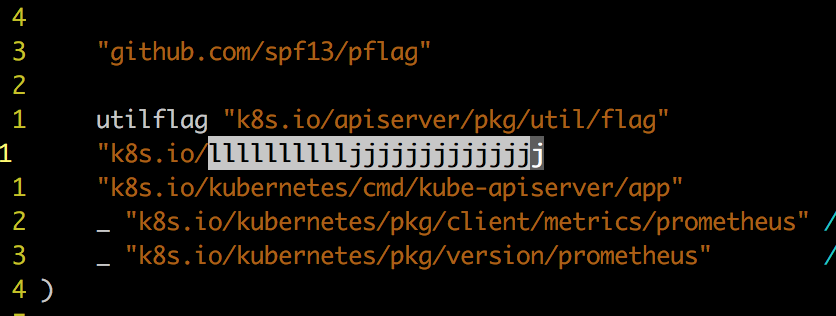
—
You are receiving this because you are subscribed to this thread.
Reply to this email directly, view it on GitHub
Christian Brabandt
This is usually a sign for that Vim cannot process the input as fast as it should.
So what terminal are you using? What configuration are you using? Does it happen with vim --clean? (See also Question 2.5 in the faq)Please try to bisect which setting/option or plugin this causes. Alternatively, you might want to check out a different terminal or using a gui version.
BTW: using lllllllljjjjjjjj is a sign for not efficiently moving the cursor in Vim. So you might want to leverage more advanced movement commands (see :h motion.txt).
witcxc
I'm using the Iterm2 terminal on mac and using the zsh. This phenomenon does not happen often and dose not effect me too much. It dose not really change the text, so i can tolerate with that. To locate what really cause the issue, will cost too much time. Anyway, thanks for replying.
Christian Brabandt
Closed #3624.
Christian Brabandt
sorry, I am closing this. I am not sure how you expect us to help you when you are not even trying to figure out what the cause of the problem on your side. My guess some plugin is to blame for making Vim unresponsive.
Gabor Marton
I have been facing the same issue nowadays. MacOS, iterm2.
VIM - Vi IMproved 9.1 (2024 Jan 02, compiled May 30 2024 05:52:44)
macOS version - arm64
I could successfully bisect the root cause of this. It was not a plugin, but a special async function I added to follow the systems dark/light theme setting and adopt vim's background and colours accordingly:
" Define the function to check macOS appearance and set Vim background
function! CheckMacOSAppearance(timer_id)
    " s: indicates script variable
    " need to call this to populate `shell_error`
    let s:theme = system('defaults read -g AppleInterfaceStyle >/dev/null 2>&1')

    " Determine the desired background setting
    if v:shell_error
        let s:desired_bg = 'light'
    else
        let s:desired_bg = 'dark'
    endif

    " Check the current background setting
    let s:current_bg = &background

    " Only change the background if it is not already set to the desired value
    if s:current_bg != s:desired_bg
        execute 'set background=' . s:desired_bg
        " Turn off/on rainbow parens, i.e. refresh.
        execute 'RainbowToggle'
        execute 'RainbowToggle'
        " Set airline theme
        "execute 'AirlineTheme ' . s:desired_bg
        let g:airline_solarized_bg=s:desired_bg
        execute 'AirlineTheme solarized'
    endif
endfunction
" Define a function to start the timer
function! StartAppearanceTimer()
    " Start a timer to call CheckMacOSAppearance every 10 seconds (10000 milliseconds)
    call timer_start(3000, 'CheckMacOSAppearance', {'repeat': -1})
endfunction
" Set up an autocommand to start the timer when Vim starts
augroup AppearanceCheck
    autocmd!
    autocmd VimEnter * call StartAppearanceTimer()
augroup END
By removing the autocmd for starting the timer, the issue is resolving.
—
Reply to this email directly, view it on GitHub.
You are receiving this because you are subscribed to this thread.
Christian Brabandt
That is a typical symptom when running external commands very often and the single commands takes too long to finish (which impacts the redrawing)
—
Reply to this email directly, view it on GitHub.
You are receiving this because you are subscribed to this thread.