
[vim/vim] zero width non-joiner (ZWNJ) renders as its Unicode codepoint <200c> (#7932)

Farid Cheraghi
This problem is already reported here but the conceal solution has side effects and is not desired. The Gnome terminal with BiDi support renders ZWNJ correctly but when I run Vim inside Gnome terminal, it shows ZWNJ as <200c> using the same font; I use Vazir font in the screenshots but the same happens with the ubiquitous Liberation Mono font.
The word فارسی in Gnome Terminal:
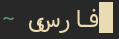
The same word in Vim run inside Gnome Terminal:

To reproduce type or copy/paste the word سی (a ZWNJ resides between the letter س and ی) in both the Gnome terminal (or any libvte based terminal with BiDi support) and Vim.
—
You are receiving this because you are subscribed to this thread.
Reply to this email directly, view it on GitHub, or unsubscribe.
MSKF
I can reproduce that.
—
Reply to this email directly, view it on GitHub.
You are receiving this because you are subscribed to this thread.
Christian Brabandt
Closed #7932 as not planned.
—
Reply to this email directly, view it on GitHub.
You are receiving this because you are subscribed to this thread.
Christian Brabandt
duplicate of #204
—
Reply to this email directly, view it on GitHub.
You are receiving this because you are subscribed to this thread.
avidseeker
I don't think it's a duplicate. Support for special Unicode character is a different issue from Bidi rendering, despite some overlap (It's better to divide a big topic like bidi into smaller problems anyways). I'd prefer to keep the discussion here to avoid hijacking the original issue.
—
Reply to this email directly, view it on GitHub.
You are receiving this because you are subscribed to this thread.
avidseeker
I think there is a solution that is a middle ground. Not complete conceal and not conceal that replaces with whitespace either.
I just noticed this behavior while editing a Vim help file (syntax.txt): Lines such as:
TEX *tex.vim* *ft-tex-syntax* *latex-syntax*
have conceal for asterisks * that are not shown unless in Visual or Insert mode.
—
Reply to this email directly, view it on GitHub.
You are receiving this because you are subscribed to this thread.
Christian Brabandt
That is concealing
—
Reply to this email directly, view it on GitHub.
You are receiving this because you are subscribed to this thread.
avidseeker
It is a stronger type of concealing I just realized is possible in Vim. The conceal I'm used to, at least in LaTeX and Markdown, is that characters are unconcealed as soon as the cursor is in the same line with them. This is not the case with help filetype. They are unconcealed only in Visual and Insert modes, and they're not replaced with whitespace characters.
Would it be possible to ship a solution like the one you provided: https://vi.stackexchange.com/questions/17900 to be the default with Vim? Perhaps toggle-able behind a command similar to :list. ZWNJ is not the only Unicode control character. There are dozens more: https://en.wikipedia.org/wiki/Category:Control_characters
—
Reply to this email directly, view it on GitHub.
You are receiving this because you are subscribed to this thread.
avidseeker
@faridcher you mentioned that "conceal solution has side effects and is not desired". Can you clarify what these unintended side effects are?
—
Reply to this email directly, view it on GitHub.
You are receiving this because you are subscribed to this thread.
Farid Cheraghi
@avidseeker it hides certain markups. This is of paramount importance while editing plain text dominant files like TeX (as opposed to a programming language). Imagine you had to toggle conceal mode to properly see character "a" in English. The ZWNJ in plain text (conceal=0) is great both for editing as well as reading.
—
Reply to this email directly, view it on GitHub.
You are receiving this because you are subscribed to this thread.
avidseeker
Conceal hides markup? Can you give an example .tex document?
I think Vim should already have a selective conceal where is hidden but markup is not.
—
Reply to this email directly, view it on GitHub.
You are receiving this because you are subscribed to this thread.