
[vim/vim] Add support for tty dim/faint text (TTY ANSI CODE 2) (#8269)

Igor Morgado
To enlarge the syntax capabilities of vim in low colour terminals when not running under gui, it should be nice to add the official ANSI tty escape code for dim/faint text. This mode is supported by many terminals, as xterm, rxvt, gnome-terminal (VTE lib), and probably many more. This will greatly enhance the experience of terminal users
Here is how it looks under xterm
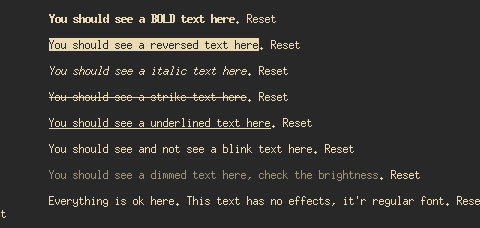
and gnome terminal

Here is a list of ANSI TTY escape codes Wikipedia
The color shades are visible in xterm, and faint isn't mapped to light palette as we can see here
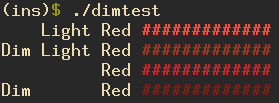
The escape codes that generated these shades were:
(ins)$ ./dimtest | cat -v
    Light Red ^[[91m#############^[[0m
Dim Light Red ^[[2m^[[91m#############^[[0m
          Red ^[[31m#############^[[0m
Dim       Red ^[[2m^[[31m#############^[[0m
The solution would need to:
- Add a new terminal attribute
- Associate the new terminal attribute to code 2
- Add the information in vim-doc. |attr-list|
—
You are receiving this because you are subscribed to this thread.
Reply to this email directly, view it on GitHub, or unsubscribe.
Romain Lafourcade
@igormorgado Could you share your "testface" script, please?
Igor Morgado
Sure.. here goes.
(ins)$ cat testface.sh
#!/usr/bin/env bash

BOLD=$(tput bold)
DIM=$(tput dim)
ITALIC=$(tput sitm)
UNDER=$(tput smul)
STRIKE=$(tput ritm)
REV=$(tput rev)
BLINK=$(tput blink)
CRST=$(tput sgr0 )

tput init
echo -e "
${BOLD}You should see a BOLD text here${CRST}. Reset
${REV}You should see a reversed text here${CRST}. Reset
${ITALIC}You should see a italic text here${CRST}. Reset
${STRIKE}You should see a strike text here${CRST}. Reset
${UNDER}You should see a underlined text here${CRST}. Reset
${BLINK}You should see and not see a blink text here${CRST}. Reset
${DIM}You should see a dimmed text here, check the brightness${CRST}. Reset
Everything is ok here. This text has no effects, it'r regular font${CRST}. Reset
${CRST}
"
And the ansi code output if needed for comparison. (under xterm)
(ins)$ ./testface.sh  | cat -v
^[[!p^[[?3;4l^[[4l^[>^[[?69l
^[[1mYou should see a BOLD text here^[(B^[[m. Reset
^[[7mYou should see a reversed text here^[(B^[[m. Reset
^[[3mYou should see a italic text here^[(B^[[m. Reset
^[[23mYou should see a strike text here^[(B^[[m. Reset
^[[4mYou should see a underlined text here^[(B^[[m. Reset
^[[5mYou should see and not see a blink text here^[(B^[[m. Reset
^[[2mYou should see a dimmed text here, check the brightness^[(B^[[m. Reset
Everything is ok here. This text has no effects, it'r regular font^[(B^[[m. Reset
^[(B^[[m
Removed excessive new lines.
Romain Lafourcade
@igormorgado thanks.