
PLEASE fix VDH, multiple downloads causing entire system/browser crashes, stopping USB ports from functioning
259 views
Skip to first unread message

kona long
Aug 25, 2023, 9:26:53 AM8/25/23
to Video DownloadHelper Q&A
Windows 10 Professional 64 bit
Firefox 117.0 (64-bit)
VDH Version 8.0.0.0
VdhCoApp 1.6.3
System Specs:
i7 8700K
NVIDIA GeForce GTX 1070 Ti
64 GB DDR4 RAM
Most recent internet speed check has me at approximately 500 Mbps.
This is a fairly high end gaming PC that I built myself not prebuilt, the RAM alone was around $300. And I never have system crashes, my system is on for weeks and months at a time with no problems. Hard drives are all looking healthy in various hard drive diagnostic programs.
Here is a GIF showing my VDH settings:
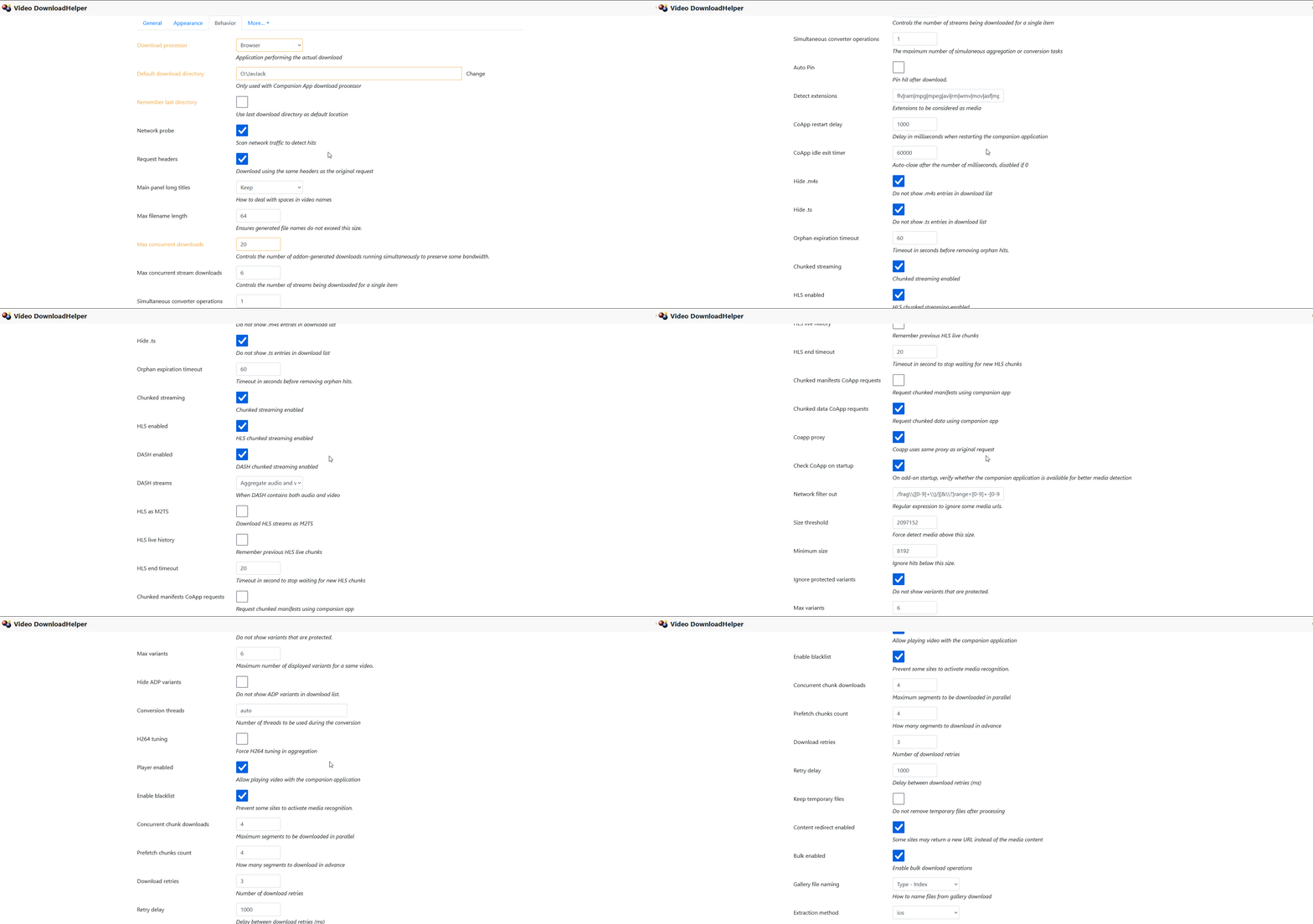
Maybe there is some setting you think I should change/lower to try and stop this from happening.
I don't have a license for Firefox but I paid for a lifetime license years ago for Chrome. VDH doesn't work well on Chrome at all when the user has many tabs open, serious video detection issues arise, I got tired of videos not being detected on Chrome when they're detected fine on Firefox, both browsers with many tabs.
But on to the main issue at hand.
I did some initial searching and my issue seems to be similar to an issue Wild Willy ran into and doesn't look like he was able to find a solution: https://groups.google.com/g/video-downloadhelper-q-and-a/c/lCy0hw8t-uE/m/b9uJjEqDBwAJ
That post is from 5 years ago, cmon now mig...this is a serious issue, people are losing any unsaved work on their computers and who knows what kind of system damage and corruption these crashes are causing and multiple downloads are going to be something people want to take advantage of. You've done a great job with this app, no other video download app comes close to VDH, it's helping lots of people but it still needs serious work when it comes to major issues like this for heavy users like myself who are utilizing your app on a daily basis.
Something we need to remember is that even though these forums may not be flooded with posts about this or other major issues, most people aren't even going to bother going through the trouble of figuring out where to make a post about major issues they encounter and spend a bunch of time typing all that up as people want things quick these days, many don't like to type too much or do a lot of reading. You see this in places like YouTube for example - if I check 5-10 videos with 1-2 million views for example, those videos only have about 2,000-20,000 people bothering to type out a short comment about it, that is a mere 1-2% of users providing feedback, this goes for most things on the internet.
So lately I've been using this site (NSFW warning): m i s s a v . c o m (without spaces)
Make sure you have your Adblocker enabled, it's a porn site and may have some annoying ads.
And something I think is important to note is that downloads from this site seem to all download through the Companion App where they're placed in queue, etc not direct downloads if that makes sense. When VDH does direct downloads through the browser and not the companion app, I can download as many videos at once as I like and I never had a crash from that.
Downloads from here are typically around 500 MB - 2 GB each. Downloading one or a few videos on this site is fine, never had an issue with downloading just one or a handful of files from this site over the course of multiple months now. But it looks like once I get to around 15+ concurrent downloads the major issues arise.
I couldn't believe it when I saw how badly VDH was causing my system to crash when downloading 15+ large videos. In one of the most recent cases, I had about 50+ videos in queue. Maybe a few hours down the line I notice that entire USB ports on my computer are ceasing to function. I use a wireless mouse and I have basically a 'receiver' connected to a USB port which allows the mouse to function wirelessly. Well now the mouse stopped working because downloading these several files I later found out caused my USB ports to stop working. My keyboard I think was fine in a different port...until I disconnected it to see if my mouse would work in that port. When I tried to reconnect the keyboard it wouldn't turn back on. So at that point I had to just restart my PC because no USB ports were working anymore.
After the PC restart everything was back to normal, USB ports were working again. And that was the first time I ever had any kind of USB port issue like that. So I knew the VDH companion app was the culprit, that was the only major system process I had running preceding the USB ports ceasing to function.
In the most recent case, I tried downloading about 20 files, hoping that downloading fewer videos might prevent this from happening again. Well it happened again except this time it just broke the browser. My Ublock extension seemed to stop working as I was now seeing ads on the site, I could see a blue number near the VDH extension icon indicating how many downloads are in queue but nothing actually showed when I checked the queue and I don't think any of the downloads even finished before this crash happened.
I think in another case just couldn't really use the system anymore so I had to restart the PC.
And you can probably imagine how extremely frustrating it is to have to go and try and locate 20+ videos that all failed. VDH won't tell you what downloads you had in queue that failed if the downloads are through the companion app and a crash happens. Checking the download directory for partial downloads does help but only to a certain extent - you'll only be able to see the videos that actually began to download but the ones that were in queue are just gone, no way to easily locate the queued downloads.
You have to go and sift through your browser history to try and figure out what you did and didn't download and for those of us who have hundreds of pages of videos we're checking that we may or may not download, it's an extremely tedious process to try and figure out which ones were the ones we actually downloaded and were in queue that didn't even begin to start downloading yet before the crash happens.
I hope this information helps you in hopefully solving this problem once and for all and maybe you have ideas on how I can remedy this issue once and for all because I'm now at a point where I'm afraid to download too many videos at once through the VDH companion app in fear of another crash happening potentially causing damage to my system and my data. Heavy users like myself realize the importance of downloading and saving our favorite videos because videos get deleted left and right every day, entire websites go poof and our favorite videos are gone from the face of the internet forever.
So your app is extremely vital in helping people to archive content on the internet, to preserve our favorite content before it's gone forever, you're helping far more people than you'll ever know, most are silently using your app and loving it and it's crucial that we make VDH the very best it can be, these crashes have got to go. It seems that the companion app is using far more system resources than it should be but that's just a hunch, I just always notice how things like CPU usage are so high when the download is done with the companion app but not so much when it's a direct download through the browser. But I have no control (to my knowledge) over how VDH decides to download the video for the particular site.
kona long
Aug 25, 2023, 9:34:04 AM8/25/23
to Video DownloadHelper Q&A
BTW, to view a larger image of the GIF I posted of my VDH settings you can right click it then click 'open image in new tab'. Wasn't expecting the embedded image to be so small.
Message has been deleted

mjs
Aug 25, 2023, 10:27:19 PM8/25/23
to Video DownloadHelper Q&A
You can't fault a computer with those specs, but even with such hardware I think you're trying to do too much at the one time.
It sounds like a memory leak problem occurring , probably something similar to an issue I had when I first joined this group.
I rarely run into the problem these days but I'm only doing one download at a time. If 15+ is crippling the computer then drop the number
down to 10+ or 6 downloads at a time. There's got to be threshold you should not exceed.
One last thing, there are 2 settings you should change :
Concurrent chunk downloads &
Prefetch chunks count
Both are set to 4, try changing both to 2 and see if that helps.
--
A vdh user

Wild Willy
Aug 25, 2023, 11:32:50 PM8/25/23
to Video Download Helper Google Group
I have to agree with mjs that you just need to adapt & do what works. If fewer downloads
avoids the system freezes, then that's what you have to do.
Just for the record, I have Concurrent chunk downloads = 16, Prefetch chunks count = 4.
But those aren't the crucial setting. Those control only how any given single download
operates. The critical setting is Max concurrent downloads. I happen to have that set
at 128. I never reach that level & I explain why below.
However, fiddling with VDH settings is not really a productive exercise. At one time I
believed the thing that caused thrashing at the termination of a download was the moov
atom of MP4s. But Michel recently disabused me of that misconception. I believed it was
the moov atom that was held in program storage that caused the thrashing. Apparently it
is some other internal data structure that Michel has chosen to hold in program storage.
This leaves the management of the storage to the Windows (and other systems) paging
algorithm. Other systems, specifically Linux, apparently have rational paging
algorithms. Windows does not seem to be that good. So there is indeed an internal
program design issue here. But I'm not entirely convinced Michel thinks it is worthy of
serious attention. Problems with licensing on Chrome would appear to be the latest fire
he is attempting to put out.
All that being what it may, there are other reasons to just discipline yourself to
download a more reasonably low number of things concurrently. Any given web site
typically throttles its service. Typically, a given web site will allot you, let's pick
a number for argument's sake, 10 million bytes per second. If you download 1 item, you
will get 10 million bytes per second on that. If you try to do 2 at the same time, you
will get 5 million bytes per second with each one. Three at a time will be throttled to
10/3 million bytes per second EACH. Ten at a time will be throttled to 1 million bytes
per second EACH. In other words, it's going to take the same amount of time doing them
many at once as it would to do them one after the other.
OK. Let's say you want to download 1 thing at a time from each of 10 sites at the same
time. Now your overall bandwidth comes into play. You said you have a 500M connection.
First off, you need to understand the mildly shady trick ISPs use when they advertise
their download speed. 500M is not 500 meg. A meg is 2 raised to the 20th power. 1024
squared. 1024. Not 1000. 1024. The interesting mixed metaphor of 2 raised to the 10th
power. 1024 = 1K. This is the basic unit of storage that operating systems report for
file sizes. So 1 meg is actually a little over 1 million. But the 500M is really 500
million, not meg at all. Moreover, it's 500 million BITS per second, NOT bytes. So you
need to divide by 8. A 500M connection is really only 62.5 million bytes per second.
Only. That's still mighty fast. It's just that it's not 500. I guess ISPs don't think
62.5 is as sexy a number as 500.
Now, if each of your 10 sites throttles its service to 10 million bytes per second, you
are not going to get full usage of your connection with each download when you go past 6
concurrent downloads. I would imagine the 10 downloads will end up being throttled by
your ISP -- your ISP, not the web sites -- to only 62.5/10 = 6.25 million bytes per
second of service. Then as each one completes, the others will likely speed up. But the
point is, you're just trying to push too much sewage through your pipe at the same time.
You're going to get sewage backing up into your sinks & toilets. It's just not worth the
trouble.
In practice, a site that throttles to 10 million bytes per second is rare. Most give you
maybe 2-3 million. Unless you're dealing with YouTube, where you typically see well
under 1 million bytes per second, even under half a million bytes per second. In the
end, I come back to what mjs said. You're better off with disciplining yourself to some
ceiling number of concurrent downloads. If you're short on discipline, set Max
concurrent downloads at some lower value in VDH. Let VDH enqueue your downloads. There
are complications if you're dealing with web sites whose pages expire, which many sites
do, like YouTube, like some sites with paid subscriptions. There's just nothing you can
do about that. That's the way the sites manage their web pages. It would not be
unexpected to have downloads sit in the queue long enough that they will fail when they
get their turn because their web pages timed out. That would not be VDH's fault.
Now on the issue of logging, I have raised that one a number of times, as have other
users. Most other applications we have become accustomed to generate activity logs. Not
VDH. This hurts users, but it also hurts VDH. The absence of an activity log makes it
nigh on impossible to diagnose errors except by guessing. I don't know why Michel has
never seen fit to add this sort of instrumentation to VDH. It also means users have to
manually track what they are downloading & manually figure out what they might have to
retry in the case of failures. It's just particularly bad for folks like you who
download insane amounts from the web. I will politely refrain from speculating about
what you spend your time doing other than downloading stuff off the web. Downloading
isn't the goal activity. Watching it is. I don't see where you have any time to watch
what you've downloaded. But that is not a proper topic of discussion here.
So in the end, you'll just have to limit your concurrent downloads, not just because VDH
can't handle too high a value, but also because of external, practical considerations.
avoids the system freezes, then that's what you have to do.
Just for the record, I have Concurrent chunk downloads = 16, Prefetch chunks count = 4.
But those aren't the crucial setting. Those control only how any given single download
operates. The critical setting is Max concurrent downloads. I happen to have that set
at 128. I never reach that level & I explain why below.
However, fiddling with VDH settings is not really a productive exercise. At one time I
believed the thing that caused thrashing at the termination of a download was the moov
atom of MP4s. But Michel recently disabused me of that misconception. I believed it was
the moov atom that was held in program storage that caused the thrashing. Apparently it
is some other internal data structure that Michel has chosen to hold in program storage.
This leaves the management of the storage to the Windows (and other systems) paging
algorithm. Other systems, specifically Linux, apparently have rational paging
algorithms. Windows does not seem to be that good. So there is indeed an internal
program design issue here. But I'm not entirely convinced Michel thinks it is worthy of
serious attention. Problems with licensing on Chrome would appear to be the latest fire
he is attempting to put out.
All that being what it may, there are other reasons to just discipline yourself to
download a more reasonably low number of things concurrently. Any given web site
typically throttles its service. Typically, a given web site will allot you, let's pick
a number for argument's sake, 10 million bytes per second. If you download 1 item, you
will get 10 million bytes per second on that. If you try to do 2 at the same time, you
will get 5 million bytes per second with each one. Three at a time will be throttled to
10/3 million bytes per second EACH. Ten at a time will be throttled to 1 million bytes
per second EACH. In other words, it's going to take the same amount of time doing them
many at once as it would to do them one after the other.
OK. Let's say you want to download 1 thing at a time from each of 10 sites at the same
time. Now your overall bandwidth comes into play. You said you have a 500M connection.
First off, you need to understand the mildly shady trick ISPs use when they advertise
their download speed. 500M is not 500 meg. A meg is 2 raised to the 20th power. 1024
squared. 1024. Not 1000. 1024. The interesting mixed metaphor of 2 raised to the 10th
power. 1024 = 1K. This is the basic unit of storage that operating systems report for
file sizes. So 1 meg is actually a little over 1 million. But the 500M is really 500
million, not meg at all. Moreover, it's 500 million BITS per second, NOT bytes. So you
need to divide by 8. A 500M connection is really only 62.5 million bytes per second.
Only. That's still mighty fast. It's just that it's not 500. I guess ISPs don't think
62.5 is as sexy a number as 500.
Now, if each of your 10 sites throttles its service to 10 million bytes per second, you
are not going to get full usage of your connection with each download when you go past 6
concurrent downloads. I would imagine the 10 downloads will end up being throttled by
your ISP -- your ISP, not the web sites -- to only 62.5/10 = 6.25 million bytes per
second of service. Then as each one completes, the others will likely speed up. But the
point is, you're just trying to push too much sewage through your pipe at the same time.
You're going to get sewage backing up into your sinks & toilets. It's just not worth the
trouble.
In practice, a site that throttles to 10 million bytes per second is rare. Most give you
maybe 2-3 million. Unless you're dealing with YouTube, where you typically see well
under 1 million bytes per second, even under half a million bytes per second. In the
end, I come back to what mjs said. You're better off with disciplining yourself to some
ceiling number of concurrent downloads. If you're short on discipline, set Max
concurrent downloads at some lower value in VDH. Let VDH enqueue your downloads. There
are complications if you're dealing with web sites whose pages expire, which many sites
do, like YouTube, like some sites with paid subscriptions. There's just nothing you can
do about that. That's the way the sites manage their web pages. It would not be
unexpected to have downloads sit in the queue long enough that they will fail when they
get their turn because their web pages timed out. That would not be VDH's fault.
Now on the issue of logging, I have raised that one a number of times, as have other
users. Most other applications we have become accustomed to generate activity logs. Not
VDH. This hurts users, but it also hurts VDH. The absence of an activity log makes it
nigh on impossible to diagnose errors except by guessing. I don't know why Michel has
never seen fit to add this sort of instrumentation to VDH. It also means users have to
manually track what they are downloading & manually figure out what they might have to
retry in the case of failures. It's just particularly bad for folks like you who
download insane amounts from the web. I will politely refrain from speculating about
what you spend your time doing other than downloading stuff off the web. Downloading
isn't the goal activity. Watching it is. I don't see where you have any time to watch
what you've downloaded. But that is not a proper topic of discussion here.
So in the end, you'll just have to limit your concurrent downloads, not just because VDH
can't handle too high a value, but also because of external, practical considerations.
kona long
Aug 26, 2023, 6:55:39 PM8/26/23
to Video DownloadHelper Q&A
mjs you're scaring me with that very first sentence, how do you know me so well. I am definitely guilty of being a huge multitasker, I'm just addicted to the idea of taking care of multiple things at once, getting more things done in less time. And I also have a bad habit of pushing things to their limits with this unending curiosity to find out just what those limits may truly be. So when I discovered I could actually increase the number of concurrent downloads so I can have more downloading at one time it was like Christmas for me.
Well seems like I pushed VDH far past it's limits. And as much as I want to be stubborn and get mad at Michel for not yet fixing this issue in VDH, I have to remind myself that he has a life and a job, etc to deal with already and this issue isn't as important as Chrome licensing issues like you mentioned Willy. And you also made some very good points about the website/ISP throttling. Bandwidth is definitely something that crossed my mind. But then I get those conflicting thoughts and hunger to push those pipes to their limits anyway to get the most out of it and achieve more in less time. But all in all you're totally right Willy, I should just discipline myself for now, I'll first try the short of discipline option and lower the concurrent downloads to 10 to start then 6, that should fix it.
Expiring pages, another very good point. Yeah I've noticed on some sites, including this one, after a certain amount of hours any attempts to initiate a download will fail until I refresh the page. And that can end up breaking all those downloads in queue, actually something I initially wanted to test over time and see what happens. Interestingly enough, when I did manage to download 100+ videos at one time which I think took me some hours with VDH, none of them failed.
Man I'm happy to see that you agree with me when it comes to the logging issue and it's nice to see that other users have also raised that concern. Hopefully Michel at least has this on a to-do list to get through eventually but that's a very important feature for all the reasons you've listed, very well said.
LOL you're a funny guy Willy. Yeah I'm something like a Japanese video collector. People think it's just terrible videos with asian women screaming for no reason and heavy censoring (which many are unfortunately) but once you actually find the good stuff, best performers, much less censoring, nothing else in the world compares. The good Japanese performers actually don't hold back AT ALL compared to most American actresses and likely everywhere else in the world, you're hooked after that, the good Japanese performers show what a woman can really do, puts videos in every other part of the world to shame. But it's painful when your favorite videos on the internet are just gone forever out of nowhere. Oh as for the time, that is definitely a daunting task for sure. I just skim through a handful here and there to find the ones with the very best scenes, mark them as being high or low quality videos and for what reason.
Thanks for the help on this and taking the time out of your day to look into this for me and help me figure it all out, have a great weekend Willy and mjs. You guys really should be on Michel's payroll with all the time you put into helping users.
Wild Willy
Aug 28, 2023, 2:23:43 PM8/28/23
to Video Download Helper Google Group
I feel the need to point out some things. This is advice I have posted a sizable number
of times elsewhere in this forum. Click this:
https://groups.google.com/g/video-downloadhelper-q-and-a/c/BzPLK2YyL-s
Be sure you carefully read the first 2 paragraphs there. Once you have read that, you
can check out the references within that web page that I am about to give you. But don't
just find the relevant link & click it. READ the context around the link. I recommend
you bookmark that link & read the entire page, if not now, if not in one sitting, bit by
bit over time.
Unsuspecting users have been caught out by a rather stupid design choice made by Google.
The way thread pages are displayed here is controlled by a symbol that appears in the
upper right part of every discussion page of Google Groups, the page I cite above being
but one among the thousands of examples. Actually, some shorter pages don't have it.
But almost all pages do. The symbol looks like an upside down V above a V. Or it looks
like a V above an upside down V. Hover your mouse over that to make a tooltip appear.
Then click the symbol. Then keep hovering there to see how the tooltip changes. Click
the symbol a few times to get an idea of what it does. You want that symbol to look like
a V above an upside down V. If it's the other way, click the symbol. Once it looks like
a V above an upside down V, then you'll be able to read the thread. Why that thing even
exists is beyond me. I point all this out because every so often, somebody doesn't know
about this & it makes my advice here seem baffling. It's not baffling. Google Groups is
baffling. This is how to make it all make sense.
You find a reference on that web page by searching the text of that page using various
search keys. The search keys I am suggesting are these:
stealth quote
short tutorial
using gmail to post here
Next, look for "stealth quote" within the text of that web page. That will give you
another link to click. Click that, read what you find, & follow the advice, not just for
your posts in this thread, not just for your posts in this forum, but for your posts
anywhere on Google Groups.
Next, look for "short tutorial" within the text of that web page. That explains why your
response here will use the Reply all button. It also explains why you will NOT use the
Reply to author button.
Next, look for "using gmail to post here" within the text of that web page. That will
give you a couple of links to read, at least one of which is sure to apply to you. Even
if you don't use GMail, even if you use another E-mail tool to post here, even if you
don't post here via E-mail, what it says there about how to construct posts to the group
applies to you no matter how you post here. If you ignore the advice in that reference,
you will appear to be rude. You don't want to be rude, do you?
The "stealth quote" reference may be particularly relevant but all 3 references are still
important for people to read & follow the advice contained in them. It has long been my
belief -- and I do admit it is a belief, backed only by circumstantial evidence -- that
sometimes the Google bots censor posts whose signal to noise ratio is too small. By that
I mean that the size of the text you are adding is much smaller than the size of the text
you are quoting. You probably don't even realize you are quoting anything. Google does
make it difficult to see that you are quoting previous posts. You may even be quoting an
astonishingly large amount, many times as much as what you want to post. So it is
imperative that you read those 3 references & always follow the advice given there.
of times elsewhere in this forum. Click this:
https://groups.google.com/g/video-downloadhelper-q-and-a/c/BzPLK2YyL-s
Be sure you carefully read the first 2 paragraphs there. Once you have read that, you
can check out the references within that web page that I am about to give you. But don't
just find the relevant link & click it. READ the context around the link. I recommend
you bookmark that link & read the entire page, if not now, if not in one sitting, bit by
bit over time.
Unsuspecting users have been caught out by a rather stupid design choice made by Google.
The way thread pages are displayed here is controlled by a symbol that appears in the
upper right part of every discussion page of Google Groups, the page I cite above being
but one among the thousands of examples. Actually, some shorter pages don't have it.
But almost all pages do. The symbol looks like an upside down V above a V. Or it looks
like a V above an upside down V. Hover your mouse over that to make a tooltip appear.
Then click the symbol. Then keep hovering there to see how the tooltip changes. Click
the symbol a few times to get an idea of what it does. You want that symbol to look like
a V above an upside down V. If it's the other way, click the symbol. Once it looks like
a V above an upside down V, then you'll be able to read the thread. Why that thing even
exists is beyond me. I point all this out because every so often, somebody doesn't know
about this & it makes my advice here seem baffling. It's not baffling. Google Groups is
baffling. This is how to make it all make sense.
You find a reference on that web page by searching the text of that page using various
search keys. The search keys I am suggesting are these:
stealth quote
short tutorial
using gmail to post here
Next, look for "stealth quote" within the text of that web page. That will give you
another link to click. Click that, read what you find, & follow the advice, not just for
your posts in this thread, not just for your posts in this forum, but for your posts
anywhere on Google Groups.
Next, look for "short tutorial" within the text of that web page. That explains why your
response here will use the Reply all button. It also explains why you will NOT use the
Reply to author button.
Next, look for "using gmail to post here" within the text of that web page. That will
give you a couple of links to read, at least one of which is sure to apply to you. Even
if you don't use GMail, even if you use another E-mail tool to post here, even if you
don't post here via E-mail, what it says there about how to construct posts to the group
applies to you no matter how you post here. If you ignore the advice in that reference,
you will appear to be rude. You don't want to be rude, do you?
The "stealth quote" reference may be particularly relevant but all 3 references are still
important for people to read & follow the advice contained in them. It has long been my
belief -- and I do admit it is a belief, backed only by circumstantial evidence -- that
sometimes the Google bots censor posts whose signal to noise ratio is too small. By that
I mean that the size of the text you are adding is much smaller than the size of the text
you are quoting. You probably don't even realize you are quoting anything. Google does
make it difficult to see that you are quoting previous posts. You may even be quoting an
astonishingly large amount, many times as much as what you want to post. So it is
imperative that you read those 3 references & always follow the advice given there.
Reply all
Reply to author
Forward
0 new messages