
Not working in wetv.vip anymore
597 views
Skip to first unread message

Bethany
Feb 3, 2022, 10:53:29 AM2/3/22
to Video DownloadHelper Q&A
Hello, I am using Chrome with Windows.
I was successfully downloaded a few videos from wetv.vip last month, but today when I tried there are no media to download from the VDH browser extension.
The videos I was able to download last month were ep 2 to ep 14, here is the URL of ep 2:
and here is the video I was about to download today:
However, this show is only restricted in Thailand. I am using VPN to watch. I am sure it doesn't work not because it is restricted in Thailand, because the videos I downloaded before available international still couldn't download either today.
Please help.

Wild Willy
Feb 3, 2022, 6:39:59 PM2/3/22
to Video DownloadHelper Q&A
I visited the first link you posted & without launching playback, this is what I got:




I was not even using a VPN. I launched the download of that variant:
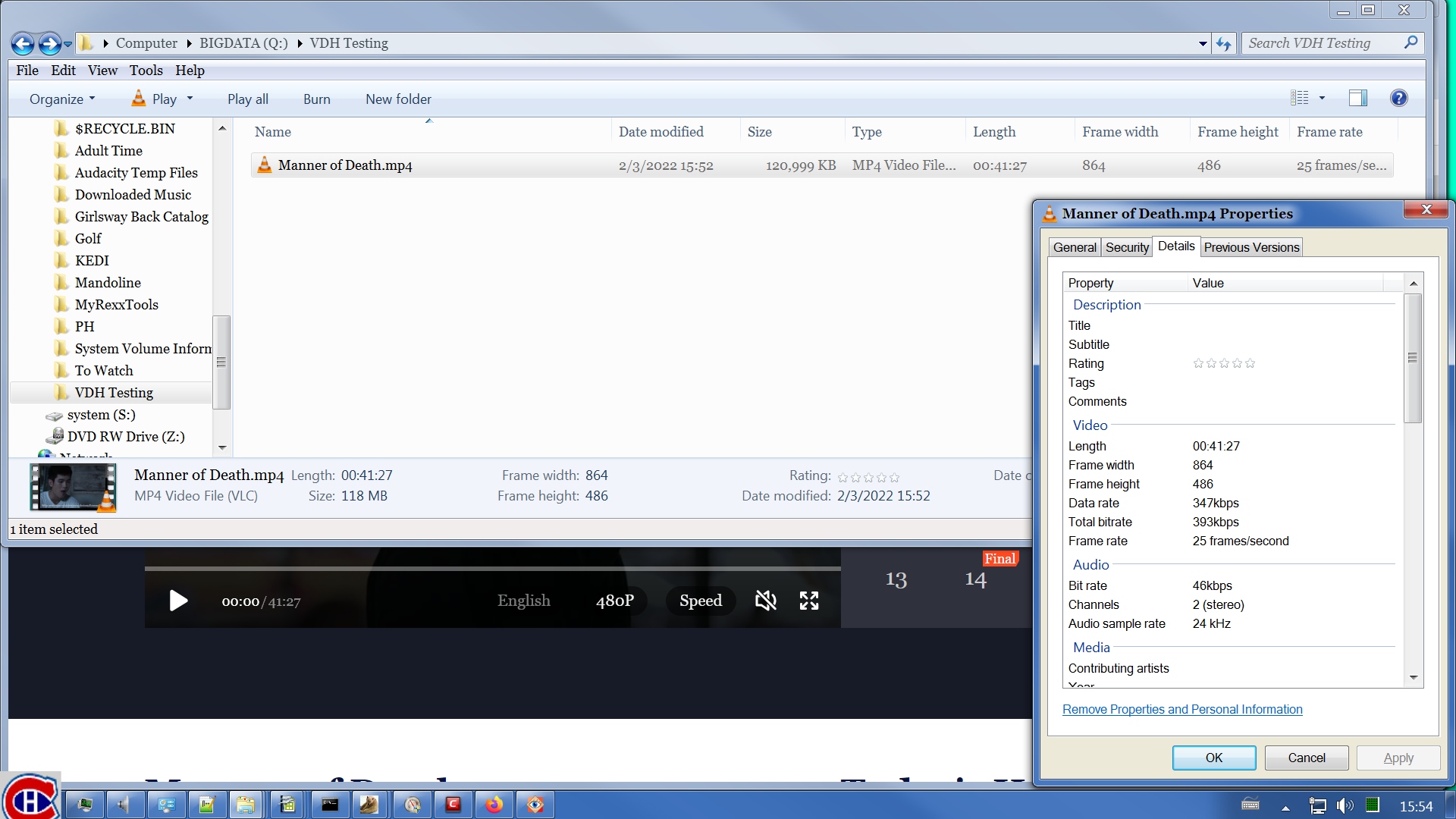
Here's the results I got:
What you can't see, because the Properties applet obscures it, is the Date created attribute. You need to see that plus the Date modified attribute in order to calculate the download time. It happened to be 1 minute, which works out to an average of about 2 million bytes per second download speed, quite decent.
I opened the file in VLC:
I opened the file in VLC:
It played fine, with both video & audio from beginning to end. I didn't sit & watch it, just skimmed through it to make sure it was all there. It did seem to be. It included all the opening & closing credits.
It struck me that since I don't understand the language being spoken -- I'm assuming it's Thai -- that I might like to have English subtitles if I were actually interested in watching this. I did note that there were a few passages that did have subtitles, I assume in Thai as well, so certain of these characters were speaking some other language or languages, which is interesting. In any case, I tried looking for a manifest:
It struck me that since I don't understand the language being spoken -- I'm assuming it's Thai -- that I might like to have English subtitles if I were actually interested in watching this. I did note that there were a few passages that did have subtitles, I assume in Thai as well, so certain of these characters were speaking some other language or languages, which is interesting. In any case, I tried looking for a manifest:
If you look closely in that image, you can see that I eventually did launch playback of the TV program. I managed to improve the resolution to 1920x1080. Also, English captions somehow came on. I didn't click any buttons to get those so the site must have detected my location & turned them on for me. Convenient.
I wasn't having much luck finding a manifest but I did find several entries for SRT captions. I found subtitles in Spanish, Italian, Korean, Japanese, Chinese, & English. I'm guessing at those because among those, I speak only English. (Revise that. On later inspection, I discovered that there were no Japanese captions, rather 2 types of Chinese captions. Also, what I thought was Italian was actually Portuguese. Doesn't change the fact that I don't speak any of those other languages. I would have recognized French but they apparently didn't think of offering those.) I downloaded each subtitle file (that's how I guessed what languages they were) by simply double clicking the entry in the Network Monitor. That launched the usual browser dialog for saving the file:
I wasn't having much luck finding a manifest but I did find several entries for SRT captions. I found subtitles in Spanish, Italian, Korean, Japanese, Chinese, & English. I'm guessing at those because among those, I speak only English. (Revise that. On later inspection, I discovered that there were no Japanese captions, rather 2 types of Chinese captions. Also, what I thought was Italian was actually Portuguese. Doesn't change the fact that I don't speak any of those other languages. I would have recognized French but they apparently didn't think of offering those.) I downloaded each subtitle file (that's how I guessed what languages they were) by simply double clicking the entry in the Network Monitor. That launched the usual browser dialog for saving the file:
After I hunted diligently but without success in the Network Monitor for a manifest, I looked in the Details page of the variant that VDH offered:
It appears that the master manifest & the media manifest were the same. In other words, there was no master manifest, only the media manifest. I have no idea how VDH found this manifest. As far as I could tell, both via filtering & via just scrolling the Network Monitor, that manifest was not listed. When I filtered on m3u8, a bunch of GIFs showed up. Not very helpful. Filtering on mpd gave nothing. I sure would like to know how VDH found that manifest. I gave the manifest URL that VDH found to ffprobe & this is what I got:
______________________________________________________________________________________
Duration: 00:41:27.72, start: 0.000000, bitrate: 0 kb/s
Program 0
Metadata:
variant_bitrate : 0
Stream #0:0: Video: h264 (High) ([27][0][0][0] / 0x001B), yuv420p(tv, bt709), 864x486 [SAR 1:1 DAR 16:9], 25 fps, 25 tbr, 90k tbn
Metadata:
variant_bitrate : 0
Stream #0:1: Audio: aac (HE-AAC) ([15][0][0][0] / 0x000F), 48000 Hz, stereo, fltp
Metadata:
variant_bitrate : 0
______________________________________________________________________________________
This was after I had selected the 1920x1080 resolution in the player. For some reason, VDH never recognized the higher resolution. There must be something in there that tells the player about the resolution but I just couldn't find it. Apparently, neither could VDH because even after refreshing the page, VDH still showed only the one low-resolution variant even though the player was playing at 1080p resolution.
So bottom line is, VDH downloaded this video no problem, although it couldn't find the higher resolution content. I was even able to find captions. I am running Windows 7 64-bit, Firefox 96.0.3 64-bit, licensed VDH 7.6.3a1 beta, CoApp 1.6.3. You say you are running Chrome. Unfortunately, Michel does not post beta versions of VDH for Chrome. Perhaps there's something in the beta that makes this work on Firefox when it fails on Chrome. I think at this point, I would use OBS to just record this thing instead of download it. What's OBS? Take a look over here:
https://groups.google.com/g/video-downloadhelper-q-and-a/c/BzPLK2YyL-s
There's a reference to OBS in there.
For your second video, I got this:
______________________________________________________________________________________
Duration: 00:41:27.72, start: 0.000000, bitrate: 0 kb/s
Program 0
Metadata:
variant_bitrate : 0
Stream #0:0: Video: h264 (High) ([27][0][0][0] / 0x001B), yuv420p(tv, bt709), 864x486 [SAR 1:1 DAR 16:9], 25 fps, 25 tbr, 90k tbn
Metadata:
variant_bitrate : 0
Stream #0:1: Audio: aac (HE-AAC) ([15][0][0][0] / 0x000F), 48000 Hz, stereo, fltp
Metadata:
variant_bitrate : 0
______________________________________________________________________________________
This was after I had selected the 1920x1080 resolution in the player. For some reason, VDH never recognized the higher resolution. There must be something in there that tells the player about the resolution but I just couldn't find it. Apparently, neither could VDH because even after refreshing the page, VDH still showed only the one low-resolution variant even though the player was playing at 1080p resolution.
So bottom line is, VDH downloaded this video no problem, although it couldn't find the higher resolution content. I was even able to find captions. I am running Windows 7 64-bit, Firefox 96.0.3 64-bit, licensed VDH 7.6.3a1 beta, CoApp 1.6.3. You say you are running Chrome. Unfortunately, Michel does not post beta versions of VDH for Chrome. Perhaps there's something in the beta that makes this work on Firefox when it fails on Chrome. I think at this point, I would use OBS to just record this thing instead of download it. What's OBS? Take a look over here:
https://groups.google.com/g/video-downloadhelper-q-and-a/c/BzPLK2YyL-s
There's a reference to OBS in there.
For your second video, I got this:
This is not a VDH problem. I'm have no idea what is going on with this one but the site refused to even let me see this one. That kind of puts VDH at the mercy of that problem. It's rather curious wording. It's not saying that it can't play the content because of my geographic location. It's another problem entirely. Odd.
Wild Willy
Feb 3, 2022, 11:07:19 PM2/3/22
to Video Download Helper Google Group
This had me too intrigued to let it lie. This time I tried something a bit different.
Instead of simply clicking your link above, going to the page, then opening the Network
Monitor, I did things in a different order. First, I put your URL into my system
clipboard. Then I opened a new browser tab & opened the Network Monitor on the empty
page. Then I pasted your URL into the address bar & hit Enter. Then I went into the
resolution button on the video, still without launching playback, and changed the
resolution to 1920x1080 (1080p). This time, I actually found a manifest by filtering on
m3u8. It was a bit tricky because the filter still showed a large number of GIFs for
reasons I can't explain. Except they weren't really GIFs. Trying to display them by
double clicking on one of them generated an error message in Firefox saying it was a
corrupted image. The URLs of these alleged GIFs did contain what looked like an embedded
URL for a manifest. Maybe this is some way they have of trying to thwart downloaders.
Maybe one of these GIF URLs contains the URL of the master manifest I'd so like to find.
I'm not sufficiently motivated to investigate that possibility. In any case, the needle
was there in the haystack. There was one item listed that was not labeled as a GIF near
the bottom of the list. It turned out to be a manifest. It was not a master manifest,
just a stream manifest. So I used ffmpeg to download the TV show in 1920x1080. And I
got the captions again (I had deleted everything I had done a few hours ago). I got the
captions with ffmpeg as well & told it to convert the srt subtitles to vtt. The download
of the show went much slower than earlier. You'd expect it to take longer since the
resolution was higher than earlier so the file would be bigger. But in addition to that,
I wasn't getting 2 million bytes per second from the server, rather something under
400,000 bytes per second. I don't know why. Maybe now is a busier time so the web site
was throttling things more than earlier. This time it was a file of 372M & it took 18
minutes to download. That gives an average download speed of only about 360,000 bytes
per second.
After I had all that going on, I did launch playback of the show in 1080p on the web page
& let it run for about 30 seconds. This time, VDH recognized nothing, not even the low
resolution variant I saw a few hours ago. I don't know why I'm getting such different
results now compared to a few hours ago. Such inconsistency is always annoying. But
there it is. If you really want to download this thing in 1080p, you can do it with
ffmpeg. I cited a link above in connection with OBS. Look in that same thread for a
different topic: an alternative technique to try when VDH fails to download something.
Do a string search on the word "alternative." The technique I describe in that reference
is what I did here to download the show again.
Instead of simply clicking your link above, going to the page, then opening the Network
Monitor, I did things in a different order. First, I put your URL into my system
clipboard. Then I opened a new browser tab & opened the Network Monitor on the empty
page. Then I pasted your URL into the address bar & hit Enter. Then I went into the
resolution button on the video, still without launching playback, and changed the
resolution to 1920x1080 (1080p). This time, I actually found a manifest by filtering on
m3u8. It was a bit tricky because the filter still showed a large number of GIFs for
reasons I can't explain. Except they weren't really GIFs. Trying to display them by
double clicking on one of them generated an error message in Firefox saying it was a
corrupted image. The URLs of these alleged GIFs did contain what looked like an embedded
URL for a manifest. Maybe this is some way they have of trying to thwart downloaders.
Maybe one of these GIF URLs contains the URL of the master manifest I'd so like to find.
I'm not sufficiently motivated to investigate that possibility. In any case, the needle
was there in the haystack. There was one item listed that was not labeled as a GIF near
the bottom of the list. It turned out to be a manifest. It was not a master manifest,
just a stream manifest. So I used ffmpeg to download the TV show in 1920x1080. And I
got the captions again (I had deleted everything I had done a few hours ago). I got the
captions with ffmpeg as well & told it to convert the srt subtitles to vtt. The download
of the show went much slower than earlier. You'd expect it to take longer since the
resolution was higher than earlier so the file would be bigger. But in addition to that,
I wasn't getting 2 million bytes per second from the server, rather something under
400,000 bytes per second. I don't know why. Maybe now is a busier time so the web site
was throttling things more than earlier. This time it was a file of 372M & it took 18
minutes to download. That gives an average download speed of only about 360,000 bytes
per second.
After I had all that going on, I did launch playback of the show in 1080p on the web page
& let it run for about 30 seconds. This time, VDH recognized nothing, not even the low
resolution variant I saw a few hours ago. I don't know why I'm getting such different
results now compared to a few hours ago. Such inconsistency is always annoying. But
there it is. If you really want to download this thing in 1080p, you can do it with
ffmpeg. I cited a link above in connection with OBS. Look in that same thread for a
different topic: an alternative technique to try when VDH fails to download something.
Do a string search on the word "alternative." The technique I describe in that reference
is what I did here to download the show again.
Reply all
Reply to author
Forward
0 new messages