
filename must not contain illegal characters (Russian letters in title?)
750 views
Skip to first unread message

Александр Кузнецов
Apr 7, 2020, 12:47:33 AM4/7/20
to Video DownloadHelper Q&A
I have licence and I'm trying to download video from site I used to download earlier, but error happen:
filename must not contain illegal characters.
This is private education portal, so I couldn't give you access, sorry.
I tried in licensed Chrome via companion and got only 2Kb file (in attached file)
I tried unlicensed Firefox via web download and see error: "filename must not contain illegal characters."
I think the problem could be in video title:"Занятие №5", cause plugin could not support utf-8 in filenames.
There're info about file:
| actions | [ 0 : "openlocalfile" 1 : "cvplay" 2 : "openlocalcontainer" 3 : "quickdownload" 4 : "download" 5 : "downloadconvert" 6 : "copyurl" 7 : "blacklist" 8 : "details" 9 : "deletehit" 10 : "pin" |
| extension | mp4 |
| frameId | 0 |
| fromCache | true |
| headers | [ 0:{ "name": "Sec-Fetch-Dest" "value": "video" 1:{ "name": "User-Agent" "value": "Mozilla/5.0 (Macintosh; Intel Mac OS X 10_14_6) AppleWebKit/537...." 2:{ "name": "Accept" "value": "*/*" |
| id | network-probe:2abd7c59 |
| isPrivate | false |
| length | 152611672 |
| localDirectory | /Users/dsdr/dwhelper |
| localFilePath | /Users/dsdr/dwhelper/task5.mp4 |
| opStartDate | 1586233965714 |
| operation | null |
| orphanT | 1586234000341 |
| orphanT0 | 1586233940341 |
| pageUrl | |
| referrer | |
| running | 0 |
| status | active |
| tabId | 21 |
| title | Занятие №5 |
| topUrl | |
| type | video |
| url | |
| urlFilename | 5181 |
Could you help me anyway to force download this videos?
Thanks!
Александр Кузнецов
Apr 7, 2020, 3:41:28 AM4/7/20
to video-download...@googlegroups.com
upd: Firefox download success, but only web mode. Companion mode failed.
Reinstalled companion lib doesn't help in chrome, but gave a bit more debug code:
Could not get information from media ' Занятие №5 ' from file '/Users/dsdr/dwhelper/ Занятие №5-1.mp4'. The file might be corrupted.
{
"file": "/Users/dsdr/dwhelper/ Занятие №5-1.mp4",
"stat": {
"dev": 16777220,
"mode": 33188,
"nlink": 1,
"uid": 501,
"gid": 20,
"rdev": 0,
"blksize": 4096,
"ino": 10596268,
"size": 1776,
"blocks": 8,
"atimeMs": 1586245008026.099,
"mtimeMs": 1586245006785.4695,
"ctimeMs": 1586245006785.4695,
"birthtimeMs": 1586245005883.8494,
"atime": "2020-04-07T07:36:48.026Z",
"mtime": "2020-04-07T07:36:46.785Z",
"ctime": "2020-04-07T07:36:46.785Z",
"birthtime": "2020-04-07T07:36:45.884Z"
}
}
Exit code: 1
ffprobe version n4.0-1-ga5b047e-vdhcoapp Copyright (c) 2007-2018 the FFmpeg developers
built with Apple LLVM version 8.0.0 (clang-800.0.42.1)
configuration: --arch=x86_64 --enable-runtime-cpudetect --enable-gpl --extra-version=vdhcoapp --enable-shared --enable-pthreads --prefix=/Users/mig/vdhcoapp/converter/src-build/mac/64/converter-build --enable-version3 --extra-cflags=-I/Users/mig/vdhcoapp/converter/src-build/mac/64/deps/include --extra-ldflags='-L/Users/mig/vdhcoapp/converter/src-build/mac/64/deps/lib -L/Users/mig/vdhcoapp/converter/src-build/mac/64/zlib' --pkg-config=pkg-config --enable-libvo-amrwbenc --enable-libopus --enable-libvorbis --enable-libvpx --enable-libx264 --enable-libmp3lame --enable-libxvid --enable-libopencore_amrnb --enable-libopencore_amrwb --enable-encoder=libvpx-vp9 --enable-libwebp --enable-zlib --enable-libopenjpeg --enable-libx265 --enable-libtheora --enable-libaom --disable-doc
libavutil 56. 14.100 / 56. 14.100
libavcodec 58. 18.100 / 58. 18.100
libavformat 58. 12.100 / 58. 12.100
libavdevice 58. 3.100 / 58. 3.100
libavfilter 7. 16.100 / 7. 16.100
libswscale 5. 1.100 / 5. 1.100
libswresample 3. 1.100 / 3. 1.100
libpostproc 55. 1.100 / 55. 1.100
[mov,mp4,m4a,3gp,3g2,mj2 @ 0x7f8e11802200] Format mov,mp4,m4a,3gp,3g2,mj2 detected only with low score of 1, misdetection possible!
[mov,mp4,m4a,3gp,3g2,mj2 @ 0x7f8e11802200] moov atom not found
/Users/dsdr/dwhelper/ Занятие №5-1.mp4: Invalid data found when processing input

mig
Apr 7, 2020, 4:05:59 AM4/7/20
to Video DownloadHelper Q&A
What is the version of the coapp you are running ? You can see that from the VDH settings.
What do you mean exactly by:
upd: Firefox download success, but only web mode. Companion mode failed.
Can you perform a "Download" and pick a safe file name rather than a "Quick download" that uses a default name that could possibly cause problems ?
Can you share the URL of the link containing the video ?
Александр Кузнецов
Apr 7, 2020, 5:21:00 AM4/7/20
to video-download...@googlegroups.com
> What is the version of the coapp you are running ? You can see that from the VDH settings
VdhCoApp 1.4.0
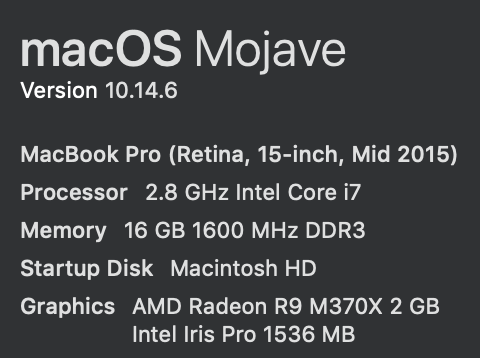
Google chrome Version 80.0.3987.163 (Official Build) (64-bit)
Firefox browser 74.0.1 (64-bit)
> What do you mean exactly by:
upd: Firefox download success, but only web mode. Companion mode failed.
I mean, when I choose to download I see options: download via browser or via companion app.
When I choose companion, I got error,
When I choose browser mode - I get success download video.
> Can you perform a "Download" and pick a safe file name rather than a "Quick download" that uses a default name that could possibly cause problems ?
Yes I can, I tried, but it doesn't help, ffmpeg error:
[mov,mp4,m4a,3gp,3g2,mj2 @ 0x7fe162801200] Format mov,mp4,m4a,3gp,3g2,mj2 detected only with low score of 1, misdetection possible!
[mov,mp4,m4a,3gp,3g2,mj2 @ 0x7fe162801200] moov atom not found
/Users/dsdr/dwhelper/1.mp4: Invalid data found when processing input
> Can you share the URL of the link containing the video ?
Link is https://my.skvot.io/ru/lesson/show/3452?time=2967 , but it's under account and I couldn't share it with you.
But I could share link https://bangbangeducation.ru/course/arduino/lesson/822009d1-499e-11ea-9f15-0242c0a83003 (you can register for free here), where you can see same Russian title and no problem downloading:

| _mpdCommonBaseUrl | ../ |
| actions | [ 0 : "abort" 1 : "blacklist" 2 : "details" 3 : "deletehit" 4 : "pin" |
| audioMpd | { "id": "a35db2ce" "base_url": "../audio/a35db2ce/chop/" "format": "mp42" "mime_type": "audio/mp4" "codecs": "mp4a.40.2" "bitrate": 255000 "avg_bitrate": 255000 "duration": 629.376 "channels": 2 "sample_rate": 48000 "max_segment_duration": 6 "init_segment": "AAAAHGZ0eXBpc281AAACAGlzbzVpc282bXA0MQAAAsptb292AAAAbG12aGQAAAAA..." "segments": [ 0 - 100 ][ 100 - 104 ] |
| audioUrl | |
| bitrate | 2880000 |
| chunked | dash-adp |
| descrPrefix | DASH streaming |
| duration | 629 |
| extension | mp4 |
| frameId | 73 |
| fromCache | true |
| group | grp-aaca4a3 |
| headers | [ ... ] |
| id | dash:aaca4a3-4 |
| isPrivate | false |
| length | null |
| opStartDate | 1586250769425 |
| operation | null |
| originalId | network-probe:aaca4a3 |
| pageUrl | |
| referrer | |
| running | 1 |
| size | 1920x1080 |
| status | running |
| tabId | 67 |
| thumbnailUrl | |
| title | Модуль знакомства. Урок 1. Введение в Arduino. Типы плат. Аналоговые и цифровые пины.. Вечера с Arduino. Базовый курс — Bang Bang Education |
| topUrl | |
| urlFilename | master |
| videoMpd | { "id": "ecc4a9c4" "base_url": "ecc4a9c4/chop/" "format": "mp42" "mime_type": "video/mp4" "codecs": "avc1.640028" "bitrate": 2880000 "avg_bitrate": 893000 "duration": 629.3666666666667 "framerate": 30 "width": 1920 "height": 1080 "max_segment_duration": 6 "init_segment": "AAAAHGZ0eXBpc281AAACAGlzbzVpc282bXA0MQAAAwZtb292AAAAbG12aGQAAAAA..." "segments": [ 0:{ "start": 0 "end": 6.066666666666666 "url": "segment-1.m4s" "size": 180158 1:{ "start": 6.066666666666666 "end": 12.133333333333333 "url": "segment-2.m4s" "size": 245034 2:{ ... }3:{ ... }4:{ ... }5:{ ... }6:{ ... }7:{ ... }8:{ ... }9:{ ... }10:{ ... }11:{ ... }12:{ ... }13:{ ... }14:{ ... }15:{ ... }16:{ ... }17:{ ... }18:{ ... }19:{ ... }20:{ ... }21:{ ... }22:{ ... }23:{ ... }24:{ ... }25:{ ... }26:{ ... }27:{ ... }28:{ ... }29:{ ... }30:{ ... }31:{ ... }32:{ ... }33:{ ... }34:{ ... }35:{ ... }36:{ ... }37:{ ... }38:{ ... }39:{ ... }40:{ ... }41:{ ... }42:{ ... }43:{ ... }44:{ ... }45:{ ... }46:{ ... }47:{ ... }48:{ ... }49:{ ... }50:{ ... }51:{ ... }52:{ ... }53:{ ... }54:{ ... }55:{ ... }56:{ ... }57:{ ... }58:{ ... }59:{ ... }60:{ ... }61:{ ... }62:{ ... }63:{ ... }64:{ ... }65:{ ... }66:{ ... }67:{ ... }68:{ ... }69:{ ... }70:{ ... }71:{ ... }72:{ ... }73:{ ... }74:{ ... }75:{ ... }76:{ ... }77:{ ... }78:{ ... }79:{ ... }80:{ ... }81:{ ... }82:{ ... }83:{ ... }84:{ ... }85:{ ... }86:{ ... }87:{ ... }88:{ ... }89:{ ... }90:{ ... }91:{ ... }92:{ ... }93:{ ... }94:{ ... }95:{ ... }96:{ ... }97:{ ... }98:{ ... }99:{ ... }[ 100:{ ... }101:{ ... }102:{ ... }103:{ "start": 623.3666666666667 "end": 629.3666666666667 "url": "segment-104.m4s" "size": 90024 |
| videoUrl |

mig
Apr 7, 2020, 6:07:58 AM4/7/20
to Video DownloadHelper Q&A
Unfortunately, i did not succeed in registering to the site, so i could not experience the issue.
I can see the video is hosted on Vimeo. Are you able to download a regular Vimeo video like the one at https://vimeo.com/384009791/51acdbedf1 ?
Also, is there any chance you are using a proxy in your browser to download the video ? Some type of proxies do not work well with the companion app.
If it works with Firefox (assuming using Browser as Download Processor), it should work with Chrome with the same setting. Can you open the VDH settings in Chrome, go to tab Behaviour, and change parameter Download processor (the top-most one) to either Ask (you'll get prompted as you are in Firefox) or Browser (to use the browser automatically) ?
Александр Кузнецов
Apr 7, 2020, 9:19:51 AM4/7/20
to Video DownloadHelper Q&A
> Also, is there any chance you are using a proxy in your browser to download the video ?
I tried without proxy, but same result:
[mov,mp4,m4a,3gp,3g2,mj2 @ 0x7fb280800000] Format mov,mp4,m4a,3gp,3g2,mj2 detected only with low score of 1, misdetection possible!
[mov,mp4,m4a,3gp,3g2,mj2 @ 0x7fb280800000] moov atom not found
/Users/dsdr/dwhelper/ Занятие №5-2.mp4: Invalid data found when processing input
> Can you open the VDH settings in Chrome, go to tab Behaviour, and change parameter Download processor (the top-most one) to either Ask (you'll get prompted as you are in Firefox) or Browser (to use the browser automatically) ?
I couldn't, because there is no such button in settings:
mig
Apr 8, 2020, 10:33:11 AM4/8/20
to Video DownloadHelper Q&A
Ok, so you had a proxy. The issue is probably related to that. You need to make VDH to re-detect the video after you removed your proxy setting. You can restart the browser and return to the page to make sure.
Regarding the settings. It looks like there is an issue here. Thanks for noticing and reporting the problem. When in the VDH settings page, open the dropdown menu and pick Reset settings (the bottom-most menu item) and you should see the whole parameters set again. Parameter Download Processor should be back to its default value, Ask, so you should be OK.
Александр Кузнецов
Apr 8, 2020, 11:54:51 PM4/8/20
to video-download...@googlegroups.com
I closed proxy app, verified, that I'm not proxying traffic,
reseted VideoDownloader (all except licence) and reloaded VideoDownloader app,
closed chrome and reopen url,
but got same error.
And extension doesn't ask, it use app, as default.
So I removed extension from chrome, reopen chrome, install extension again and now I can choose - app or web.
Using browser got error:
Download error
Invalid filename
Using app:
Could not get information from media ' Занятие №5 ' from file '/Users/dsdr/dwhelper/ Занятие №5-4.mp4'. The file might be corrupted.
{ "file": "/Users/dsdr/dwhelper/ Занятие №5-4.mp4", "stat": { "dev": 16777220, "mode": 33188, "nlink": 1, "uid": 501, "gid": 20, "rdev": 0, "blksize": 4096, "ino": 10719331, "size": 1776, "blocks": 8, "atimeMs": 1586404928957.9583, "mtimeMs": 1586404927732.0056, "ctimeMs": 1586404927732.0056, "birthtimeMs": 1586404926825.0051, "atime": "2020-04-09T04:02:08.958Z", "mtime": "2020-04-09T04:02:07.732Z", "ctime": "2020-04-09T04:02:07.732Z", "birthtime": "2020-04-09T04:02:06.825Z" } } Exit code: 1 ffprobe version n4.0-1-ga5b047e-vdhcoapp Copyright (c) 2007-2018 the FFmpeg developers built with Apple LLVM version 8.0.0 (clang-800.0.42.1) configuration: --arch=x86_64 --enable-runtime-cpudetect --enable-gpl --extra-version=vdhcoapp --enable-shared --enable-pthreads --prefix=/Users/mig/vdhcoapp/converter/src-build/mac/64/converter-build --enable-version3 --extra-cflags=-I/Users/mig/vdhcoapp/converter/src-build/mac/64/deps/include --extra-ldflags='-L/Users/mig/vdhcoapp/converter/src-build/mac/64/deps/lib -L/Users/mig/vdhcoapp/converter/src-build/mac/64/zlib' --pkg-config=pkg-config --enable-libvo-amrwbenc --enable-libopus --enable-libvorbis --enable-libvpx --enable-libx264 --enable-libmp3lame --enable-libxvid --enable-libopencore_amrnb --enable-libopencore_amrwb --enable-encoder=libvpx-vp9 --enable-libwebp --enable-zlib --enable-libopenjpeg --enable-libx265 --enable-libtheora --enable-libaom --disable-doc libavutil 56. 14.100 / 56. 14.100 libavcodec 58. 18.100 / 58. 18.100 libavformat 58. 12.100 / 58. 12.100 libavdevice 58. 3.100 / 58. 3.100 libavfilter 7. 16.100 / 7. 16.100 libswscale 5. 1.100 / 5. 1.100 libswresample 3. 1.100 / 3. 1.100 libpostproc 55. 1.100 / 55. 1.100 [mov,mp4,m4a,3gp,3g2,mj2 @ 0x7fee8e801000] Format mov,mp4,m4a,3gp,3g2,mj2 detected only with low score of 1, misdetection possible! [mov,mp4,m4a,3gp,3g2,mj2 @ 0x7fee8e801000] moov atom not found /Users/dsdr/dwhelper/ Занятие №5-4.mp4: Invalid data found when processing input
mig
Apr 9, 2020, 1:14:12 AM4/9/20
to Video DownloadHelper Q&A
Александр Кузнецов
Apr 11, 2020, 7:43:53 AM4/11/20
to video-download...@googlegroups.com
> Are you able to download a regular Vimeo video like the one at https://vimeo.com/384009791/51acdbedf1 ?
yeah, success, no errors or problems.
Video proof for you: https://youtu.be/UzaisJ6dvcE

Tom Slick
Jan 27, 2021, 8:28:13 PM1/27/21
to Video DownloadHelper Q&A
Is it possible to put something in the extension or the co-app to prevent the use of illegal characters? Ideally, this would include all characters across the three main desktop operating systems and accommodate Windows and Unix type filesystems. Everything really comes from Unix and Microsoft only took a slightly different path. The obvious characters include file separators, wildcards, and list separators.
I recently copied the name of a video from YouTube to use as a file name. I didn't even think of the fact that it had a colon (:) in the title. Everything just went along as normal. The extension accepted my filename and kept track of the file with my chosen title. Windows saved the file name as everything before the colon without a file extension. The output apparently went to a nonexistent drive and unsaved file using the rest of the file name after the colon. Windows did not give me an error until I tried to find or play the nonexistent file from within the extension interface in Firefox.
If a user tries to use any character from the list, a message window should pop up and say that the file name may not contain the characters $ * / \ | etc. The other issue may be to make sure all file name output is plain text Unicode. Other text encoding can cause character incompatibility even on different computers with the same operating system.

Wild Willy
Jan 27, 2021, 11:55:15 PM1/27/21
to Video Download Helper Google Group
I have some experience on Windows using VDH to download files named with French titles. I know
there's at least a couple of French users of VDH who have posted on here in recent months who could
probably say more on this subject. What's more, they were using MACs. French titles routinely
include such characters as é, ô, ç, and so on. In my experience, these work fine in VDH & they are
acceptable in file names as well. So the issue is not likely to be the Russian characters,
although I admit I have never done anything with Russian files since it's not a language I speak.
I suppose it's possible that certain Russian characters aren't accepted but I would think that
would be very unlikely. It is my understanding that there is a Russian language version of Windows
so I would expect all Russian characters to be valid. I know the original poster was using a MAC,
but I would be very surprised if there is no Russian version of MAC OS.
My Windows 7 tells me that the following characters are not valid in file names:
/ \ : * ? " < > |
Those are, respectively, forward slash, back slash, colon, asterisk, question mark, double
quotation mark, less than, greater than, vertical bar.
This is the list that floats up in a tool tip in the Windows file manager when I attempt to rename
a file using one of these characters. Notice that the dollar sign ($), the apostrophe ('), the
number sign (#), the at sign (@), space, parentheses ( () ), brackets ( [] ), plus (+), minus (-),
& even the ampersand (&) are all VALID in file names. I have used them all at various times. One
character that is not listed is the comma (,). If you try to use a comma, it is interpreted as a
separator between entries in a list so you don't get the results you were expecting. You can
actually put a comma into a file name, but I think you're asking for trouble if you do. So if a
VDH download proposes a file name that includes any of the banned characters, it is on your
shoulders to fix the file name in VDH's file selection dialog preceding download, as Tom Slick has
pointed out in his post above. But this is for Windows. I can't comment on what characters are
banned in the various flavors of UNIX that are out there, meaning all the Linux variants & MAC OS.
(It is my understanding that MAC OS is a variant of Linux.) I have no experience with those
systems. But whatever are the banned characters, I would expect it's still on your shoulders to
fix any invalid file names that VDH might propose to you on those platforms.
Now ffmpeg is a different issue. I'm talking about the ffmpeg you can download from ffmpeg.org,
not the captive ffmpeg inside VDH. With native ffmpeg, you can't use accented characters. I've
tried. It's not a good idea. I have not figured out a way around this problem, either. I would
imagine Russian characters are just as problematic. With ffmpeg, I have downloaded whatever file
it was, and then after that completed, I repaired the file name manually to include whatever
accented characters I might have wanted.
there's at least a couple of French users of VDH who have posted on here in recent months who could
probably say more on this subject. What's more, they were using MACs. French titles routinely
include such characters as é, ô, ç, and so on. In my experience, these work fine in VDH & they are
acceptable in file names as well. So the issue is not likely to be the Russian characters,
although I admit I have never done anything with Russian files since it's not a language I speak.
I suppose it's possible that certain Russian characters aren't accepted but I would think that
would be very unlikely. It is my understanding that there is a Russian language version of Windows
so I would expect all Russian characters to be valid. I know the original poster was using a MAC,
but I would be very surprised if there is no Russian version of MAC OS.
My Windows 7 tells me that the following characters are not valid in file names:
/ \ : * ? " < > |
Those are, respectively, forward slash, back slash, colon, asterisk, question mark, double
quotation mark, less than, greater than, vertical bar.
This is the list that floats up in a tool tip in the Windows file manager when I attempt to rename
a file using one of these characters. Notice that the dollar sign ($), the apostrophe ('), the
number sign (#), the at sign (@), space, parentheses ( () ), brackets ( [] ), plus (+), minus (-),
& even the ampersand (&) are all VALID in file names. I have used them all at various times. One
character that is not listed is the comma (,). If you try to use a comma, it is interpreted as a
separator between entries in a list so you don't get the results you were expecting. You can
actually put a comma into a file name, but I think you're asking for trouble if you do. So if a
VDH download proposes a file name that includes any of the banned characters, it is on your
shoulders to fix the file name in VDH's file selection dialog preceding download, as Tom Slick has
pointed out in his post above. But this is for Windows. I can't comment on what characters are
banned in the various flavors of UNIX that are out there, meaning all the Linux variants & MAC OS.
(It is my understanding that MAC OS is a variant of Linux.) I have no experience with those
systems. But whatever are the banned characters, I would expect it's still on your shoulders to
fix any invalid file names that VDH might propose to you on those platforms.
Now ffmpeg is a different issue. I'm talking about the ffmpeg you can download from ffmpeg.org,
not the captive ffmpeg inside VDH. With native ffmpeg, you can't use accented characters. I've
tried. It's not a good idea. I have not figured out a way around this problem, either. I would
imagine Russian characters are just as problematic. With ffmpeg, I have downloaded whatever file
it was, and then after that completed, I repaired the file name manually to include whatever
accented characters I might have wanted.

Zock Tant
Mar 11, 2023, 6:32:37 AM3/11/23
to Video DownloadHelper Q&A
Hi,
is there any possiblity to just prompt an option to select the download path for each file? so the renaming could be done instantly before the download starts..


Wild Willy
Mar 11, 2023, 6:43:29 AM3/11/23
to Video DownloadHelper Q&A
Zock, I just answered you over here:
Reply all
Reply to author
Forward
0 new messages