
I can no longer download anything with the latest upgrade (7.3.6). Previous to the change, I had no problem downloading using Firefox 48 on my laptop.
1,614 views
Skip to first unread message

Simon George
May 31, 2019, 4:34:55 AM5/31/19
to Video DownloadHelper Q&A
After you read this text, please remove it before posting (CTRL-A then DEL). If you don't do so, it means you haven't done the very minimum to help yourself and you may not receive the assistance you expect from this forum.
- please take the time to do some research on the FAQ (https://downloadhelper.net/faq) and the forum before asking your question, the answer is probably there
- never post your license key in the forum. If you think it is useful to us to search for your license, just write the 8 last characters of the license key
- when reporting a problem, specify when appropriate:
- whether you are running Video DownloadHelper on Firefox or on Chrome
- the link to the page containing the video you have problems with
- any error message you may get
- do not hesitate to include screenshots to illustrate your post

Taylor Bryant
May 31, 2019, 12:08:29 PM5/31/19
to Video DownloadHelper Q&A
Same same.
Taylor Bryant
May 31, 2019, 12:25:29 PM5/31/19
to Video DownloadHelper Q&A
Oops, I should say, same, but I am running Firefox 67.0 (64 bit)

drp...@humboldt1.com
May 31, 2019, 2:29:58 PM5/31/19
to Video DownloadHelper Q&A
New update broke my ability to download videos. I have Firefox 67.0 64 bit and cannot download:
It does not detect any video. "No media to process in current tab"

Andrey Rivendell
May 31, 2019, 6:36:33 PM5/31/19
to Video DownloadHelper Q&A
the same with me - VDH 7.3.6 and Firefox 67 - no media even on youtube

jc vdh
Jun 1, 2019, 3:47:27 AM6/1/19
to Video DownloadHelper Q&A
Hi all,
no problem here with last update and last Firefox, but we'll keep one eye on this.
jerome

Eric
Jun 1, 2019, 4:44:39 AM6/1/19
to Video DownloadHelper Q&A
Same problem here. I use MAC OS 10.6.8 Snow Leopard on my Mac Book Pro to be able to keep using some older hardware interfaces. The last Firefox version that OS 10.6.8 accepts is 48.0.2. My plug-in can no longer recognize videos in a webpage since the latest VDH 7.3.6 update in May 31 2019. Please fix it. Some of us cannot use the latest Firefox versions. Or at least give us access to download the previous version of VDH and then we can disable add-on updates. Thanks!
Taylor Bryant
Jun 1, 2019, 5:20:28 PM6/1/19
to Video DownloadHelper Q&A
I should amend. I uninstalled and reinstalled and it appears to be working. With one exception - I was trying to download this:
and I get "No media to process"
Not sure if it's because it's an unorthodox format or what.

Wild Willy
Jun 1, 2019, 10:59:52 PM6/1/19
to Video DownloadHelper Q&A
You need to look carefully at ALL the VDH settings on the Behavior tab. There are many settings that will exclude certain variants from the VDH list based on both type & size. On the other hand, none of that will help with "Blood in the Face." Look very carefully at the listings of the variants in the VDH menu, assuming you've got your Behavior settings adjusted so they appear. Every single one of the variants I saw has a little lock icon beside it. At normal resolutions, the lock icon looks a lot like a fly speck. But if you get out a magnifying glass & stretch your imagination a little, it does look sort of like a lock. This is an indication that you must be a premium subscriber to YouTube to see those variants. Of course, VDH can't download locked variants. In other words, YouTube has played a slimy trick on the world & made it so you can't download that particular video without buying a subscription to YouTube. In short, for that particular video, you're out of luck. You might pay attention to that for other videos, not just on YouTube but anywhere. Yes, I know you can play the video without being a premium subscriber to YouTube. I don't know what sort of jiggerypokery they do to make things be like that. But that's the way it is. Tough noogies on us.

Nathan Elke
Jun 2, 2019, 3:08:08 AM6/2/19
to Video DownloadHelper Q&A
I'm getting the same behaviour; running Firefox ver 67, since the upgrade, YouTube videos are all showing the same thing: "No media to process in the current tab". When I do an "Analyze Page", it shows three JPGs, no videos. Looking in the settings under behaviour, as you suggested, I see nothing selected to limit which variants are shown. I even went to some videos I previously downloaded, and they are not showing anything to download, either. Now, when I look at videos I downloaded before, they DO still show variants. Some of the ones that don't work:
Ones that do:
Since I see NO Variants for the ones that don't work, I obviously can't see the tiny "lock" you mentioned...is there anything on the Youtube screen itself that indicates whether a video is downloadable with VDH?
Wild Willy
Jun 2, 2019, 6:39:50 AM6/2/19
to Video DownloadHelper Q&A
In all your cases, Nathan, I see variants that appear to be downloadable with VDH. The first 2 of your 3 you say don't work have a lot of locked variants, but they each have something that looks like it would download. (I didn't feel like actually downloading them but even if I did successfully download them that would prove nothing & not help you.) All 5 of your examples show variants for me. So there's got to be something different in your settings compared to mine. I can't imagine what that would be. Mayhe there's something elsewhere in the settings that is making trouble. And I'm also running Firefox 67.0 64-bit with VDH 7.3.6a1 (the most recent beta, which is not particularly recent any more).
YouTube would never condescend to acknowledge the existence of VDH. They probably wish VDH would go away. So no, there's nothing that would appear on a YouTube page that would say anything at all about VDH.

Desert Paul
Jun 3, 2019, 1:52:27 PM6/3/19
to Video DownloadHelper Q&A
No longer able to download from youtube. Firefox 67.0, https://www.youtube.com/watch?v=WeYo-RMl7wI or any other videos. "No media to process in the current tab".
Paid for license.
Wild Willy
Jun 3, 2019, 3:13:24 PM6/3/19
to Video DownloadHelper Q&A
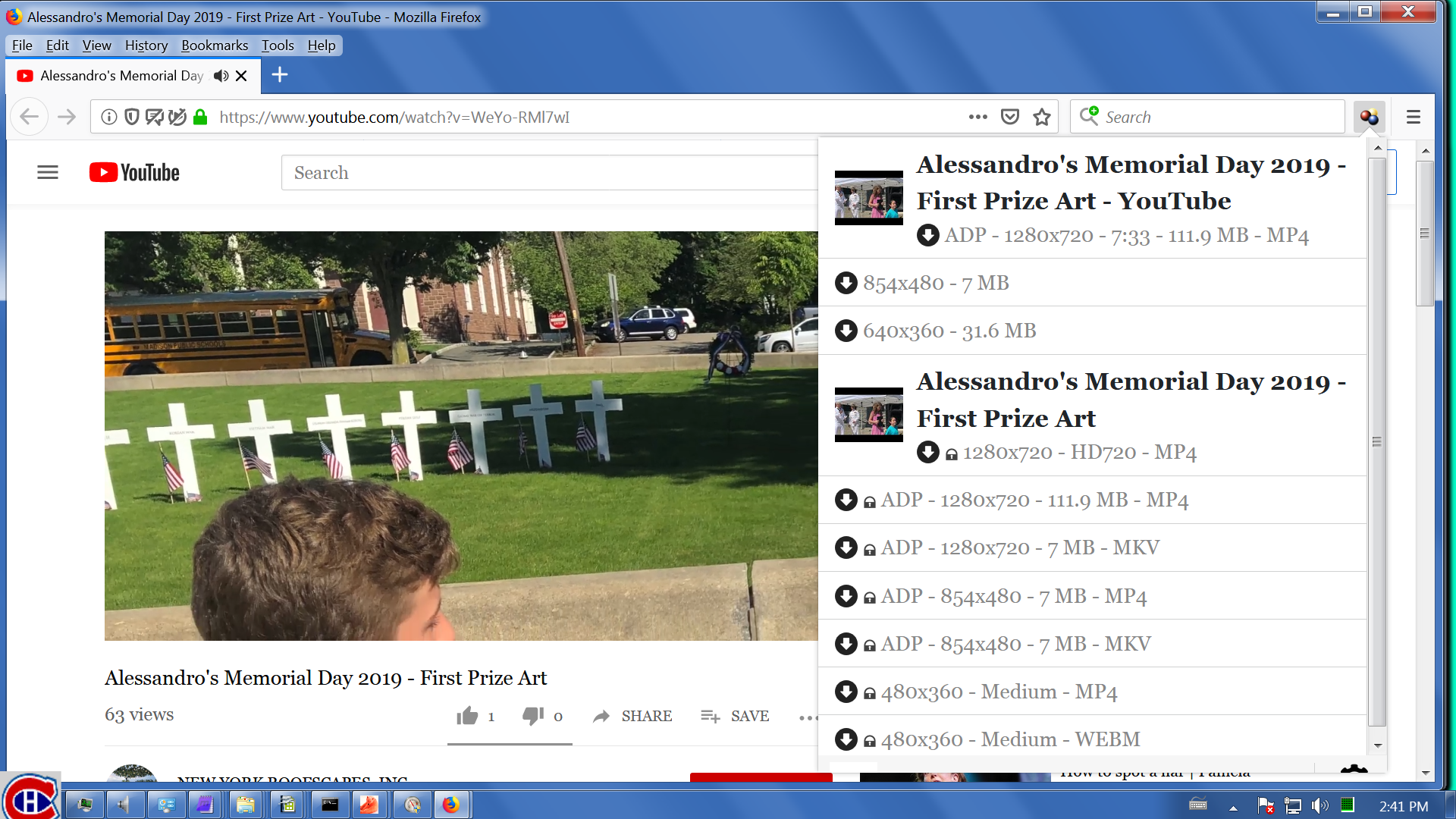
As you can see in the attached file, there's several variants offered but many of them are locked. However, the first one, the one that says ADP - 1280x820 - 7:33 - 111.9MB - MP4, does look like it would download quite nicely. It is my understanding that since this is an ADP variant, it can be downloaded only with the CoApp.
Wild Willy
Jun 3, 2019, 3:27:19 PM6/3/19
to Video DownloadHelper Q&A
And I did download it. Results summarized in the attached files. I did play it in VLC & it played fine, both audio & video. I didn't actually watch it, just skimmed through it. But it did appear to be all there.
Andrey Rivendell
Jun 3, 2019, 4:12:13 PM6/3/19
to Video DownloadHelper Q&A
I know the solution: install any other video download extention for Firefox: ) Hopefully i have no paid license ;)

Troy
Jun 3, 2019, 6:31:05 PM6/3/19
to Video DownloadHelper Q&A
I added the FVD Video Downloader extension and VDH started working again.
Message has been deleted

Jay
Jun 5, 2019, 1:11:07 AM6/5/19
to video-download...@googlegroups.com
I see No Media To Process In the Current Tab when I view that Youtube video Desert Paul linked to. What is Wild Willy doing to get download options to appear? My VDH install is all default Behavior settings. This has always worked fine. Something must have changed with Youtube or VDH or Firefox in the past 2-3 days that is resulting in No Media showing up for some Youtube videos. If I had to guess, I'd say it is videos that Youtube has flagged as having copyrighted audio on them. I've noticed for months that those videos will not display most of the normal download options but will still have a .webm file that can be saved. Now they no longer have even that .webm option.
I've been all over this forum hoping for an answer to this new issue that just appeared in the past couple days. I tried posting earlier today to inquire about it but it seems that was deleted, as was my reply to another thread.
One existing post claims "SOLVED" in the title which just says to go back to an older version of VDH if you can find one and trust the source. That's not solving the issue for most users, if that even works at all. It seems to be an issue with some combination of Youtube's latest streaming code, VDH 7.3.6 and Firefox 67.0. I'm on Windows 10 while others here report the same issue on MacOS.
Would appreciate further investigation.
Here are two more Youtube videos that don't offer any download links if you're experiencing whatever issue it is that I and Desert Paul and Eric and drp@,,, are all reporting:
Again, I'm on 7.3.6 on Firefox version 67.0 (64bit), Windows 10. All defaults. Companion app installed and license verified. I haven't touched any VDH settings, so if you want to reproduce start there.
Thank you.
edit: Just found something else that's missing - 4K options. When watching a 4K video in one of its available 4K resolutions, VDH used to list that resolution as one of the available download options. It usually wouldn't appear until the Youtube video was running in 4K, but once it was, it would be listed at the top of the dropdown list. That is no longer happening. Here is an example: https://www.youtube.com/watch?v=z2B6drC3EmU No 4K options appear listed in VDH for that video.
So whatever "broke", apparently took out the ability to recognize and capture the stream that 4K videos run in and videos that are determined to have copyrighted music in them. Hope that helps narrow it down or make it more reproducible.
Wild Willy
Jun 5, 2019, 2:34:53 AM6/5/19
to Video DownloadHelper Q&A
You're going to love this. I got variants to appear for both of those latest videos.
In the VDH Settings, each one is color coded. Black ones are default values, green ones have been changed by you. Tell us every green one you have. Tedious, yes, but maybe the answer lies there. It will at least tell me what is different between your setup & mine.
Jay
Jun 5, 2019, 3:06:19 AM6/5/19
to video-download...@googlegroups.com
Hey, that actually makes me hopeful this can be fixed. :)
I have all set to Default just to ensure that isn't an issue, restarted browser fully (verified no process was running in Task Manager just to be certain), and I still see the same issue.
Are you using 7.3.6 for Firefox?
Are you using Firefox v67.0? 64bit? Or v67.0.1 64bit? (I just tried upgrading to that since it was available. Same No Media issue persists.
Are you using Win10 64-bit?
Thanks.
p.s., i've also tried reloading the browser extension, disabling UBlock Origin and reloading the Youtube video page, just to ensure that wasn't blocking something new that would somehow impact VDH. Checked NoScript's blocks and the only script it is blocking on Youtube is DoubleClick.net, which is Google's banner ad system and is blocked by default. Those are the only other add-ons in place and I've been running them for years alongside VDH with no issues.
Wild Willy
Jun 5, 2019, 11:48:40 AM6/5/19
to Video DownloadHelper Q&A
I have been using the 7.3.6a1 beta of VDH since it was released rather a long time ago. I've just updated to Firefox 67.0.1. I'm running Windows 7 64-bit. I do have a few green options.
- Main panel long lines: Over several lines - should be irrelevant here
- Icon activation: Hit from any tab - irrelevant
- Private notifications: not checked - not entirely sure what that affects, may have to do with locked variants
- File dialog, Alert dialog: Window - don't affect anything until you actually get into the file download step
- Tools menu: checked - irrelevant
- Download processor: CoApp - my personal recommendation
- Downloead directory: I doubt anybody has this set to the default unless they just don't know how to use VDH
- Several maximum settings - irrelevant
- Simultaneous converter operations - irrelevant
- Orphan expiration timeout - irrelevant
- Chunked manifests CoApp requests: checked - goes hand in hand with using the CoApp but I think it's irrelevant here
- Ignore protected variants: unchecked - extremely relevant here because I'm seeing now that ALL the offered variants are locked for those latest 2 videos. In fact, some of the videos that had unlocked variants the other day, including the Memorial Day one that I downloaded, now show ONLY locked variants.
So it seems like you should uncheck the one setting that is preventing the display of the locked variants. It would at least get VDH to display the variants that you can't download if only to reassure you that VDH is acting properly in NOT giving you anything you can download. Such is the state of affairs in the land of YouTube trying to defeat all downloaders other than their own. And I'm not too sure it would help either, although I can't say for sure since I don't have it. In fact, I've just gone back & checked some videos I downloaded from YouTube a year or longer ago & they now show only locked variants as well. Seems YouTube has seriously increased their activities meant to inconvenience their users as much as possible.
Wild Willy
Jun 5, 2019, 12:06:03 PM6/5/19
to Video DownloadHelper Q&A
This is totally ridiculous. In order to post here, of course I have to be signed on. And what exactly do I have to be signed on to? Right. Google. And who owns YouTube? Indeed. So if I'm trying out links in this thread while I'm writing a post, I'm signed on to . . . that's right . . . YouTube. After I posted above, I logged off & cycled Firefox & thought I'd check some of those videos again. And presto, they had variants that were downloadable. Oh yeah, that makes a lot of sense. Well, there it is. If you want to download things from YouTube, try it when you're NOT LOGGED ON. Of course. Isn't that obvious? Makes all the sense in the world, don't you think? The things you learn by stumbling around in the dark . . .
Jay
Jun 5, 2019, 12:08:52 PM6/5/19
to Video DownloadHelper Q&A
Thanks.
I'm very curious how you were able to download those videos yesterday
but not today. Makes me wonder if the upgrading to the latest Firefox
version (76.0 or later) has something to do with it.
Unchecking Ignore Protected Variants does indeed reveal a variety of options, all with a lock symbol.
I've never seen this issue before so I guess Youtube made a change to their streams to lock things down or the new Firefox version enables some sort of media signing/encrypting function?
Seems odd for Youtube to lock these down, given these are not paid access videos. VDH will have to look for another way to access the stream, given more and more YT videos will become unavailable if left as-is. Given the video is playing in the browser, there has to be some way to intercept it.
Wild Willy
Jun 5, 2019, 12:16:05 PM6/5/19
to Video DownloadHelper Q&A
No no. I've tried it a couple of times now. Log off. Then cycle the browser. I think both are important. Make sure you're not logged in here because logging in here automatically logs you into everything Google owns, including YouTube. So once you're sure you're logged off, then close all browser windows. Once Firefox is gone, which can occasionally take some time so monitor it in the Task Manager, then reopen your browser & go to YouTube & try again. The list of variants has been different for me, and the videos that had only locked variants suddenly have unlocked variants.
Wild Willy
Jun 5, 2019, 12:30:02 PM6/5/19
to Video DownloadHelper Q&A
And dpn't forget the little trick of going into fullscreen & selecting a resolution even if it appears to already be selected. I've just observed once again that that makes new variants appear.
Jay
Jun 5, 2019, 8:24:59 PM6/5/19
to Video DownloadHelper Q&A
This actually helped me find a partial workaround for the moment, thank you! I opened a new tab in Private Browsing mode and was able to get a single unlocked stream there. What a weird workaround, but hopefully it helps mig find a way to get DLH working again for normal logged in Youtube. :)
Wild Willy
Jun 5, 2019, 8:50:18 PM6/5/19
to Video DownloadHelper Q&A
I don't consider this a VDH problem. YouTube evidently assumes, if you're logged in, that you have whatever privileges there & if you are going to download anything, you'll use their downloader. I've seen it mentioned that YouTube has their own downloader. I don't know anything about it since I've never installed or used it. If you're not logged in, you're anonymous & can't be forced to download using anything. If you're not logged in, I don't believe YouTube can tell the difference between VDH doing a download & somebody just playing the clip. So I don't expect Michel to do one single solitary tiny thing as result of what we're discovering here. Just don't be logged on there. Which happens to mean don't be logged on here, either. Because it's a shared logon. Logging onto YouTube logs you onto Google Groups and vice versa. Just don't be logged on. Simple. Same as going fullscreen & selecting or reselecting a resolution. That helps VDH recognize more variants. Nothing needs to change in VDH because of that. It's just the way it works. I would assume that a private tab presents you to YouTube as a not logged on user, even if you are still logged on here at the same time. So it's just a variation on the same theme. At least we're making headway. I'd like to hear from the other people who have posted links in this thread. Does being logged off of YouTube suddenly make variants appear?

Steve Smoot
Jun 7, 2019, 11:54:37 AM6/7/19
to Video DownloadHelper Q&A
Confirmed here. log out and it works. Sadly "Private browsing" didn't seem to do it either even tho it didn't show as logged in.

Jeffrey Dyell
Jun 7, 2019, 12:24:15 PM6/7/19
to Video DownloadHelper Q&A
I'm not even seeing the DownLoadHelper icon on YouTube any more????



Space Moose
Jun 8, 2019, 12:49:26 PM6/8/19
to Video DownloadHelper Q&A
Confirmed, logging out DOES work!! Hahaha wow what a load of garbage.
This problem makes me worry that YouTube will find a way to permanently block VDH...
Reply all
Reply to author
Forward
0 new messages