
Resolution Problem
458 views
Skip to first unread message

VDH User
Oct 12, 2022, 5:40:47 PM10/12/22
to Video DownloadHelper Q&A
I've had VDH for ages, and usually use it for downloading YouTube videos. It stopped working a few weeks back, and I have been trying to find a solution. I updated the CoApp, which was out of date, and I have also switched to the latest Beta, after looking for suggestions on the forum. I also tried downloading without being logged into YouTube, and tried switching off DRM support in Firefox. It seems that the problem is, I can only downlaod in some resolutions and not others.
An example link is this one: https://www.youtube.com/watch?v=F8sGGKxSYNM
I can now download this one in the lower resolution offered (854x480) but not in 1280x720, which also appears on the VDH list. This is a copy of the error messages:
Short content 1555(Details) <#>
Short content 1555(Details) <#>
Could not get information from media 'Chares Oliveira: I’ll shock the
world vs. Islam Makhachev at UFC 280 | ESPN MMA - YouTube' from file
'C:\Users\Name\AppData\Local\Temp\vdh-8016ZZcVpeRbAOZ9.tmp'. The file
might be corrupted.(Details) <#>
Chares Oliveira: I’ll shock the world vs. Islam Makhachev at UFC 280 |
ESPN MMA - YouTube
Failed aggregating "Chares Oliveira: I’ll shock the world vs. Islam
Makhachev at UFC 280 | ESPN MMA - YouTube"(Details) <#>
This is what I'm using:
Windows 10 Pro
Firefox 105.0.3 (64-bit)
7.6.3a6 Beta (Licence Verified)
VdhCoApp 1.6.3
Any ideas why only a low resolution works? Thanks in advance for any advice!
An example link is this one: https://www.youtube.com/watch?v=F8sGGKxSYNM
I can now download this one in the lower resolution offered (854x480) but not in 1280x720, which also appears on the VDH list. This is a copy of the error messages:
Short content 1555(Details) <#>
Short content 1555(Details) <#>
Could not get information from media 'Chares Oliveira: I’ll shock the
world vs. Islam Makhachev at UFC 280 | ESPN MMA - YouTube' from file
'C:\Users\Name\AppData\Local\Temp\vdh-8016ZZcVpeRbAOZ9.tmp'. The file
might be corrupted.(Details) <#>
Chares Oliveira: I’ll shock the world vs. Islam Makhachev at UFC 280 |
ESPN MMA - YouTube
Failed aggregating "Chares Oliveira: I’ll shock the world vs. Islam
Makhachev at UFC 280 | ESPN MMA - YouTube"(Details) <#>
This is what I'm using:
Windows 10 Pro
Firefox 105.0.3 (64-bit)
7.6.3a6 Beta (Licence Verified)
VdhCoApp 1.6.3
Any ideas why only a low resolution works? Thanks in advance for any advice!

Wild Willy
Oct 12, 2022, 7:42:27 PM10/12/22
to Video Download Helper Google Group
I went to that page & changed the resolution to 1280x720 using the gear inside the
player. I got the VDH menu you can see in the attached image. You have to sift through
all the variants for the ads but the one highlighted in the image is the one that
appeared when I changed resolution. For some reason, every time I first visit YouTube,
they give me a default resolution of 640x480. Once I change the resolution on one video,
I get that higher resolution on any other YouTube page I visit during the same Firefox
session. In any case, I downloaded the highlighted variant & it gave me a perfectly
playable video with audio. VLC had no problem with it. I didn't sit & watch the whole
thing, just sampled it to make sure I had the whole thing, with audio right to the end.
The only difference between your setup & mine is I'm on Windows 7 64-bit. Otherwise, I
have the same releases of Firefox, VDH, & the CoApp. Also, before I go to any YouTube
page, I always go into about:config in Firefox & change media.autoplay.blocking_policy
from 1 to 2. This really blocks the YouTube ads from autoplaying, as opposed to other
measures I've read about that don't do the job. YouTube cycles through the ads but they
don't play. I don't know if this might make any difference for you. I also have
media.autoplay.default set permanently to 5. I'm not sure how I came to have that
setting. It's not the default but that's one I never change.
I don't know why it works for me & not for you.
By the way, the Short Content errors are noise. I got 2 of those on this download & the
download worked just fine anyway. I don't know what those errors are reporting but I've
always ignored them.
VDH User
Oct 13, 2022, 6:12:13 AM10/13/22
to Video DownloadHelper Q&A
Thanks a lot for taking the time to help! I did try manually selecting the 1280x720 resolution, but I still wasn't able to download the video. My resolution setting always seems to default to 'Auto' which I think offers the highest availalb reesolution according to my connection speed at the time. In the VDH window I am usually offered two different resolutions to download. Regarding ads, I have always used the Adblock Plus extension for Firefox. This works amazing well, especially for YouTube. In fact, I never knew that YouTube even had adverts in their videos, until one day I watched YouTube on an Amazon Firestick!
There are still some videos that I cannot download in any resolution. For example: https://www.youtube.com/watch?v=CU0N0HkUnXA
I've attached a screenshot of how my VDH screen looks.
My settings for
media.autoplay.blocking_policy &
media.autoplay.default were 0 & 1 respectively. I changed these to 2 & 5, but it didn't help either.
Wild Willy
Oct 13, 2022, 12:56:24 PM10/13/22
to Video Download Helper Google Group
On that Moon River video, I got the same VDH menu as you did. Once again, the 1280x720
variant downloaded for me no problem.
I get an Auto default resolution, too. But like I said before, it usually says 480p is
my Auto selection. I don't know why. My ISP gives me 50 million bytes per second
bandwidth, enough for 3840x2160 @ 60fps if that might happen to be available, with plenty
to spare. So I don't know why they always choose 480p for me. It's annoying to have to
always change resolution. My experience does not support the hypothesis that they decide
which resolution to pick for Auto based on my available bandwidth at the time. Auto is
certainly not guaranteed to be the highest resolution available. If you choose a high
resolution on one video, the next YouTube video you visit will have an Auto selection
that is likely to be the highest on offer. But that's only because you primed the pump
with the previous video.
Speaking of bandwidth, this video is only 15M, even at the highest resolution offered
here, which is only 1280x720. 15M should download in a few seconds on my connection.
But as I've pointed out elsewhere, YouTube throttles their downloads so that you will see
it take whatever is roughly half the duration of the video. In this case, Resource
Monitor showed my download taking up about 125,000 bytes per second, a reprehensibly,
pitifully low usage. But true to form, the download took about 2 minutes, roughly half
the duration of the video. I've managed to get several million bytes per second out of
YouTube, but that was on something with a duration of a couple of hours. And sure
enough, that download took an hour. So the several million bytes per second download
speed was actually deceptively slow. If they used responsible throttling instead of
stingy throttling, that two hour video could still have been downloaded in about 10
minutes or less.
Generally on YouTube, I see only 1 resolution on the VDH menu by default. As I pick
other resolutions through the gear, each one gets added to the VDH menu. This particular
video (Moon River) offers 5 different resolutions. You can make them all appear on the
VDH menu one by one. On other sites, VDH might offer a few variants of varying
resolutions without your even having to launch playback. That's a result of the way the
web site presents its information on the web page. YouTube uses a particularly quirky
technique. I'm amazed Michel has gotten VDH to work at all on YouTube. In contrast, on
sites that rely on relatively standard HLS manifests, VDH usually detects whatever
resolutions are included in the master manifest, a number I've seen range from 1 to 8
variants & more. There's no predicting that. VDH is at the mercy of however each web
site goes about its business.
variant downloaded for me no problem.
I get an Auto default resolution, too. But like I said before, it usually says 480p is
my Auto selection. I don't know why. My ISP gives me 50 million bytes per second
bandwidth, enough for 3840x2160 @ 60fps if that might happen to be available, with plenty
to spare. So I don't know why they always choose 480p for me. It's annoying to have to
always change resolution. My experience does not support the hypothesis that they decide
which resolution to pick for Auto based on my available bandwidth at the time. Auto is
certainly not guaranteed to be the highest resolution available. If you choose a high
resolution on one video, the next YouTube video you visit will have an Auto selection
that is likely to be the highest on offer. But that's only because you primed the pump
with the previous video.
Speaking of bandwidth, this video is only 15M, even at the highest resolution offered
here, which is only 1280x720. 15M should download in a few seconds on my connection.
But as I've pointed out elsewhere, YouTube throttles their downloads so that you will see
it take whatever is roughly half the duration of the video. In this case, Resource
Monitor showed my download taking up about 125,000 bytes per second, a reprehensibly,
pitifully low usage. But true to form, the download took about 2 minutes, roughly half
the duration of the video. I've managed to get several million bytes per second out of
YouTube, but that was on something with a duration of a couple of hours. And sure
enough, that download took an hour. So the several million bytes per second download
speed was actually deceptively slow. If they used responsible throttling instead of
stingy throttling, that two hour video could still have been downloaded in about 10
minutes or less.
Generally on YouTube, I see only 1 resolution on the VDH menu by default. As I pick
other resolutions through the gear, each one gets added to the VDH menu. This particular
video (Moon River) offers 5 different resolutions. You can make them all appear on the
VDH menu one by one. On other sites, VDH might offer a few variants of varying
resolutions without your even having to launch playback. That's a result of the way the
web site presents its information on the web page. YouTube uses a particularly quirky
technique. I'm amazed Michel has gotten VDH to work at all on YouTube. In contrast, on
sites that rely on relatively standard HLS manifests, VDH usually detects whatever
resolutions are included in the master manifest, a number I've seen range from 1 to 8
variants & more. There's no predicting that. VDH is at the mercy of however each web
site goes about its business.


dave madsen
Oct 13, 2022, 5:00:33 PM10/13/22
to Wild Willy, Video Download Helper Google Group
On Thu, Oct 13, 2022 at 11:56 AM Wild Willy <grampaw...@gmail.com> wrote:
On that Moon River video, I got the same VDH menu as you did. Once again, the 1280x720 variant downloaded for me no problem.
I decided to try this as another data point. I won't do this often, it takes forever to create an email like this and I'm supposed to be doing something else :-). My configuration is different than Willy's, and I thought it would be worth a test. Win 10 Pro x64 21H2, FF 105.0.3, Ghostery, AdBlock Plus, NoScript. I've never changed the settings that Willy mentions, so they're at FF defaults whatever they may be. VDH 7.6.0, CoApp 1.6.2, licensed.
Note to Willy: I've used VDH for a long time (at least since 2013, that's the date on the earliest email I could find with "Video Download Helper") through various machines, and I've been puzzled for a long time about how long it takes to D/L a vid. Quite a while ago (years), I sent an email for support (I can't find it now) saying how slow it was, and he responded [paraphrasing a lot] "It works fine here and no one else has complained. Maybe you just have a slow machine." I've since gotten faster Internet and after a certain point, it's made essentially no difference. But as I've gotten faster machines with more memory, it's made much more of a difference. It still takes WAY too long, and I've suspected for a long time that YT does traffic throttling -- it would make a lot of sense in multiple ways for them to keep it at just above the actual play speed to allow for some readahead buffering. However, I've never gone to the trouble of checking memory usage or CPU when D/L, so I don't know whether more memory or CPU really makes a difference.
(Some tests involving multiple simultaneous downloads and checking network usage, CPU, and memory usage would be interesting, and maybe would characterize the throttling that I think YT does. If you do this both on the same machine as well separate machines but on the same network (while monitoring aggregate network usage), would get additional data. I'm too lazy to do it, I just want to D/L vids occasionally. :-))
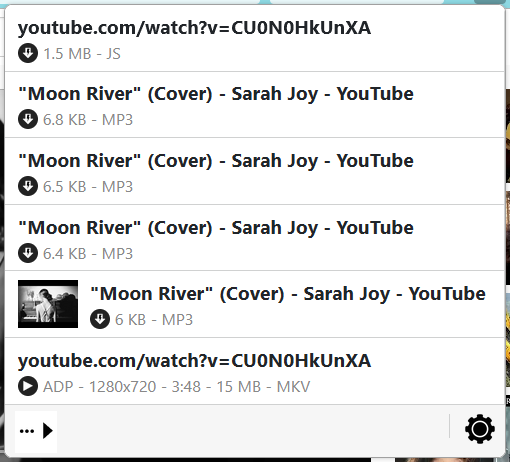
Was able to D/L vid at https://www.youtube.com/watch?v=CU0N0HkUnXA (Moon River) with no problem. Before clicking VDH, I manually selected "720" resolution even though that was what YT already selected on Auto. That's the max offered by YT for this vid. The last entry VDH detected was what I D/L. See screenshot. It D/L as youtube.comwatchv=CU0N0HkUnXA.mkv; Windows properties say length 00:03:48, total bitrate 0kbps, all other vid properties blank (just like Microsoft). VLC says 1280x720, audio 48000, 32-bit.
Hope this helps!
VDH Detected:
NoScript results for that page:

Ghostery results for that page:

AdBlock Plus results for that page:

Wild Willy
Oct 13, 2022, 6:15:43 PM10/13/22
to Video Download Helper Google Group
Thanks Dave! The absence of good information in Windows Properties is down to the fact
that this is an MKV file, which apparently is not supported by unenhanced Windows. I
have something called K-Lite Codec Pack. I don't remember now why I have it. I got it a
long time ago for reasons I can no longer reconstruct. After years of hibernation, it
recently woke up & started prompting me to update it. So I did. Now, certain file types
that Windows doesn't otherwise understand, are giving more information in Properties
boxes. This applies to MKV & WEBM in particular. The only properties you should really
rely on are the ones you can get from VLC, as you did, & ffprobe. In any case, I'm glad
you tried this & had no trouble downloading this video that seems to be giving our
original poster so much trouble.
As for the YouTube throttling issue, do your own unofficial monitoring for the next few
downloads you do from there. You'll start to notice that the time to download
approximates one half the duration of the item. At least, that's what I've been
noticing. It would be nice if others could add to the data points. For really small,
low resolution items, I have seen download speeds as low as 30,000 bytes per second.
That's almost dial-up modem performance. But sure enough, when I paid enough attention
to how long it took to download, it was half the duration of the video. That seems to be
their policy. It has nothing to do with your computer configuration, nor with your
Internet bandwidth. They do what they do & the rest of us are of no concern to them.
that this is an MKV file, which apparently is not supported by unenhanced Windows. I
have something called K-Lite Codec Pack. I don't remember now why I have it. I got it a
long time ago for reasons I can no longer reconstruct. After years of hibernation, it
recently woke up & started prompting me to update it. So I did. Now, certain file types
that Windows doesn't otherwise understand, are giving more information in Properties
boxes. This applies to MKV & WEBM in particular. The only properties you should really
rely on are the ones you can get from VLC, as you did, & ffprobe. In any case, I'm glad
you tried this & had no trouble downloading this video that seems to be giving our
original poster so much trouble.
As for the YouTube throttling issue, do your own unofficial monitoring for the next few
downloads you do from there. You'll start to notice that the time to download
approximates one half the duration of the item. At least, that's what I've been
noticing. It would be nice if others could add to the data points. For really small,
low resolution items, I have seen download speeds as low as 30,000 bytes per second.
That's almost dial-up modem performance. But sure enough, when I paid enough attention
to how long it took to download, it was half the duration of the video. That seems to be
their policy. It has nothing to do with your computer configuration, nor with your
Internet bandwidth. They do what they do & the rest of us are of no concern to them.
Reply all
Reply to author
Forward
0 new messages