
VDH7.3.5 can only download WEBM file
1,367 views
Skip to first unread message

Su Cai
Jan 29, 2019, 8:31:54 AM1/29/19
to Video DownloadHelper Q&A
VDH 7.3.5
Win x86-64
Mozilla Firefox 64.0.2
VdhCoApp 1.2.4
I wanna get MP4 file on youtube through VDH. But now I can only download the WEBM file for any videos on youtube, which is low resolution and takes much more time to transfer format. But I can download MP4 file normally on vimeo and other video websites.
I'm the license user. It began to work abnormally about 2 months ago. It is useless even if I reinstall Firefox and VDH :(
Thanks for your help.

https://www.youtube.com/watch?v=_KBcCEgbS8Q


jcv...@gmail.com
Jan 30, 2019, 1:52:04 AM1/30/19
to Video DownloadHelper Q&A
Hi,
we can only propose what is available from the site.
It seems I get much more formats for the YT video you shared
jerome

Su Cai
Feb 1, 2019, 2:36:40 AM2/1/19
to Video DownloadHelper Q&A
I find the reason why I only have the WEBM download list. It is caused by coapp. After I uninstalled vdhcoapp ( where is at C:\Program Files\net.downloadhelper.coapp), then I have all format list.

However it brings new problem that if I wanna download ADP 1920*1080 file, then it will let me install coapp. But after I install coapp, I can only download WEBM file. So I think it is wrong with coapp. The latest coapp is VdhCoAppSetup-1.2.4 (released on Jul 5, 2018). So who have the same issue like me?
jcv...@gmail.com
Feb 2, 2019, 3:41:15 AM2/2/19
to Video DownloadHelper Q&A
That's strange, I don't have the reason, I'm gonna try to ask the tech team for this.
jerome
jcv...@gmail.com
Feb 2, 2019, 3:59:00 AM2/2/19
to Video DownloadHelper Q&A
I tried with your video https://www.youtube.com/watch?v=xlyH71GwYUc but it says "video not available"
do you have another one with the same problem?
jerome

Jorge Jorhoe
Feb 2, 2019, 12:50:10 PM2/2/19
to Video DownloadHelper Q&A
I have the Companion App Installed.
I have only changed these two settings:
Firefox / Tools / Add-ons / Extensions / VDH / Options / Behavior / Download processor - Browser / Save
Firefox / Tools / Add-ons / Extensions / VDH / Options / Behavior / Default download directory - Desktop / Save
Go to the video . . . WebM is the only option . . . Click the browser's Refresh button
Then you will see the video listed two or three times, but the other format options are available
Arrow at the bottom of the list / Garbage can / Clear hits / Go to another video
Then you will see the video listed two times, but the other format options are available
I have only changed these two settings:
Firefox / Tools / Add-ons / Extensions / VDH / Options / Behavior / Download processor - Browser / Save
Firefox / Tools / Add-ons / Extensions / VDH / Options / Behavior / Default download directory - Desktop / Save
Go to the video . . . WebM is the only option . . . Click the browser's Refresh button
Then you will see the video listed two or three times, but the other format options are available
Arrow at the bottom of the list / Garbage can / Clear hits / Go to another video
Then you will see the video listed two times, but the other format options are available
jcv...@gmail.com
Feb 3, 2019, 4:30:14 AM2/3/19
to Video DownloadHelper Q&A
thanks for this feedback, I take note for the tech team.
jerome

Greig Bridger
Feb 9, 2019, 4:41:56 PM2/9/19
to Video DownloadHelper Q&A
My God, thank YOU!!!!!!!!!!!!!!! been so frustrating with only WebM!!!! Yay!!!
Jorge Jorhoe
Feb 15, 2019, 11:02:56 AM2/15/19
to video-download...@googlegroups.com
I was getting Web M only . . . Refresh . . . Refresh
I accidentally clicked, and it was downloading a WebM . . . Somehow I clicked again, and was getting another WebM . . . I clicked the X to cancel them
Arrow at the bottom of the list / Garbage can / Clear hits / Refresh . . . Now I see the other format options are available . . . and can download the MP4
Why is it like this?
Jorge Jorhoe
Mar 19, 2019, 8:55:00 AM3/19/19
to Video DownloadHelper Q&A

Wild Willy
Mar 19, 2019, 11:09:25 PM3/19/19
to video-download...@googlegroups.com
I went to the video https://www.youtube.com/watch?v=9p3DzUwxI0o&feature=youtu.be & opened the VDH menu. I got what you can see in attached image Variants.png. (Click each image to see a magnified, legible version of the image.) You'll notice there's a bunch of entries. Next you should open VDH's settings dialog. You do that by clicking the little gear icon in the bottom right corner of the VDH menu. You can see it is partially obscured in the attached image Settings.png. This is due to a bug I take every opportunity to point out. It is shameful that this bug has been allowed to persist for well over a year since the first time I complained about it. It is a simple GUI bug. When the VDH menu is long enough, as it is in this case, all the VDH buttons & controls at the bottom of the menu are at least partially cut off, sometimes completely. This sort of inattention to obvious GUI issues is a black eye for the development team (and I probably mean Michel when I say this). Such a simple, basic, fundamental problem should never have been allowed into a product released to the public. Worse, even though you should have dropeed everything to fix this, you have not. Shame. Shame. Shame. In any case, you can hover the mouse over the gear & the "Settings" tool-tip will appear. Then click the gear. This will give you the display shown in attached image VDHSettings.png. Click the indicated control. That will give you the Behavior page of VDH settings as shown in attached image Behavior1.png. Scroll down until you see the settings shown in attached image Behavior2.png. Note the highlighted setting. The default for this setting is that the check box is checked, as you can see in the image from its color. The changed color shows that I have changed the setting from its default. I have unchecked the box. If you leave the check on that box, it will reduce the number of variants you will see in the main VDH menu shown in attached image Variants.png. Look closely at that image Variants.png. I highlight the relevant bits in attached image Indicators.png. I'm showing a blowup of one of them in attached image Blowup.png. Now you can see that the little indicator looks like a lock. This indicates that the variant is locked. You can't access that particular variant unless you . . . I don't know, pay YouTube some money, I suppose. In any case, if you have left the box for the VDH setting "Ignore protected variants" at its default, meaning if you have left it checked, those variants will not appear in the VDH menu.
jcv...@gmail.com
Mar 20, 2019, 2:43:03 AM3/20/19
to Video DownloadHelper Q&A
sorry for this annoying ergonomic issue, in case the settings wheel is hidden you can always use the right click button to get the VDH contextual menu > settings.
jerome
Wild Willy
Mar 20, 2019, 5:11:30 AM3/20/19
to Video DownloadHelper Q&A
Mouse button 2 is good for some of the hidden things but it's no help to get access to, for example, the blue dot with the number for in-flight downloads. I say again, something so basic should have been fixed the moment it was noticed.
Jorge Jorhoe
Mar 20, 2019, 11:40:07 AM3/20/19
to Video DownloadHelper Q&A
That got it Will, thanks!
I changed this also, from Browser: Download processor - Companion Application
If I click to another video, I see that the MP4 is not protected, so apparently, that is a setting on this particular video.
Wild Willy
Mar 20, 2019, 12:25:06 PM3/20/19
to Video DownloadHelper Q&A
If you're looking to get a target file that is MP4 but none of the offered variants is MP4, there's 2 ways to get what you want. They're pretty much equivalent. One is to do a Download & Convert function instead of a simple download. There's a dialog for choosing the target file type. Just select the one that says Re-encoded MP4 (h264/aac). Otherwise, you can download the WEBM file & convert it after the fact. To do that, open the main VDH menu & hover the mouse as shown in the attached image MainMenu.png. This makes some tool icons appear. You want to click the one for Convert local files indicated in the attached image Tools.png. That launches a dialog for selecting the file you want to convert, the output file type, & the destination file name & directory for the converted file.
Jorge Jorhoe
Mar 20, 2019, 5:33:57 PM3/20/19
to Video DownloadHelper Q&A
I think it would still have that QR code in the top left though, right? When would that ever be used?
It looks like WebM started in 2010? If it plays, the format doesn't bother me.

surfotw10
May 19, 2021, 4:01:58 PM5/19/21
to Video DownloadHelper Q&A
Hi, I just tried something out while downloading a music video and it worked. As I was about to download, I renamed the *.webm extension for *.mp4. The file did download as an *.mp4 file, and it works fine. I just wanted to share this in case it helps anyone.




Wild Willy
May 20, 2021, 2:22:34 AM5/20/21
to Video Download Helper Google Group
I have been in the habit of advising that you should never change the file extension when you do a
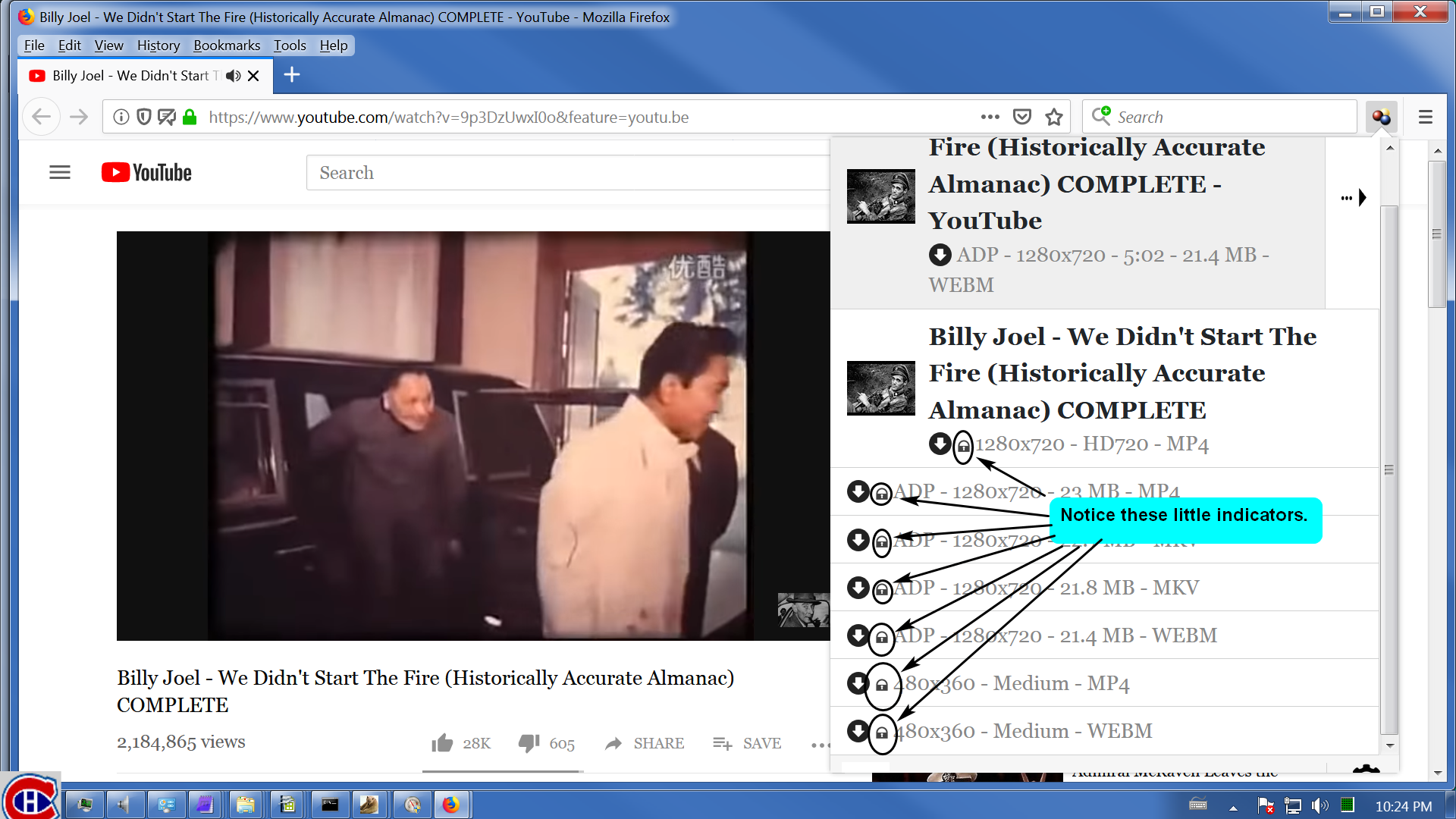
VDH download. But your comment inspired me to experiment with this. I started with the Billy Joel
video we were talking about 2 years ago. You can see in the attached image #1 below how different
it looks today. I'm going to guess this is due to a combination of YouTube doing things
differently today compared to 2 years ago plus changes in VDH, many in reaction to changes foisted
upon the world by YouTube. In any case, I downloaded the video 2 ways. First, I modified the file
extension from MKV to MP4. Then, I left the file extension as MKV. I then pumped both files into
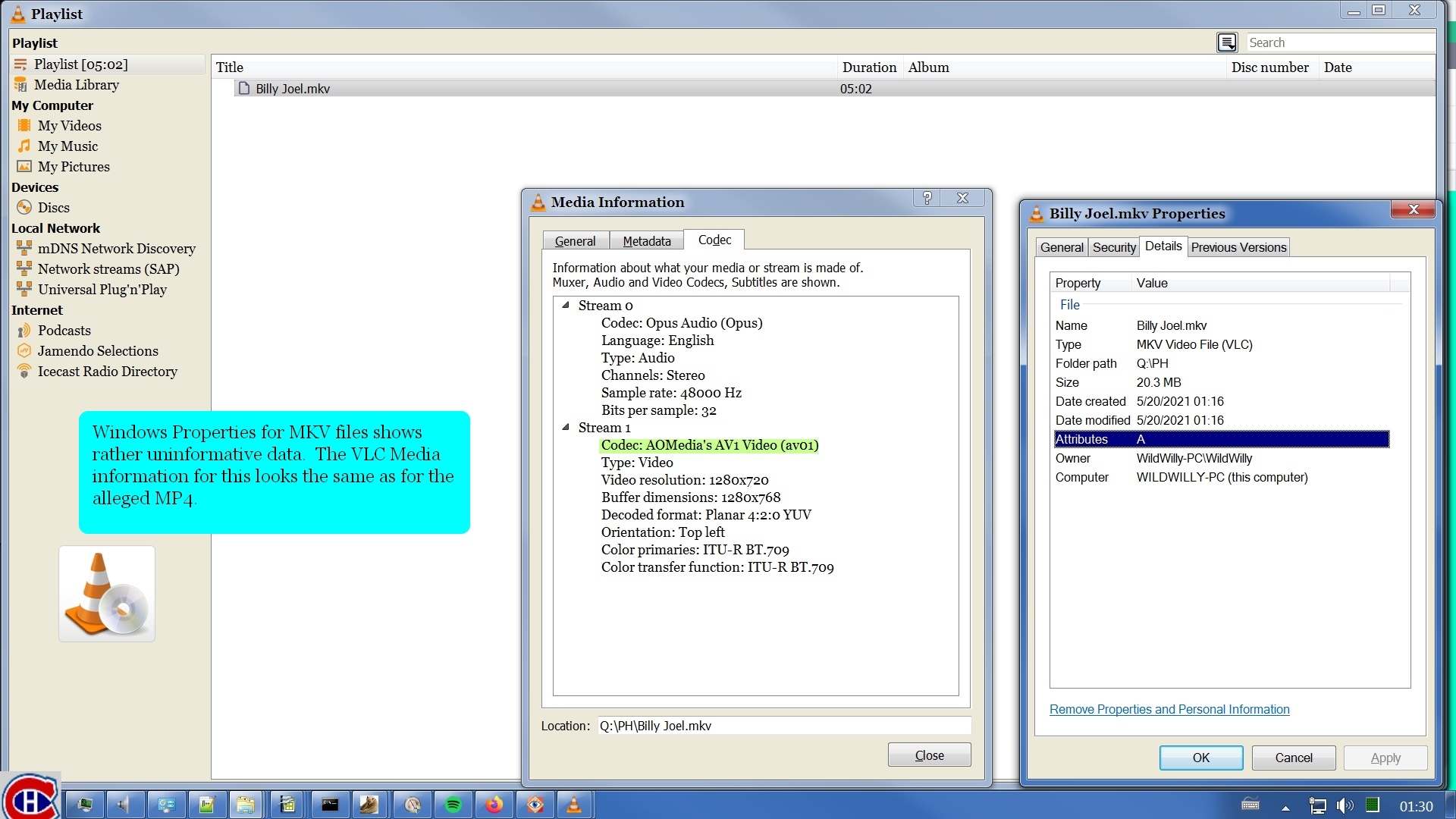
ffprobe. The results are in the attached file ffprobe.txt. I compared the 2 files using both
Windows Properties and VLC's Media Information. These results are in attached images #2 & #3.
You'll note that there's not much significant difference between the alleged MP4 & the MKV. In
contrast, I've provided the same information for a real MP4 I have here. I've also included its
information in ffprobe.txt for comparison.
My conclusion is that changing the file extension in the VDH dialog DOES NOT CONVERT the file from
one format to another. Sure, it gives you a file that plays fine, at least in this case. Will it
in every case? I have my doubts. No matter what, I am going to continue to advise that you leave
the file extension alone when you use VDH to do a download. If you want a different format, do a
Download and Convert or do a straight Download & do a Convert after that completes. Simply telling
VDH to save the downloaded file with a different extension does not make it have the format of the
extension you choose.



surfotw10
May 30, 2021, 7:18:56 PM5/30/21
to Video DownloadHelper Q&A
@Wild Willy, Hello, ¡I see that you are right! There seems to be something wrong with the file which extension I have renamed... When I put, in Windows, to show me large icons, inside my video files folder, the renamed *.mp4 file won't appear as it usually does: like a movie preview. Instead it only shows as an enlarged VLC Icon. § By the way, I am using VLC media player for my video files.
This is too bad. I really prefer the *.mp4 format for all my video files so much more than the *.webm. The only workaround I have found is that you can download a file as a *.webm and then convert it later to *.mp4 using the VLC media player. However, this time consuming. I really hope that VDH finds a more direct solution to this problem someday.
God bless you all.
Reply all
Reply to author
Forward
0 new messages