
Video Downloadhelper doesn't ignore hits below a certain size.
1,329 views
Skip to first unread message

mjs
Feb 13, 2022, 2:48:37 AM2/13/22
to Video DownloadHelper Q&A
In the settings there is a value of 4096 which equates to 4 kilobytes. I still see hits in the 1 to 2 kilobytes range which vdh is supposed to ignore but it doesn't. I see this behavior on
How can these small hits be ignored.

jcv...@gmail.com
Feb 14, 2022, 2:38:13 AM2/14/22
to Video DownloadHelper Q&A
Hi,
are you talking about the minimum size ?
Do you have an example with a public URL ?
jerome
mjs
Feb 14, 2022, 4:07:21 AM2/14/22
to Video DownloadHelper Q&A
Yes regarding minimum size. I should have given examples. Here is where I saw one with a screenshot:
Notice the smaller hit which can't be the actual video to download. It doesn't occur on every video there but this is what I'm
talking about.


Wild Willy
Feb 14, 2022, 8:41:21 AM2/14/22
to Video Download Helper Google Group
For some reason, when I visit that page, I do not see the small variant you are showing
in your image. Maybe my HOSTS file is blocking the site from which that is served. If
you post one item from the VDH Details information on that variant, specifically the URL
of the MP4, I'll check my HOSTS file to verify that.
But that isn't really an obstacle. I fooled around a bit with my Minimum size setting.
To make sure I was getting what I thought I was getting, I did it like this:
1. Change the value of the VDH setting.
2. Click Save.
3. Reload the extension.
4. Display the settings again to verify my change to the setting had stuck.
5. Reload the web page.
I tried doing this with a few different values for the setting. When I had it set to
512, the 36.7M MP4 was listed on the VDH menu. When I set it to 1 million, the variant
did not appear on the VDH menu. That would imply that the setting indeed does work, but
not correctly. This video is larger than 1 million bytes so it still should have been
detected by VDH. Using a binary search approach, I determined that the variant would
appear when I had my minimum size set to 628,086, but it would not appear when I had my
minimum size set to 628,087. I switched back & forth between the 2 values a few times
just to make sure I had the boundary number & wasn't just seeing some fluky effect. What
relation does 628,086 have to 36.7M? (Besides that they're both numbers.) I divided
36.7M by 628,086 & got 61.27 (rounding off). So, I'm not seeing any relation between the
two numbers. Maybe somebody else can. But I'm using the 7.6.3a1 beta. Also Firefox,
but I think you are, too, if I'm reading the clues in your image right. Maybe Michel did
something in this area of VDH in one of the betas. I have a vague recollection that this
issue has been raised before & Michel actually acknowledged that the setting didn't seem
to be working. So there's a chance he changed something & didn't make any fanfare about
it. That would be like him. I'd say there's more work to do on this setting.
Out of curiosity, I opened the Network Monitor to see what might be going on with this
site. First I filtered on .m3u8 to see if we had any HLS manifests. Nope. Then I
filtered on .mpd to see if we had any DASH manifests. Equally nope. So then I deleted
the filter & just scrolled through everything. There were many entries of type js & a
handful of type json, among other things like images, HTML, & whatnot I find that in
general, looking at js & json entries is just a waste of time. They usually display a
dog's breakfast of impenetrable code that I can't understand. But I did notice 2 entries
for a straight MP4. They were duplicates. For some reason, the exact same entry was in
there twice. The same URL showed on both entries. That's kind of weird but I don't know
if it's relevant. When I double clicked either one, I got a new browser tab in which I
had the 17:35 video in Firefox's basic video player. I let it play a few seconds &
indeed it did show the 2 talking heads & you could hear them . . . if you cared to endure
their blather, which I did not. To reinforce the point, I also looked at the Details
page that you can get out of VDH. It did not show any entries for a manifest, something
you will see on other web pages where some sort of manifest is in evidence. I guess my
filtering failed because there really isn't a manifest on this page. Sometimes I do have
truly blinding insights.
When I was done with my experimenting, I wanted to reset the setting. I deleted the
value in the setting, clicked Save & checked what the web page was giving me. It gave me
an empty VDH menu. So I changed the setting to explicitly contain a 0 instead of being
simply empty. That made the variant reappear on the VDH menu. This sounds like a
separate, completely unrelated bug. Given the faulty way this setting appears to be
operating, I would recommend you run with it set to 0 until we hear positive confirmation
from Michel that this has been fixed.
Anyway, the VDH setting in question definitely has an effect on what variants appear on
the VDH menu, but it sure doesn't work in a way I can predict.
in your image. Maybe my HOSTS file is blocking the site from which that is served. If
you post one item from the VDH Details information on that variant, specifically the URL
of the MP4, I'll check my HOSTS file to verify that.
But that isn't really an obstacle. I fooled around a bit with my Minimum size setting.
To make sure I was getting what I thought I was getting, I did it like this:
1. Change the value of the VDH setting.
2. Click Save.
3. Reload the extension.
4. Display the settings again to verify my change to the setting had stuck.
5. Reload the web page.
I tried doing this with a few different values for the setting. When I had it set to
512, the 36.7M MP4 was listed on the VDH menu. When I set it to 1 million, the variant
did not appear on the VDH menu. That would imply that the setting indeed does work, but
not correctly. This video is larger than 1 million bytes so it still should have been
detected by VDH. Using a binary search approach, I determined that the variant would
appear when I had my minimum size set to 628,086, but it would not appear when I had my
minimum size set to 628,087. I switched back & forth between the 2 values a few times
just to make sure I had the boundary number & wasn't just seeing some fluky effect. What
relation does 628,086 have to 36.7M? (Besides that they're both numbers.) I divided
36.7M by 628,086 & got 61.27 (rounding off). So, I'm not seeing any relation between the
two numbers. Maybe somebody else can. But I'm using the 7.6.3a1 beta. Also Firefox,
but I think you are, too, if I'm reading the clues in your image right. Maybe Michel did
something in this area of VDH in one of the betas. I have a vague recollection that this
issue has been raised before & Michel actually acknowledged that the setting didn't seem
to be working. So there's a chance he changed something & didn't make any fanfare about
it. That would be like him. I'd say there's more work to do on this setting.
Out of curiosity, I opened the Network Monitor to see what might be going on with this
site. First I filtered on .m3u8 to see if we had any HLS manifests. Nope. Then I
filtered on .mpd to see if we had any DASH manifests. Equally nope. So then I deleted
the filter & just scrolled through everything. There were many entries of type js & a
handful of type json, among other things like images, HTML, & whatnot I find that in
general, looking at js & json entries is just a waste of time. They usually display a
dog's breakfast of impenetrable code that I can't understand. But I did notice 2 entries
for a straight MP4. They were duplicates. For some reason, the exact same entry was in
there twice. The same URL showed on both entries. That's kind of weird but I don't know
if it's relevant. When I double clicked either one, I got a new browser tab in which I
had the 17:35 video in Firefox's basic video player. I let it play a few seconds &
indeed it did show the 2 talking heads & you could hear them . . . if you cared to endure
their blather, which I did not. To reinforce the point, I also looked at the Details
page that you can get out of VDH. It did not show any entries for a manifest, something
you will see on other web pages where some sort of manifest is in evidence. I guess my
filtering failed because there really isn't a manifest on this page. Sometimes I do have
truly blinding insights.
When I was done with my experimenting, I wanted to reset the setting. I deleted the
value in the setting, clicked Save & checked what the web page was giving me. It gave me
an empty VDH menu. So I changed the setting to explicitly contain a 0 instead of being
simply empty. That made the variant reappear on the VDH menu. This sounds like a
separate, completely unrelated bug. Given the faulty way this setting appears to be
operating, I would recommend you run with it set to 0 until we hear positive confirmation
from Michel that this has been fixed.
Anyway, the VDH setting in question definitely has an effect on what variants appear on
the VDH menu, but it sure doesn't work in a way I can predict.
mjs
Feb 14, 2022, 7:38:47 PM2/14/22
to Video DownloadHelper Q&A
Yes using Firefox. I find it puzzling why these small variants show on some videos but I go back to the same video example above
and this time it isn't there. I had to go to another example video where there is a small variant:
On this small variant the url showing in the hit details is :
https://cdn.plyr.io/static/blank.mp4
The site doesn't use any fancy tech for their videos ,they're just plain mp4 videos.

Wild Willy
Feb 14, 2022, 11:14:09 PM2/14/22
to Video DownloadHelper Q&A
Baffling indeed. I went to that second page you've just posted & I didn't see the small variant. I checked my HOSTS file & I'm not blocking that site. But thanks for providing that URL. You'll note the rather ominous name blank.mp4. I wouldn't be expecting too much from this. I decided to run ffprobe on the URL & this is what I got:
____________________________________________________________________
Input #0, mov,mp4,m4a,3gp,3g2,mj2, from 'https://cdn.plyr.io/static/blank.mp4':
Metadata:
major_brand : mp42
minor_version : 512
compatible_brands: isomiso2avc1mp41
creation_time : 2016-07-14T06:33:54.000000Z
encoder : HandBrake 0.10.5 2016021100
Duration: 00:00:01.00, start: 0.000000, bitrate: 14 kb/s
Stream #0:0(und): Video: h264 (Main) (avc1 / 0x31637661), yuv420p(tv, bt709), 32x20, 6 kb/s, 5 fps, 5 tbr, 90k tbn (default)
Metadata:
creation_time : 2016-07-14T06:33:54.000000Z
handler_name : VideoHandler
vendor_id : [0][0][0][0]
Metadata:
major_brand : mp42
minor_version : 512
compatible_brands: isomiso2avc1mp41
creation_time : 2016-07-14T06:33:54.000000Z
encoder : HandBrake 0.10.5 2016021100
Duration: 00:00:01.00, start: 0.000000, bitrate: 14 kb/s
Stream #0:0(und): Video: h264 (Main) (avc1 / 0x31637661), yuv420p(tv, bt709), 32x20, 6 kb/s, 5 fps, 5 tbr, 90k tbn (default)
Metadata:
creation_time : 2016-07-14T06:33:54.000000Z
handler_name : VideoHandler
vendor_id : [0][0][0][0]
____________________________________________________________________
A one-second video with no audio. I can see why you would want to prevent VDH from detecting this garbage. Why would such a thing even exist? Rhetorical question. I don't know why I'm not seeing it. I guess I lead a charmed life.
Did you try my experiment of varying the VDH setting to see where the cutoff is for displaying or not displaying the actual useful variant from your first video? I'd like to compare results. I would expect you could save some time by just taking my value 628,086 as your starting point. I would hope you get the same results I did. But that's why you experiment, sort of like why they play the games. You never know the outcome until the event has happened.
jcv...@gmail.com
Feb 15, 2022, 5:21:19 AM2/15/22
to Video DownloadHelper Q&A
hi,
might be a little bug but we had a look and did not manage to reproduce the problem, we only get the 36M hit.
if you have other examples...
jerome
Message has been deleted
Message has been deleted
Wild Willy
Feb 15, 2022, 5:35:47 AM2/15/22
to Video Download Helper Google Group
Never mind about the tiny variant. mjs sees it. I don't see it. You don't see it. But
forget about it. It does not expose the bug. What exposes the bug is my experiment with
the 36.7M variant. Set Minimum size = 628,086. Does VDH recognize the 36.7M variant?
Then set Minimum size = 628,087. Does VDH fail to recognize the 36.7M variant? If you
don't get the same results I did, try a different threshold number for Minimum size.
That's what you should be trying to replicate. Forget about the tiny variant. That's a
red herring. My experiment exposed a bug on my system. That's the experiment you should
be trying to perform.
forget about it. It does not expose the bug. What exposes the bug is my experiment with
the 36.7M variant. Set Minimum size = 628,086. Does VDH recognize the 36.7M variant?
Then set Minimum size = 628,087. Does VDH fail to recognize the 36.7M variant? If you
don't get the same results I did, try a different threshold number for Minimum size.
That's what you should be trying to replicate. Forget about the tiny variant. That's a
red herring. My experiment exposed a bug on my system. That's the experiment you should
be trying to perform.
Message has been deleted
Message has been deleted
Wild Willy
Feb 15, 2022, 5:51:18 AM2/15/22
to Video Download Helper Google Group
And be sure you Reload the extension after each change to the Minimum size. I have found
that it is necessary to Reload the extension. When I don't reload the extension, the
experiment does not expose the bug. So be sure that in addition to clicking Save after
you change the setting, also Reload the extension.
Meanwhile, Google is acting up tonight. When I try to post messages here via the web
interface, they get deleted. Fortunately, I am able to post messages via E-mail. If you
find some pending messages from me in the moderation queue, you can go ahead & delete
them. I have posted everything I wanted to post via E-mail.
that it is necessary to Reload the extension. When I don't reload the extension, the
experiment does not expose the bug. So be sure that in addition to clicking Save after
you change the setting, also Reload the extension.
Meanwhile, Google is acting up tonight. When I try to post messages here via the web
interface, they get deleted. Fortunately, I am able to post messages via E-mail. If you
find some pending messages from me in the moderation queue, you can go ahead & delete
them. I have posted everything I wanted to post via E-mail.
Wild Willy
Feb 15, 2022, 8:23:52 AM2/15/22
to Video DownloadHelper Q&A
Are you saying that a value of either
628,086 or
628,087 in the Minimum size setting has no effect on whether VDH displays the 36.7M variant? Not the little 1-second MP4. We should quit talking about that one. I'm interested in only the actual video of the 2 talking heads. Are you saying VDH sees the regular variant with both values even after you do a Reload extension operation after each time you change & save the Minimum size setting?
And look at this. Google is letting me post this now via the web interface. Do I hear the word "SUCKS" echoing around here?
Message has been deleted
Wild Willy
Feb 15, 2022, 8:32:56 AM2/15/22
to Video Download Helper Google Group
By the way, when I write 628,086 or 628,087 here, that is not what I put in the VDH
setting. I'm typing a comma here just for clarity. If you type a comma in the number in
the setting, it thinks you are giving it 2 numbers & it ignores one of them. When you
change the setting, you have to enter the value as 628086 or 628087
It was too good to be true. Google is back to sucking. I could post only 1 message in a
row. I was forced to post this one via E-mail.
setting. I'm typing a comma here just for clarity. If you type a comma in the number in
the setting, it thinks you are giving it 2 numbers & it ignores one of them. When you
change the setting, you have to enter the value as 628086 or 628087
It was too good to be true. Google is back to sucking. I could post only 1 message in a
row. I was forced to post this one via E-mail.
Matthew
Feb 15, 2022, 6:10:36 PM2/15/22
to Video Download Helper Google Group
Yeah by changing those two values each time it displayed the variant of the actual video. Yes that's what it did it helps.
Hope this worked, response via email.
--
You received this message because you are subscribed to a topic in the Google Groups "Video DownloadHelper Q&A" group.
To unsubscribe from this topic, visit https://groups.google.com/d/topic/video-downloadhelper-q-and-a/HYynmCLgvPg/unsubscribe.
To unsubscribe from this group and all its topics, send an email to video-downloadhelper...@googlegroups.com.
To view this discussion on the web visit https://groups.google.com/d/msgid/video-downloadhelper-q-and-a/620bab79.1c69fb81.ab742.03b1%40mx.google.com.
Wild Willy
Feb 15, 2022, 6:43:59 PM2/15/22
to Video Download Helper Google Group
Oh great. Once again, I'm the only one who sees something. I would expect the VDH guys
to experiment with this. If 628,086 is not the cutoff number, maybe some other higher
number will cause the same effect for them that I saw. I don't want the VDH guys to just
shrug their shoulders & say 628,086 vs 628,087 didn't make any difference. I want them
to look for a number at which it does make a difference. Use a binary search approach,
like I did. If the feature works, there is a number you can set, below which the variant
appears, and above which it does not. If they find that the number is 36.7M, then
they're showing that the feature works as designed. All I can say is that on my system,
it is not working as designed. The VDH guys have to try harder.
to experiment with this. If 628,086 is not the cutoff number, maybe some other higher
number will cause the same effect for them that I saw. I don't want the VDH guys to just
shrug their shoulders & say 628,086 vs 628,087 didn't make any difference. I want them
to look for a number at which it does make a difference. Use a binary search approach,
like I did. If the feature works, there is a number you can set, below which the variant
appears, and above which it does not. If they find that the number is 36.7M, then
they're showing that the feature works as designed. All I can say is that on my system,
it is not working as designed. The VDH guys have to try harder.
Message has been deleted
mjs
Feb 17, 2022, 4:40:42 AM2/17/22
to Video DownloadHelper Q&A
I think that I might have fixed this problem by clicking on the arrow to the right of the small variant then click Add to blacklist.
Video downloadhelper listed two urls --> cdn.plyr.io and plyr.io which I blocked.
I have vdh in another browser and found a video which produced a small variant , opened same video in Firefox and no small variant just
the variant for the video itself. This wouldn't have been possible if these small variants were using the same urls as the actual videos do.
Wild Willy
Feb 17, 2022, 5:29:00 AM2/17/22
to Video Download Helper Google Group
Exactly. The 1-second video is hosted on cdn.plyr.io but the video itself is on
www.bitchute.com. Sites generally use services to supply ads so the ads are usually not
hosted on the same site as the content. That makes it easy to block the ads but not the
content. Unless you're somebody like Spotify & you've gotten wise to this idea, and you
host your ads yourself.
But I'm not so sure I'd call this a solution. Seems more like a workaroud, a
circumvention. The VDH Setting for Minimum size should work but it doesn't. I'm still
waiting for the VDH guys to report what results they get from replicating my experiment.
It should be easy enough to replicate the experiment. It took me only about 10-15
minutes to perform when I did it. A binary search approach zeroes in pretty quickly on a
range where the variant appears & doesn't appear. I'm waiting to hear news whether they
replicated my results when they replicate my experiment. I expect them to replicate my
experiment. I'm hoping they also replicate my results but I'm prepared to hear that
replicating my experiment gave different results. That's called the scientific method.
I am being 100% reasonable to expect them to replicate my experiment. I just want them
to report their results so we can compare theirs with mine. It's their feature. They
should be willing to prove it works. I'm saying I have results that show it doesn't
work. I am not yet convinced they did the same thing I did. I think they just took my
number & couldn't replicate my result. That is NOT the same as replicating my
experiment. If the setting works, there is a number at which the variant will appear &
above which it will disappear. I want them to verify that the number is indeed the size
of the variant. If that's what they find, then I'll shut my rambling mouth. But I want
them to perform the experiment and tell me about it. On my system, the setting doesn't
work. That's a challenge. I expect them to respond. Their response above is not proof
they actually researched this. I got this 36.7M variant to disappear by setting the
minimum size way smaller than 36.7M. That is a bug. I don't see where they said they
tried a handful of minimum size values & determined that the 36.7M variant appears so
long as they set the minimum size below 37.6M but it disappears when they set it higher
than that. Plus, in my experiment, I had to reload the extension every time I changed
the setting. That seems like it shouldn't be necessary but I found it was. Maybe that's
a second bug. I tried changing the setting & not reloading the extension. That didn't
affect the appearance or absence of the variant from the VDH menu. As soon as I reloaded
the extension, the new setting went into effect & there was a change on the VDH menu. I
specifically tested in such a way that I controlled for each variable separately. I'm
not convinced yet they did that. I described above in clear detail what steps you have
to follow. Now I want to hear what they observe when they follow my steps.
www.bitchute.com. Sites generally use services to supply ads so the ads are usually not
hosted on the same site as the content. That makes it easy to block the ads but not the
content. Unless you're somebody like Spotify & you've gotten wise to this idea, and you
host your ads yourself.
But I'm not so sure I'd call this a solution. Seems more like a workaroud, a
circumvention. The VDH Setting for Minimum size should work but it doesn't. I'm still
waiting for the VDH guys to report what results they get from replicating my experiment.
It should be easy enough to replicate the experiment. It took me only about 10-15
minutes to perform when I did it. A binary search approach zeroes in pretty quickly on a
range where the variant appears & doesn't appear. I'm waiting to hear news whether they
replicated my results when they replicate my experiment. I expect them to replicate my
experiment. I'm hoping they also replicate my results but I'm prepared to hear that
replicating my experiment gave different results. That's called the scientific method.
I am being 100% reasonable to expect them to replicate my experiment. I just want them
to report their results so we can compare theirs with mine. It's their feature. They
should be willing to prove it works. I'm saying I have results that show it doesn't
work. I am not yet convinced they did the same thing I did. I think they just took my
number & couldn't replicate my result. That is NOT the same as replicating my
experiment. If the setting works, there is a number at which the variant will appear &
above which it will disappear. I want them to verify that the number is indeed the size
of the variant. If that's what they find, then I'll shut my rambling mouth. But I want
them to perform the experiment and tell me about it. On my system, the setting doesn't
work. That's a challenge. I expect them to respond. Their response above is not proof
they actually researched this. I got this 36.7M variant to disappear by setting the
minimum size way smaller than 36.7M. That is a bug. I don't see where they said they
tried a handful of minimum size values & determined that the 36.7M variant appears so
long as they set the minimum size below 37.6M but it disappears when they set it higher
than that. Plus, in my experiment, I had to reload the extension every time I changed
the setting. That seems like it shouldn't be necessary but I found it was. Maybe that's
a second bug. I tried changing the setting & not reloading the extension. That didn't
affect the appearance or absence of the variant from the VDH menu. As soon as I reloaded
the extension, the new setting went into effect & there was a change on the VDH menu. I
specifically tested in such a way that I controlled for each variable separately. I'm
not convinced yet they did that. I described above in clear detail what steps you have
to follow. Now I want to hear what they observe when they follow my steps.


mig
Feb 17, 2022, 8:19:11 AM2/17/22
to Video DownloadHelper Q&A
Damned, it looks like my messages are also being deleted in this thread :(
Basically, i was writing that there was indeed a bug there, easily verifiable by setting 50000000 in the Minimum size parameter and checking that the 30MB-something video was still detected.
It is now fixed in the VDH base code and it will be part of the next release.
Thanks all for reporting and investigating the issue !
Wild Willy
Feb 17, 2022, 5:15:36 PM2/17/22
to Video Download Helper Google Group
It seems Google doesn't play favorites . . .
Merci Michel! I am eagerly looking forward to 7.6.3a2 beta. Or maybe 7.6.4a1 beta?
7.7.0a1 beta? Can I possibly convince you to post one of those? I know you're going to
do that anyway because the Mozilla extension site makes you remove VDH before installing
a new version, thus trashing your existing VDH Settings. What genius came up with that
idea? Anyway, a new beta would be most welcome here. That would also include the famous
ffmpeg option you mentioned a few months ago, wouldn't it?
https://groups.google.com/g/video-downloadhelper-q-and-a/c/S4K1QgvT-K4/m/sRCSmxmjAAAJ
Merci Michel! I am eagerly looking forward to 7.6.3a2 beta. Or maybe 7.6.4a1 beta?
7.7.0a1 beta? Can I possibly convince you to post one of those? I know you're going to
do that anyway because the Mozilla extension site makes you remove VDH before installing
a new version, thus trashing your existing VDH Settings. What genius came up with that
idea? Anyway, a new beta would be most welcome here. That would also include the famous
ffmpeg option you mentioned a few months ago, wouldn't it?
https://groups.google.com/g/video-downloadhelper-q-and-a/c/S4K1QgvT-K4/m/sRCSmxmjAAAJ
Wild Willy
Aug 17, 2022, 6:37:52 AM8/17/22
to Video DownloadHelper Q&A
Now that I have VDH 7.6.3a6 beta, I decided to revisit this. With minimum size set to 628086 (readable 628,086) the variant is not displayed in the VDH menu. With the minimum size set to 628087 (readable 628,087) the variant is displayed. This is not correct. The variant is actually 36.7M & should be displayed on the VDH menu with the minimum size set to either number because they are both less than 36.7M. The variant should be displayed with any value for the setting below 36.7M & not displayed for any value above 36.7M. In other words, this bug has not been addressed. There is no change in VDH's behavior since I tested this with 7.6.3a1 back in February.
mjs
Aug 17, 2022, 9:11:18 PM8/17/22
to Video DownloadHelper Q&A
I'm not sure about that , 36M would equate to something over 36,000 bytes so both of those numbers you used are well above that. So shouldn't
anything below that not show. There is another test to try on YouTube, I've been seeing small MP3 files on there in the 6 kilobytes range.
If the minimum number is set to 7168 this should be enough above those small MP3 files.
Wild Willy
Aug 17, 2022, 9:58:01 PM8/17/22
to Video Download Helper Google Group
36M = 36x1024x1024 = 37,748,736. How is 37 million less than 628 thousand?
Let me have a few URLs for those YouTube examples.
Let me have a few URLs for those YouTube examples.
mjs
Aug 17, 2022, 11:25:07 PM8/17/22
to Video DownloadHelper Q&A
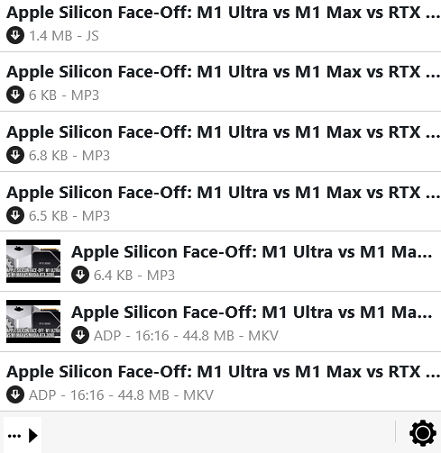
Ok I think I was incorrect , I meant to say 36000 kilobytes while what you're referring to is in bytes so yes you had it right. The bytes and kilobytes
are getting me confused. But here is an example: https://www.youtube.com/watch?v=gtIOumOjYWs
Wild Willy
Aug 18, 2022, 1:44:58 AM8/18/22
to Video Download Helper Google Group
I set the minimum size to 10 thousand & the little 6K variants disappeared. So it worked
for that YouTube example. That only proves that the size detection is not consistent.
It definitely does not work on the original example on bitchute. It is still true that a
problem remains unresolved.
for that YouTube example. That only proves that the size detection is not consistent.
It definitely does not work on the original example on bitchute. It is still true that a
problem remains unresolved.
mjs
Oct 14, 2022, 4:09:35 AM10/14/22
to Video DownloadHelper Q&A
Although it was said to be fixed in the new versions of VDH, tested 7.6.3.3 in ungoogled chromium it does not look like it worked.

Minimum size set to 7500 and went back to Bitchute, opened a video to find a small variant of 1.7 kb
And although downloading on YouTube is not allowed on the chrome version I saw the same small files in the digital foundry video above.
mjs
Nov 15, 2022, 4:59:32 AM11/15/22
to Video DownloadHelper Q&A
Still waiting on the new version of VDH for Firefox but I tried the latest version on Edge and set the size to 7000. Small files on YouTube still show
in the 6kb range. If this was supposed to be fixed , it doesn't look like it.
Reply all
Reply to author
Forward
0 new messages