
Ties across new lines
248 views
Skip to first unread message

Michael Hills
Jan 20, 2016, 2:47:14 AM1/20/16
to vexflow
Hi,
I'm trying to render responsive sheet music, but when I reduce the screen size down, the tie between bars breaks down and looks like the following.
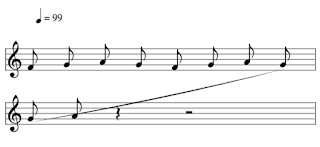

My question is, how is this normally represented in sheet music and how do I get Vex Flow to render it properly? I've tried googling how this is normally handled but no such luck.
Just some background, I'm adding pitch detection -> sheet music in my app https://itunes.apple.com/us/app/musique/id976995892?mt=8
I analyze the detected pitches to determine tempo, notes and key signature. I then jam them into 4/4 bars where notes that go across bars are automatically split into ties.
I am using MusicXML as my intermediate format for rendering as I intend to allow users to export the sheet music. I initially tried using https://github.com/ringw/vexflow but ran into a few issues (mostly because I was too new to Vex Flow to understand how to use it properly) and ended up writing my own reduced-music-xml renderer (I'm only using a small subset of MusicXML).
Regards,
Mike

Dani
Jan 20, 2016, 4:36:39 AM1/20/16
to vex...@googlegroups.com
Hi Michael.
See here how it is represented: http://lsdb.flow-machines.com/sampleLJS/example_basic_view.php
You have to create two ties: A tie (new Vex.Flow.StaveTie ) from the top note to 'null', and another from 'null' to the bottom note.See here how it is represented: http://lsdb.flow-machines.com/sampleLJS/example_basic_view.php
Best
--
--
You received this message because you are subscribed to the Google
Groups "vexflow" group.
To post to this group, send email to vex...@googlegroups.com
To unsubscribe from this group, send email to
vexflow+u...@googlegroups.com
For more options, visit this group at
http://groups.google.com/group/vexflow?hl=en
---
You received this message because you are subscribed to the Google Groups "vexflow" group.
To unsubscribe from this group and stop receiving emails from it, send an email to vexflow+u...@googlegroups.com.
For more options, visit https://groups.google.com/d/optout.
Michael Hills
Jan 20, 2016, 5:57:25 AM1/20/16
to vexflow
Hi Dani,
It works perfectly, thank you!
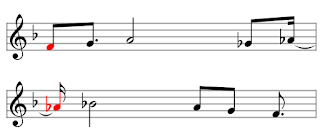
On a side note I'm having a separate issue now just testing out colouring notes using setStyle. When using beams the stems don't colour, and when not using beams the 'flags' don't change colour.


Mohit Muthanna Cheppudira
Jan 20, 2016, 7:23:34 AM1/20/16
to vexflow
On Wed, Jan 20, 2016 at 5:57 AM, Michael Hills <mhi...@gmail.com> wrote:
Hi Dani,It works perfectly, thank you!On a side note I'm having a separate issue now just testing out colouring notes using setStyle. When using beams the stems don't colour, and when not using beams the 'flags' don't change colour.
I'm not sure that setStyle works on beams -- it was just meant for note heads. It should be pretty simple to fix though.
Mohit Muthanna [mohit (at) muthanna (uhuh) com]
Michael Hills
Jan 20, 2016, 8:38:25 AM1/20/16
to vexflow, mo...@muthanna.com
That's okay, this seems to work well enough. Demo: https://youtu.be/upBnEVOeb2Q
Mohit Muthanna Cheppudira
Jan 20, 2016, 9:07:11 AM1/20/16
to vexflow
Looks good. Not that a nice alternative is to have a translucent bar that floats across the notes as they're played. :-)
Michael Hills
Jan 20, 2016, 9:31:46 AM1/20/16
to vexflow, mo...@muthanna.com
Yeah I wanted to do that but was looking for the quickest solution right now. Maybe later. :)
Reply all
Reply to author
Forward
0 new messages