
why vagrant up seems to pause on booting vm?
727 views
Skip to first unread message

mnz...@gmail.com
Mar 1, 2015, 5:19:16 PM3/1/15
to vagra...@googlegroups.com
half an hour passed, but the vm is still booting, what's wrong?

Alvaro Miranda Aguilera
Mar 1, 2015, 5:21:41 PM3/1/15
to vagra...@googlegroups.com
Check Virtualbox gui and the resources on the host.
if you are close to max out memory, virtualbox will pause some vms.
Alvaro
On Mon, Mar 2, 2015 at 11:19 AM, <mnz...@gmail.com> wrote:
half an hour passed, but the vm is still booting, what's wrong?
--
You received this message because you are subscribed to the Google Groups "Vagrant" group.
To unsubscribe from this group and stop receiving emails from it, send an email to vagrant-up+...@googlegroups.com.
For more options, visit https://groups.google.com/d/optout.
mnz...@gmail.com
Mar 1, 2015, 6:03:13 PM3/1/15
to vagra...@googlegroups.com
the default memory allocated to this vm is 1024MB, vbox gui indicate that this vm is running, but how long will it take until this booting process complete?
Alvaro Miranda Aguilera
Mar 1, 2015, 6:21:36 PM3/1/15
to vagra...@googlegroups.com
Is upto the host capabilities and how much Vagrant does.
The typical vagrant up from a simple Vagrantfile is like this.
A - determine box to use
B - box exits locally and match version? or need to download
C - create VM from template
D - initial boot
E - run provisioning scripts
So, in a very first run, B need to download the VM.. this can take some time
then, C is the first boot.. this should be 1 minute or so
then E, seconds
Can you record an screencast to be able to see what you see?
mnz hz
Mar 1, 2015, 7:49:25 PM3/1/15
to vagra...@googlegroups.com
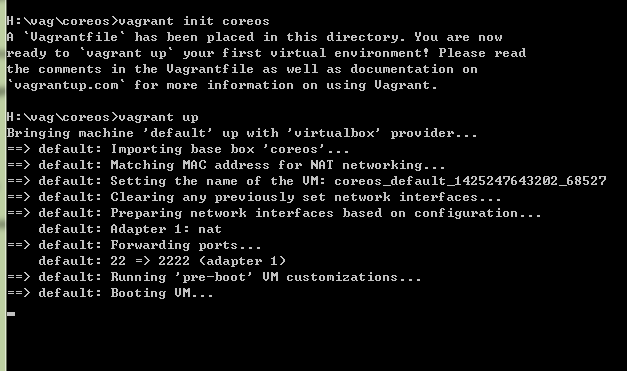
since i init from local box, the isssue should be that the vagrant up process stayed in phase D or E and never finished, what's wrong?
H:\test\coreos>vagrant up
Bringing machine 'default' up with 'virtualbox' provider...
==> default: Clearing any previously set forwarded ports...
==> default: Clearing any previously set network interfaces...
==> default: Preparing network interfaces based on configuration...
default: Adapter 1: nat
==> default: Forwarding ports...
default: 22 => 2222 (adapter 1)
==> default: Running 'pre-boot' VM customizations...
==> default: Booting VM...
--
You received this message because you are subscribed to a topic in the Google Groups "Vagrant" group.
To unsubscribe from this topic, visit https://groups.google.com/d/topic/vagrant-up/xeYaDfiRgJY/unsubscribe.
To unsubscribe from this group and all its topics, send an email to vagrant-up+...@googlegroups.com.
Alvaro Miranda Aguilera
Mar 2, 2015, 2:15:45 AM3/2/15
to vagra...@googlegroups.com
Please share a vagrantfile to reproduce.. happy to have a look.
Alvaro.
mnz hz
Mar 2, 2015, 8:48:12 AM3/2/15
to vagra...@googlegroups.com
it's the default Vagrantfile created by vagrant init coreos
maybe vagrant on win7 x64 have some compatibility problem, if i restart my computer vagrant up may run well , but after hours , this command works innormally
H:\vag\coreos>cat Vagrantfile
# -*- mode: ruby -*-
# vi: set ft=ruby :
Vagrant.configure(2) do |config|
# The most common configuration options are documented and commented below.
# For a complete reference, please see the online documentation at
# Every Vagrant development environment requires a box. You can search for
# boxes at https://atlas.hashicorp.com/search.
config.vm.box = "coreos"
end
Reply all
Reply to author
Forward
0 new messages