
Virtual Box bridged network and port forwarding VAGRANT
215 views
Skip to first unread message

Yayaoui Namoussi
Apr 3, 2020, 11:21:58 AM4/3/20
to Vagrant
Hey guys i'm having serious problme with to portforward my port 5060 i'm stuck on it since 1 week :(
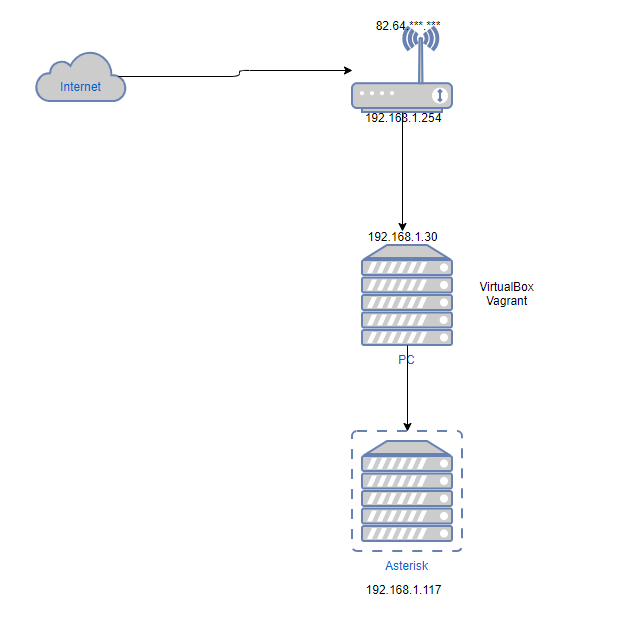
the probleme is i want to portforward the port 5060 on my bridge network not in nat so naturaly i did this
config.vm.network "public_network", :bridge => "Realtek PCIe 2.5GbE Family Controller", :ip => "192.168.1.117"
###########DEFAULT ROUTER##############
    config.vm.provision "shell",
    run: "always",
    inline: "route add default gw 192.168.1.254"

 config.vm.provision "shell",
    run: "always",
    inline: "eval `route -n | awk '{ if ($8 ==\"eth0\" && $2 != \"0.0.0.0\") print \"route del default gw \" $2; }'`"
  config.vm.network "forwarded_port", :adapter=>2, guest: 5060,host: 5060, protocol: "udp"
Then when i do vagrant reload i have this
default: VirtualBox adapter #2 not configured as "NAT". Skipping port
in my router i did port forwarding like this 192.168.1.117 / UDP / ALL IP / 5060 / 5060
and still when i try to check open port through internet its says the port is close

Alvaro Miranda Aguilera
Apr 3, 2020, 3:14:31 PM4/3/20
to vagra...@googlegroups.com
if you comment out and try from the home network, does work?
do you have how to test ?
you dont need port forward if the VM is having a public IP on the network
--
This mailing list is governed under the HashiCorp Community Guidelines - https://www.hashicorp.com/community-guidelines.html. Behavior in violation of those guidelines may result in your removal from this mailing list.
GitHub Issues: https://github.com/mitchellh/vagrant/issues
IRC: #vagrant on Freenode
---
You received this message because you are subscribed to the Google Groups "Vagrant" group.
To unsubscribe from this group and stop receiving emails from it, send an email to vagrant-up+...@googlegroups.com.
To view this discussion on the web visit https://groups.google.com/d/msgid/vagrant-up/d647b519-e8f0-4d38-a738-3398e4eb9e96%40googlegroups.com.
Alvaro
Yayaoui Namoussi
Apr 3, 2020, 4:08:41 PM4/3/20
to Vagrant
To unsubscribe from this group and stop receiving emails from it, send an email to vagra...@googlegroups.com.
To view this discussion on the web visit https://groups.google.com/d/msgid/vagrant-up/d647b519-e8f0-4d38-a738-3398e4eb9e96%40googlegroups.com.
--Alvaro
Alvaro Miranda Aguilera
Apr 5, 2020, 1:52:17 PM4/5/20
to vagra...@googlegroups.com
it shoudl work without port forward
whats the output from the vm of
route -n
ip addr
as long default gw goes to the router it should work
To unsubscribe from this group and stop receiving emails from it, send an email to vagrant-up+...@googlegroups.com.
To view this discussion on the web visit https://groups.google.com/d/msgid/vagrant-up/510b54bd-bf3f-487c-80bd-be9f9f42684e%40googlegroups.com.
Alvaro
Message has been deleted
Yayaoui Namoussi
May 7, 2020, 3:32:58 AM5/7/20
to Vagrant
Well i think its cause i need a default route to the router
0.0.0.0 10.0.2.2 0.0.0.0 UG 0 0 0 eth0
10.0.2.0 0.0.0.0 255.255.255.0 U 0 0 0 eth0
192.168.1.0 0.0.0.0 255.255.255.0 U 0 0 0 eth1
0.0.0.0 10.0.2.2 0.0.0.0 UG 0 0 0 eth0
10.0.2.0 0.0.0.0 255.255.255.0 U 0 0 0 eth0
192.168.1.0 0.0.0.0 255.255.255.0 U 0 0 0 eth1
when i add
0.0.0.0 192.168.1.254 it start working,but i dont understund why its not add by
Alvaro Miranda Aguilera
May 9, 2020, 1:30:45 AM5/9/20
to vagra...@googlegroups.com
i would suggest:
compare the output of route print when works and when doesnt
run the commands you have for route one at the time, and check route print
perhaps there is some step missed, some route needed to be clean or something
alvaro
On Thu, May 7, 2020 at 2:16 AM Yayaoui Namoussi <jete...@gmail.com> wrote:
Well i think its cause i need a default route to the router
0.0.0.0 10.0.2.2 0.0.0.0 UG 0 0 0 eth010.0.2.0 0.0.0.0 255.255.255.0 U 0 0 0 eth0192.168.1.0 0.0.0.0 255.255.255.0 U 0 0 0 eth1when i add0.0.0.0 192.168.1.254 it start working,but i dont understund why its not add by
config.vm.provision "shell", run: "always", inline: "route add default gw 192.168.1.254"
To view this discussion on the web visit https://groups.google.com/d/msgid/vagrant-up/510b54bd-bf3f-487c-80bd-be9f9f42684e%40googlegroups.com.
--Alvaro
--
This mailing list is governed under the HashiCorp Community Guidelines - https://www.hashicorp.com/community-guidelines.html. Behavior in violation of those guidelines may result in your removal from this mailing list.
GitHub Issues: https://github.com/mitchellh/vagrant/issues
IRC: #vagrant on Freenode
---
You received this message because you are subscribed to the Google Groups "Vagrant" group.
To unsubscribe from this group and stop receiving emails from it, send an email to vagrant-up+...@googlegroups.com.
To view this discussion on the web visit https://groups.google.com/d/msgid/vagrant-up/0a61687e-49f2-4222-9d68-37c58a7ce38c%40googlegroups.com.
Alvaro
Reply all
Reply to author
Forward
0 new messages