
Cached data or startup snapshot?
516 views
Skip to first unread message

Alexandru Dima
Feb 14, 2018, 11:57:38 AM2/14/18
to v8-users
Hi,
Which one would you recommend we (VSCode) use?
Today, we are using cached data, but I wanted to find out if a startup snapshot would help us more. I've crammed all of VSCode's source code (except third party node modules) in a file and I've created a startup snapshot using `mksnapshot`. I would have thought that the startup snapshot would beat the current cached data usage on startup speed by a long shot...
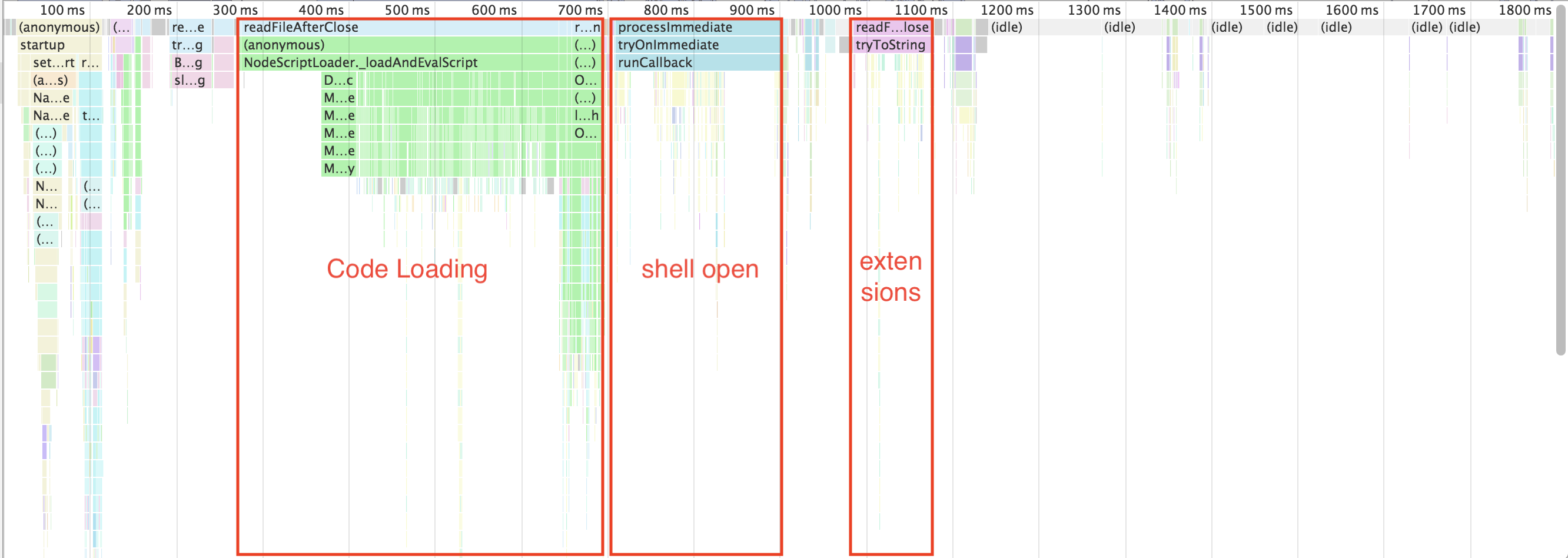
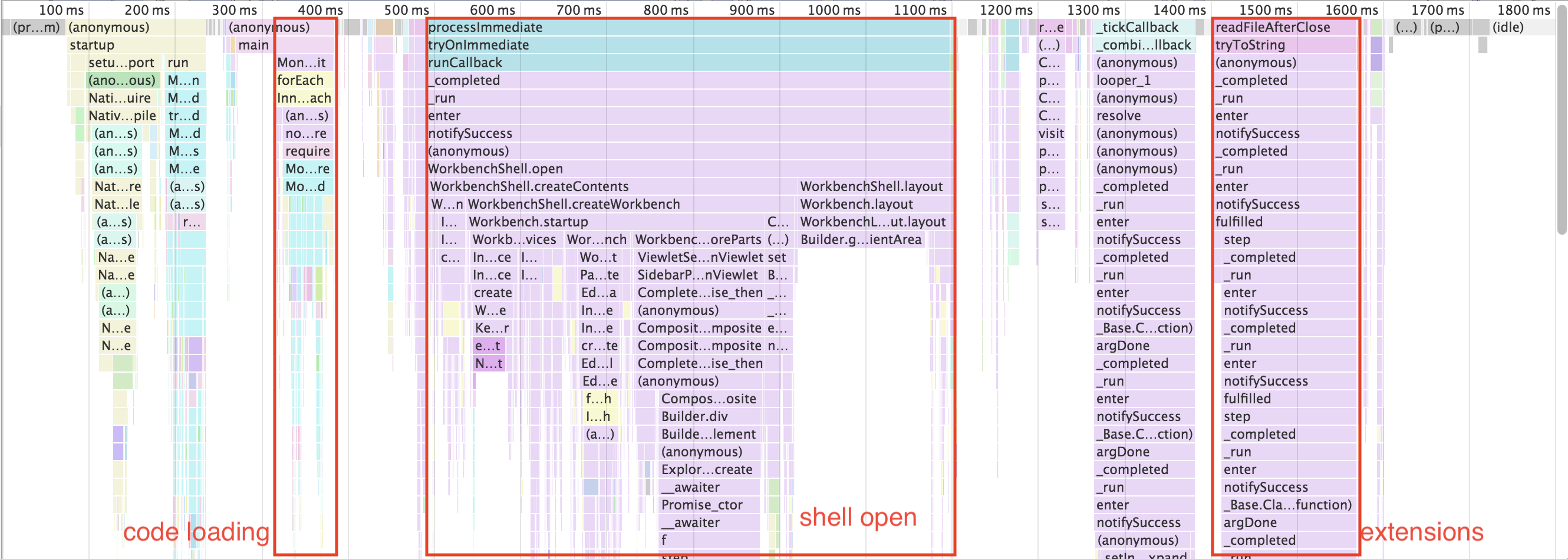
I was surprised to see that all of the time gains of using a startup snapshot (~200-300ms of code loading) is lost and then some while creating the UI (DOM and stuff...). It looks to me like the code that lives in the startup snapshot is fundamentally slower (50% or 100% slower), and that perhaps it does not use inlining? (see the deep stack traces below).
1. Before (using cached data)
2. After (using startup snapshot)
Is this expected? Cached data is always faster than startup snapshot?
We are on an oldish version of v8 (5.8.283.38), as we're using Electron 1.7.9.
Thanks,
Alex
Alexandru Dima
Feb 16, 2018, 6:17:56 AM2/16/18
to v8-users
Maybe I've complicated my question needlessly.
To rephrase, when using custom startup snapshots, via `mksnapshot`, will the snapshotted code run slower than the same code loaded from sources at runtime?
Thanks,
Alex

Yang Guo
Feb 16, 2018, 7:22:03 AM2/16/18
to v8-users
Node.js doesn't support custom startup snapshot, so I guess you only included pure JS parts in the startup snapshot.
The startup snapshot is mainly intended to persist state, i.e. changes to the native context. By default it does not persist code. So I would be surprised if you saw any reduction in parse/compile time with the startup snapshot. There is no "snapshotted code".
Code caching on the other hand is intended to persist code, not state. You use it to bypass parse/compile.
Alexandru Dima
Feb 16, 2018, 9:33:11 AM2/16/18
to v8-users
Hi Yang,
Thanks for answering!
I only snapshot pure JS code (written in AMD form), and when the JS code needs node modules (built-in, native, JS only, etc), I feed it proxy objects (`new Proxy`). Here is how the code I snapshot looks like - https://gist.github.com/alexandrudima/bda598fbed179a581986b634cc94ab8d
I am trying to implement what is described here[1] for VS Code (also an Electron app). Perhaps the main difference is that I can snapshot a huge amount of code, as we compile our code to AMD and I don't need to hack or do anything with node's require to stitch things up. I also wrote our own AMD loader, so I can do everything I need to in order to snapshot basically all of our code. I am running `mksnapshot start.js --startup_blob snapshot_blob.bin`. This creates a 40 MB `snapshot_blob.bin` file, which I use to overwrite the original 1.3 MB `snapshot_blob.bin` file that ships with Electron. The 40MB snapshot is effectively the entire VS Code application (except for node modules, for which the code has references to proxy objects).
The file I am producing, snapshot_blob.bin, contains all the heap state after executing the code in start.js. The heap state includes all the AMD modules, with their exports, such as class definitions (functions with prototypes), all the other utility functions, statics, etc, which I can call and execute directly without loading any additional JS source code in the VM at runtime. Sorry for calling it "snapshotted code", but that's what I meant. My code is there, available, I don't need to load it, so it is a part of the snapshot...
At runtime, when the application starts up, there is startup code (part of the snapshot too) which will begin to instantiate those classes (also part of the snapshot), will then proceed to look at what folder/files you have opened, what is the environment, what folder you have opened, etc. and eventually will "paint" by creating DOM nodes, etc...
My problem is that these classes, which are captured in the snapshot, are significantly slower when I execute them, compared to when those same classes (same code) are loaded from source or from code caching. I was trying to capture this problem in my original screenshots. The "shell open" part of the two screenshots shows this problem. When loading code from source or from code caching, the JS profiler shows that everything is "squashed" into the `runCallback` method. When running the classes as they are captured in the snapshot, the JS profiler shows perhaps each and every function call.
I have followed some of your tips from here [2], i.e. I tried running `mksnapshot --ignition --turbo start.js --startup_blob snapshot_blob.bin`
I also tried running `mksnapshot --no-lazy start.js --startup_blob snapshot_blob.bin`.
All of these tweaks resulted in varying sizes in the output `snapshot_blob.bin`, but the speed of the executing code was still slower.
I am wondering if I am doing something silly (e.g. perhaps by using proxies, or if the v8 flags don't 100% match at runtime, should --ignition --turbo be there at runtime too ?) or is it expected that functions (code) included in a snapshot are slower than those loaded at runtime?
Thank you again for your time,
Alex
Yang Guo
Feb 21, 2018, 8:16:44 AM2/21/18
to v8-users
Some comments:
- When you say classes run slower, do you mean they take longer to execute, or do you mean they spend time on compilation too?
- Does your non-snapshotted version use proxies too? Proxies are indeed significantly slower.
- You should no longer need --ignition --turbo. This is the default with the newest V8.- What version of V8 are you using?
- It's not expected that code in the snapshot is slower than code at runtime. But I expect that there is no code embedded in the snapshot in the first place.
- Do you have a small repro I can play with? E.g. source to include in the snapshot and the code to run. Ideally pure JS that I can run in Node.
Cheers,
Yang
Alexandru Dima
Feb 23, 2018, 5:59:58 AM2/23/18
to v8-users
Hi Yang,
I have spent quite some time to create a repro that executes the exact same code in the exact same state, once with the code loaded from cached data, and once with the code running from a startup snapshot.
In this standalone repro, the total time is indeed better for starting from a startup snapshot (column 2), but note that executing the startup code (blue) is 27% slower when the same code executes with the same state from a startup snapshot:

The repro is at https://github.com/alexandrudima/v8-repro and I would appreciate if you can please take a look. The README there contains all the steps needed to set it up.
Here are some specific answers in blue:
> When you say classes run slower, do you mean they take longer to execute, or do you mean they spend time on compilation too?
I mean the code takes longer to execute, I use Date.now() before and after executing the code.
> Does your non-snapshotted version use proxies too? Proxies are indeed significantly slower.
This makes a lot of sense. I have removed the usage of proxies, such that both versions have the exact same code.
> You should no longer need --ignition --turbo. This is the default with the newest V8.
> What version of V8 are you using?
The one that comes with Electron 1.7.9, v8 version 5.8.283.38
> It's not expected that code in the snapshot is slower than code at runtime. But I expect that there is no code embedded in the snapshot in the first place.
I'm sorry, I don't understand what you mean. The startup snapshot contains the source code inside of it (see index2.html in the repro where no code loading is needed, as the code is part of the startup snapshot).
> Do you have a small repro I can play with? E.g. source to include in the snapshot and the code to run. Ideally pure JS that I can run in Node.
I'm sorry, the repro is not small and it involves running Electron, as the source code which reproduces needs electron to execute. I have tried to load only a subset of the code (some editor text buffer and stress it out by doing large text operations), but I could not reproduce the same slowdown in that case. If you can guide me through it, I can try to reduce the repro, but I don't know what I'm looking for. Everything is slower, there is not one particular section of code that is slower.
P.S. If you uncomment the link tag in the html files, this is what the code is doing:

Thank you,
Alex

fengx...@gmail.com
Jul 17, 2018, 2:53:50 AM7/17/18
to v8-users
So what is the result? Have you found the reason that cause code executing slower?
在 2018年2月23日星期五 UTC+8下午6:59:58,Alexandru Dima写道:
在 2018年2月23日星期五 UTC+8下午6:59:58,Alexandru Dima写道:
Reply all
Reply to author
Forward
0 new messages