
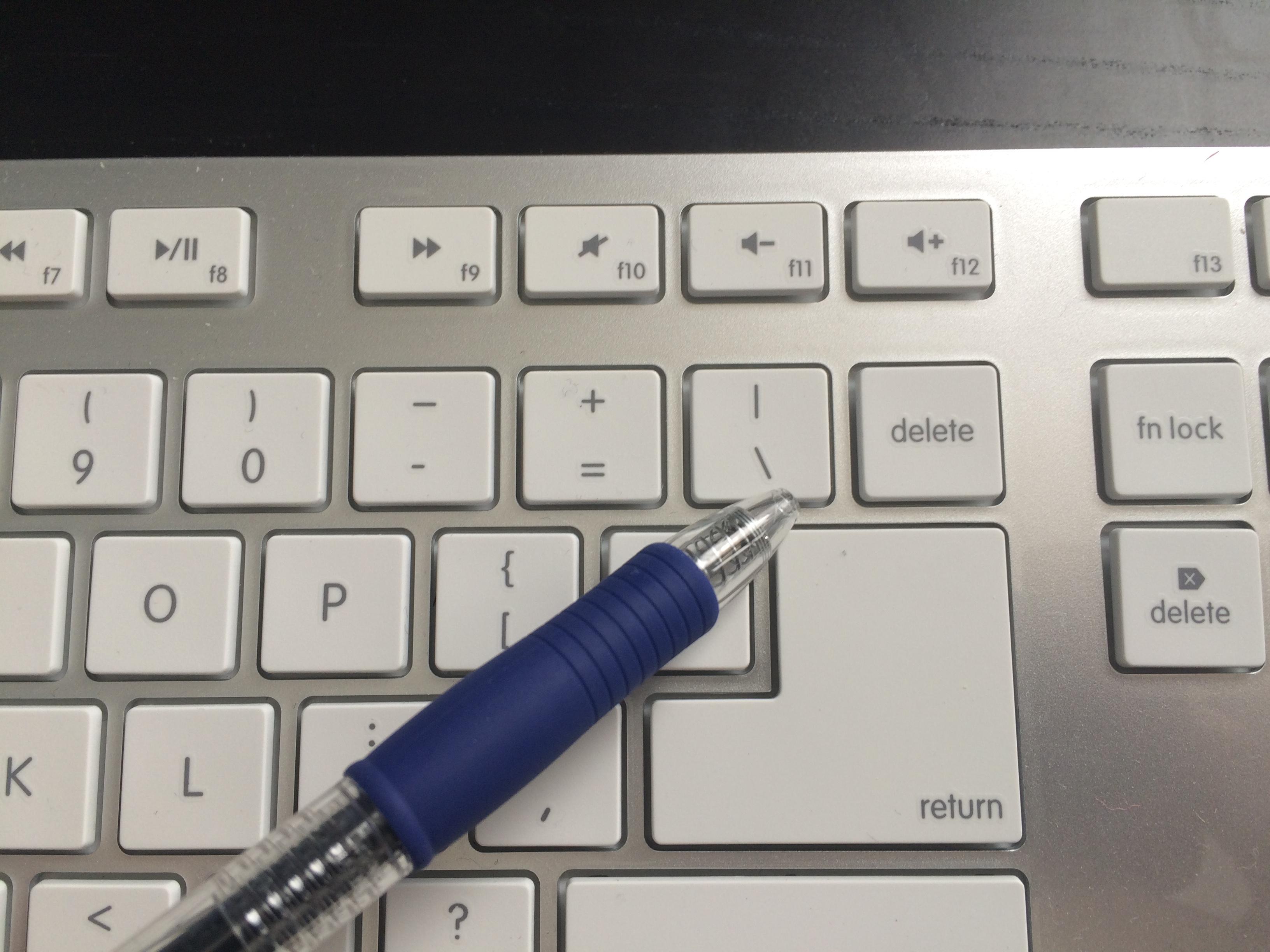
new keyboard with single delete key (not the usual double)
166 views
Skip to first unread message

Phillyfilm
Feb 26, 2016, 12:35:27 PM2/26/16
to Ukelele Users
Hi all. I have a new keyboard that uses a standard single key sized delete key rather than the common double sized one. To its left (and to the right of the = key) is a backslash and vertical slash key (\ and |). After so many years, my pinky finger is used to hitting the larger delete key, but now I find I keep hitting the \ key. So I'd like to remap that key to be another delete key, effectively giving me back the standard double-sized delete key.
The problem I'm having is that Ukulele seems to have only the more traditional keyboard key layout, where the delete key is double sized and there is no \ key.
My question is: is there any such keyboard layout available in Ukulele, or is there some way for me to modify the default keyboard layout? Thanks!

Sorin Paliga
Feb 26, 2016, 12:49:04 PM2/26/16
to ukelel...@googlegroups.com
This is an eternally repeated question: UKELELE cannot modify system keys. There are other solutions, though:
also:
In my humble opinion, using a non-Apple keyboard, different from the Apple standard, is your risk. As far as I can see, it is different from most other non-Apple keyboards. You should either replace it with a more Apple-like keyboard, or try to adapt to it, as long as you bought it.
But this is already too much for you, perhaps.
--
You received this message because you are subscribed to the Google Groups "Ukelele Users" group.
To unsubscribe from this group and stop receiving emails from it, send an email to ukelele-user...@googlegroups.com.
To post to this group, send email to ukelel...@googlegroups.com.
Visit this group at https://groups.google.com/group/ukelele-users.
For more options, visit https://groups.google.com/d/optout.
<IMG_3407.JPG>

Tom Gewecke
Feb 26, 2016, 2:05:59 PM2/26/16
to ukelel...@googlegroups.com
On Feb 26, 2016, at 10:35 AM, Phillyfilm wrote:
> Hi all. I have a new keyboard that uses a standard single key sized delete key rather than the common double sized one. To its left (and to the right of the = key) is a backslash and vertical slash key (\ and |).
Phillyfilm
Feb 26, 2016, 2:22:57 PM2/26/16
to Ukelele Users
Thanks, Cattus, I'll give these other utilities a look.
If I may, I'd like to add that this keyboard is actually a third-party Mac-specific keyboard. All function keys map perfectly to the Mac OS, and it includes the requisite command key with clover leaf. The *only* difference that i have found is in this single key anomaly (they opted for a larger return key and a smaller delete key, and relocated the \ | key to accommodate it). To be honest, it was never even something I would have thought to look for. I purchased it because it is wireless, has an extended keyboard, looks virtually identical to the wired Apple extended keyboard, was reasonably priced and had some good reviews. Had I experienced this odd delete key layout in the past, I would have thought to look for it and might have chosen a different keyboard.
Sorin Paliga
Feb 26, 2016, 2:46:25 PM2/26/16
to ukelel...@googlegroups.com
Maybe some people like that location, it is not usual, anyway.

Gé van Gasteren
Feb 26, 2016, 3:59:49 PM2/26/16
to ukelel...@googlegroups.com
Hi,
As Sorin pointed out, you can’t change a "character key" into a "command key" by using a custom keyboard layout, i.e. with Ukelele.
However, you may not need all that other software, after all:
With Ukelele, you could just remove the backslash and vertical bar assigned to that key on the unshift level and shift level. Then the key still won’t work as a delete key, but it won’t give you annoying characters either. Maybe that’s already enough for you?
However, you may not need all that other software, after all:
With Ukelele, you could just remove the backslash and vertical bar assigned to that key on the unshift level and shift level. Then the key still won’t work as a delete key, but it won’t give you annoying characters either. Maybe that’s already enough for you?
Ukelele obviously didn't detect your keyboard type correctly; that's why it picked the wrong "picture".
You can display a layout that includes that \ key, by changing the View / Keyboard Type... e.g. to USB Pro Keyboard and clicking on the drop-down menu on the right to change ANSI into ISO.
You can display a layout that includes that \ key, by changing the View / Keyboard Type... e.g. to USB Pro Keyboard and clicking on the drop-down menu on the right to change ANSI into ISO.
The layout will not look the same as your physical keyboard, but that doesn't matter as long as you edit the right key, i.e. the one with \ displayed on it.
Good luck...
Gé van Gasteren
Feb 26, 2016, 4:07:47 PM2/26/16
to ukelel...@googlegroups.com
Sorry, I wrote something wrong there: It shouldn't be necessary to switch to ISO-layout. The \ key should appear in ANSI layouts as well.
I'll attach a picture from each: in ANSI layouts, the \ key is above the Return key; in ISO layouts, it's located to its left.
If you still don't find that \ key, then please attach a screenshot of Ukelele's display on your screen to help us find a clue.


Message has been deleted
Phillyfilm
Feb 27, 2016, 6:38:55 PM2/27/16
to Ukelele Users
Thanks to all for your help! I ended up using Karabiner to change the Backslash key to Delete, then added back the Backslash in place of F14, as it was functioning as a duplicate to F1. All's well that ends well!
Sorin Paliga
Feb 28, 2016, 3:24:54 AM2/28/16
to ukelel...@googlegroups.com
This is the correct approach for such instances, this is Karabiner designed for.
> On 28 Feb 2016, at 01:38, Phillyfilm <aser...@gmail.com> wrote:
>
> ------=_Part_1854_2138676472.1456616335228
> Content-Type: multipart/alternative;
> boundary="----=_Part_1855_348228489.1456616335236"
>
> ------=_Part_1855_348228489.1456616335236
> Content-Type: text/plain; charset=UTF-8
> Content-Type: text/html; charset=UTF-8
> Content-Transfer-Encoding: quoted-printable
>
> <div dir=3D"ltr">Thanks to all for your help! =C2=A0I ended up using Karabi=
> ner to change the Backslash key to Delete, then added back the Backslash in=
> place of F14, as it was functioning as a duplicate to F1. =C2=A0All's =
> well that ends well!<br></div>
>
> <p></p>
>
> -- <br />
> You received this message because you are subscribed to the Google Groups &=
> quot;Ukelele Users" group.<br />
> To unsubscribe from this group and stop receiving emails from it, send an e=
> mail to <a href=3D"mailto:ukelele-user...@googlegroups.com">ukele=
> le-users+u...@googlegroups.com</a>.<br />
> To post to this group, send email to <a href=3D"mailto:ukelele-users@google=
> groups.com">ukelel...@googlegroups.com</a>.<br />
> Visit this group at <a href=3D"https://groups.google.com/group/ukelele-user=
> s">https://groups.google.com/group/ukelele-users</a>.<br />
> For more options, visit <a href=3D"https://groups.google.com/d/optout">http=
> s://groups.google.com/d/optout</a>.<br />
>
> ------=_Part_1855_348228489.1
> On 28 Feb 2016, at 01:38, Phillyfilm <aser...@gmail.com> wrote:
>
> ------=_Part_1854_2138676472.1456616335228
> Content-Type: multipart/alternative;
> boundary="----=_Part_1855_348228489.1456616335236"
>
> ------=_Part_1855_348228489.1456616335236
> Content-Type: text/plain; charset=UTF-8
>
> Thanks to all for your help! I ended up using Karabiner to change the
> Backslash key to Delete, then added back the Backslash in place of F14, as
> it was functioning as a duplicate to F1. All's well that ends well!
>
> Thanks to all for your help! I ended up using Karabiner to change the
> Backslash key to Delete, then added back the Backslash in place of F14, as
> it was functioning as a duplicate to F1. All's well that ends well!
>
> --
> You received this message because you are subscribed to the Google Groups "Ukelele Users" group.
> To unsubscribe from this group and stop receiving emails from it, send an email to ukelele-user...@googlegroups.com.
> To post to this group, send email to ukelel...@googlegroups.com.
> Visit this group at https://groups.google.com/group/ukelele-users.
> For more options, visit https://groups.google.com/d/optout.
>
> ------=_Part_1855_348228489.1456616335236
> You received this message because you are subscribed to the Google Groups "Ukelele Users" group.
> To unsubscribe from this group and stop receiving emails from it, send an email to ukelele-user...@googlegroups.com.
> To post to this group, send email to ukelel...@googlegroups.com.
> Visit this group at https://groups.google.com/group/ukelele-users.
> For more options, visit https://groups.google.com/d/optout.
>
> Content-Type: text/html; charset=UTF-8
> Content-Transfer-Encoding: quoted-printable
>
> <div dir=3D"ltr">Thanks to all for your help! =C2=A0I ended up using Karabi=
> ner to change the Backslash key to Delete, then added back the Backslash in=
> place of F14, as it was functioning as a duplicate to F1. =C2=A0All's =
> well that ends well!<br></div>
>
> <p></p>
>
> -- <br />
> You received this message because you are subscribed to the Google Groups &=
> quot;Ukelele Users" group.<br />
> To unsubscribe from this group and stop receiving emails from it, send an e=
> mail to <a href=3D"mailto:ukelele-user...@googlegroups.com">ukele=
> le-users+u...@googlegroups.com</a>.<br />
> To post to this group, send email to <a href=3D"mailto:ukelele-users@google=
> groups.com">ukelel...@googlegroups.com</a>.<br />
> Visit this group at <a href=3D"https://groups.google.com/group/ukelele-user=
> s">https://groups.google.com/group/ukelele-users</a>.<br />
> For more options, visit <a href=3D"https://groups.google.com/d/optout">http=
> s://groups.google.com/d/optout</a>.<br />
>
> ------=_Part_1855_348228489.1
Reply all
Reply to author
Forward
0 new messages