
Re: [ukelele-users] Ukulele does not add my keyboard
181 views
Skip to first unread message

Sorin Paliga
Feb 26, 2016, 3:40:03 AM2/26/16
to ukelel...@googlegroups.com
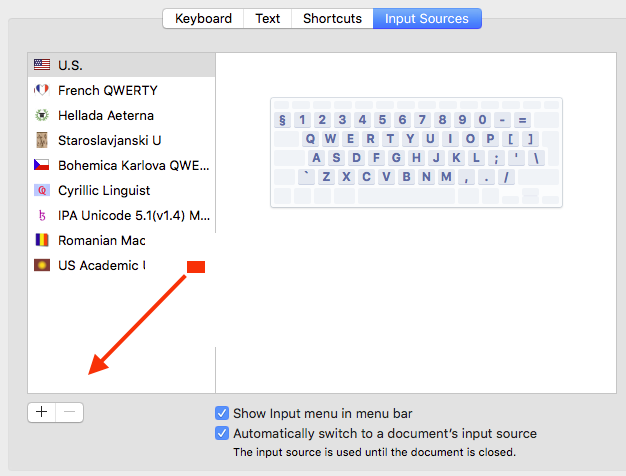
Have you completed the rest of the steps? I.e., after installing, log out or restart, then go to sys prefs/keyboards, then activate the new keylayout. Otherwise, yes, nothing changes at a first sight.
You may also put the keylayout manually to /Library/Keyboard Layouts or ~/Library/Keyboard Layouts (i.e. the user lever) then follow the other steps as described. The two screenshots indicate where you should get to. The new keylayout will probably be under Others.
BTW, where have you saved the new keylayout?
On 26 Feb 2016, at 01:45, Андрей Ермаков <waragainsto...@gmail.com> wrote:I created a custom keyboard based on russian cyrillyc keyboard. I press Install, but nothing is changed at all.--
You received this message because you are subscribed to the Google Groups "Ukelele Users" group.
To unsubscribe from this group and stop receiving emails from it, send an email to ukelele-user...@googlegroups.com.
To post to this group, send email to ukelel...@googlegroups.com.

Visit this group at https://groups.google.com/group/ukelele-users.
For more options, visit https://groups.google.com/d/optout.

Gé van Gasteren
Feb 26, 2016, 9:10:31 AM2/26/16
to ukelel...@googlegroups.com
Hi Andrey,
"Install" in Ukelele means: "save the custom layout file in the right place". (That would be in the <root>/Library/Keyboard Layouts folder.)
After that, you need to activate the layout in System Preferences/Keyboard/Input Sources as Sorin described to be able to use it.
This two-step procedure may seem unnecessarily complicated, but it’s the best way to have some 150 layouts pre-installed in OS X, ready for the user who needs them, without being in the way.
Good luck!
On 26 February 2016 at 00:45, Андрей Ермаков <waragainsto...@gmail.com> wrote:
I created a custom keyboard based on russian cyrillyc keyboard. I press Install, but nothing is changed at all.
--
You received this message because you are subscribed to the Google Groups "Ukelele Users" group.
To unsubscribe from this group and stop receiving emails from it, send an email to ukelele-user...@googlegroups.com.
To post to this group, send email to ukelel...@googlegroups.com.
Reply all
Reply to author
Forward
0 new messages