
Swapping ` and \ keys in British layout
205 views
Skip to first unread message

Adam Bramley
Sep 21, 2020, 11:27:56 AM9/21/20
to Ukelele Users
Hi all,
I have a Logitech K800 keyboard that looks like this:
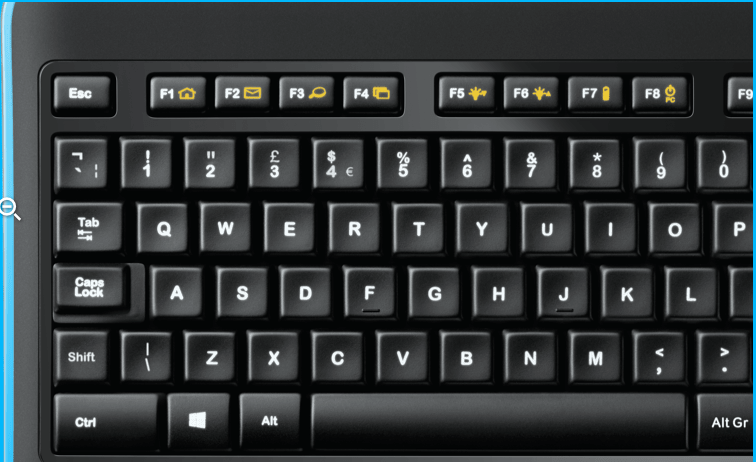
The \ and ` buttons are reversed. When I press what's labelled \ on the keyboard, it types ` and vice versa. Same for the shift and alt versions of the keys.
I've used Ukelele to create a layout swapping these keys around:
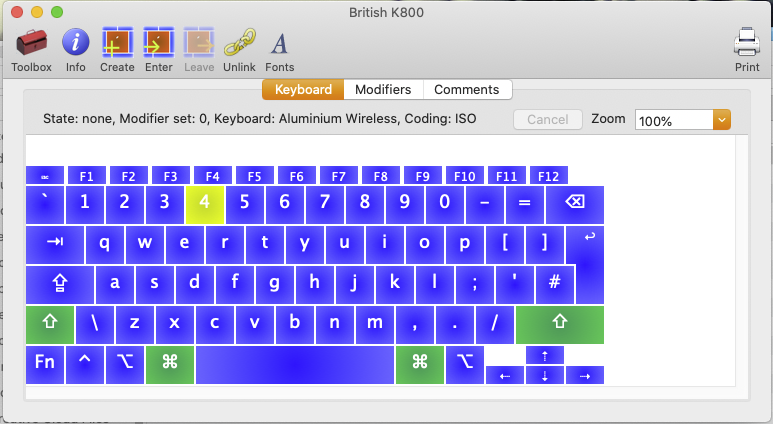
and when I select that layout in Input the layout preview looks correct:

But when I type, \ and ` are still swapped around.
Could anyone help me out with where I'm going wrong?
Cheers!
Adam

Tom Gewecke
Sep 21, 2020, 11:31:02 AM9/21/20
to ukelel...@googlegroups.com, atjbr...@gmail.com
Do you have British K-800 showing in the “flag” menu at the top right of the screen?
On Sep 21, 2020, at 11:27 AM, Adam Bramley <atjbr...@gmail.com> wrote:
Hi all,I have a Logitech K800 keyboard that looks like this:
<Screenshot 2020-09-21 at 16.23.14.png>The \ and ` buttons are reversed. When I press what's labelled \ on the keyboard, it types ` and vice versa. Same for the shift and alt versions of the keys.I've used Ukelele to create a layout swapping these keys around:
<Screenshot 2020-09-21 at 16.22.13.png>and when I select that layout in Input the layout preview looks correct:
<Screenshot 2020-09-21 at 16.26.15.png>
But when I type, \ and ` are still swapped around.
Could anyone help me out with where I'm going wrong?
Cheers!
Adam
--
You received this message because you are subscribed to the Google Groups "Ukelele Users" group.
To unsubscribe from this group and stop receiving emails from it, send an email to ukelele-user...@googlegroups.com.
To view this discussion on the web visit https://groups.google.com/d/msgid/ukelele-users/5cd247c9-081c-496a-9662-7deb63da0ce2n%40googlegroups.com.
<Screenshot 2020-09-21 at 16.23.14.png><Screenshot 2020-09-21 at 16.26.15.png><Screenshot 2020-09-21 at 16.22.13.png>
Adam Bramley
Sep 21, 2020, 11:32:28 AM9/21/20
to Ukelele Users
Yes:

Tom Gewecke
Sep 21, 2020, 11:42:24 AM9/21/20
to ukelel...@googlegroups.com
I wonder if the machine thinks the keyboard is the wrong “type” (ansi instead of iso). Check
On Sep 21, 2020, at 11:32 AM, Adam Bramley <atjbr...@gmail.com> wrote:Yes:
To view this discussion on the web visit https://groups.google.com/d/msgid/ukelele-users/5c07c04f-0180-48b6-a971-48321b3e077en%40googlegroups.com.
<Screenshot 2020-09-21 at 16.32.09.png>
Adam Bramley
Sep 21, 2020, 11:46:31 AM9/21/20
to Ukelele Users
I don't get that menu:

It's a Logitech Universal Receiver device. Apparently these are often not registered as keyboards, but as other input methods or even as mice. Reckon that's what's going on here?

Sorin Paliga
Sep 21, 2020, 2:22:12 PM9/21/20
to ukelel...@googlegroups.com
The chars/symbols/letters inscribed on the physical keyboard may be different from the ones in the keylayout, because macOS and Windows (sometimes/often) use different locations. That physical keyboard is planned to be used by Windows users, others a planned to be used by both types of users (mine is Logitech K480 which has four symbols for each of the keys left to Z and left to 1, respectively. The simplest way to be happy is to learn the location of those chars disregarding the inscriptions on the physical keyboard, these are not relevant. You may use that physical keyboard to write in Russian, Greek or Korean, for example, the only problems is to learn where the chars are located. In you very case it is indeed simple.
On 21 Sep 2020, at 18:27, Adam Bramley <atjbr...@gmail.com> wrote:
Hi all,I have a Logitech K800 keyboard that looks like this:
<Screenshot 2020-09-21 at 16.23.14.png>The \ and ` buttons are reversed. When I press what's labelled \ on the keyboard, it types ` and vice versa. Same for the shift and alt versions of the keys.I've used Ukelele to create a layout swapping these keys around:
<Screenshot 2020-09-21 at 16.22.13.png>and when I select that layout in Input the layout preview looks correct:
<Screenshot 2020-09-21 at 16.26.15.png>
But when I type, \ and ` are still swapped around.
Could anyone help me out with where I'm going wrong?
Cheers!
Adam

Gé van Gasteren
Sep 21, 2020, 4:42:48 PM9/21/20
to ukelel...@googlegroups.com
It’s a bit of a mystery, this…
A few thoughts:
• You wrote:
I've used Ukelele to create a layout swapping these keys around:
But in the picture, the two keys don’t look swapped. Was the \ on the top left key when you started, i.e. before you did any editing?
• I think there is a trick to force System Preferences to show that button to change the keyboard type, but unfortunately, I forgot what it was. Maybe just unplugging and reconnecting will do the trick?
On the other hand, everywhere it is shown with the extra key next to the Z, so logically speaking that means that the system recognizes it as ISO.
• Maybe the software you’re using is "defaulting" to another layout without telling you, even though your custom keyboard layout is shown as selected on the menu? Some applications don’t support custom layouts.
Adam Bramley
Sep 22, 2020, 6:45:15 AM9/22/20
to Ukelele Users
I don't remember the original layout of the template, but I do remember creating it from the British, PC keyboard layout.
In any case, I've kept this layout and used Karabiner to swap the ` and \ keys. Now every key results in the symbol printed on it, and even my function keys are working.
The only buttons not working now are Scroll Lock, which seems to be more of an app related issue as its so rarely used, and the calculator button which OSX just doesn't recognise. I'll live with that!
Gé van Gasteren
Sep 22, 2020, 8:45:53 AM9/22/20
to ukelel...@googlegroups.com
Yes, Karabiner is always a good thing to keep in mind when starting a project, asking oneself:
Can this be done with Ukelele or do I need Karabiner?
In your case I still have the feeling it might be possible to swap those two keys with Ukelele in some way, but if this works, why bother…
Actually, it would probably be interesting for John to know if there’s a difference, with certain hardware keyboards, in the way a layout works inside Ukelele and when actually installed.
--
You received this message because you are subscribed to the Google Groups "Ukelele Users" group.
To unsubscribe from this group and stop receiving emails from it, send an email to ukelele-user...@googlegroups.com.
To view this discussion on the web visit https://groups.google.com/d/msgid/ukelele-users/37256b06-4366-4b13-9715-558cf2dd9eebn%40googlegroups.com.
Adam Bramley
Sep 23, 2020, 5:58:47 AM9/23/20
to Ukelele Users
Happy to provide some logs if it can help, but it's a very old keyboard that I don't think you can buy new anymore, so maybe more effort than it's worth. The replacement is the Logitech MX Keys, which seems to come with dual printed keys in the Windows & Mac configuration.
Sorin Paliga
Sep 23, 2020, 10:12:16 AM9/23/20
to ukelel...@googlegroups.com
I do vote for both Logitech mice and keyboards. I have two of theirs: K 480 and K380, they are both multi-device (3) and very comfortable, The latter is newer model (despite its lower number), and a really good toy to use.
Both types have PC and Mac chars on their keys.
To view this discussion on the web visit https://groups.google.com/d/msgid/ukelele-users/ad06be55-a4df-4d79-94c9-fecd57f0fa8en%40googlegroups.com.
Reply all
Reply to author
Forward
0 new messages