
Ubuntu 15.04 Updates Thread

Cloud Ninja
 Ubuntu 15.04. Today it got its name: ‘Vivid Vervet’.
Release week! Already! I wouldn’t call Trusty ‘vintage’ just yet, but Utopic is poised to leap into the torrent stream. We’ve all managed to land our final touches to *buntu and are excited to bring the next wave of newness to users around the world. Glad to see the unicorn theme went down well, judging from the various desktops I see on G+.
And so it’s time to open the vatic floodgates and invite your thoughts and contributions to our soon-to-be-opened iteration next. Our ventrous quest to put GNU as you love it on phones is bearing fruit, with final touches to the first image in a new era of convergence in computing. From tiny devices to personal computers of all shapes and sizes to the ventose vistas of cloud computing, our goal is to make a platform that is useful, versal and widely used.
Who would have thought – a phone! Each year in Ubuntu brings something new. It is a privilege to celebrate our tenth anniversary milestone with such vernal efforts. New ecosystems are born all the time, and it’s vital that we refresh and renew our thinking and our product in vibrant ways. That we have the chance to do so is testament to the role Linux at large is playing in modern computing, and the breadth of vision in our virtual team.
To our fledgling phone developer community, for all your votive contributions and vocal participation, thank you! Let’s not be vaunty: we have a lot to do yet, but my oh my what we’ve made together feels fantastic. You are the vigorous vanguard, the verecund visionaries and our venerable mates in this adventure. Thank you again.
This verbose tract is a venial vanity, a chance to vector verbal vibes, a map of verdant hills to be climbed in months ahead. Amongst those peaks I expect we’ll find new ways to bring secure, free and fabulous opportunities for both developers and users. This is a time when every electronic thing can be an Internet thing, and that’s a chance for us to bring our platform, with its security and its long term support, to a vast and important field. In a world where almost any device can be smart, and also subverted, our shared efforts to make trusted and trustworthy systems might find fertile ground. So our goal this next cycle is to show the way past a simple Internet of things, to a world of Internet things-you-can-trust.
In my favourite places, the smartest thing around is a particular kind of monkey. Vexatious at times, volant and vogie at others, a vervet gets in anywhere and delights in teasing cats and dogs alike. As the upstart monkey in this business I can think of no better mascot. And so let’s launch our vicenary cycle, our verist varlet, the Vivid Vervet!
Cloud Ninja
Ubuntu 15.04 Beta Available to Download, Ubuntu MATE Is Now An Official Flavor
The first Ubuntu 15.04 Vivid Vervet beta is now available for download. with most community flavors taking part.
As has been the case for some years the mainline Ubuntu release, that is the version that uses Unity as the default desktop, does not participate in this development milestone.
Not that you’ll miss it. Alongside beta downloads for Kubuntu, Lubuntu, Xubuntu, the China-focused Ubuntu Kylin and Ubuntu GNOME is a new build of Ubuntu MATE — which becomes an official flavor as of this milestone.
It is the first new spin to be added to the Ubuntu family since 2013 with Ubuntu Kylin.
Ubuntu MATE Is Now An Official Ubuntu Flavor
Today’s news will be remembered less for the changes in the distributions themselves and more for who they are joined by. As of today Ubuntu MATE is an official flavor of the Ubuntu project.
With two well received releases under its belt Ubuntu MATE has garnered praise from users and reviewers alike thanks, in part, to its seamless blend of the latest Ubuntu base and the ever-improving ‘classic’ GNOME desktop.
‘Official status gives Ubuntu MATE access to Canonical’s huge infrastructure…’
The newly gained “official” status doesn’t result in too many user-facing differences — the most noticeable change for now is that Ubuntu MATE download images are now being hosted and distributed on the main Ubuntu image server.
Behind the scenes and the benefits of official community flavor status are more substantial.
Being welcomed into the official flavor fold now provides the Ubuntu MATE team access to Canonical’s huge infrastructure for automated building, testing and distributing, including the creation of live daily images and PowerPC spins.
The move could offer some extra promotion, media coverage and community attention, all of which are sure to be richly welcomed.
Ubuntu MATE 14.04 LTS and 14.10 will remain “unofficial” releases despite today’s announcement.
What’s New in Ubuntu 15.04 Beta 1
Ubuntu MATE 15.04 Beta 1

Ubuntu MATE 15.04 Beta 1 itself makes for a somewhat rough debut.
The MATE 1.8 series desktop currently has a number of issues with Ubuntu’s glibc. An additional PPA needs to be added to the system’s Software Sources so pending fixes can be delivered.
Elsewhere you’ll find improvements to the MATE Tweak utility, which gains a session interface layout switching option, fixes for multi-monitor under GTK2, the addition of ‘folder-colors’, and plenty more.
Testers hopping aboard can also expect a few extra packages to filter down in the coming month, including Caja (file manager) actions installed by default and a new lock keys applet.
Download Ubuntu MATE 15.04 Beta 1
Ubuntu GNOME 15.04 Beta 1

As with the previous alpha releases Ubuntu GNOME 15.04 Beta 1 includes GNOME 3.14, GNOME Shell 3.14.2 and a handful of extra applications.
Adventurous users can try an experimental Wayland session, new to this beta. This requires the ‘gnome-session-wayland’ package to be installed, the “GNOME on Wayland” session selected at login and currently only works with open-source GPU drivers.
Testers will also find a new default wallpaper (above) and updated slides in the Ubiquity installer slideshow.
Download Ubuntu GNOME 15.04 Beta 1
Kubuntu 15.04 Beta 1

Kubuntu 15.04 Beta 1 is looking gorgeous now that the Plasma 5 desktop is enabled by default. It’s also more stable and more featured. It features refinements, bug fixes and feature tweaks thanks to the fast Plasma 5 releases, with Plasma 5.2.1 shipped in this beta.
Also bundled in is KDE Applications 14.12.2, which comes loaded with bug fixes and translation updates, and the new LibreOffice 4.4.
Xubuntu 15.04 Beta 1
This latest beta of Xubuntu 15.04 features a new LightDM configuration tool, a developer-only wallpaper, and improved support for multiple monitor configuration.
The XFCE window manager can now handle window previews and client side decorations.
Other Releases
As in earlier alpha releases, Lubuntu and Ubuntu Kylin are sporting only modest changes, bug fixes, UI refinement and theme updates.
Beta means bugs
Beta releases of Ubuntu should not be installed as the primary OS on any system given the likelihood of bugs, breakages and other potential headaches.
Ubuntu 15.04 Will Be Released on April 23
Cloud Ninja
Ubuntu 15.04 Beta 2 Released, Ready for Download

Ubuntu 15.04 Beta 2 is now available for download and testing
The release is the second and final beta in the Ubuntu 15.04 development cycle and will be followed by a Release Candidate build on April 16, ahead of the final release on April 23.
Beta 2 is of particular interest as it is the first milestone release that the regular Unity-using version of Ubuntu takes part in.
What’s New in Ubuntu 15.04 Beta 2
Now, before anyone gets too giddy about seeing what’s new, remember that Ubuntu 15.04 (Vivid Vervet) is a ‘maintenance release’ and will be largely similar to the 14.04 LTS and 14.10 releases made last
Bug fixes, polish and small usability improvements are the Vivid Vervet’s calling card. Even the most significant change to take place in Ubuntu for a few years, the move to SystemD as the distribution’s init system, is largely imperceptible.
Unity 7.3
Ubuntu’s default desktop shell Unity receives a fresh round of refinements this release cycle.
Locally Integrated Menus (LIM) are enabled by default in Ubuntu 15.04, embedding app menus inside the window border rather than placing them at the top of the screen — though it’s only with this beta that locally integrated menus show up on unfocused windows.
A small change as it may be it is, as we noted when the ‘Always Show Menus’ option arrived in January, one that addresses the concerns some users had over the disappearing mouseover menus discoverability for newcomers.
If you don’t like locally integrated menus you don’t have to use them. A switch in the System settings > Appearance > Behaviour allows menus to go back to the old behaviour, so anyone who prefer their menus tucked neatly at the top of the desktop can quickly revert to their preferred way of working.
The Dash, HUD and logout/shutdown dialog now show up correctly over fullscreen windows, and minor adjustments to the animations on login and logout should make for a faster startup and shutdown experience.
Compiz 0.9.12
The well-worn Compiz window manager gains a much-needed fix from nVidia that solves issues of blank or black windows for users with the Nvidia proprietary driver enabled.
Compiz now supports the MATE desktop fully, complemented by a refresh of the gtk-window-decorator for Gnome2 support.
Application Updates
Beta testers will also find updated versions of Ubuntu’s core default app set, including the Firefox web-browser, Thunderbird e-mail client and Rhythmbox music player.
Download Ubuntu 15.04 Beta
To download Ubuntu 15.04 Beta 2 (and bearing in mind all the usual caveats that come from running beta-quality software) head over to the official downloads page.
Ubuntu 15.04 Beta 2 — Flavors
Shipping their own beta wares alongside Ubuntu proper is the family of official flavors, including the newly appointed Ubuntu MATE.
The change logs for a few of these, Lubuntu and Xubuntu in particular, are fairly minimal with only a few package updates, misc improvements and bug fixes between them.
Other members are packing more substantive changes this cycle.
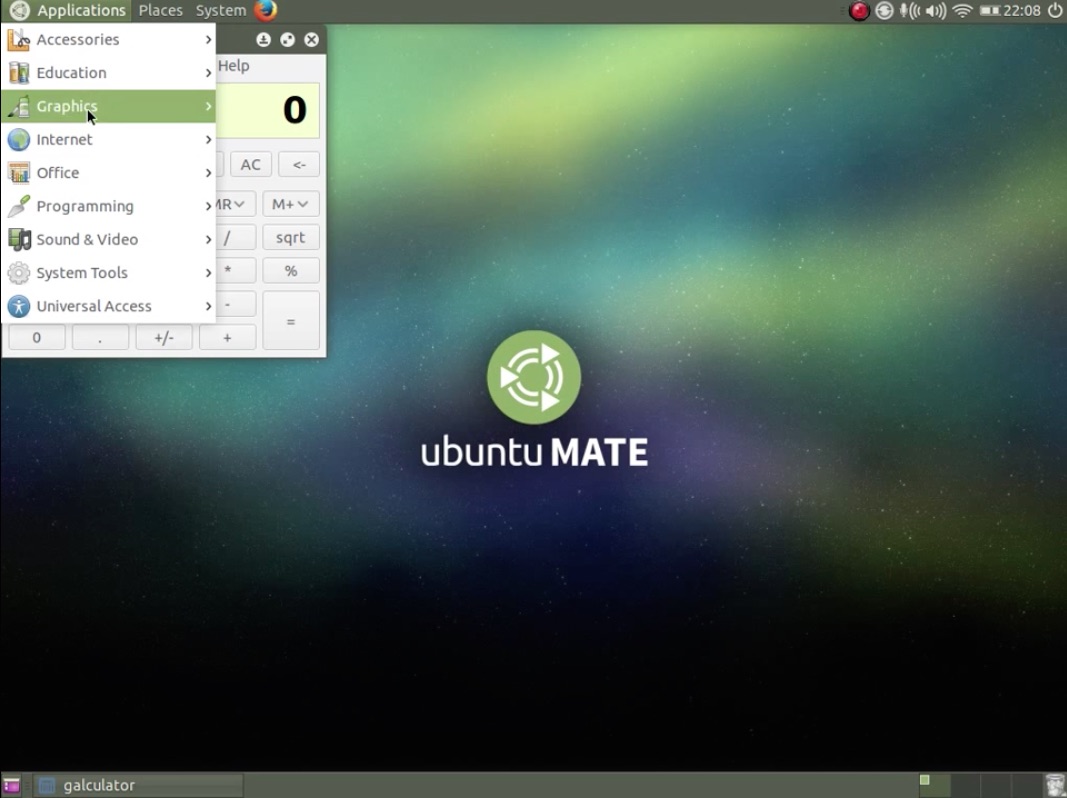
Ubuntu MATE 15.04 Beta 2 balms the teething issues that blighted its inaugural beta, with a few minor changes introduced as a result.
The latest versions of Folder Color and Caja (the MATE file manager) actions are both now installed by default and there’s a new lock keys applet for keyboard aficionados to get acquainted with. The MATE Menu applet is also now available as is improved support for those wanting to use Compiz desktop effects.
On the application side the Cheese webcam app has been replaced with the lighter and less fancy guvcview, but an app still great for snapping a quick desktop selfie and the new drop-down Terminal app Tilda.
Download Ubuntu MATE 15.04 Beta 2
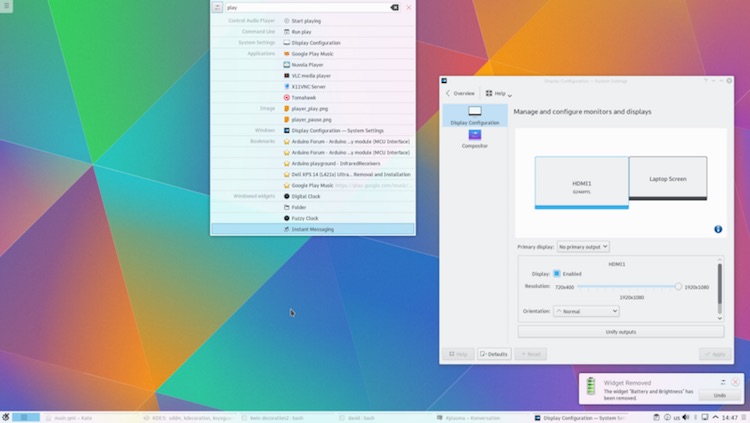
Kubuntu 15.04 Beta 2 continues to impress visually with the new Plasma 5.2 desktop enabled by default, while the suite of KDE Applications 14.12.2 offers a solid and reliable set of core apps. LibreOffice 4.4 and Firefox 36 also come preloaded.
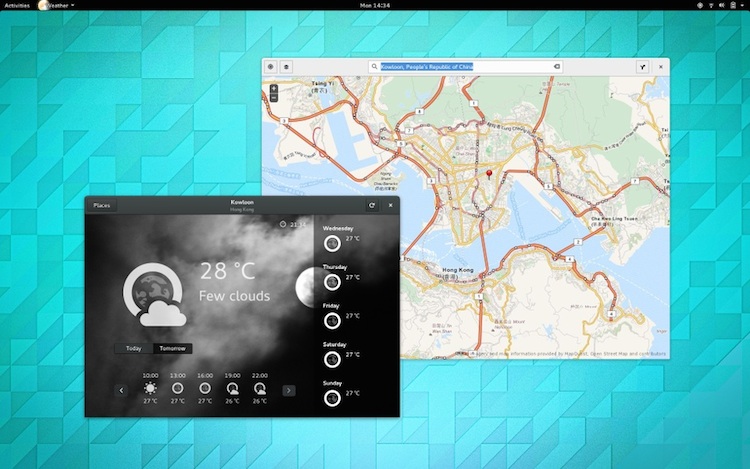
Ubuntu GNOME 15.04 Beta 2 ships with last October’s GNOME 3.14 desktop shell and associated apps out of the box. While not as shiny as this weeks GNOME 3.16 release (schedules are to blame) it offers a broader set of improvements over the mix of GNOME 3.10 and 3.12 used for its 14.10 release.
As with other community flavors, Ubuntu GNOME 15.04 also comes with the latest versions of popular apps and features a new default wallpaper.
Download Ubuntu GNOME 15.04 Beta 2
Remember: beta releases are intended for testing and feedback purposes rather than daily use. They are not production-ready. You may encounter bugs, find missing or broken functionality and experience quirks will using them.
Ubuntu 15.04 Will Be Released on April 23
Cloud Ninja
Ubuntu 15.04 Released, This Is What’s New
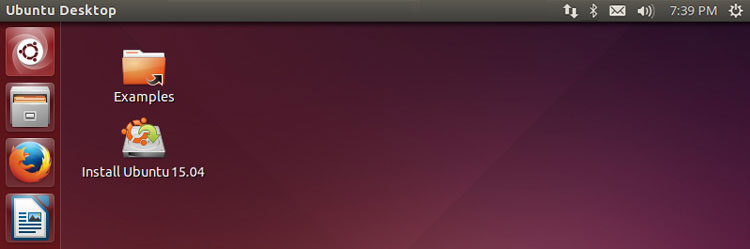
Well, here we are. After six busy months, one beta and a bunch of minor changes, the final stable release of Ubuntu 15.04 is now ready for you to download.
Also Read: Things To Do After Installing Ubuntu 15.04
Only a modest set of improvements are rolling out with Ubuntu 15.04 Vivid Vervet. While this means the release can’t rival the heavy change-logs of releases past, the adage ‘don’t fix what isn’t broke’ is clearly one the Vervet plays to.
The bug fixes, improvements in usability and a fresh serving of software updates add up to a somewhat substantive total, creating a release that feels more polished than ever.
Enough chatter. Let’s dive in and see what’s new in Ubuntu 15.04.
Ubuntu 15.04 – New Features
Systemd
‘You may notice a change in boot speed [because of Systemd]…’
The headline change in Ubuntu 15.04 is the introduction of the Systemd init system at boot-time.
This is the software that initializes (hence the name ‘init’) first when booting, and handles loading of the various modules and background processes that make much of a modern computer operating system do what it needs to.
Ubuntu previously used Upstart, its own custom-made Init system, at boot time. When Debian, the Linux distribution that Ubuntu is built upon, chose to adopt Systemd Ubuntu understandably fell in line.
Upstart is available in 15.04. It’s included as a fallback in GRUB and is used for controlling user sessions.
The merits (or lack thereof) of the switch are largely moot for the less technically minded. It is possible that some users will notice a slight change in boot speed depending on their configuration.
Unity 7.3

Menus can now be set to always show
The Unity desktop environment used by default in Ubuntu 15.04 receives a handful of small refinements, most of which aim to either fix bugs or correct missteps in earlier versions.
For example, application menus can now be set to ‘Always Show’.
Yeah; you no longer have to push your mouse to the top of the screen to show the ‘File’, ‘Edit’, ‘Help’, etc menus — not if you don’t want to.
If you prefer having your applications menus available inside application windows use the toggle in System Settings > Appearance > Behaviour to set things up how you like.
These “locally integrated menus”, introduced in 14.10, also support the ‘Always Show’ feature and showing up on mouseover of unfocused windows.
Other improvements to Unity in Vivid Vervet include a fix for showing the overlay elements (HUD, Dash, etc) over fullscreen windows and small adjustments to the speed of login and logout animations.
Compiz 0.9.12
Powering the Unity desktop experience is Compiz, the tried-and-trusted window manager. In keeping with the rest of this release the changes it gets are modest and made up of bug fixes and compatibility with alternative desktop environments.
Ubuntu Linux Kernel 3.19
While not based on the latest version of the Linux Kernel Ubuntu 15.04 ships with a modified version of 3.19.3 one. Expect a few updates to the most recent 3.19.x patch releases shortly after release.
Application Updates

New and updated apps feature
You’ll also find updated versions many of Ubuntu’s default apps, including the latest Firefox web-browser and Thunderbird e-mail client, a new version of the Rhythmbox music player plus an entirely revamped Totem video player.
- LibreOffice 4.3.2.2
- Firefox 37
- Thunderbird 31.6
- Shotwell 0.20.2
- Nautilus 3.14.2
- Evince 3.14.2
- Rhythmbox 3.1
- Totem 3.14.1
- GNOME Terminal 3.14
New Default Wallpaper

Ubuntu 15.04 Default Wallpaper
Ubuntu’s default wallpaper choice is irrelevant to some, integral to others. Whatever side of the fence you sit on the new wallpaper is palatable enough. After all: first impressions count.
Expect to see this new design flash up in various ‘Ubuntu in the wild’ posts over the next six months!
Ubuntu Make
Having been formally introduced in last October’s release the ‘Ubuntu Developer Tools Center’ has undergone a number of changes for Vivid, including being renamed as the more memorable ‘Ubuntu Make’.
Ubuntu Make simplifies the process of installing a host of developer-orientated tools, editors, libraries and software development kits including the Android SDK, IDEA, PyCharm, and the new Firefox Developer Edition.
Improvements to the way library managers behave now allows multiple system libraries to be run/used without conflict.
Our Vivid Verdict
‘Ubuntu 15.04 shines… a glowing example of a desktop that just works for users’
Ubuntu 15.04 is yet another solid entry in the distribution’s long release history. A dependable desktop operating system suited for end users but with plenty of convenient extras to woo developers with.
Though the Unity 7 desktop is largely mothballed as work progresses on the new converged experience with Unity 8, the modest refinements received here buff the experience. Unity in Ubuntu 15.04 shines brighter, a glowing example of a desktop that ‘just works’ for users.
With a support period of just nine months and many of the Unity improvements on show being backported to Ubuntu 14.04 LTS, the case for upgrading is weakened.
But for fans who like running the latest version and for developers in need of the latest packages and libraries to work with, Ubuntu 15.04 Vivid Vervet offers few drawbacks, plenty of positives.
Download Ubuntu 15.04 ‘Vivid Vervet’
Looking for Ubuntu 15.04 downloads? .ISO images are available to download direct from Canonical through your browser
Download Ubuntu 15.04 Vivid Vervet
Alternatively, you may get your download faster by using the torrents below.
Ubuntu 15.04 Desktop (64bit) Torrent Ubuntu 15.04 Desktop (32bit) Torrent
To upgrade Ubuntu 14.10 to Ubuntu 15.04 you’ll need to be patient; you’ll get a notification prompt asking if you want to upgrade at some point in the next 24 to 48 hours. You can check for the update from the command line (in 14.10) by using;
sudo do-release-upgrade
Ubuntu 14.04 LTS users will need to manually opt-in to non-LTS releases in the ‘Software & Updates > Updates’ tab to see the prompt.
Source: http://www.omgubuntu.co.uk/2015/04/ubuntu-15-04-download-new-features