
only rename in search folders, not media library (4.5.8)
237 views
Skip to first unread message

Adam
Feb 16, 2022, 3:49:08 PM2/16/22
to TV Rename
Hello
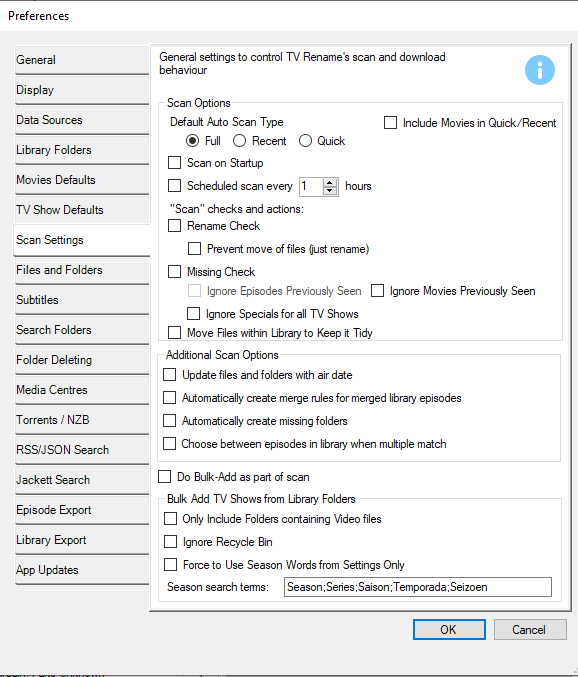
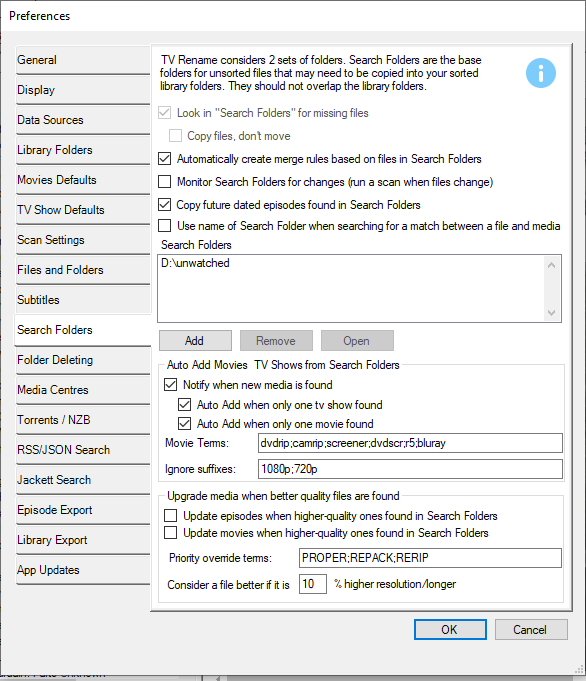
I'm a new user, trying to figure out if TV Rename can meet my needs. I've read the Quick-Start, skimmed what I thought were the relevant parts of the manual / user guide and searched the archives of this help group. I've spent the best part of an hour fiddling around and have made some progress, but I'm not quite there yet, so I'm hoping someone here can help me work out if TV Rename is worth investing more time setting up for my needs.
I want TV Rename to scan my 'Search Folder' (where my new TV and movie files go) and rename them using TVDB or similar. I'd be happy for it to move them into my Media Library, but I'd prefer that to be optional if possible and I'd like to preview any changes before I commit to them. Some of the new files in my Search Folder belong to existing TV series in my Media Library, others will be part of new series that don't exist in my Media Library yet.
I don't want TV Rename to change the filenames or folder structure of my Media Library. I'm aware my library has some minor naming inconsistencies, but these do not cause problems for Kodi's scraper and if I change the filenames or folder structure I will lose the 'watched' status of these files in Kodi. (I have over 1000 TV series and 3000 movies, so going through these manually to mark which have been watched is a non-starter.)
I set up the folders and preferences as suggested in the Quick-Start. Then when I first ran a Full Scan, I saw suggestions for missing episodes and files that needed renaming in my Media Library, but I couldn't see the downloaded files in my Search Folder. I found some useful options in Preferences | Scan Settings which turned off features I didn't need such as missing episodes, but now when I run a Full Scan I get no results at all.
Can TV Rename do what I want and if so, what settings do I need to change?
Thanks in advance!
Adam
PS Here are a couple of screenshots in case they help.

Sparky53
Feb 16, 2022, 10:22:27 PM2/16/22
to TV Rename
Hi,
Welcome! I think you will be able ot get TV Rename working for you from what you have said, but you may need to adjust they way that you maintian your library a little.
Firstly - as a general hint, I would only try scanning one show until you have the settings about right for you. (right click and 'Quick Scan xxx'). This is just a quick way to scan through and see the impact of some of the (many) settings.
Have you run the 'Bulk Add' feature on your existing library to add the shows in your library to the app?
Taking your message one sentance at a time:
I want TV Rename to scan my 'Search Folder' (where my new TV and movie files go) and rename them using TVDB or similar. I'd be happy for it to move them into my Media Library, but I'd prefer that to be optional if possible and I'd like to preview any changes before I commit to them.
* Yes the general process is to run a scan, review the proposed actions and then 'Do' those actions.
* TVR is built around the idea that it is planning to move files from the 'search' folders into the library
Some of the new files in my Search Folder belong to existing TV series in my Media Library, others will be part of new series that don't exist in my Media Library yet.
* If you want TVR ro recognise the new shows, then turn 'Auto-Add' on - looks like you have.
I don't want TV Rename to change the filenames or folder structure of my Media Library.
* That's OK, TVR has a few options to help. TVshows can be in a number of formats (eg: all in the root folder or all in sub folders.)
* You can specify the 'root' folder for each TV show
* You can set the library default for many settings and override them for individual shows. (for example generally show subfolders are in the 'season xx' format, but I have some that are in the 'Series xx' format')
* Movies are a little less easy to do this with, but the 'Bulk-Add' feature should take this into account.
I'm aware my library has some minor naming inconsistencies, but these do not cause problems for Kodi's scraper and if I change the filenames or folder structure I will lose the 'watched' status of these files in Kodi. (I have over 1000 TV series and 3000 movies, so going through these manually to mark which have been watched is a non-starter.)
* I have TVR update episode names and folders and Kodi is clever enough to keep track of watched status I think. Maybe do a trial and see.
* TV Rename will suggest changes to keep the library in order, but each suggestion can be ignored.
I set up the folders and preferences as suggested in the Quick-Start. Then when I first ran a Full Scan, I saw suggestions for missing episodes and files that needed renaming in my Media Library, but I couldn't see the downloaded files in my Search Folder.
* They should have been in there? maybe just lost in the noise? Try scaning one show only and may be easier to see.
I found some useful options in Preferences | Scan Settings which turned off features I didn't need such as missing episodes, but now when I run a Full Scan I get no results at all.
* Turnign off missing episodes will really hamper the functionality; I'd leave that on for now.
* If you have a legacy show that needs to stay as it is. Say 'Friends' then it can be ignored per series
* If you have a show where you only want to have seasons 1 and 2 then add not interested seasons to the 'Ignored Seasons' list
* If you have episodes you know you don't care about then you can right click and add the 'missing item' into the 'ignore list' so they don't bug you again
In other news:
There is a 'Quick Rename' function in the tools menu that allows you to quickly dump files there and rename them in place
Under 'Files and Folders' disable 'Case Sensitive match for filenames' as this may reduce minor naming changes
Hope that helps.
Adam
Feb 17, 2022, 7:47:25 PM2/17/22
to TV Rename
Hi,


Thanks a lot for the quick and helpful reply.
Firstly - as a general hint, I would only try scanning one show until you have the settings about right for you. (right click and 'Quick Scan xxx'). This is just a quick way to scan through and see the impact of some of the (many) settings.
That's a great tip and has really helped me as I try to get used to the software.
Have you run the 'Bulk Add' feature on your existing library to add the shows in your library to the app?
Yes, but it didn't go brilliantly, I'm afraid. When I used 'Auto ID All', it failed to ID many of the shows in my Media Library. Example:
Then when I clicked 'Add & Close' I got a 'Download Progress' progress dialog that didn't advance for about ten minutes. The Cancel button didn't work and I had to close it from the taskbar:
I exited TV Rename without saving anything and tried again after a reboot. The same thing happened the next time.
* If you want TVR ro recognise the new shows, then turn 'Auto-Add' on - looks like you have.
Is there a way to test that functionality without running a Full Scan in the same way as I can test a single existing show by Right-Clicking and selecting 'Quick Scan'?
* That's OK, TVR has a few options to help. TVshows can be in a number of formats (eg: all in the root folder or all in sub folders.)* You can specify the 'root' folder for each TV show* You can set the library default for many settings and override them for individual shows. (for example generally show subfolders are in the 'season xx' format, but I have some that are in the 'Series xx' format')
That sounds positive though I can't be sure until I actually finish setting it up. This is my concern and why I'm asking a lot of questions - I don't want to spend hours learning and tweaking the software only to find out it doesn't quite meet my needs!
The majority of my TV shows are in show folders, but not sorted by season within those folders. However, there are a few exceptions. What options do I need to set to take account of that?
* I have TVR update episode names and folders and Kodi is clever enough to keep track of watched status I think. Maybe do a trial and see.
I have definitely in the past lost watched status in Kodi as a result of renaming folders and files. Perhaps Kodi has got smarter since then but since there are no obvious benefits to me of renaming e.g. 1x01 to S1E01 and a possible downside, I'd rather avoid it and certainly want to postpone investigating it at least until I have TVR renaming my new files which is the reason I installed it.
* TV Rename will suggest changes to keep the library in order, but each suggestion can be ignored.
Great, I'll do that initially.
* They should have been in there? maybe just lost in the noise? Try scaning one show only and may be easier to see.
Yes that fixed it, thanks! I see them now.
* Turnign off missing episodes will really hamper the functionality; I'd leave that on for now.
OK. Will it hamper other functionality besides telling me which episodes of a show I don't have? That's not something that's especially useful to me and I am trying to focus on the features I really need.
There is a 'Quick Rename' function in the tools menu that allows you to quickly dump files there and rename them in place
Oh wow! That's exactly what I wanted. I don't have time to test it thoroughly now but it seems to do what I want. This can be my path into using TVR - start just renaming, then move onto to renaming and moving, then see if it's worth tidying my Media Library and finally figure out if I can find a use for missing episodes or 'When to Watch'.
Under 'Files and Folders' disable 'Case Sensitive match for filenames' as this may reduce minor naming changes
That's already disabled by default - at least I can't remember changing it!
Thanks again.
Adam
Sparky53
Feb 17, 2022, 8:29:51 PM2/17/22
to TV Rename
OK - some random points from your email:
1. Seems like 'Bulk Add' is finding folders called 'extrafanart': Two options to fix this: (1) Check Preferences->Scan Settings->Only Include Folders containing Video Files, (2) Ignore them and rescan (I would advise option 1 given there are a few)
2. Re Download Progress hanging: I suspect it is doing stuff behind the scenes, so either be patient, or keep an eye on the log file to see what's going on. I use http://www.baremetalsoft.com/baretail/index.php for this
3. Best way to test 'Auto-Add' is to do a 'Quick Scan' (maybe setup TVR to just point to a search folder with a small number of files) - https://www.tvrename.com/manual/features/#scanning for details of the scan types
3. Best way to test 'Auto-Add' is to do a 'Quick Scan' (maybe setup TVR to just point to a search folder with a small number of files) - https://www.tvrename.com/manual/features/#scanning for details of the scan types
4. Re ''The majority of my TV shows are in show folders, but not sorted by season within those folders. However, there are a few exceptions. What options do I need to set to take account of that?' Bulk add recognises 'flat' and subfolders automatically based on the names in settings (for season, series etc ie if a folder contains subfolders with these names it assumes it is organised by season). In the show's settings, click on the 'folders' tab
Hope that helps,
Cheers
Issues for me:
- Check 'Download Progress' updates accurately and cancel button works
Sparky53
Feb 17, 2022, 8:36:33 PM2/17/22
to TV Rename
Also, for a show that you are happy to leave in a format that does not match your 'Filename Template' (eg
1x01 to S1E01) then you can disable renaming for that show. Edit TV Show Settings -> Advanced tab -> 'Do Renaming'
If most of your shows are non-standard then you can change the default to off in Preferences -> TV Show Defaults -> Default Advanced Settings
Quick Rename TV Files is quite new, so be gentle and let me know any feedback please!

Mariusz Piliszek
Jul 27, 2023, 8:30:32 AM7/27/23
to TV Rename
Hi,
I'm struggling with this since some time now. Is there a way to prevent renaming of items that are already in the library? It is quite often that TVR is renaming files that were already processed by it (e.g. name was corrected in the data source site). After each such rename my Kodi's watched is corrupted.
Regards,
Mariusz.

TV Rename
Jul 27, 2023, 10:35:15 AM7/27/23
to TV Rename
Have you tired setting 'missing check' to to and 'renaming check' to off for a show?
Mariusz Piliszek
Jul 28, 2023, 5:09:50 AM7/28/23
to TV Rename
With "Rename check" set to off it seems to be working fine. I'll keep monitoring it and let you know later.
Thanks.
Mariusz Piliszek
Aug 5, 2023, 5:09:51 AM8/5/23
to TV Rename
Unfortunately, it does not work. If "Rename check" is not turned on even new episodes (not yet in the library) are not renamed. So still there is no way to make TVRename not to rename only files that were already added to the library.
Reply all
Reply to author
Forward
0 new messages