
svn:global-ignores
2,433 views
Skip to first unread message

Chris
Aug 20, 2013, 4:05:07 PM8/20/13
to us...@tortoisesvn.tigris.org, christoph...@merton.ox.ac.uk
Dear TortoiseSVN team,
First, thank you for all your efforts to provide such a great tool.
Now, my suggestion is regarding the handling of the new svn:global-ignores feature for folders that have not yet been added to the repository.
At the moment, until a folder is "added", the svn:global-ignores filter is not applied.
Instead, it would be great if svn:global-ignores could be used to hide files in sub-folders even before they are added.
Finally, on a related note, at the moment clicking "ignore" on a file fails if the parent folder hasn't yet been added. Could TortoiseSVN offer to add the folder and re-attempt setting the ignore in that case?
Best wishes,
Chris.
------------------------------------------------------
http://tortoisesvn.tigris.org/ds/viewMessage.do?dsForumId=4061&dsMessageId=3063072
To unsubscribe from this discussion, e-mail: [users-un...@tortoisesvn.tigris.org].
First, thank you for all your efforts to provide such a great tool.
Now, my suggestion is regarding the handling of the new svn:global-ignores feature for folders that have not yet been added to the repository.
At the moment, until a folder is "added", the svn:global-ignores filter is not applied.
Instead, it would be great if svn:global-ignores could be used to hide files in sub-folders even before they are added.
Finally, on a related note, at the moment clicking "ignore" on a file fails if the parent folder hasn't yet been added. Could TortoiseSVN offer to add the folder and re-attempt setting the ignore in that case?
Best wishes,
Chris.
------------------------------------------------------
http://tortoisesvn.tigris.org/ds/viewMessage.do?dsForumId=4061&dsMessageId=3063072
To unsubscribe from this discussion, e-mail: [users-un...@tortoisesvn.tigris.org].
Bob Archer
Aug 21, 2013, 1:15:33 PM8/21/13
to us...@tortoisesvn.tigris.org, christoph...@merton.ox.ac.uk
> Dear TortoiseSVN team,
>
> First, thank you for all your efforts to provide such a great tool.
>
> Now, my suggestion is regarding the handling of the new svn:global-ignores
> feature for folders that have not yet been added to the repository.
>
> At the moment, until a folder is "added", the svn:global-ignores filter is not
> applied.
I'm not sure what you are saying here? Are you saying that you can't apply a property to a folder that is NOT versioned? If so, that is correct.
>
> First, thank you for all your efforts to provide such a great tool.
>
> Now, my suggestion is regarding the handling of the new svn:global-ignores
> feature for folders that have not yet been added to the repository.
>
> At the moment, until a folder is "added", the svn:global-ignores filter is not
> applied.
>
> Instead, it would be great if svn:global-ignores could be used to hide files in
> sub-folders even before they are added.
Generally, global ignores are done at the project or repository level... that the whole point of them, so you don't have to add svn:ignore to every new folder, you can put an svn:global-ignores at your project root and it would apply to anything you are adding under that path recursively, including when using the import command.
BOb
>
> Finally, on a related note, at the moment clicking "ignore" on a file fails if the
> parent folder hasn't yet been added. Could TortoiseSVN offer to add the folder
> and re-attempt setting the ignore in that case?
>
> Best wishes,
>
> Chris.
>
> ------------------------------------------------------
> http://tortoisesvn.tigris.org/ds/viewMessage.do?dsForumId=4061&dsMessageI
> d=3063072
>
> To unsubscribe from this discussion, e-mail: [users-
------------------------------------------------------
http://tortoisesvn.tigris.org/ds/viewMessage.do?dsForumId=4061&dsMessageId=3063144
Ben Fritz
Aug 21, 2013, 5:48:11 PM8/21/13
to us...@tortoisesvn.tigris.org
On Wed, Aug 21, 2013 at 12:15 PM, Bob Archer <Bob.A...@amsi.com> wrote:
>> Dear TortoiseSVN team,
>>
>> First, thank you for all your efforts to provide such a great tool.
>>
>> Now, my suggestion is regarding the handling of the new svn:global-ignores
>> feature for folders that have not yet been added to the repository.
>>
>> At the moment, until a folder is "added", the svn:global-ignores filter is not
>> applied.
>
> I'm not sure what you are saying here? Are you saying that you can't apply a property to a folder that is NOT versioned? If so, that is correct.
>
I think he means something like the following scenario. Assume you
>> Dear TortoiseSVN team,
>>
>> First, thank you for all your efforts to provide such a great tool.
>>
>> Now, my suggestion is regarding the handling of the new svn:global-ignores
>> feature for folders that have not yet been added to the repository.
>>
>> At the moment, until a folder is "added", the svn:global-ignores filter is not
>> applied.
>
> I'm not sure what you are saying here? Are you saying that you can't apply a property to a folder that is NOT versioned? If so, that is correct.
>
have a working copy of a directory which has svn:global-ignores set to
ignore files named "foo". In an existing subdirectory, create a file
named "foo". SVN ignores it as intended. Now create a new directory
but do NOT add that directory. Create a new file "foo" within that
unversioned directory.
The OP expects that the file "foo" within the unversioned directory
does not show up in the list of changes, because "foo" is in the
global ignore list.
------------------------------------------------------
http://tortoisesvn.tigris.org/ds/viewMessage.do?dsForumId=4061&dsMessageId=3063169
Chris
Aug 23, 2013, 10:49:21 AM8/23/13
to Bob Archer, users, christoph...@merton.ox.ac.uk
Dear Bob and TortoiseSVN Users,
Here's an example...
Create an empty repository and check out a working copy.
Set svn:global-ignores to "*.asv *.tmp" at the top level (with a newline between those two patterns if it matters).
Now, mkdir "theFiles", cd "theFiles", touch a.m a.asv b.m b.asv c.tmp d.tmp e.tmp f.tmp
Right-click on the WC and choose commit. You see this dialog...
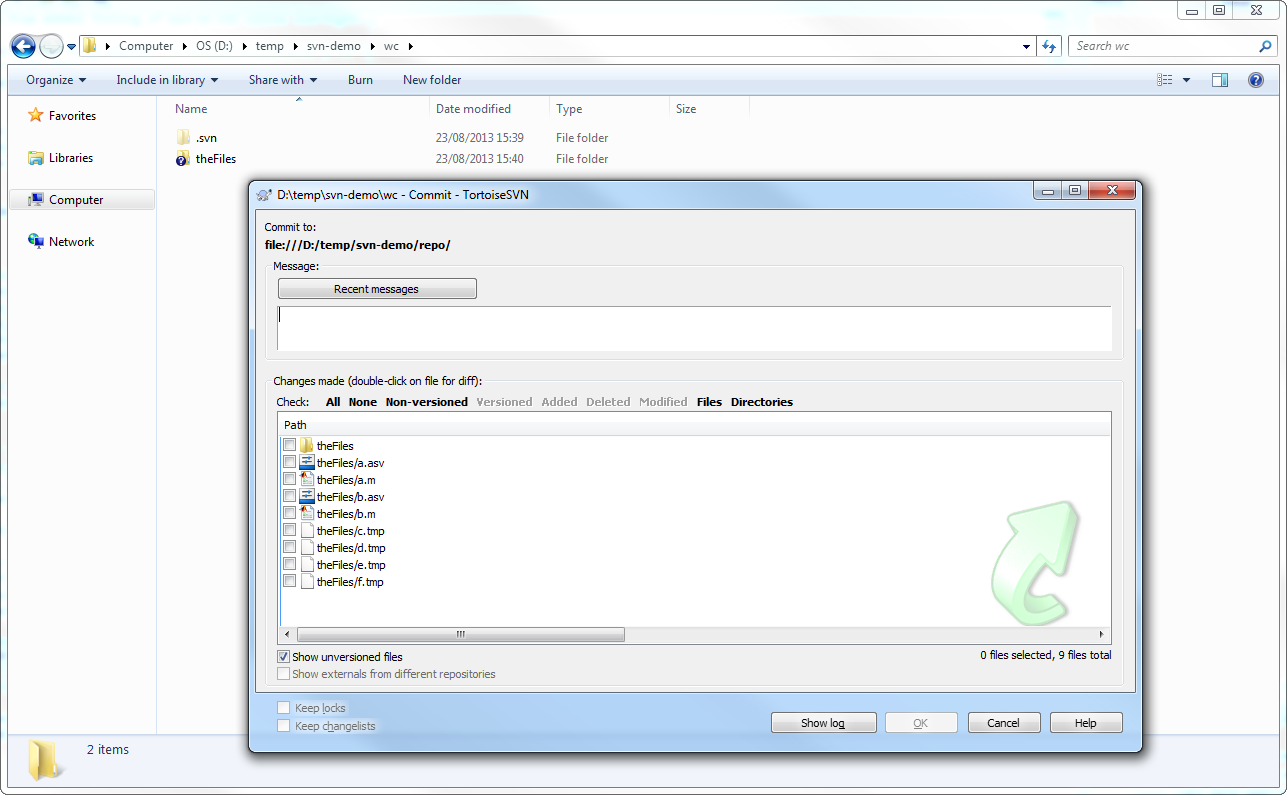
Notice how all the *.asv and *.tmp files still show up, even though the intent of the svn:global-ignores was that they not be versioned.
Choose "Add" on the "theFiles" folder and you see this:

again, all those *.tmp and *.asv files have been selected by default, even though the svn:global-ignores property on the parent folder shows that they aren't desirable files.
Finally, if we add just the "theFiles" folder and nothing else, then the commit dialog looks like this:

My suggestion is that the TortoiseSVN Commit and Add dialogs should filter the list of files in unversioned child folders according to the svn:global-ignores that would be active if that child folder were added.
I understand that the current behaviour is perhaps "right" in some sense - but even so, I don't think it is helpful. The display is cluttered with junk files and it is easy to accidentally add a file that should be being ignored.
Best wishes,
Chris.
Here's an example...
Create an empty repository and check out a working copy.
Set svn:global-ignores to "*.asv *.tmp" at the top level (with a newline between those two patterns if it matters).
Now, mkdir "theFiles", cd "theFiles", touch a.m a.asv b.m b.asv c.tmp d.tmp e.tmp f.tmp
Right-click on the WC and choose commit. You see this dialog...
Notice how all the *.asv and *.tmp files still show up, even though the intent of the svn:global-ignores was that they not be versioned.
Choose "Add" on the "theFiles" folder and you see this:
again, all those *.tmp and *.asv files have been selected by default, even though the svn:global-ignores property on the parent folder shows that they aren't desirable files.
Finally, if we add just the "theFiles" folder and nothing else, then the commit dialog looks like this:
My suggestion is that the TortoiseSVN Commit and Add dialogs should filter the list of files in unversioned child folders according to the svn:global-ignores that would be active if that child folder were added.
I understand that the current behaviour is perhaps "right" in some sense - but even so, I don't think it is helpful. The display is cluttered with junk files and it is easy to accidentally add a file that should be being ignored.
Best wishes,
Chris.
On 21/08/2013 18:15, Bob Archer wrote:
Stefan Küng
Aug 23, 2013, 12:10:46 PM8/23/13
to us...@tortoisesvn.tigris.org
On 23.08.2013 16:49, Chris wrote:
> Dear Bob and TortoiseSVN Users,
>
> Here's an example...
>
> Create an empty repository and check out a working copy.
>
> Set svn:global-ignores to "*.asv *.tmp" at the top level (with a newline
> between those two patterns if it matters).
>
> Now, mkdir "theFiles", cd "theFiles", touch a.m a.asv b.m b.asv c.tmp
> d.tmp e.tmp f.tmp
>
> Right-click on the WC and choose commit. You see this dialog...
>
>
>
> Dear Bob and TortoiseSVN Users,
>
> Here's an example...
>
> Create an empty repository and check out a working copy.
>
> Set svn:global-ignores to "*.asv *.tmp" at the top level (with a newline
> between those two patterns if it matters).
>
> Now, mkdir "theFiles", cd "theFiles", touch a.m a.asv b.m b.asv c.tmp
> d.tmp e.tmp f.tmp
>
> Right-click on the WC and choose commit. You see this dialog...
>
>
>
> Notice how all the *.asv and *.tmp files still show up, even though the
> intent of the svn:global-ignores was that they not be versioned.
Not exactly: the svn:global-ignores only ignores files inside a working
> intent of the svn:global-ignores was that they not be versioned.
copy, more specifically inside versioned folders.
Your files are inside an unversioned folder so they're not ignored by
the svn:global-ignores property.
If you want to globally ignore such files, you have to set those up in
the settings dialog under "global ignores" because only those work on
unversioned folders and files inside them.
Stefan
--
___
oo // \\ "De Chelonian Mobile"
(_,\/ \_/ \ TortoiseSVN
\ \_/_\_/> The coolest interface to (Sub)version control
/_/ \_\ http://tortoisesvn.net
------------------------------------------------------
http://tortoisesvn.tigris.org/ds/viewMessage.do?dsForumId=4061&dsMessageId=3063253
To unsubscribe from this discussion, e-mail: [users-un...@tortoisesvn.tigris.org].
Dan Lasley
Sep 11, 2013, 8:03:57 AM9/11/13
to us...@tortoisesvn.tigris.org
Just to follow up, the ignore filters are not applied when you to the first Import to the repository, so you have to manage a bunch of files that should never have been included.
That is how I interpret "global" in "global-ignore" - every time, all the time.
------------------------------------------------------
http://tortoisesvn.tigris.org/ds/viewMessage.do?dsForumId=4061&dsMessageId=3064340
That is how I interpret "global" in "global-ignore" - every time, all the time.
------------------------------------------------------
http://tortoisesvn.tigris.org/ds/viewMessage.do?dsForumId=4061&dsMessageId=3064340
Bob Archer
Sep 11, 2013, 10:29:38 AM9/11/13
to us...@tortoisesvn.tigris.org
> Just to follow up, the ignore filters are not applied when you to the first Import
> to the repository, so you have to manage a bunch of files that should never
> have been included.
>
> That is how I interpret "global" in "global-ignore" - every time, all the time.
That really depends. If you are importing into a folder that has a parent that has svn:global-ignores on it, then those file patterns should be ignored when you do your import.
> to the repository, so you have to manage a bunch of files that should never
> have been included.
>
> That is how I interpret "global" in "global-ignore" - every time, all the time.
http://blogs.collab.net/subversion/repository-dictated-configuration-day-3-global-ignores
If it isn't working like this, I would say it is a bug and you should post on the svn mail list.
BOb
------------------------------------------------------
http://tortoisesvn.tigris.org/ds/viewMessage.do?dsForumId=4061&dsMessageId=3064358
Dan Lasley
Sep 11, 2013, 3:14:23 PM9/11/13
to us...@tortoisesvn.tigris.org
Ah-ha! I'm using a web-based host for collaboration reasons, and I haven't found the global-ignores option there.
Currently (and this may be inefficient), I do the following:
1) Import a new project to the web-host.
2) Check-out a working copy to my computer.
3) Adjust the ignore settings on my working folder
4) Commit the folder, which then deletes/unversions the ignored files.
This is OK as my projects are small. I wonder if there's a better way.
------------------------------------------------------
http://tortoisesvn.tigris.org/ds/viewMessage.do?dsForumId=4061&dsMessageId=3064374
Currently (and this may be inefficient), I do the following:
1) Import a new project to the web-host.
2) Check-out a working copy to my computer.
3) Adjust the ignore settings on my working folder
4) Commit the folder, which then deletes/unversions the ignored files.
This is OK as my projects are small. I wonder if there's a better way.
------------------------------------------------------
http://tortoisesvn.tigris.org/ds/viewMessage.do?dsForumId=4061&dsMessageId=3064374
Bob Archer
Sep 11, 2013, 4:16:14 PM9/11/13
to us...@tortoisesvn.tigris.org
> Ah-ha! I'm using a web-based host for collaboration reasons, and I haven't
> found the global-ignores option there.
>
> Currently (and this may be inefficient), I do the following:
>
> 1) Import a new project to the web-host.
> 2) Check-out a working copy to my computer.
> 3) Adjust the ignore settings on my working folder
> 4) Commit the folder, which then deletes/unversions the ignored files.
>
> This is OK as my projects are small. I wonder if there's a better way.
Global ignores is a client configuration item, NOT a server configuration item. It's "global" to the CLIENT, ie all the working copies you use on that client. So, you should be able to edit your client config file to add your ignore.
> found the global-ignores option there.
>
> Currently (and this may be inefficient), I do the following:
>
> 1) Import a new project to the web-host.
> 2) Check-out a working copy to my computer.
> 3) Adjust the ignore settings on my working folder
> 4) Commit the folder, which then deletes/unversions the ignored files.
>
> This is OK as my projects are small. I wonder if there's a better way.
If you want it global to everyone using the repository you can put svn:global-ignores of the repository root folder, and it should propagate to all your projects. As long as your users have access to read the root folder, the svn:global-ignores should apply to every thing imported and added to that repository.
BOb
------------------------------------------------------
http://tortoisesvn.tigris.org/ds/viewMessage.do?dsForumId=4061&dsMessageId=3064383
Simon Large
Sep 11, 2013, 5:41:39 PM9/11/13
to us...@tortoisesvn.tigris.org
On 11 September 2013 21:16, Bob Archer <Bob.A...@amsi.com> wrote:
>> Ah-ha! I'm using a web-based host for collaboration reasons, and I haven't
>> found the global-ignores option there.
>>
>> Currently (and this may be inefficient), I do the following:
>>
>> 1) Import a new project to the web-host.
>> 2) Check-out a working copy to my computer.
>> 3) Adjust the ignore settings on my working folder
>> 4) Commit the folder, which then deletes/unversions the ignored files.
>>
>> This is OK as my projects are small. I wonder if there's a better way.
>
> Global ignores is a client configuration item, NOT a server configuration item. It's "global" to the CLIENT, ie all the working copies you use on that client. So, you should be able to edit your client config file to add your ignore.
>
> If you want it global to everyone using the repository you can put svn:global-ignores of the repository root folder, and it should propagate to all your projects. As long as your users have access to read the root folder, the svn:global-ignores should apply to every thing imported and added to that repository.
Just to confuse you there are two global ignores in subversion. The
>> Ah-ha! I'm using a web-based host for collaboration reasons, and I haven't
>> found the global-ignores option there.
>>
>> Currently (and this may be inefficient), I do the following:
>>
>> 1) Import a new project to the web-host.
>> 2) Check-out a working copy to my computer.
>> 3) Adjust the ignore settings on my working folder
>> 4) Commit the folder, which then deletes/unversions the ignored files.
>>
>> This is OK as my projects are small. I wonder if there's a better way.
>
> Global ignores is a client configuration item, NOT a server configuration item. It's "global" to the CLIENT, ie all the working copies you use on that client. So, you should be able to edit your client config file to add your ignore.
>
> If you want it global to everyone using the repository you can put svn:global-ignores of the repository root folder, and it should propagate to all your projects. As long as your users have access to read the root folder, the svn:global-ignores should apply to every thing imported and added to that repository.
one Bob is talking about is accessed from the TSVN settings dialog and
is local to that machine but affects all working copies. The
svn:global-ignore property works in almost the same way as the
svn:ignore property except that it is inherited by all child folders.
It is perhaps ill-named, being more of a recursive-ignore, and for
this reason the TSVN menu refers to it as 'ignore recursively'.
Simon
------------------------------------------------------
http://tortoisesvn.tigris.org/ds/viewMessage.do?dsForumId=4061&dsMessageId=3064393
Dan Lasley
Sep 17, 2013, 2:35:51 PM9/17/13
to us...@tortoisesvn.tigris.org
Now I'm confused. You said earlier (and provided a link) that the svn: properties are set by the highest parent folder, in this case my web-hosted repository. The example provided shows a network server where properties can be assigned/changed. I can't do that on my web host.
In your more recent post, you said that these properties are set by the child folder. I can't access the repository folder directly.
Right or wrong, I'm definitely confused.
------------------------------------------------------
http://tortoisesvn.tigris.org/ds/viewMessage.do?dsForumId=4061&dsMessageId=3064735
In your more recent post, you said that these properties are set by the child folder. I can't access the repository folder directly.
Right or wrong, I'm definitely confused.
------------------------------------------------------
http://tortoisesvn.tigris.org/ds/viewMessage.do?dsForumId=4061&dsMessageId=3064735
Bob Archer
Sep 17, 2013, 2:56:37 PM9/17/13
to us...@tortoisesvn.tigris.org
> Now I'm confused. You said earlier (and provided a link) that the svn:
> properties are set by the highest parent folder, in this case my web-hosted
> repository. The example provided shows a network server where properties
> can be assigned/changed. I can't do that on my web host.
>
> In your more recent post, you said that these properties are set by the child
> folder. I can't access the repository folder directly.
>
> Right or wrong, I'm definitely confused.
Svn:global-ignores is a property set on the repository. You don't need access to your host server to set that. Svn:global-ignores is combined with any "global ignores" set up in the config file. This is a "client" setting however on a shared host like Linux that file might be used by multiple users. Since we are talking about tortoise we are only dealing with windows here.
> properties are set by the highest parent folder, in this case my web-hosted
> repository. The example provided shows a network server where properties
> can be assigned/changed. I can't do that on my web host.
>
> In your more recent post, you said that these properties are set by the child
> folder. I can't access the repository folder directly.
>
> Right or wrong, I'm definitely confused.
Svn:global-ignores is inherited... svn searchs UP the folder hierarchy until it finds it... once it finds it, then it stops lookings.
So....
/This
/This/Is
/This/Is/My
/This/Is/My/Path
If you are adding to /This/Is/My/Path and you have svn:global-ignores set at both /This/Is/My and /This/Is ... only the setting on /this/is/my will be used.
BOb
------------------------------------------------------
http://tortoisesvn.tigris.org/ds/viewMessage.do?dsForumId=4061&dsMessageId=3064738
Dan Lasley
Sep 18, 2013, 9:36:06 AM9/18/13
to us...@tortoisesvn.tigris.org
OK, let me try again.
If I look at the TSVN properties in any folder in c:\projects\ it has svn:global-ignore set to ignore *.OBJ and *.LST.
When I go to Import my project for the first time, uploading it to my web-host repository, the LST and OBJ files get uploaded and "versioned". This is not the desired result.
What do I need to do to get these settings to apply?
Thanks for your patience.
------------------------------------------------------
http://tortoisesvn.tigris.org/ds/viewMessage.do?dsForumId=4061&dsMessageId=3064807
If I look at the TSVN properties in any folder in c:\projects\ it has svn:global-ignore set to ignore *.OBJ and *.LST.
When I go to Import my project for the first time, uploading it to my web-host repository, the LST and OBJ files get uploaded and "versioned". This is not the desired result.
What do I need to do to get these settings to apply?
Thanks for your patience.
------------------------------------------------------
http://tortoisesvn.tigris.org/ds/viewMessage.do?dsForumId=4061&dsMessageId=3064807
Simon Large
Sep 18, 2013, 11:07:42 AM9/18/13
to us...@tortoisesvn.tigris.org
On 18 September 2013 14:36, Dan Lasley <dla...@milleredge.com> wrote:
> OK, let me try again.
>
> If I look at the TSVN properties in any folder in c:\projects\ it has svn:global-ignore set to ignore *.OBJ and *.LST.
>
> When I go to Import my project for the first time, uploading it to my web-host repository, the LST and OBJ files get uploaded and "versioned". This is not the desired result.
>
> What do I need to do to get these settings to apply?
Any svn: property applies only to a versioned working copy. At the
> OK, let me try again.
>
> If I look at the TSVN properties in any folder in c:\projects\ it has svn:global-ignore set to ignore *.OBJ and *.LST.
>
> When I go to Import my project for the first time, uploading it to my web-host repository, the LST and OBJ files get uploaded and "versioned". This is not the desired result.
>
> What do I need to do to get these settings to apply?
time when you do the import you have no working copy as you are
creating a new project in the repository, so there is nowhere to hang
these properties onto. The point of these properties is to allow you
to ignore files within an already-versioned working copy structure.
They do not and cannot work on import.
By contrast the global ignores in TSVN's settings are always there and
can be applied to imports.
Subversion has no mechanism, when you import a new project into the
repository, to tell you what files to ignore. You can set up a
server-side pre-commit hook to reject commits which include such
files, but it would be a sledgehammer solution and occasionally you
may need to version a file which would normally be ignored.
Personally I never use import at all. The manual describes a 2-stage
import process whereby you first create an empty folder in your
repository and checkout on top of your existing project folder. This
makes the project folder, but not its content, versioned. You can then
add svn:ignore properties, and also use the Add dialog to cherry pick
which files you want to include.
Simon
------------------------------------------------------
http://tortoisesvn.tigris.org/ds/viewMessage.do?dsForumId=4061&dsMessageId=3064810
Bob Archer
Sep 18, 2013, 11:51:23 AM9/18/13
to us...@tortoisesvn.tigris.org
> On 18 September 2013 14:36, Dan Lasley <dla...@milleredge.com> wrote:
> > OK, let me try again.
> >
> > If I look at the TSVN properties in any folder in c:\projects\ it has svn:global-
> ignore set to ignore *.OBJ and *.LST.
> >
> > When I go to Import my project for the first time, uploading it to my web-host
> repository, the LST and OBJ files get uploaded and "versioned". This is not the
> desired result.
> >
> > What do I need to do to get these settings to apply?
>
> Any svn: property applies only to a versioned working copy. At the time when
> you do the import you have no working copy as you are creating a new project
> in the repository, so there is nowhere to hang these properties onto. The point
> of these properties is to allow you to ignore files within an already-versioned
> working copy structure.
> They do not and cannot work on import.
>
> By contrast the global ignores in TSVN's settings are always there and can be
> applied to imports.
>
> Subversion has no mechanism, when you import a new project into the
> repository, to tell you what files to ignore.
In 1.8.x that isn't correct. I just tested this.
> > OK, let me try again.
> >
> > If I look at the TSVN properties in any folder in c:\projects\ it has svn:global-
> ignore set to ignore *.OBJ and *.LST.
> >
> > When I go to Import my project for the first time, uploading it to my web-host
> repository, the LST and OBJ files get uploaded and "versioned". This is not the
> desired result.
> >
> > What do I need to do to get these settings to apply?
>
> Any svn: property applies only to a versioned working copy. At the time when
> you do the import you have no working copy as you are creating a new project
> in the repository, so there is nowhere to hang these properties onto. The point
> of these properties is to allow you to ignore files within an already-versioned
> working copy structure.
> They do not and cannot work on import.
>
> By contrast the global ignores in TSVN's settings are always there and can be
> applied to imports.
>
> Subversion has no mechanism, when you import a new project into the
> repository, to tell you what files to ignore.
I created a folder in my test repository named "root". I added the svn:global-ignores property to it with *.obj *.bu. (this could just as easily have been trunk)
I created a local folder rootbob and created 3 files in it, one with .txt, one with .obj, one with .bu extensions. I right clicked and chose import, put a path of ^/root/bob and clicked ok. As expected only the .txt file was added, the other two were properly ignored.
> You can set up a server-side pre-
> commit hook to reject commits which include such files, but it would be a
> sledgehammer solution and occasionally you may need to version a file which
> would normally be ignored.
>
> Personally I never use import at all. The manual describes a 2-stage import
> process whereby you first create an empty folder in your repository and
> checkout on top of your existing project folder. This makes the project folder,
> but not its content, versioned. You can then add svn:ignore properties, and also
> use the Add dialog to cherry pick which files you want to include.
>
> Simon
BOb
------------------------------------------------------
http://tortoisesvn.tigris.org/ds/viewMessage.do?dsForumId=4061&dsMessageId=3064816
Dan Lasley
Sep 19, 2013, 8:46:59 AM9/19/13
to us...@tortoisesvn.tigris.org
Simon - thanks. Since I was starting with an existing project, I didn't quite follow the significance of starting with an empty project on my web-host. I'll try that next time.
Bob - your method still doesn't work with a web-hosted repository. At least on CloudForge.
------------------------------------------------------
http://tortoisesvn.tigris.org/ds/viewMessage.do?dsForumId=4061&dsMessageId=3064871
Bob - your method still doesn't work with a web-hosted repository. At least on CloudForge.
------------------------------------------------------
http://tortoisesvn.tigris.org/ds/viewMessage.do?dsForumId=4061&dsMessageId=3064871
Bob Archer
Sep 19, 2013, 12:31:18 PM9/19/13
to us...@tortoisesvn.tigris.org
> Simon - thanks. Since I was starting with an existing project, I didn't quite
> follow the significance of starting with an empty project on my web-host. I'll
> try that next time.
>
> Bob - your method still doesn't work with a web-hosted repository. At least on
> CloudForge.
It really shouldn't matter where the repository is hosted... since this is a client side feature. Are you using version 1.8 or higher of Tortoise SVN? This will not work in 1.7.x clients. So, you must be doing something wrong, or using a pre 1.8 client.
> follow the significance of starting with an empty project on my web-host. I'll
> try that next time.
>
> Bob - your method still doesn't work with a web-hosted repository. At least on
> CloudForge.
Oh... one thing I was wrong about from the release notes:
When multiple svn:global-ignores properties apply to a path, then the different values are appended to any runtime global-ignores in effect and the value of any svn:ignore property that applies to the path.
(I had thought it only used the closest setting when walking the tree).
Also according to the release notes, inherited properties do no require a certain server version: http://subversion.apache.org/docs/release-notes/1.8.html
BOb
------------------------------------------------------
http://tortoisesvn.tigris.org/ds/viewMessage.do?dsForumId=4061&dsMessageId=3064887
Gavin Lambert
Sep 19, 2013, 11:19:55 PM9/19/13
to us...@tortoisesvn.tigris.org
On 9/19/2013 1:36 AM, Quoth Dan Lasley:
settings and in the SVN client registry configuration. (Or at least one
of those.)
Which is one of the reasons why I never ever use it.
Use the Repo-Browser or another method (eg. web access to some external
hosted repository) to create an empty folder in your repository first,
then SVN Checkout that folder to the folder you want to import (making
sure that it does get checked out to that folder, and not a subfolder of
that folder -- it'll usually default to the latter especially if the
names don't match).
After that, you've got a normal working copy that you can Add things to
and then finally Commit once you're happy.
If you find yourself doing this a lot, you can even create a "pre-made"
empty folder (possibly with some properties pre-set) and use the
Repo-Browser to make a copy of that rather than creating a truly empty
folder. (This was more useful before 1.8 inherited properties though.)
------------------------------------------------------
http://tortoisesvn.tigris.org/ds/viewMessage.do?dsForumId=4061&dsMessageId=3064921
> When I go to Import my project for the first time, uploading it to
> my web-host repository, the LST and OBJ files get uploaded and
> "versioned". This is not the desired result.
IIRC, Import also bypasses the client-side global ignores in the TSVN
> my web-host repository, the LST and OBJ files get uploaded and
> "versioned". This is not the desired result.
settings and in the SVN client registry configuration. (Or at least one
of those.)
Which is one of the reasons why I never ever use it.
Use the Repo-Browser or another method (eg. web access to some external
hosted repository) to create an empty folder in your repository first,
then SVN Checkout that folder to the folder you want to import (making
sure that it does get checked out to that folder, and not a subfolder of
that folder -- it'll usually default to the latter especially if the
names don't match).
After that, you've got a normal working copy that you can Add things to
and then finally Commit once you're happy.
If you find yourself doing this a lot, you can even create a "pre-made"
empty folder (possibly with some properties pre-set) and use the
Repo-Browser to make a copy of that rather than creating a truly empty
folder. (This was more useful before 1.8 inherited properties though.)
------------------------------------------------------
http://tortoisesvn.tigris.org/ds/viewMessage.do?dsForumId=4061&dsMessageId=3064921
Dan Lasley
Sep 20, 2013, 8:39:34 AM9/20/13
to us...@tortoisesvn.tigris.org
"IIRC, Import also bypasses the client-side global ignores in the TSVN settings and in the SVN client registry configuration. (Or at least one of those.)"
Ah, that would explain it.
Also, that clarifies the "blank project" method mentioned elsewhere in this thread.
Many Thanks!
------------------------------------------------------
http://tortoisesvn.tigris.org/ds/viewMessage.do?dsForumId=4061&dsMessageId=3064934
Dan Lasley
Sep 20, 2013, 8:40:39 AM9/20/13
to us...@tortoisesvn.tigris.org
Bob,
Per Gavin:
"IIRC, Import also bypasses the client-side global ignores in the TSVN settings and in the SVN client registry configuration. (Or at least one of those.)"
Which would explain what I'm seeing.
------------------------------------------------------
http://tortoisesvn.tigris.org/ds/viewMessage.do?dsForumId=4061&dsMessageId=3064935
Per Gavin:
"IIRC, Import also bypasses the client-side global ignores in the TSVN settings and in the SVN client registry configuration. (Or at least one of those.)"
------------------------------------------------------
http://tortoisesvn.tigris.org/ds/viewMessage.do?dsForumId=4061&dsMessageId=3064935
Bob Archer
Sep 20, 2013, 9:33:42 AM9/20/13
to us...@tortoisesvn.tigris.org
> Bob,
>
> Per Gavin:
>
> "IIRC, Import also bypasses the client-side global ignores in the TSVN settings
> and in the SVN client registry configuration. (Or at least one of those.)"
>
> Which would explain what I'm seeing.
Right, I've NEVER been talking about the ignores in the config file... only the repository dictated ignores work during import.
>
> Per Gavin:
>
> "IIRC, Import also bypasses the client-side global ignores in the TSVN settings
> and in the SVN client registry configuration. (Or at least one of those.)"
>
> Which would explain what I'm seeing.
BOb
------------------------------------------------------
http://tortoisesvn.tigris.org/ds/viewMessage.do?dsForumId=4061&dsMessageId=3064937
imtr...@gmail.com
Dec 7, 2017, 11:23:04 AM12/7/17
to TortoiseSVN
I know this is an old thread, but this is one of the most annoying "feature".
Often I have to add large amount of code with existing folder structure. What I do is to add each top level folder manually first, to get the global-ignore being read. So it's quite a pain for some projects like Android that has multiple subfolders.
Often I have to add large amount of code with existing folder structure. What I do is to add each top level folder manually first, to get the global-ignore being read. So it's quite a pain for some projects like Android that has multiple subfolders.
Reply all
Reply to author
Forward
0 new messages