
Help me use my Ti nspire as a Financial calculator

Vincent Douglass

John Hanna
In the Calculator app press <menu> and locate the Finance tools. Use the Solver to computer TVM values. Pretty powerful stuff in there and it’s all compatible with the rest of the TI-Nspire apps through the use of the resulting variables such as tvm.pmt.
Regards,
John Hanna
T3 - Teachers Teaching with Technology
“… descended into irrelevance a while ago but hoping to rise to mere obscurity soon.”
--
--
To post to this group, send email to tins...@googlegroups.com
To unsubscribe send email to tinspire+u...@googlegroups.com
For more options, visit this group at
http://groups.google.com.au/group/tinspire?hl=en-GB?hl=en-GB
The tns documents shared by group members are archived at
https://sites.google.com/site/tinspiregroup/classroom-news/welcome-abouttime
---
You received this message because you are subscribed to the Google Groups
"tinspire" group.
To unsubscribe from this group and stop receiving emails from it, send an email
to tinspire+u...@googlegroups.com.
For more options, visit https://groups.google.com/d/optout.
Vincent Douglass

Larry Schroeder

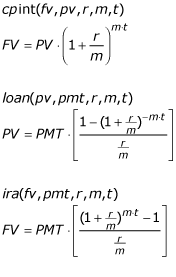
Add cpint and ira functions as one-line global LibPub functions on the same page as loan. Function order on page is not important. Refresh the libraries and type the path or call them up using ctalog. Add parameters with x being in the position of the one you looking for. Chapter 1 video and TI-Nspire Scientific Notation Program video show more examples of one-line global functions. On the Numerical CX you would need to add the functions solved in reverse. my Post in Hour of Programming for writing one-line-global-functions shows how we can use them on the Numerical CX model.
The only advantage to doing them yourself is to help you understand what is happening plus this technique works with any formulas you want to add.
If you want written explanation see my eBook at Amazon or complete Chapter 1 and Chapter 5 samples at ComputerLearningService.com