
Help me solve this equation with Nspire
74 views
Skip to first unread message

Vincent Douglass
Jan 24, 2015, 11:41:01 PM1/24/15
to tins...@googlegroups.com
I need help with adding this "perpetuity" equation to financial solver. I am having an issue with infinity in the "n" field of financial solver. See video.
Please help!


Adam Pennell
Jan 24, 2015, 11:58:22 PM1/24/15
to tins...@googlegroups.com
What I have found that will work is using n=999 instead of n=infinity. Obviously, 999 is not the same as infinity, but when the calculator rounds the answer, it will be accurate. Of course, there is nothing magical about 999. Still, if you get much smaller, the answer will not be accurate, and if you get much larger, you will sometimes get an error.
Adam Pennell
--
--
To post to this group, send email to tins...@googlegroups.com
To unsubscribe send email to tinspire+u...@googlegroups.com
For more options, visit this group at
http://groups.google.com.au/group/tinspire?hl=en-GB?hl=en-GB
The tns documents shared by group members are archived at
https://sites.google.com/site/tinspiregroup/classroom-news/welcome-abouttime
---
You received this message because you are subscribed to the Google Groups "tinspire" group.
To unsubscribe from this group and stop receiving emails from it, send an email to tinspire+u...@googlegroups.com.
For more options, visit https://groups.google.com/d/optout.
Larry Schroeder
Jan 25, 2015, 7:09:09 AM1/25/15
to tins...@googlegroups.com
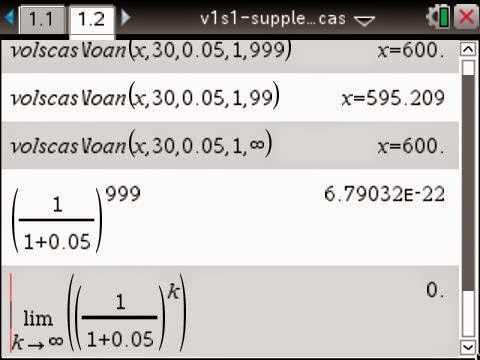
I see in your youtube video you have the CAS software. What was interesting was that the one line global finance formulas I wrote let me experiment in a visual way with the material in your youtube video and allowed me to use infinity as a parameter - see above screen. I originally wrote these formula for the ti-89 cas when the tvm - financial solver was an additional ti-89 program that you had to download. I just converted then to one line global functions which allowed me to add them to my CAS library - see attached library and supplementary file. Adding global one line formulas to the library is handy for math and physics courses and would also be useful in any course that has lots of formulas. Finance course should be a good candidate. See my videos on adding one line global functions and using scientific notation. Additional information about global one line functions is found in chapter 1 and and chapter 7 of my eBook, available through amazon. Free complete chapter 1 and chapter 6 is available at ComputerLearningService.com. See youtube for video explanation of the chapter 1-3.
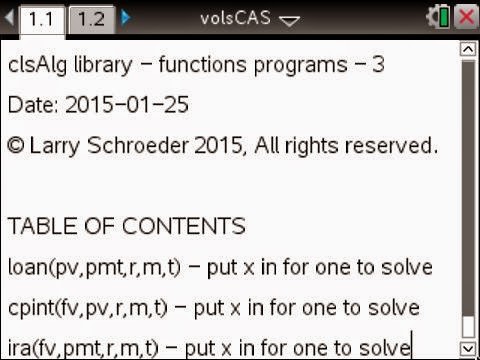
Functions name and parameters are shown above for the volsCAS library file. Tab 1.1 is a note page.

Above is Tab 1.2, the functions definitions, shown using document preview option. We used Define LibPub function(parameters)=solve(formula,x) with the function, parameters, and formula given next for each of the three functions.

Screen above -function, parameters, formula shown using MathType

The above samples show some of the formulas main uses. Notice r is a decimal for the percent, m compounding period, and t is years. x goes in parameter list for one we are looking for.

Add the volsCAS.tns file to your MyLib folder. Refresh the libraries. Type the path or use catalog to bring up library function. See tab 1.1 for sample uses of library functions and tab 1.2 for first screen shot in this post. Use your scratchpad to experiment was x in various places in the parameter list for the formulas.
Reply all
Reply to author
Forward
0 new messages