
How to install on Raspberry Pi 3 running LibreElec
456 views
Skip to first unread message

mre...@gmail.com
Jul 5, 2020, 12:12:07 AM7/5/20
to TigerVNC User Discussion/Support
Hi. I'm new to this, and I'm trying to install TigerVNC on my Raspberry Pi 3 which is running LibreElec. My ultimate goal is to be able to view and control my Raspberry Pi's GUI using my Mac, since I have no standalone monitor.
I followed these instructions but changing the url to what I found on this VNC Releases page. The steps I did were:
I followed these instructions but changing the url to what I found on this VNC Releases page. The steps I did were:
- I connected to my Raspberry Pi via SSH from my Mac
- Changed directory to ~/.kodi/addons
- wget https://github.com/TigerVNC/tigervnc/archive/v1.10.1.zip
- unzip v1.10.1.zip
- rm v1.10.1.zip
- reboot
- reconnected to my Raspberry Pi via SSH from my Mac
- typed "vncconfig", got "-sh: vncconfig: not found"
- typed "vncserver", got "-sh: vncserver: not found"
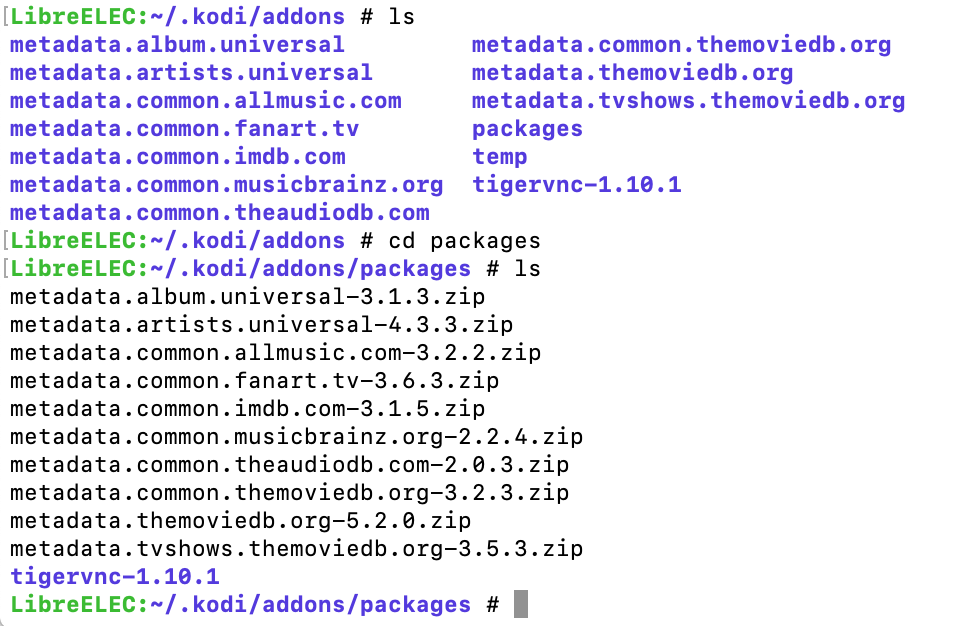
I wasn't sure exactly which directory the tigervnc-1.10.1 folder should be in, so I copied it into both of these directories: "~/.kodi/addons" and "~/.kodi/addons/packages"
Here's a screenshot showing the tigervnc-1.10.1 directory in each of those directories.
Where do I go from here to be able to run the VNC server from my Raspberry Pi?
Here's a screenshot showing the tigervnc-1.10.1 directory in each of those directories.
Where do I go from here to be able to run the VNC server from my Raspberry Pi?
mre...@gmail.com
Jul 5, 2020, 12:13:37 AM7/5/20
to TigerVNC User Discussion/Support
Am I supposed to be using a binary from https://bintray.com/tigervnc/stable/tigervnc/1.10.1#files/ ? If so, I really have no idea which one to use for LibreElec.

Brian Hinz
Jul 5, 2020, 6:06:29 PM7/5/20
to mre...@gmail.com, TigerVNC User Discussion/Support
Unfortunately, we don't have the means to support all linux distributions so we have chosen to supply pre-packaged binaries only for the Enterprise/LTS type distros. I'm not familiar with LibreElec but if it's based on ubuntu bionic then you *might* be able to install our arm64 debian packages. Otherwise, your best bet might be to email the LibreElec maintainers and ask them to provide packages.
-brian
--
You received this message because you are subscribed to the Google Groups "TigerVNC User Discussion/Support" group.
To unsubscribe from this group and stop receiving emails from it, send an email to tigervnc-user...@googlegroups.com.
To view this discussion on the web visit https://groups.google.com/d/msgid/tigervnc-users/36e61f8e-15e4-4590-9340-84a0495ee366o%40googlegroups.com.
Reply all
Reply to author
Forward
0 new messages