
[HELP]A question when using tigervnc on RockyLinux

Yao, Nero
Dear Sir or Madam,
I am using RockyLinux as OS for my development. For peer works, I’d like to use tigervnc to login in the system.
When I use the command “systemctl start vncserver@:2” to start a vncserver on the port 5902.
I have made it access to the port 5902 through the firewall.
I have edited the config file /etc/systemd/system/vncserver@\:2.service

The server could not be created.
The log content is that:
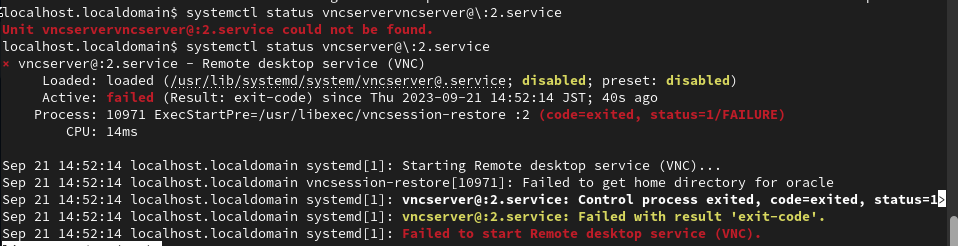
And also, I tried to use the command “vncserver :2” to create a vncserver. The client can connect to the server. But there is a black screen and could not do anything to the server.
The config file ~/.vnc/xstartup is like that.

Here is the snapshot of the screen.

But when I use “sudo vncsever :2” to create vncserver , I can use vnc viewer to login in as the root account, and the GUI could be work.
My RockyLinux version is 9.2,and my tigerVNC version is 1.12.0.
If possible could you please look and help me with this problem?
Because I am not an English local user, if there are any works used inappropriate, I feel so sorry.
I look forward to hearing from you!
Best regards,
Nero Yao,
Advantest (China) Co., Ltd.
Tel:
Fax:
Add: C Block, Bldg.3, 168 HuaTuo Road,
Zhangjiang Hi-Tech Park, Shanghai, China, 201203

Pierre Ossman
>
> My RockyLinux version is 9.2,and my tigerVNC version is 1.12.0.
> If possible could you please look and help me with this problem?
> Because I am not an English local user, if there are any works used inappropriate, I feel so sorry.
> I look forward to hearing from you!
>
which means it's not something we can help you with here.
You can report the issue to Red Hat or Rocky and see if they can help
out. Our you could try our packaging instead, which you can find under
"Releases" on our homepage.
Regards
--
Pierre Ossman Software Development
Cendio AB https://cendio.com
Teknikringen 8 https://twitter.com/ThinLinc
583 30 Linköping https://facebook.com/ThinLinc
Phone: +46-13-214600
A: Because it messes up the order in which people normally read text.
Q: Why is top-posting such a bad thing?

Tom Gee

Marty C
Loaded: loaded (/etc/systemd/system/vncserver@:3.service; enabled; preset: disabled)
Active: inactive (dead) since Tue 2024-09-17 23:35:03 PDT; 8s ago
Duration: 53ms
Process: 13813 ExecStartPre=/usr/libexec/vncsession-restore :3 (code=exited, status=0/SUCCESS)
Process: 13824 ExecStart=/usr/libexec/vncsession-start :3 (code=exited, status=0/SUCCESS)
Main PID: 13831 (code=exited, status=0/SUCCESS)
CPU: 100ms
Sep 17 23:35:03 jackson-jackpot systemd[1]: Starting Remote desktop service (VNC)...
Sep 17 23:35:03 jackson-jackpot systemd[1]: Started Remote desktop service (VNC).
Sep 17 23:35:03 jackson-jackpot systemd[1]: vncserver@:3.service: Deactivated successfully.

lavanya tech
--
You received this message because you are subscribed to the Google Groups "TigerVNC User Discussion/Support" group.
To unsubscribe from this group and stop receiving emails from it, send an email to tigervnc-user...@googlegroups.com.
To view this discussion on the web visit https://groups.google.com/d/msgid/tigervnc-users/5c608797-e5e9-4864-9277-a2d68874d252n%40googlegroups.com.