
[The Computer Kid] How To Put Your Wifi Card Into Promiscuous Mode And Start Collecting Information
16 views
Skip to first unread message

Conrad Sykes
Sep 7, 2013, 1:15:01 AM9/7/13
to the-comp...@googlegroups.com
Many wifi hacks/pentests start out the exact same way; which is getting your wifi card into promiscous/monitoring mode and then to start collecting information about the devices around you. Thus that is the topic of this tutorial. For this tutorial we will be using a Linux distro such as Ubuntu or Backtrack and we will assume your
wireless card is “wlan0”, which it typically is, but if you want to verify that wlan0 is
available you can run the “ifconfig” command to see your network
interference’s.
I hope you have found this information helpful. As always please use this knowledge responsibly, and only do hacking/pentests on networks that you have permission to do so on.
--
Posted By Conrad Sykes to The Computer Kid at 9/06/2013 10:15:00 PM
Also we will be using the wireless pentesting application suite called aircrack-ng which is pre-installed in Backtrack or here's a link to instructions on how to compile/install it on other systems Installation Instructions. Once aircrack-ng is installed we can begin...
- In the terminal type "sudo su" and put in your creditials when prompted. This will give you root access.
- Next type “airmon-ng start wlan0”. This puts your card into promiscuous/monitoring mode. After you run the command it may warn you about running processes that may cause you trouble but typically you can ignore this warning message. The important thing to look for where is where it says “monitor mode enabled on” followed by “mon0”, or "mon1", etc. Make note of the mon#, and for the rest of this demo we will be assuming it is mon0.

- Now that you have your wifi card in promiscuous mode you can begin to view the traffic around you. In the terminal type “airodump-ng mon0”. You will now see two lists, the first list is the list of wifi hotspots nearby and the second list is a list of wifi devices such as laptops and cellphones. This command will continue to update with live information until you kill the program with CTRL-C.
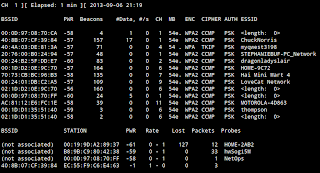
- Now that we have our wifi card in promiscuous mode and have information about the wifi devices around us we can use this information to decide what next step to take. For instance if we want to hack/pentest a router we now know if that router is using WEP or WPA and thus what attack vector to take.


--
Posted By Conrad Sykes to The Computer Kid at 9/06/2013 10:15:00 PM
Reply all
Reply to author
Forward
0 new messages