Finding controls in an embedded web browser control

1,055 views
Skip to first unread message

Mark Ingalls

unread,
Jan 17, 2014, 8:29:42 PM1/17/14
to teststa...@googlegroups.com
Hi All,

I've been using TestStack.White to successfully test one of our applications until we made a recent change. Our login dialog box has recently moved from a WPF window with its own text box controls to an embedded WebBrowser control that fetches a login page from a webserver and as a result, it has HTML controls.

I've added a reference to TestStack.White.Webbrowser to my project, but I cannot figure out how to get a handle to the HTML text boxes.

Here's a list of what I've tried:

var email = window.Get<TextBox>(SearchCriteria.ByAutomationId("Email")); // the html id of the email text box is "Email" and the var 'window' is the dialog box

This fails with an exception indicating that White cannot find a control with that id. I have a feeling that this is because the dialog window is WPF and the controls it is looking for are 'hidden' from it by the hosted web browser control.

Next, I tried to get a handle to the web browser control by:

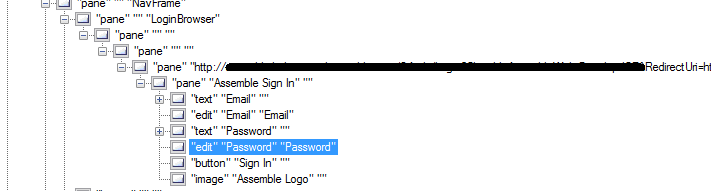
var loginPage = window.Get<BrowserWindow>(SearchCriteria.ByText("Assemble Sign In").AndControlType(ControlType.Pane)); //"Assemble Sign In" is the text indicated by visual UIAVerify for the browser control

This fails with an exception indicating that White cannot find the browser control because I must specify at least two criteria, which I plainly have, so I'm stumped on that one.

For what it is worth, there are 4 panes between the Window referenced by the variable 'window' and the web browser control and their FrameworkId in visual UIAVerify changes from WPF to Win32 to InternetExplorer on the way down.


I cannot find anything on the documentation site about automating an embedded web browser and I'm hoping someone here can help.

Thanks,
Mark


Jake Ginnivan

unread,
Jan 18, 2014, 5:57:48 AM1/18/14
to Mark Ingalls, teststa...@googlegroups.com

So the WebBrowser project is badly named. It actually should be called TestStack.White.Silverlight


It’s entire purpose is to get the browser window, then the Silverlight control inside the page.


This doesn’t have a very good story I am afraid until the ComUiaWrapper branch is finished, because it exposes an ‘InternetExplorer’ automation framework which allows white to discover and work with web controls in internet explorer.

The current managed uia library cannot ‘see’ browser controls.


I think with Visual UIA verify you need the older version, not the one which uses the newer COM UIA Wrapper to see exactly what White sees.


You may need to grab the browser control as a Pane, then just use the Keyboard to input Tabs and hotkeys to select the appropriate fields and submit the login phone.


Hope that helps.

https://lh3.googleusercontent.com/-pjiESOnhwhA/UtnYaEGxGUI/AAAAAAAADPw/6UWlx3I21rQ/s1600/ControlTree.png


I cannot find anything on the documentation site about automating an embedded web browser and I'm hoping someone here can help.

Thanks,
Mark


--
You received this message because you are subscribed to the Google Groups "TestStack.White" group.
To unsubscribe from this group and stop receiving emails from it, send an email to teststack_whi...@googlegroups.com.
For more options, visit https://groups.google.com/groups/opt_out.

Mark Ingalls

unread,
Jan 18, 2014, 4:01:25 PM1/18/14
to Jake Ginnivan, teststa...@googlegroups.com
Thanks, Jake.

Your suggested solution works for submitting the form (although it is pretty fragile), but will not work for the rest of my tasks that need to test the result of checking to ensure that I receive the correct messages / pages when attempting to login with bad credentials.

Anyway, thanks again for the prompt reply. I eagerly await the completion of the com uia work. Now, I'm off to find the older version of visual uiaverify. I have a feeling that having the newer version is cause of some other issues I've been struggling with.

Mark

Jake Ginnivan

unread,
Jan 19, 2014, 1:41:52 AM1/19/14
to Mark Ingalls, teststa...@googlegroups.com
You can try the nuget packages off my build server (login as guest) at teamcity.ginnivan.net (find White, then the Com uia branch, and there will be nuget packages under artifacts)

Not all tests are passing, but its functional and may be better for you than the released version?

Give it a try, let me know how it goes and if you have issues with it you can raise an issue or even submit a pull request :)

Sent from my Windows Phone

From: Mark Ingalls
Sent: ‎18/‎01/‎2014 21:01
To: Jake Ginnivan
Cc: teststa...@googlegroups.com
Subject: Re: Finding controls in an embedded web browser control

Reply all
Reply to author
Forward
0 new messages