
how to pass OCR only in certain part of image (rect XY)?
1,941 views
Skip to first unread message

Renato Forti
Feb 3, 2015, 6:05:34 AM2/3/15
to tesser...@googlegroups.com
Hi All,
I have a lot of docs that I need index.
The index is only one field of image (PDF) .
My question is, have some way to pass OCR only in certain part of image?
See my sample, I need scan (OCR) only the area that I highlighted in red!
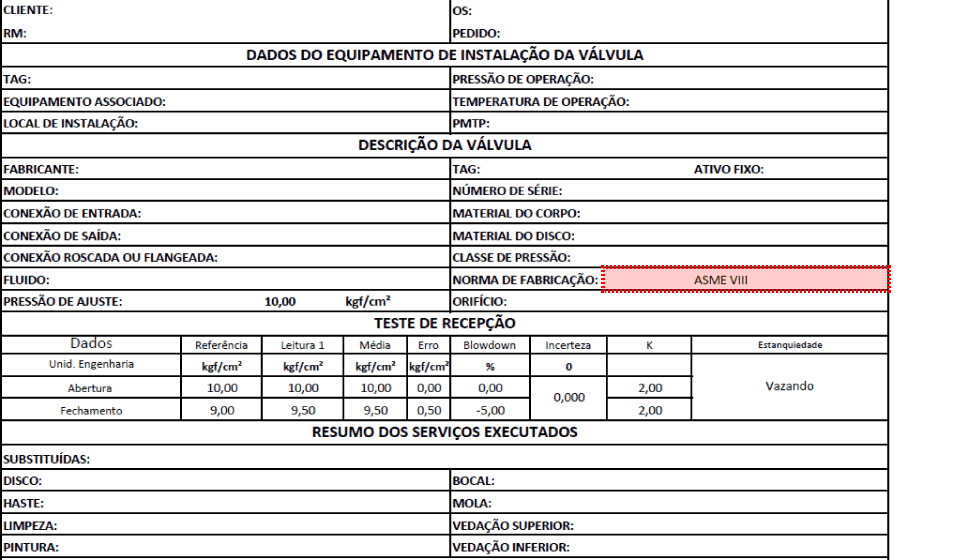
Thanks for help!

Allistair
Feb 3, 2015, 7:45:58 AM2/3/15
to tesser...@googlegroups.com
This is a preprocessing step that you would need to do with an image library, to crop your input image to just the area you want to send to OCR. If your input is a template and scanned reliably, i.e. orientation/size/resolution, then it should be relatively easy to crop the area. If not, then you will need to think a bit harder about how to do that.
--
You received this message because you are subscribed to the Google Groups "tesseract-ocr" group.
To unsubscribe from this group and stop receiving emails from it, send an email to tesseract-oc...@googlegroups.com.
To post to this group, send email to tesser...@googlegroups.com.
Visit this group at http://groups.google.com/group/tesseract-ocr.
To view this discussion on the web visit https://groups.google.com/d/msgid/tesseract-ocr/5b3e5856-be1f-4e7a-a24d-035fc2a1aa61%40googlegroups.com.
For more options, visit https://groups.google.com/d/optout.
Renato Forti
Feb 3, 2015, 12:48:15 PM2/3/15
to tesser...@googlegroups.com
Thanks a lot!
Yes, my input is a template in PDF!
Do you know any place that I can find some info, that show to do this?
My language is C++, so any library that work with this suitable for me!
Thanks again!
Renato Forti
Feb 4, 2015, 5:26:40 AM2/4/15
to tesser...@googlegroups.com
Hi, I used Boost.gil, and works!
thanks
#include <iostream>
#include <boost/gil/gil_all.hpp>
#include <boost/mpl/vector.hpp>
#include <boost/gil/typedefs.hpp>
#include <boost/gil/extension/dynamic_image/any_image.hpp>
#include <boost/gil/image_view.hpp>
#include <boost/gil/planar_pixel_reference.hpp>
#include <boost/gil/color_convert.hpp>
#include <boost/gil/typedefs.hpp>
#include <boost/gil/image_view_factory.hpp>
#ifndef BOOST_GIL_NO_IO
#include <boost/gil/extension/io/jpeg_io.hpp>
#include <boost/gil/extension/io/jpeg_dynamic_io.hpp>
#include <boost/gil/extension/io/tiff_io.hpp>
#include <boost/gil/extension/io/tiff_dynamic_io.hpp>
#endif
using namespace boost::gil;
class image_crop
{
rgb8_view_t view_;
public:
image_crop( rgb8_view_t v )
: view_( v ) {}
void crop(int x, int y, int width, int height, image_crop& out) {
rgb8_image_t s( width, height );
copy_pixels( subimage_view( view_
, x
, y
, width
, height
)
, view( s )
);
out.view_ = view( s );
}
rgb8_view_t& get_result_view() {
return view_;
}
};
int main ( int argc , char **argv)
{
rgb8_image_t img;
tiff_read_image("C:\\Users\\Renato Tegon Forti\\Desktop\\cropimage\\test.tif", img);
image_crop i( view( img ) );
image_crop out( view( img ) );
i.crop(644, 288, 300, 20, out );
tiff_write_view("C:\\Users\\Renato Tegon Forti\\Desktop\\cropimage\\out.tif",out.get_result_view());
return 0;
Reply all
Reply to author
Forward
0 new messages