Re: automatically detect that I am driving my car, in that case forward all incoming calls (and/or SMS) to my OEM car phone

3,140 views
Skip to first unread message

easiuser

unread,
Aug 6, 2012, 11:46:47 AM8/6/12
to tas...@googlegroups.com
First of all, you cannot divert your phone calls to the car phone using Tasker unless you can do so by sending a code to your carrier or google voice.
 
Secondly Tasker can only detect if bluetooth is connected and not if it is present.  The A2DP plugin however may be able to detect the presence of your car phone bluetooth.
 
Other options for detecting when your in the car
-NFC Tag (need compatable phone)
-GPS speeed (battery intensive and need to allow for stoplights and stop and go traffic)
 
On Monday, August 6, 2012 5:08:54 AM UTC-5, ThePascalken wrote:
Hello,

I would like to install Tasker if it can automatically detect that I am driving my car (without dock or any action of my part), in that case forward all incoming calls (and/or SMS) to my car phone, while keeping other function working like GPS or data usage.
My car has a built in OEM car phone (2004 Mercedes). 
Is that possible?

The ideas I had were: 
1) install something in the car that can be detected by Tasker, but what?
2) The OEM car phone has Bluetooth for connecting its own receiver (for private calls instead of over the speaker system), my Android phone (xperia Ray) can detect this but is not able to connect (problem lies with the OEM system). 
Anyway could this be used to detect that the call should be forwarded?

Thank you

ThePascalken

unread,
Aug 6, 2012, 3:16:23 PM8/6/12
to tas...@googlegroups.com

Thank you for your answer,

1.) I can send a code to my carrier.
2.) my phone doesn't have NFC and even if it had I would need to remember to hold it close to the tag,
3.) GPS speed would mean that calls are diverted even if I travel with another car or by train and I do carpooling to go to work so that would mean I have to remember when I am not using my car but travelling... 
4.) My car does not have A2DP, but you think this plug in could detect the presence of my bluetooth carphone (the Android phone reports; Device found Unknown systems: AC00001056)
 They seem to be paired somehow (after I entered a common PIN code) but I do not know for which Bluetooth service.
I this A2DP plugin can detect this then this might be the solution. what do you think?


Op maandag 6 augustus 2012 17:46:47 UTC+2 schreef easiuser het volgende:

easiuser

unread,
Aug 6, 2012, 4:50:33 PM8/6/12
to tas...@googlegroups.com
Sounds like you might have a solution.  Not really familiar with the plugin but it is being discussed here https://groups.google.com/d/topic/tasker/TLsjT9Exle8/discussion
 
One issue you might have to deal with is your car's bluetooth can't be connected to two devices at the same time???  If the plugin can detect presence without connecting, you may be golden.

10amla

unread,
Aug 6, 2012, 5:09:21 PM8/6/12
to tas...@googlegroups.com
I've been playing around with mode of transport using the accelerometer(it's how MS does it with on{x}]).  That would, if it works well, tell you that you are in a vehicle.  So that would quite work.  I was going to suggest NFC tags, if your phone would work with them.  GPS is too battery intensive.  How about a magnet?  Might be too much metal being you're in a car, but tasker's magnetic field state might work.

hollywoodfrodo

unread,
Aug 6, 2012, 7:31:13 PM8/6/12
to tas...@googlegroups.com
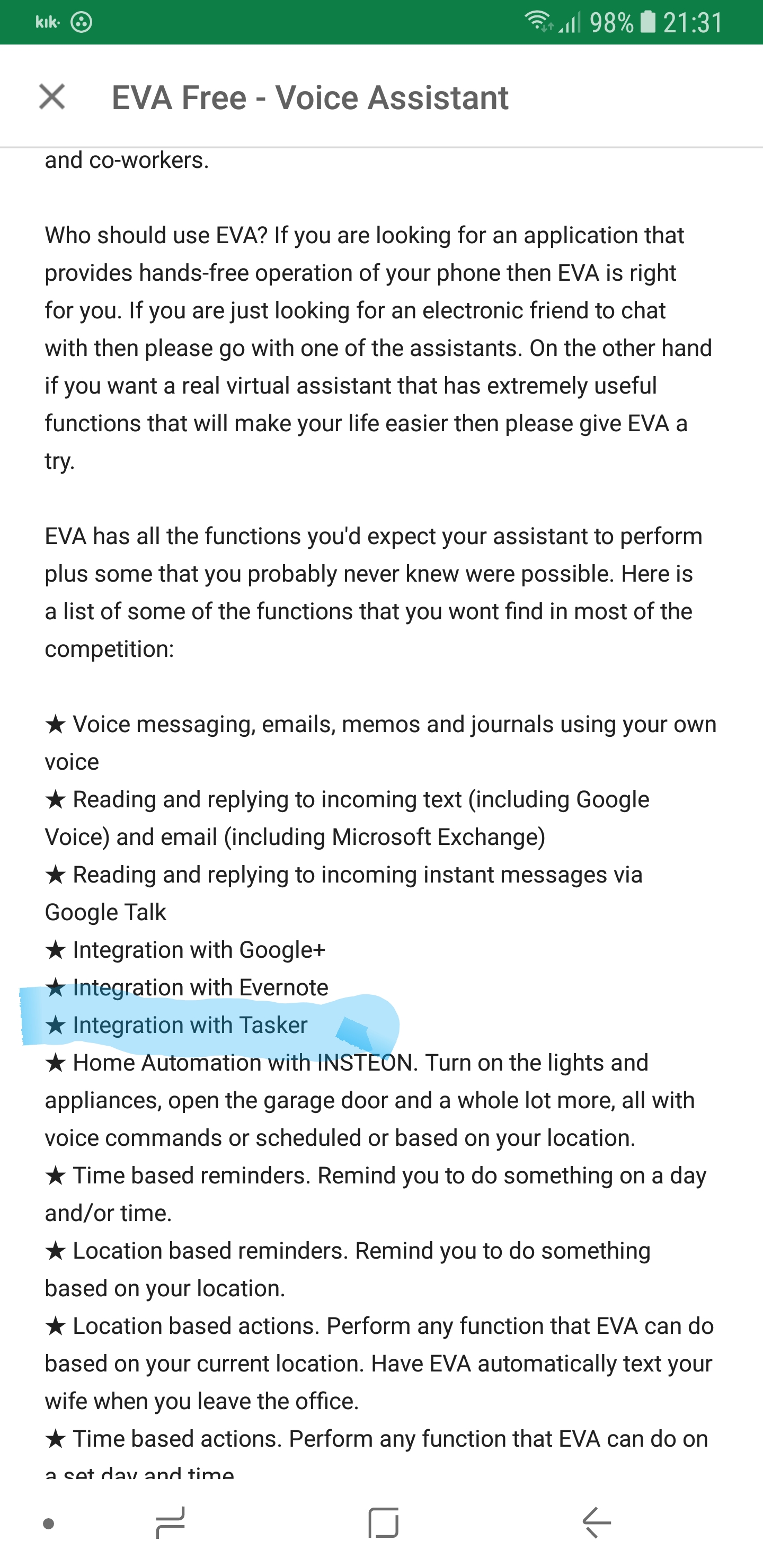
There is an app, EVA or AVX, which can detect if you are traveling away from home (or away/towards any particular destination you've set up).  It also integrates with Tasker to initiate Tasker task.  So if tasker can handle forwarding call part via a Task, then EVA or AVX could handle the triggering that task via travel to/from setting...

10amla

unread,
Aug 6, 2012, 8:13:39 PM8/6/12
to tas...@googlegroups.com
I purchased EVA based on it's ability to integrate with tasker, but I've not played with it much since i bought it.  It's sorta slipped down my list of priorities with my MOT ditherings.

EmmSqd

unread,
Aug 9, 2012, 7:31:53 PM8/9/12
to tas...@googlegroups.com

You could maybe use the orientation sensor (upsidedown maybe?) to trigger the 'in-car' state.
 
You'd just have to make sure your phone is placed in that orientation when you are in your car.

Rarry

unread,
Aug 9, 2012, 7:46:13 PM8/9/12
to tas...@googlegroups.com
>  How about a magnet?  Might be too much metal being you're in a car, but tasker's magnetic field state might work.

Nice idea! 

Could you use an old WiFi router (plenty lying around these days) hidden in the car and detect the SSID? They're usually 12v aren't they?

10amla

unread,
Aug 9, 2012, 8:57:24 PM8/9/12
to tas...@googlegroups.com
Might work if it wasn't on a "always on" circuit.

Richard Davis

unread,
Aug 9, 2012, 10:29:14 PM8/9/12
to tas...@googlegroups.com

A lot of users have posted looking for a good car dock profile and I have not seen any that really work as well as a factory dock. I have a DROID 4 and a official car dock in my work truck that works almost all the time (sometimes it does not register being placed in the dock)  I also have a generic car dock in my personal truck. I made a fairly complex profile to simulate the car dock that works OK. It uses the orientation context and power and also checks to see if I am in the night setting and a few other profile checks...

The problem with any orientation context is it is easily confused with typing on the phone ( both are on the left side) and adding power to the mix does not help much because I sometimes have it plugged in and typing.

I always thought the magnet would be the best solution (although I had not thought of the router.. great idea as well)  I started playing around with the magnetic field variable but got distracted and never went back to it. I would really like to hear if anyone has used it and how it works for them. 

I tried checking the settings when the phone was in my Motorola phone dock ( which I believe uses a magnet for detection - one polarity for car and the other for desk-) I expected a stable reading when it was in the dock but it varied greatly just sitting there not moving.  That was the extent of my testing...  hopefully I can find some time to test it more.

Rich...

electricpete

unread,
Aug 9, 2012, 10:44:50 PM8/9/12
to tas...@googlegroups.com
On Monday, August 6, 2012 4:09:21 PM UTC-5, 10amla wrote:
How about a magnet?  
 
Magnet is a novel idea.  Just a word of caution that it seems it might be possible to damage or corrupt your phone if you place too powerful/large a magnet too close to your phone. 
 

Richard Davis

unread,
Aug 9, 2012, 10:48:44 PM8/9/12
to tas...@googlegroups.com

Well that's good information...... thanks for the words of caution ...

Jason Loveman

unread,
Sep 6, 2013, 3:45:49 PM9/6/13
to tas...@googlegroups.com
I have a BRINGGR in my car to notify me if I forget to bring my phone, but since it's BT paired with the phone, it will work for detection!

Joseph Richman

unread,
Sep 6, 2013, 4:00:21 PM9/6/13
to tas...@googlegroups.com
Has functionality to detect if you're in a car moving/moving on foot/etc: https://play.google.com/store/apps/details?id=com.joaomgcd.autolocation&hl=en
To use tasker to connect to bluetooth: https://play.google.com/store/apps/details?id=org.myklos.btautoconnect&hl=en

Whark Kyryhniann

unread,
Sep 29, 2017, 4:23:20 PM9/29/17
to Tasker
@Hollywoodfrodo:  I tried searching for names similar to EVA/AVX but the results yielded personal assistants (like Siri).  If you found one or both and can tell me the name, I would greatly appreciate it !

@ThePascalken:  Did you ever find a solution you would care to share?

Jay M

unread,
Sep 30, 2017, 4:35:15 PM9/30/17
to Tasker
pretty sure hes talking about personal assistants

--
You received this message because you are subscribed to the Google Groups "Tasker" group.
To unsubscribe from this group and stop receiving emails from it, send an email to tasker+un...@googlegroups.com.
Visit this group at https://groups.google.com/group/tasker.
For more options, visit https://groups.google.com/d/optout.

--

Jay M ︻芫══一

Reply all
Reply to author
Forward
0 new messages