
Autoinput UI Query is "always true" always successful?
196 views
Skip to first unread message

André K
Jun 17, 2021, 3:03:45 PM6/17/21
to Tasker
I am using UI Query to get a variable in order to recognize if the application displays a certain "scene"
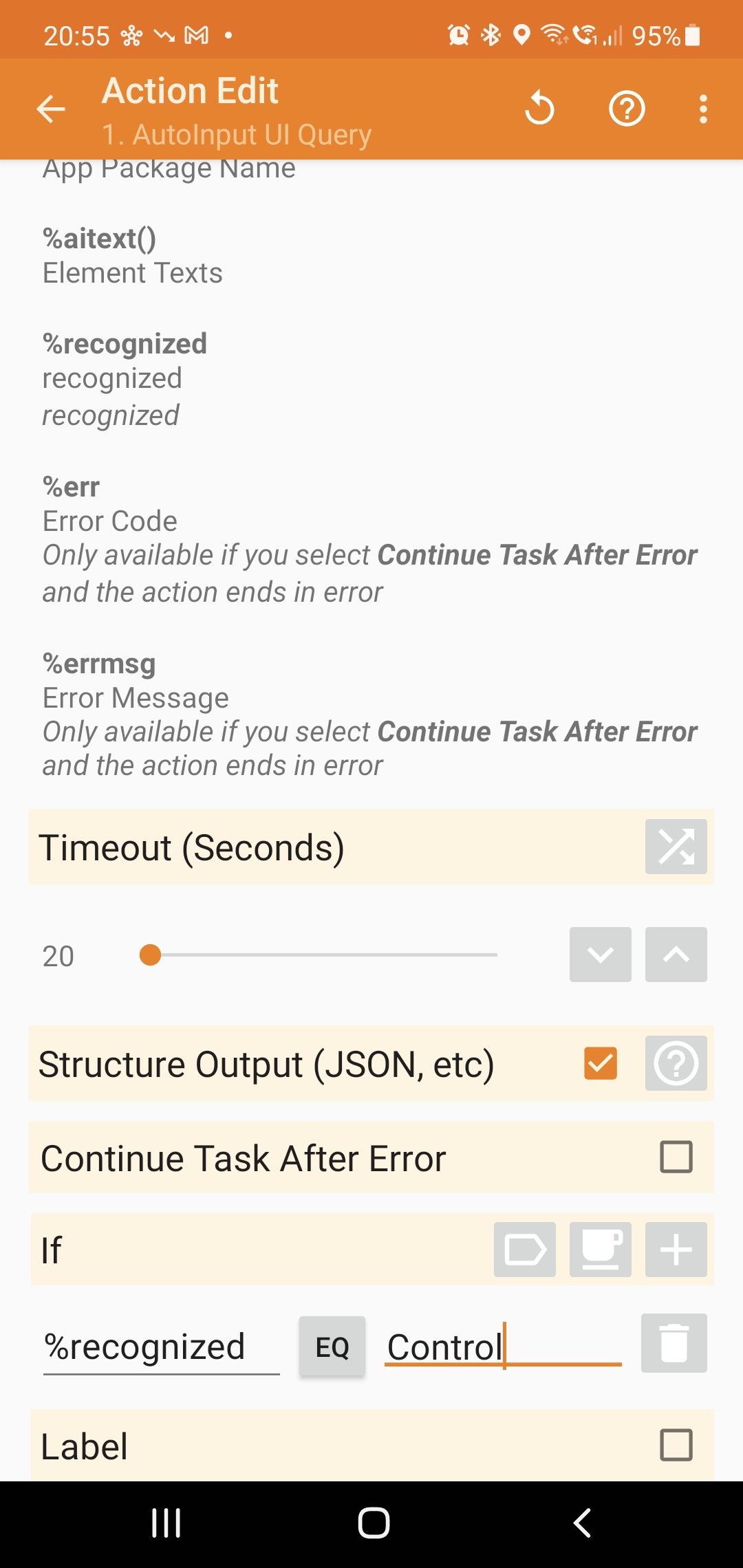
the field, is returned as %recognized
Whatever the variable is "Control" , or not, the next steps in this task are executed.
After this, I have a "beep" action.
The "timeout" of 20 seconds is not doing anything, running this task executes this action and the beep action "instantly" (I would think it would wait up to 20 seconds for a scene that matches .. and if not, never beep?)

jmjc...@gmail.com
Jun 17, 2021, 11:29:46 PM6/17/21
to Tasker
The issue is the IF condition in the AI Query action is to determine whether the AI Query action should be run or not depending on the value of %recognized. Not what you want.
1. You do want the AI Query action to run so that you can get %recognized in return. Therefore delete the IF condition.
2. After the AI Query action, create this actions::
IF %recognized EQ Control
Then
actions you want to run if %recognized equals Control
Endif
André K
Jun 18, 2021, 1:21:05 AM6/18/21
to Tasker
I figured out that IF statements worked as expected yesterday, but did not understood the IF in the task till now.
Thank you for explaining.
Reply all
Reply to author
Forward
0 new messages