
Re: Kill app once Bluetooth gets disconnected?
2,683 views
Skip to first unread message

Pent
Nov 6, 2012, 2:19:01 AM11/6/12
to Tasker
> I've setup Tasker once Bluetooth gets connected it starts TuneIn radio and
> as exit app it should kill that app once Bluetooth gets disconnected.
> So far I have no luck.
Apps can request that Android restart them even once they are killed,
so it's just not possible sometimes.
I guess you just want to stop the playback and go back to homescreen ?
You can possibly use Media Control action (stop) and then Go Home for
that.
Or since you have root you can simulate a Back button press after the
Stop, the app might
exit itself then.
Pent
> as exit app it should kill that app once Bluetooth gets disconnected.
> So far I have no luck.
Apps can request that Android restart them even once they are killed,
so it's just not possible sometimes.
I guess you just want to stop the playback and go back to homescreen ?
You can possibly use Media Control action (stop) and then Go Home for
that.
Or since you have root you can simulate a Back button press after the
Stop, the app might
exit itself then.
Pent

JohnnyBeGood
Nov 6, 2012, 2:53:09 AM11/6/12
to tas...@googlegroups.com
Thanks for the reply!
On Monday, November 5, 2012 8:41:01 PM UTC-8, JohnnyBeGood wrote:
This particular app does not restart on Bluetooth disconnect it simply says paused. If I would connect Bluetooth again it would resume once fully connected.
I'm trying to see if I can find "Media Control action" and try it that way. Once app gets stopped it is like it was closed.
I'm trying to see if I can find "Media Control action" and try it that way. Once app gets stopped it is like it was closed.
On Monday, November 5, 2012 8:41:01 PM UTC-8, JohnnyBeGood wrote:
Hi all,
I've setup Tasker once Bluetooth gets connected it starts TuneIn radio and as exit app it should kill that app once Bluetooth gets disconnected.
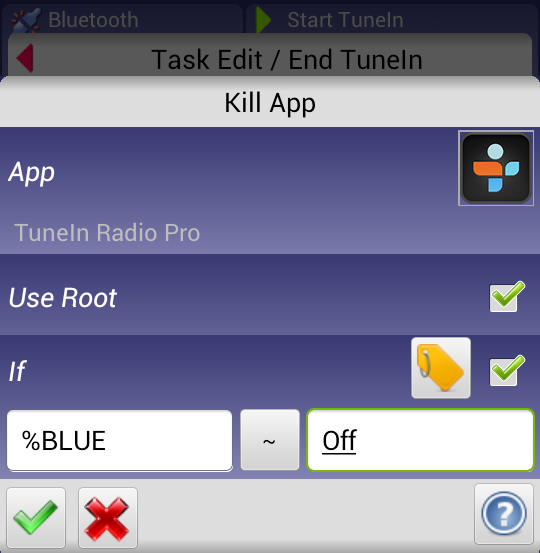
So far I have no luck. I've tried setting If to Bluetooth Status (%BLUE) ~ off and 0 but doesn't kill the app.Any suggestions?TIA
Pent
Nov 6, 2012, 6:13:59 AM11/6/12
to Tasker
It's in the media category.
Pent
Pent
Marinko Garasevic
Nov 6, 2012, 1:11:38 PM11/6/12
to tas...@googlegroups.com
Ok, I found it there and doing test it actually closes it but what's not working is if Bluetooth off. So I need to modify and make when Bluetooth gets disconnected and not turned off it should stop app, but where's that option?

Matt R
Nov 7, 2012, 2:10:29 AM11/7/12
to tas...@googlegroups.com
Just add an exit task to your already existing Bluetooth Connected profile. To do this, long-press on the task name and select "add exit task".
Matt
JohnnyBeGood
Nov 7, 2012, 3:51:59 PM11/7/12
to tas...@googlegroups.com
I did add kill app to the exit task and when I do test it actually kills it but it does not do anything when Blutoothooth disconnects. So I'm not sure how to tell tasker once it disconnects it should kill/close app.
Matt R
Nov 7, 2012, 6:01:41 PM11/7/12
to tas...@googlegroups.com
Check the run log (menu button -> more -> run log) to see if the exit task is actually firing. If it is, it probably means you can't kill the app (or it does kill but then reloads).
Matt
JohnnyBeGood
Nov 7, 2012, 10:23:29 PM11/7/12
to tas...@googlegroups.com
Thank you all who replied!
It seems like its working now and with checking option "Use root" it actually kills it.
Reply all
Reply to author
Forward
0 new messages