
My Samsung Gear 2 Project With Tasker
810 views
Skip to first unread message

Dominique Garcia
Jun 16, 2014, 3:13:08 AM6/16/14
to tas...@googlegroups.com
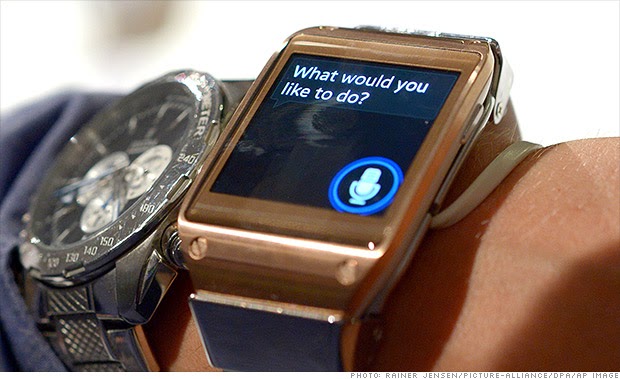 I have a Samsung Gear 2 and got it working with my non-Galaxy phone. (Gears are designed to only work with Galaxy phones initially) There are a bunch of people who successfully got the Gear 1 to work alongside Tasker cause the O/S in Gear 1 is Android. Gear 2 is different and uses a Tizen O/S so you cant put any Android apps on it. I think I may have figured out a workaround (maybe but need some assistance)
First off, here is how it works.
Cell: connects through Bluetooth to watch
Watch: Watch is able to display notifications, dial out, take calls, etc. with that Bluetooth connection
Watch: Has app called S-Voice where you can ask the Gear to do task such as make call or text someone. I am thinking maybe since the Gear 2 uses the watch as a bluetooth connection with the phone, we can get the phone to fire off Tasker task. For example, when user turns on S-Voice on Gear 2, it allows Tasker task to run such as turning off wifi or something. (Shown in picture above)
Here is how this may possibly be done... in Tasker you will see a Autovoice plugin called AUTOVOICE CTRL BT.

f you were to click on that you will see this.. HEADSET SOUND REDIRECT

However if you go back to Tasker Plugins you will see in essential plugins a plugin called BLUETOOTH CONNECT.

Having
seen all this makes me optimistic that this can be done. Now I have a
S-Voice app on the phone but it doesnt work cause I am not using a
Galaxy. So lets just say this all needs to be done without using t he
cell S-VOICE app and only the S-VOICE on the Gear 2 watch. Can someone help me?

Ron
Jul 9, 2014, 10:20:03 AM7/9/14
to tas...@googlegroups.com
I've taken more of a layman's approach by simply creating a contact in the phone's contact list called "Light" for example with a non-working short number like "11". Then create a profile "State", "Call", then enter the number 11 in the related field. Next, for your task to can create an "End Call" (to end the call before it times out on it's own) and a LED toggle. After saving you can queue-up S-voice from the watch and say "Call Light" and Tasker will run the LED toggle command. This same principle can also be used with sms as a catalyst. I've also used IFTTTT to run Nest commands for example by watching sms and calls too. Hope this helps until a more formal solution appears...hopefully.

GJD
Jul 21, 2014, 7:42:59 AM7/21/14
to tas...@googlegroups.com
I found another way to have a connection between Gear 2 and Tasker. Using AutoNotification and the Tizen app LaunchGear.
LaunchGear is used to run apps local on the phone. Unfortunally, you cannot run shortcuts, so also not tasker shortcuts.
But from tasker you can create apk apps yourself. These are standalone apps, with no interaction with tasker self. Here comes Autonotification for this.
You can create a dummy notification on which you can intercept with tasker on creation. Through this you can pass information to tasker. Cancel the notification and nothing is noticed for the UI. Make the notification percistant and also the Gear 2 doesn't pick it up.
From there you can do anything.
Do you want to pass info back to the watch, just make a normal notification with text.
For example you can get the weather forecast with tasker, to the watch. Just open LaunchGear, run the "Get Weather" app created with Tasker. And the watch gets a notification with the info.
Op maandag 16 juni 2014 09:13:08 UTC+2 schreef Dominique Garcia:
Op maandag 16 juni 2014 09:13:08 UTC+2 schreef Dominique Garcia:

Fixfax
Jul 23, 2014, 8:56:37 AM7/23/14
to tas...@googlegroups.com
You write:
You can create a dummy notification on which you can intercept with tasker on creation. Through this you can pass information to tasker. Cancel the notification and nothing is noticed for the UI. Make the notification percistant and also the Gear 2 doesn't pick it up.From there you can do anything.
I don't understand how you get information back from the gear 2 to the phone. How do I create notifications on the gear 2 that tasker can read?

Medox ST
Jul 23, 2014, 7:43:33 PM7/23/14
to tas...@googlegroups.com
Just follow my tutorial(s) on pro.medox.ro. You can also find them on xda's gear 2 sub-forum, with more user posts an troubleshooting.
Message has been deleted
GJD
Jul 24, 2014, 3:14:39 AM7/24/14
to tas...@googlegroups.com
I read the tutorial. But i have a another way using the same principle.
I do use app factory to create stand-alone apps, but i write a command to a text file.
In tasker i created an profile on the file modified event and read out that command.
I found that using notification i way to slow and unreliable. The file write is almost instantly.
I don't use LaunchGear anymore. This is also way to slow.
AppLauncher for the Gear2 is much quicker.
The only disadvantage is that the screen turns on and sometimes unlock. So i build in a Lock Screen command after 5 second, enough to see the action handled.
Reply all
Reply to author
Forward
0 new messages