Add time til event to this please

157 views
Skip to first unread message

Logan Fury

unread,
Jan 31, 2020, 3:07:27 PM1/31/20
to tas...@googlegroups.com
Hello everyone,

The following script works perfectly, being launched thru AutoVoice and speaking the next scheduled calendar event.

It currently returns:

Your next appointment is "event". This is due at "start time" til "end_time"

I'd love if it could calculate time until event ie:

Your next appointment is "event" in x hour(s) x minutes. From "start time" til "end_time" 

Does anyone have time for this edit please? 


Rich D

unread,
Jan 31, 2020, 4:52:04 PM1/31/20
to Tasker Google Groups Post
Here is one way.. 


    Add Time (1412)
    A1: Variable Set [ Name:%start_time To:11:00 am Recurse Variables:Off Do Maths:Off Append:Off Max Rounding Digits:3 ] 
    A2: Variable Set [ Name:%stop_time To:3:30 pm Recurse Variables:Off Do Maths:Off Append:Off Max Rounding Digits:3 ] 
    A3: Variable Set [ Name:%start_time To:%DATE %start_time Recurse Variables:Off Do Maths:Off Append:Off Max Rounding Digits:3 ] 
    A4: Variable Set [ Name:%stop_time To:%DATE %stop_time Recurse Variables:Off Do Maths:Off Append:Off Max Rounding Digits:3 ] 
    A5: Variable Convert [ Name:%start_time Function:Date Time to Seconds Store Result In: Mode:Default ] 
    A6: Variable Convert [ Name:%stop_time Function:Date Time to Seconds Store Result In: Mode:Default ] 
    A7: Variable Set [ Name:%diff To:%stop_time-%start_time Recurse Variables:Off Do Maths:On Append:Off Max Rounding Digits:3 ] 
    A8: Variable Set [ Name:%hrs To:floor(%diff/3600) Recurse Variables:Off Do Maths:On Append:Off Max Rounding Digits:3 ] 
    A9: Variable Set [ Name:%min To:(%diff-(%hrs*3600))/60 Recurse Variables:Off Do Maths:On Append:Off Max Rounding Digits:3 ] 
    A10: Flash [ Text:%hrs
    %min Long:On ] 
    

Logan Fury

unread,
Jan 31, 2020, 7:41:12 PM1/31/20
to Tasker
Rich I'm having a completely illogical error I can't understand. I cloned your Task and edited it to prepare to merge with the calendar Task:

Add Time Difference 2 (230)
A1: Variable Set [ Name:%ctconverted To:8:00 PM Recurse Variables:Off Do Maths:Off Append:Off Max Rounding Digits:3 ]
A2: Variable Set [ Name:%endtime To:10:30 PM Recurse Variables:Off Do Maths:Off Append:Off Max Rounding Digits:3 ]
A3: Variable Set [ Name:%ctconverted To:%DATE %ctconverted Recurse Variables:Off Do Maths:Off Append:Off Max Rounding Digits:3 ]
A4: Variable Set [ Name:%endtime To:%DATE %endtime Recurse Variables:Off Do Maths:Off Append:Off Max Rounding Digits:3 ]
A5: Flash [ Text:%ctconverted Long:On ]
A6: Wait [ MS:0 Seconds:3 Minutes:0 Hours:0 Days:0 ]
A7: Variable Convert [ Name:%ctconverted Function:Date Time to Seconds Store Result In: Mode:Default ]
A8: Variable Convert [ Name:%endtime Function:Date Time to Seconds Store Result In: Mode:Default ]
A9: Variable Set [ Name:%diff To:%endtime-%ctconverted Recurse Variables:Off Do Maths:On Append:Off Max Rounding Digits:3 ]
A10: Variable Set [ Name:%hrs To:floor(%diff/3600) Recurse Variables:Off Do Maths:On Append:Off Max Rounding Digits:3 ]
A11: Variable Set [ Name:%min To:(%diff-(%hrs*3600))/60 Recurse Variables:Off Do Maths:On Append:Off Max Rounding Digits:3 ]
A12: Flash [ Text:%hrs
%min Long:On ]

This works perfectly. As soon as I paste it in the calendar Task it errors:

16.38.35/Variables doreplresult: |%ctconverted| -> |1-31-20 Saturday 12:00 AM |
16.38.35/E Variable Convert: %ctconverted -> %ctconverted
16.38.35/E Variable Convert: ->
16.38.35/MyCal parseDateTime: bad num major parts 4
16.38.35/E Variable Convert: %ctconverted: failed.
16.38.35/E result: stop task (error)
16.38.35/Variables doreplresult: |%ctconverted| -> |1-31-20 Saturday 12:00 AM |
16.38.35/E Error: 1
16.38.35/MacroEdit action finished exeID 1 action no 25 code 596 status: Err next 25

I put a flash in and the variable is IDENTICAL to it's value when the time difference Task is run!

Have you any idea what to do?

Thank you Rich

Logan Fury

unread,
Jan 31, 2020, 9:18:43 PM1/31/20
to Tasker
I found the error, sorry.

I believe I have it solved. Im going to look over another task for someone then get back to my edits on this.

Logan Fury

unread,
Feb 1, 2020, 3:35:55 AM2/1/20
to tas...@googlegroups.com
Everything is now working stable except for a small error.

I set a task for 11 am, checked it at 12:30am and got the return back that it happened in 13 hours and 0 mins

13 hours away would be 1pm so the routine is off by 10.5 hours I believe.

Any way to correct this?

--
You received this message because you are subscribed to a topic in the Google Groups "Tasker" group.
To unsubscribe from this topic, visit https://groups.google.com/d/topic/tasker/khnxgnG9Awg/unsubscribe.
To unsubscribe from this group and all its topics, send an email to tasker+un...@googlegroups.com.
To view this discussion on the web visit https://groups.google.com/d/msgid/tasker/707a8b01-64c2-4522-a704-0cc4a49145dc%40googlegroups.com.

Logan Fury

unread,
Feb 1, 2020, 4:18:11 AM2/1/20
to tas...@googlegroups.com
I just figured it out.

its calculating the time between the start of the event and the end of the event.

Going to edit it to calculate the time between when the script is run (now) to start time of event

Matevz Leskovsek

unread,
Feb 1, 2020, 5:34:23 AM2/1/20
to tas...@googlegroups.com
logan pls keep us posted on your efforts, i am thinking of doing a
voice controlled calendar/task manager once again (did it once then
stopped using it after switching phones which f*cked up my time
formats)
> You received this message because you are subscribed to the Google Groups "Tasker" group.
> To unsubscribe from this group and stop receiving emails from it, send an email to tasker+un...@googlegroups.com.
> To view this discussion on the web visit https://groups.google.com/d/msgid/tasker/CAOr8%2B4H6ep53j5A0bADE72ZD%2B7%2BBMgu8Xiyn3rd3sLWNr2yaxQ%40mail.gmail.com.

Logan Fury

unread,
Feb 1, 2020, 5:54:47 AM2/1/20
to tas...@googlegroups.com
Morning Matevz,

My pleasure! 

This uses Marco Stornelli's CalendarTask plug in 

It starts with my separate called-on Task:

    Get Time Period (140)
    A1: Variable Set [ Name:%time To:%TIME Recurse Variables:Off Do Maths:Off Append:Off Max Rounding Digits:3 ] 
    A2: Variable Split [ Name:%time Splitter:. Delete Base:Off ] 
    A3: If [ %time1 < 12 ]
    A4: Variable Set [ Name:%TimePeroid To:Morning Recurse Variables:Off Do Maths:Off Append:Off Max Rounding Digits:3 ] 
    A5: Else If [ %time1 > 11 & %time1 < 17 ]
    A6: Variable Set [ Name:%TimePeroid To:Afternoon Recurse Variables:Off Do Maths:Off Append:Off Max Rounding Digits:3 ] 
    A7: Else 
    A8: Variable Set [ Name:%TimePeroid To:Evening Recurse Variables:Off Do Maths:Off Append:Off Max Rounding Digits:3 ] 
    A9: End If 
   
This feeds data thru a Global Variable to the main Task:

    *Next Calendar Event (231)
    A1: Perform Task [ Name:Get Time Period Priority:%priority Parameter 1 (%par1): Parameter 2 (%par2): Return Value Variable: Stop:Off ] 
    A2: Variable Convert [ Name:%TIMES Function:Seconds to Long Date Time Store Result In:%datetime Mode:Default ] 
    A3: Variable Split [ Name:%datetime Splitter:, Delete Base:Off ] 
    A4: Variable Split [ Name:%datetime3 Splitter: Delete Base:Off ] 
    A5: Variable Split [ Name:%datetime33 Splitter:: Delete Base:Off ] 
    A6: If [ %datetime331 < 10 ]
    A7: Variable Search Replace [ Variable:%datetime331 Search:0 Ignore Case:Off Multi-Line:Off One Match Only:Off Store Matches In Array: Replace Matches:On Replace With: ] 
    A8: End If 
    A9: Variable Set [ Name:%dtime To:%datetime1, %datetime2, %datetime32. %datetime331:%datetime332 Recurse Variables:Off Do Maths:Off Append:Off Max Rounding Digits:3 ] 
    A10: Get events [ Configuration:Next event in All Timeout (Seconds):30 ] 
    A11: Format date [ Configuration:Convert %ctstart into EEEE h:mma Timeout (Seconds):10 ] 
    A12: Format date [ Configuration:Convert %ctend into EEEE h:mma Timeout (Seconds):10 ] 
    A13: Say [ Text:Good %TimePeroid Logan. It is %dtime. Battery level is %BATT percent. Engine:Voice:default:default Stream:4 Pitch:5 Speed:5 Respect Audio Focus:On Network:Off Continue Task Immediately:Off ] 
    A14: AutoInput Screen Off/On [ Configuration:Screen Off Or On: Turn On Timeout (Seconds):60 ] 
    A15: Say [ Text:Your next calendar event is: %cttitle Engine:Voice:default:default Stream:4 Pitch:5 Speed:5 Respect Audio Focus:On Network:Off Continue Task Immediately:Off ] 
    A16: Notify [ Title:%ctconverted - %endtime %cttitle Text: Icon:null Number:0 Permanent:Off Priority:3 Repeat Alert:Off LED Colour:Red LED Rate:0 Sound File: Vibration Pattern: Category: ] 
    A17: Variable Search Replace [ Variable:%ctconverted Search:AM Ignore Case:Off Multi-Line:Off One Match Only:Off Store Matches In Array: Replace Matches:On Replace With: AM ] 
    A18: Variable Search Replace [ Variable:%endtime Search:AM Ignore Case:Off Multi-Line:Off One Match Only:Off Store Matches In Array: Replace Matches:On Replace With: AM ] 
    A19: Variable Search Replace [ Variable:%ctconverted Search:PM Ignore Case:Off Multi-Line:Off One Match Only:Off Store Matches In Array: Replace Matches:On Replace With: PM ] 
    A20: Variable Search Replace [ Variable:%endtime Search:PM Ignore Case:Off Multi-Line:Off One Match Only:Off Store Matches In Array: Replace Matches:On Replace With: PM ] 
    A21: Variable Set [ Name:%ctconverted To:%DATE %ctconverted  Recurse Variables:Off Do Maths:Off Append:Off Max Rounding Digits:3 ] 
    A22: Variable Set [ Name:%endtime To:%DATE %endtime Recurse Variables:Off Do Maths:Off Append:Off Max Rounding Digits:3 ] 
    A23: Variable Split [ Name:%ctconverted Splitter: Delete Base:Off ] 
    A24: Variable Split [ Name:%endtime Splitter: Delete Base:Off ] 
    A25: Variable Set [ Name:%start_time To:%ctconverted1 %ctconverted3 %ctconverted4 Recurse Variables:Off Do Maths:Off Append:Off Max Rounding Digits:3 ] 
    A26: Variable Set [ Name:%end_time To:%endtime1 %endtime3 %endtime4 Recurse Variables:Off Do Maths:Off Append:Off Max Rounding Digits:3 ] 
    A27: Variable Convert [ Name:%start_time Function:Date Time to Seconds Store Result In: Mode:Default ] 
    A28: Variable Convert [ Name:%end_time Function:Date Time to Seconds Store Result In: Mode:Default ] 
    A29: Variable Set [ Name:%timenow To:%DATE %TIME Recurse Variables:Off Do Maths:Off Append:Off Max Rounding Digits:3 ] 
    A30: Variable Convert [ Name:%timenow Function:Date Time to Seconds Store Result In:%now Mode:Default ] 
    A31: Variable Set [ Name:%diff To:%start_time-%now Recurse Variables:Off Do Maths:On Append:Off Max Rounding Digits:3 ] 
    A32: Variable Set [ Name:%hrs To:floor(%diff/3600) Recurse Variables:Off Do Maths:On Append:Off Max Rounding Digits:3 ] 
    A33: Variable Set [ Name:%min To:(%diff-(%hrs*3600))/60 Recurse Variables:Off Do Maths:On Append:Off Max Rounding Digits:3 ] 
    A34: If [ %DAYW ~ %ctconverted2 ]
    A35: Variable Set [ Name:%day To:Today Recurse Variables:Off Do Maths:Off Append:Off Max Rounding Digits:3 ] 
    A36: Else 
    A37: Variable Set [ Name:%day To:%DAYW  Recurse Variables:Off Do Maths:Off Append:Off Max Rounding Digits:3 ] 
    A38: End If 
    A39: Say [ Text:This event takes place %day in %hrs hours and %min minutes. from %ctconverted3%ctconverted4 til %endtime3%endtime4 Engine:Voice:com.cereproc.Caitlin:eng-GBR Stream:4 Pitch:5 Speed:5 Respect Audio Focus:On Network:Off Continue Task Immediately:Off ] 
   
and it has the option of voice trigger:

    Profile: AV:Next Calendar Event (189)
    Restore: no
    Event: AutoVoice Recognized [ Configuration:Easy Commands: next calendar event  ]
    Enter: *Next Calendar event (231)
    

Rich D

unread,
Feb 1, 2020, 8:36:31 AM2/1/20
to Tasker Google Groups Post
There does seem to be a issue with the am / pm for this method. In my test a start time of 11:00 am and end time of 12:30 pm gives a difference of 13 hrs 30 min. 

I believe it it universally accepted that 12:30 pm is 30 min past noon.  

I will do some testing  and  get back  to you.. 

Logan Fury

unread,
Feb 1, 2020, 8:48:39 AM2/1/20
to tas...@googlegroups.com
Hello Rich,

Thank you sir, but I have actually already fixed it. It was comparing the wrong values. I added a variable for current time and subtracted that from the time of the future event and got the proper return.

See 2 posts above for the description :)

--
You received this message because you are subscribed to a topic in the Google Groups "Tasker" group.
To unsubscribe from this topic, visit https://groups.google.com/d/topic/tasker/khnxgnG9Awg/unsubscribe.
To unsubscribe from this group and all its topics, send an email to tasker+un...@googlegroups.com.

James Monk

unread,
Feb 1, 2020, 10:21:01 PM2/1/20
to Tasker
Logan, 
Can you share the finished task?


On Saturday, February 1, 2020 at 7:48:39 AM UTC-6, Logan Fury wrote:
Hello Rich,

Thank you sir, but I have actually already fixed it. It was comparing the wrong values. I added a variable for current time and subtracted that from the time of the future event and got the proper return.

See 2 posts above for the description :)

On Sat, Feb 1, 2020 at 5:36 AM Rich D <ricp...@gmail.com> wrote:
There does seem to be a issue with the am / pm for this method. In my test a start time of 11:00 am and end time of 12:30 pm gives a difference of 13 hrs 30 min. 

I believe it it universally accepted that 12:30 pm is 30 min past noon.  

I will do some testing  and  get back  to you.. 

--
You received this message because you are subscribed to a topic in the Google Groups "Tasker" group.
To unsubscribe from this topic, visit https://groups.google.com/d/topic/tasker/khnxgnG9Awg/unsubscribe.
To unsubscribe from this group and all its topics, send an email to tas...@googlegroups.com.

Logan Fury

unread,
Feb 2, 2020, 12:57:20 AM2/2/20
to tas...@googlegroups.com
The latest working version of the Task, the Time Period Task it calls on, and an AutoVoice triggering Profile are posted in description form all have their descriptions posted 4 posts above this one.

For your convenience, im sending the 3 items in XML format to your email so you can download and install them directly to your Tasker and edit as desired.

Logan

To unsubscribe from this group and all its topics, send an email to tasker+un...@googlegroups.com.
To view this discussion on the web visit https://groups.google.com/d/msgid/tasker/9239cf61-1146-4568-9dc4-15e5033e686b%40googlegroups.com.

Rich D

unread,
Feb 2, 2020, 8:53:10 AM2/2/20
to Tasker Google Groups Post
Hello Rich,

Thank you sir, but I have actually already fixed it. It was comparing the wrong values. I added a variable for current time and subtracted that from the time of the future event and got the proper return.

See 2 posts above for the description :)

Unfortunately there is a definite issue with this approach. When I first made this a long time ago I was not experienced enough to know to "Always"  wait...let me repeat that... "Always" check the help text for any action. In the help text for the convert variable time,date -> seconds it specifically states the time  portion needs to be in 24hr format.  It turns out that it will convert time,date->second if you use 24 hr format and "Almost" work correctly. For some strange reason it will interpret 12:00 pm incorrectly.  To show this issue set your start time to 11:00 am and end time to 12:30pm . It should show 1 hr and 30  min. Instead it will show 13hr 30 min. 

The only reason I made it this way was to avoid using any plug-ins and to be able to do it with less actions than splitting up the time variables and doing all the correct math. 

I noticed for you start time you are using the current time which should be in 24hr format so you are good there burt if you want to stay with this approach you should change your end time to 24hr format as well. 

Rich D

unread,
Feb 2, 2020, 8:58:03 AM2/2/20
to Tasker Google Groups Post
I will edit and post a working version of this approach that converts to 24hr before the convert action. However in reality once both times are in 24 hr format there is not much math left to get the difference in the times which makes this approach not very practical. 

Logan Fury

unread,
Feb 2, 2020, 9:06:00 AM2/2/20
to tas...@googlegroups.com
Good Morning Rich,

Thank you very much for the clarification about the error. I'm going to create an 11am to 12:30pm task as you suggested, and ill watch the forums for your edit.

Logan

On Sun, Feb 2, 2020 at 5:58 AM Rich D <ricp...@gmail.com> wrote:
I will edit and post a working version of this approach that converts to 24hr before the convert action. However in reality once both times are in 24 hr format there is not much math left to get the difference in the times which makes this approach not very practical. 

--
You received this message because you are subscribed to a topic in the Google Groups "Tasker" group.
To unsubscribe from this topic, visit https://groups.google.com/d/topic/tasker/khnxgnG9Awg/unsubscribe.
To unsubscribe from this group and all its topics, send an email to tasker+un...@googlegroups.com.

Rich D

unread,
Feb 2, 2020, 9:08:55 AM2/2/20
to Tasker Google Groups Post

Thank you very much for the clarification about the error. I'm going to create an 11am to 12:30pm task as you suggested, and ill watch the forums for your edit.


Ok, let me know if it fails for you.
I assume your end time is in 12 hr format, correct?

Logan Fury

unread,
Feb 2, 2020, 9:10:36 AM2/2/20
to tas...@googlegroups.com
Yes please, I'd like the Tasks I use to both say and display times in 12 hr format.

--
You received this message because you are subscribed to a topic in the Google Groups "Tasker" group.
To unsubscribe from this topic, visit https://groups.google.com/d/topic/tasker/khnxgnG9Awg/unsubscribe.
To unsubscribe from this group and all its topics, send an email to tasker+un...@googlegroups.com.

Rich D

unread,
Feb 2, 2020, 9:14:48 AM2/2/20
to Tasker Google Groups Post
When you get the event data back from the plug in is it in 24 or 12hr format?

Logan Fury

unread,
Feb 2, 2020, 9:22:03 AM2/2/20
to tas...@googlegroups.com
Calendar Task is configured to return %ctstart and %ctend as 12hr. Im using: EEEE h:mma as the parameters

On Sun, Feb 2, 2020 at 6:14 AM Rich D <ricp...@gmail.com> wrote:
When you get the event data back from the plug in is it in 24 or 12hr format?

--
You received this message because you are subscribed to a topic in the Google Groups "Tasker" group.
To unsubscribe from this topic, visit https://groups.google.com/d/topic/tasker/khnxgnG9Awg/unsubscribe.
To unsubscribe from this group and all its topics, send an email to tasker+un...@googlegroups.com.

Logan Fury

unread,
Feb 2, 2020, 9:25:23 AM2/2/20
to tas...@googlegroups.com
Just realized, im computing future event time minus the current time, so having an event from 11am to 12:30pm is irrelevant.

What ill do is set a test event to begin at 12:30pm, and check it at 11:00am sharp Las Vegas time, 4 hours and 36 mins away as of this email.

Logan Fury

unread,
Feb 2, 2020, 9:28:24 AM2/2/20
to tas...@googlegroups.com
computing future event START time, minus the current time, I should have specified, sorry. I just ran the Task and it announced the upcoming 11am-12:30pm event correctly, announcing at 6:25 am that it was occurring in 4hrs 35mins.

Pending the 11am troubleshoot, its going well so far

Logan Fury

unread,
Feb 2, 2020, 11:55:00 AM2/2/20
to tas...@googlegroups.com
OK Rich, I just got confirmation of the error you predicted. At 8:53 I ran a task to announce the 12:30pm event and it announced it as happening in 15hrs 37mins.

This definitely needs a fix beyond my skill >.<

Rich D

unread,
Feb 2, 2020, 7:07:25 PM2/2/20
to Tasker Google Groups Post


OK Rich, I just got confirmation of the error you predicted. At 8:53 I ran a task to announce the 12:30pm event and it announced it as happening in 15hrs 37mins.

This definitely needs a fix beyond my skill >.<

I could not in good conscience post a help script that deliberately uses the incorrect data in a action. In addition the only reason for using the variable convert action was to simplify the conversion from 12 to 24 hr format. By the time I fixed the last approach it was just as complex as doing it the long way. 

This approach uses a child task (Convert Time To Seconds) that is called by a preform task action.  The child task will accept a time in  either 12hr (1:00 pm) or 24hr (13.00) format an return the equivalent number of seconds. So then just as in the original approach you just need to subtract the start time and stop time and change the result to hrs and minutes which is done in the example task (New Time Difference)

This of course is only for times within the same day 12:00 am to 11:59 pm. 


Child app:

    Convert Time To Seconds (1415)
    A1: Variable Set [ Name:%time To:%par1 Recurse Variables:Off Do Maths:Off Append:Off Max Rounding Digits:3 ] 
    A2: Variable Search Replace [ Variable:%time Search:: Ignore Case:Off Multi-Line:Off One Match Only:Off Store Matches In Array: Replace Matches:On Replace With:. ] 
    A3: Variable Search Replace [ Variable:%time Search:12. Ignore Case:Off Multi-Line:Off One Match Only:Off Store Matches In Array: Replace Matches:On Replace With:00. ] If [ %par1 ~ *am ]
    A4: Variable Search Replace [ Variable:%time Search:am Ignore Case:Off Multi-Line:Off One Match Only:Off Store Matches In Array: Replace Matches:On Replace With: ] 
    A5: Variable Search Replace [ Variable:%time Search:pm Ignore Case:Off Multi-Line:Off One Match Only:Off Store Matches In Array: Replace Matches:On Replace With: ] 
    A6: Variable Split [ Name:%time Splitter:. Delete Base:Off ] 
    A7: Variable Set [ Name:%time1 To:%time1+12 Recurse Variables:Off Do Maths:On Append:Off Max Rounding Digits:3 ] If [ %par1 ~ *pm & %time1 != 12 ]
    A8: Variable Set [ Name:%seconds To:(%time1*3600)+(%time2*60) Recurse Variables:Off Do Maths:On Append:Off Max Rounding Digits:3 ] 
    A9: Flash [ Text:%seconds Long:Off ] 
    A10: Return [ Value:%seconds Stop:On ] 


Example Task:


    Convert Time To Seconds (1415)
    A1: Variable Set [ Name:%time To:%par1 Recurse Variables:Off Do Maths:Off Append:Off Max Rounding Digits:3 ] 
    A2: Variable Search Replace [ Variable:%time Search:: Ignore Case:Off Multi-Line:Off One Match Only:Off Store Matches In Array: Replace Matches:On Replace With:. ] 
    A3: Variable Search Replace [ Variable:%time Search:12. Ignore Case:Off Multi-Line:Off One Match Only:Off Store Matches In Array: Replace Matches:On Replace With:00. ] If [ %par1 ~ *am ]
    A4: Variable Search Replace [ Variable:%time Search:am Ignore Case:Off Multi-Line:Off One Match Only:Off Store Matches In Array: Replace Matches:On Replace With: ] 
    A5: Variable Search Replace [ Variable:%time Search:pm Ignore Case:Off Multi-Line:Off One Match Only:Off Store Matches In Array: Replace Matches:On Replace With: ] 
    A6: Variable Split [ Name:%time Splitter:. Delete Base:Off ] 
    A7: Variable Set [ Name:%time1 To:%time1+12 Recurse Variables:Off Do Maths:On Append:Off Max Rounding Digits:3 ] If [ %par1 ~ *pm & %time1 != 12 ]
    A8: Variable Set [ Name:%seconds To:(%time1*3600)+(%time2*60) Recurse Variables:Off Do Maths:On Append:Off Max Rounding Digits:3 ] 
    A9: Flash [ Text:%seconds Long:Off ] 
    A10: Return [ Value:%seconds Stop:On ] 


Logan Fury

unread,
Feb 2, 2020, 7:52:09 PM2/2/20
to tas...@googlegroups.com
I added A3 - A8 of New Time Difference into the script between A33 and A34.

Next calendar event was calculated to happen in negative one billion, five hundred and eighty million, six hundred and ninety three thousand, four hundred hours.

I believe I did something wrong.

Where would I implement this in the existing script please? 

--
You received this message because you are subscribed to a topic in the Google Groups "Tasker" group.
To unsubscribe from this topic, visit https://groups.google.com/d/topic/tasker/khnxgnG9Awg/unsubscribe.
To unsubscribe from this group and all its topics, send an email to tasker+un...@googlegroups.com.

Rich D

unread,
Feb 2, 2020, 10:26:24 PM2/2/20
to Tasker Google Groups Post
Can you post the description with the changes?

Thanks..  Rich.

Logan Fury

unread,
Feb 2, 2020, 10:29:46 PM2/2/20
to tas...@googlegroups.com
Here you are :)

    *Next Calendar Event 3 (319)
    A33: Variable Set [ Name:%min To:(%diff-(%hrs*3600))/60 Recurse Variables:Off Do Maths:On Append:Off Max Rounding Digits:3 ] 
    A34: Perform Task [ Name:Convert Time To Seconds Priority:%priority Parameter 1 (%par1):%start_time Parameter 2 (%par2): Return Value Variable:%start_time Stop:Off ] 
    A35: Perform Task [ Name:Convert Time To Seconds Priority:%priority Parameter 1 (%par1):%stop_time Parameter 2 (%par2): Return Value Variable:%stop_time Stop:Off ] 
    A36: Variable Set [ Name:%diff To:%stop_time-%start_time Recurse Variables:Off Do Maths:On Append:Off Max Rounding Digits:3 ] 
    A37: Variable Set [ Name:%hrs To:floor(%diff/3600) Recurse Variables:Off Do Maths:On Append:Off Max Rounding Digits:3 ] 
    A38: Variable Set [ Name:%min To:(%diff-(%hrs*3600))/60 Recurse Variables:Off Do Maths:On Append:Off Max Rounding Digits:3 ] 
    A39: Flash [ Text:%hrs
    %min Long:On ] 
    A40: Wait [ MS:0 Seconds:3 Minutes:0 Hours:0 Days:0 ] 
    A41: If [ %DAYW ~ %ctconverted2 ]
    A42: Variable Set [ Name:%day To:Today Recurse Variables:Off Do Maths:Off Append:Off Max Rounding Digits:3 ] 
    A43: Else 
    A44: Variable Set [ Name:%day To:%DAYW  Recurse Variables:Off Do Maths:Off Append:Off Max Rounding Digits:3 ] 
    A45: End If 
    A46: Say [ Text:This event takes place %day in %hrs hours and %min minutes. from %ctconverted3%ctconverted4 til %endtime3%endtime4 Engine:Voice:com.cereproc.Caitlin:eng-GBR Stream:4 Pitch:5 Speed:5 Respect Audio Focus:On Network:Off Continue Task Immediately:Off ] 
    

On Sun, Feb 2, 2020, 7:26 PM Rich D <ricp...@gmail.com> wrote:
Can you post the description with the changes?

Thanks..  Rich.

--
You received this message because you are subscribed to a topic in the Google Groups "Tasker" group.
To unsubscribe from this topic, visit https://groups.google.com/d/topic/tasker/khnxgnG9Awg/unsubscribe.
To unsubscribe from this group and all its topics, send an email to tasker+un...@googlegroups.com.

Rich D

unread,
Feb 2, 2020, 10:48:27 PM2/2/20
to Tasker Google Groups Post
You can delete a26 through a33. And change a35 to set %par1 to %TIME. give that a try. If it does not work then post the description again and I will get back to you tomorrow morning.. 

Logan Fury

unread,
Feb 2, 2020, 10:55:36 PM2/2/20
to tas...@googlegroups.com
A28 errored:

19.51.23/Variables doreplresult: |%diff| -> |%diff|
19.51.23/Variables doreplresult: |%stop_time-%start_time| -> |71460-2-2-20 8:00 PM|
19.51.23/E Variable Set: %diff -> %diff
19.51.23/Variables doreplresult: |%stop_time-%start_time| -> |71460-2-2-20 8:00 PM|
19.51.23/Expr mathEval: 71460-2-2-20 8:00 PM: dsv/Variable Set/%stop_time-%start_time: Mathematical expression contains the invalid value "208:00PM" at offset 10 in expression "71460-2-2-208:00PM"
19.51.23/E Variable Set: %diff: failed, not numeric ?
19.51.23/E result: stop task (error)
19.51.23/Variables doreplresult: |%diff| -> |%diff|
19.51.23/E Error: 1
19.51.23/MacroEdit action finished exeID 1 action no 27 code 547 status: Err next 27


Here is the current edit:

    A26: Perform Task [ Name:Convert Time To Seconds Priority:%priority Parameter 1 (%par1):%start_time Parameter 2 (%par2): Return Value Variable:%start_time Stop:Off ] 
    A27: Perform Task [ Name:Convert Time To Seconds Priority:%priority Parameter 1 (%par1):%TIME Parameter 2 (%par2): Return Value Variable:%stop_time Stop:Off ] 
    A28: Variable Set [ Name:%diff To:%stop_time-%start_time Recurse Variables:Off Do Maths:On Append:Off Max Rounding Digits:3 ] 
    A29: Variable Set [ Name:%hrs To:floor(%diff/3600) Recurse Variables:Off Do Maths:On Append:Off Max Rounding Digits:3 ] 
    A30: Variable Set [ Name:%min To:(%diff-(%hrs*3600))/60 Recurse Variables:Off Do Maths:On Append:Off Max Rounding Digits:3 ] 
    A31: Flash [ Text:%hrs
    %min Long:On ] 
    A32: Wait [ MS:0 Seconds:3 Minutes:0 Hours:0 Days:0 ] 
    A33: If [ %DAYW ~ %ctconverted2 ]
    A34: Variable Set [ Name:%day To:Today Recurse Variables:Off Do Maths:Off Append:Off Max Rounding Digits:3 ] 
    A35: Else 
    A36: Variable Set [ Name:%day To:%DAYW  Recurse Variables:Off Do Maths:Off Append:Off Max Rounding Digits:3 ] 
    A37: End If 
    A38: Say [ Text:This event takes place %day in %hrs hours and %min minutes. from %ctconverted3%ctconverted4 til %endtime3%endtime4 Engine:Voice:com.cereproc.Caitlin:eng-GBR Stream:4 Pitch:5 Speed:5 Respect Audio Focus:On Network:Off Continue Task Immediately:Off ] 
   
Thank you again for your time tonight. Have a good rest of the evening :) 

On Sun, Feb 2, 2020, 7:48 PM Rich D <ricp...@gmail.com> wrote:
You can delete a26 through a33. And change a35 to set %par1 to %TIME. give that a try. If it does not work then post the description again and I will get back to you tomorrow morning.. 

--
You received this message because you are subscribed to a topic in the Google Groups "Tasker" group.
To unsubscribe from this topic, visit https://groups.google.com/d/topic/tasker/khnxgnG9Awg/unsubscribe.
To unsubscribe from this group and all its topics, send an email to tasker+un...@googlegroups.com.

Rich D

unread,
Feb 3, 2020, 5:59:04 AM2/3/20
to Tasker Google Groups Post
I was trying to edit this last night on my mobile and it was not working so good.  Try these edits..

---I did not realize you were using %end_time for your say action so you will  need to re-create the action old action A-26 and put it about where it was.

A26: Variable Set [ Name:%end_time To:%endtime1 %endtime3 %endtime4 Recurse Variables:Off Do Maths:Off Append:Off Max Rounding Digits:3 ] 


---Then since you do not seem to use %start_time for anything else you can delete action A-25

A25: Variable Set [ Name:%start_time To:%ctconverted1 %ctconverted3 %ctconverted4 Recurse Variables:Off Do Maths:Off Append:Off Max Rounding Digits:3 ] 

---Then just re-do action the new action A26 to set %par1 TO: %ctconverted3%ctconverted4 like below (this is assuming %ctconverted3%ctconverted4 s set to the start time in 12 hr format ( 8:00 pm)

A26: Perform Task [ Name:Convert Time To Seconds Priority:%priority Parameter 1 (%par1):%ctconverted3%ctconverted4 Parameter 2 (%par2): Return Value Variable:%start_time Stop:Off ] 

---We can go back to using your variable of %timenow so edit the A26 action to set the return variable to %timenow


A27: Perform Task [ Name:Convert Time To Seconds Priority:%priority Parameter 1 (%par1):%TIME Parameter 2 (%par2): Return Value Variable:%timenow Stop:Off ] 

---edit the A28 action to use %timenow instead  of %stop_time

A28: Variable Set [ Name:%diff To:%start_time-%timenow Recurse Variables:Off Do Maths:On Append:Off Max Rounding Digits:3 ]


Logan Fury

unread,
Feb 3, 2020, 6:32:18 AM2/3/20
to tas...@googlegroups.com
Good morning Rich, how are you?

This gave a return of negative 4 hrs 32mins when ran at 3:28am for a Task today at 3pm. So minutes is correct but it is 11hrs off and returning a negative hours:

    A25: Variable Set [ Name:%end_time To:%endtime1 %endtime3 %endtime4 Recurse Variables:Off Do Maths:Off Append:Off Max Rounding Digits:3 ] 
    A26: Perform Task [ Name:Convert Time To Seconds Priority:%priority Parameter 1 (%par1):%ctconverted3%ctconverted4 Parameter 2 (%par2): Return Value Variable:%timenow Stop:Off ] 
    A27: Perform Task [ Name:Convert Time To Seconds Priority:%priority Parameter 1 (%par1):%TIME Parameter 2 (%par2): Return Value Variable:%timenow Stop:Off ] 
    A28: Variable Set [ Name:%diff To:%start_time-%timenow  Recurse Variables:Off Do Maths:On Append:Off Max Rounding Digits:3 ] 
    A29: Variable Set [ Name:%hrs To:floor(%diff/3600) Recurse Variables:Off Do Maths:On Append:Off Max Rounding Digits:3 ] 
    A30: Variable Set [ Name:%min To:(%diff-(%hrs*3600))/60 Recurse Variables:Off Do Maths:On Append:Off Max Rounding Digits:3 ] 
    A31: Flash [ Text:%hrs
    %min Long:On ] 
    A32: Wait [ MS:0 Seconds:3 Minutes:0 Hours:0 Days:0 ] 
    A33: If [ %DAYW ~ %ctconverted2 ]
    A34: Variable Set [ Name:%day To:Today Recurse Variables:Off Do Maths:Off Append:Off Max Rounding Digits:3 ] 
    A35: Else 
    A36: Variable Set [ Name:%day To:%DAYW  Recurse Variables:Off Do Maths:Off Append:Off Max Rounding Digits:3 ] 
    A37: End If 
    A38: Say [ Text:This event takes place %day in %hrs hours and %min minutes. from %ctconverted3%ctconverted4 til %endtime3%endtime4 Engine:Voice:com.cereproc.Caitlin:eng-GBR Stream:4 Pitch:5 Speed:5 Respect Audio Focus:On Network:Off Continue Task Immediately:Off ] 
    
--
You received this message because you are subscribed to a topic in the Google Groups "Tasker" group.
To unsubscribe from this topic, visit https://groups.google.com/d/topic/tasker/khnxgnG9Awg/unsubscribe.
To unsubscribe from this group and all its topics, send an email to tasker+un...@googlegroups.com.

Rich D

unread,
Feb 3, 2020, 6:51:03 AM2/3/20
to Tasker Google Groups Post
In action a26 change the return variable as below

Logan Fury

unread,
Feb 3, 2020, 7:01:58 AM2/3/20
to tas...@googlegroups.com
Edit complete, ran at 4:00am, first event today 1:30pm. It claimed it was happening in -4 hours and 0 minutes.

On Mon, Feb 3, 2020 at 3:51 AM Rich D <ricp...@gmail.com> wrote:
In action a26 change the return variable as below

A26: Perform Task [ Name:Convert Time To Seconds Priority:%priority Parameter 1 (%par1):%ctconverted3%ctconverted4 Parameter 2 (%par2): Return Value Variable:%start_time Stop:Off ] 

--
You received this message because you are subscribed to a topic in the Google Groups "Tasker" group.
To unsubscribe from this topic, visit https://groups.google.com/d/topic/tasker/khnxgnG9Awg/unsubscribe.
To unsubscribe from this group and all its topics, send an email to tasker+un...@googlegroups.com.

Rich D

unread,
Feb 3, 2020, 8:05:00 AM2/3/20
to Tasker Google Groups Post
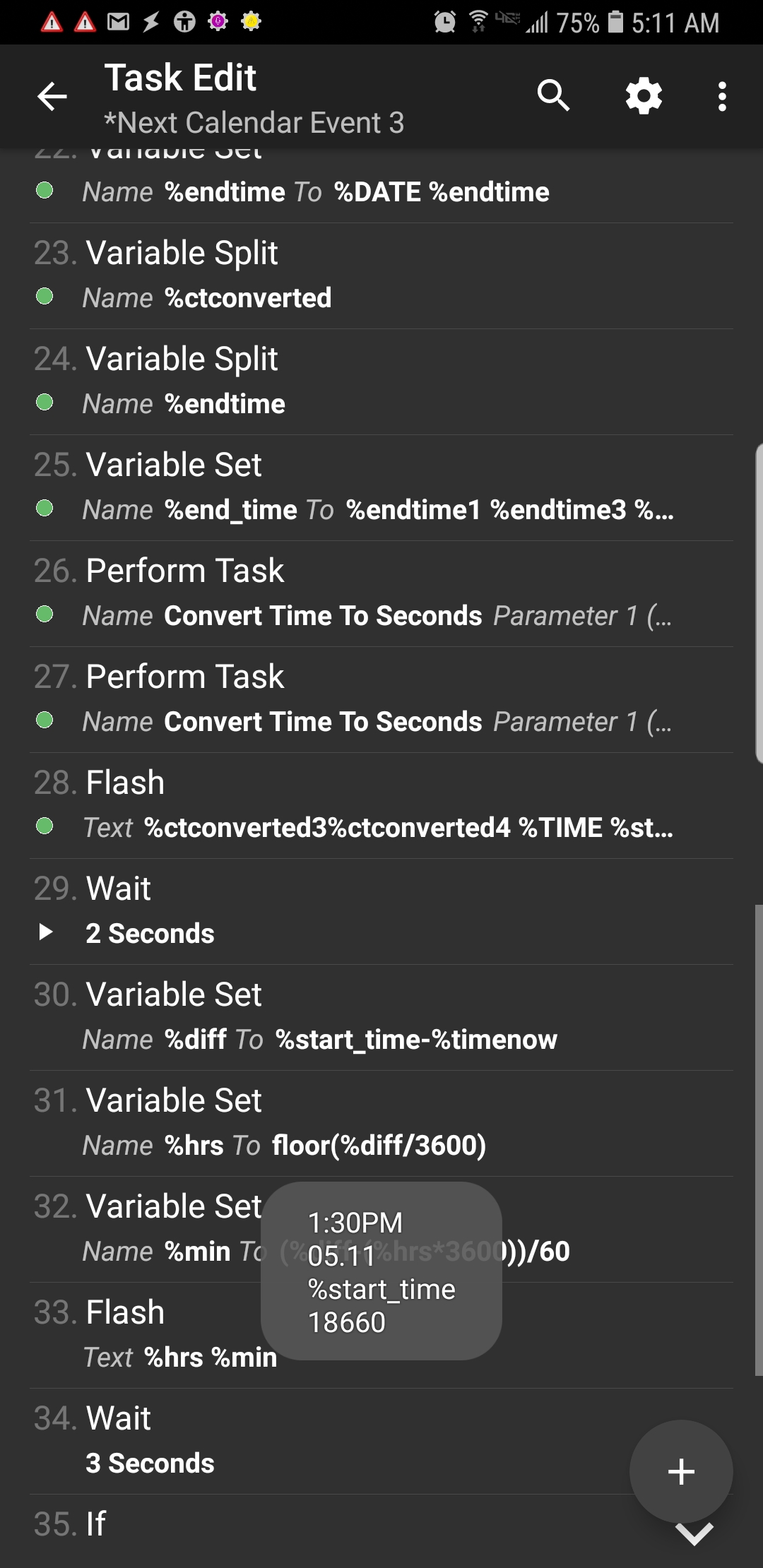
Can you put a flash action (or a notify action) after A27 and show me what is in

%ctconverted3%ctconverted4
%TIME
%start_time
%timenow

And include the latest description..

Logan Fury

unread,
Feb 3, 2020, 8:17:28 AM2/3/20
to tas...@googlegroups.com
Hello Rich,

Return was:

 1:30PM
05.11
%start_time 
18660


Latest edit:
    A26: Perform Task [ Name:Convert Time To Seconds Priority:%priority Parameter 1 (%par1):%ctconverted3%ctconverted4 Parameter 2 (%par2): Return Value Variable:%start_time Stop:Off ] 
    A27: Perform Task [ Name:Convert Time To Seconds Priority:%priority Parameter 1 (%par1):%TIME Parameter 2 (%par2): Return Value Variable:%timenow Stop:Off ] 
    A28: Flash [ Text:%ctconverted3%ctconverted4
    %TIME
    %start_time
    %timenow Long:On ] 
    A29: Wait [ MS:0 Seconds:2 Minutes:0 Hours:0 Days:0 ] 
    A30: Variable Set [ Name:%diff To:%start_time-%timenow  Recurse Variables:Off Do Maths:On Append:Off Max Rounding Digits:3 ] 
    A31: Variable Set [ Name:%hrs To:floor(%diff/3600) Recurse Variables:Off Do Maths:On Append:Off Max Rounding Digits:3 ] 
    A32: Variable Set [ Name:%min To:(%diff-(%hrs*3600))/60 Recurse Variables:Off Do Maths:On Append:Off Max Rounding Digits:3 ] 
    A33: Flash [ Text:%hrs
    %min Long:On ] 
    A34: Wait [ MS:0 Seconds:3 Minutes:0 Hours:0 Days:0 ] 
    A35: If [ %DAYW ~ %ctconverted2 ]
    A36: Variable Set [ Name:%day To:Today Recurse Variables:Off Do Maths:Off Append:Off Max Rounding Digits:3 ] 
    A37: Else 
    A38: Variable Set [ Name:%day To:%DAYW  Recurse Variables:Off Do Maths:Off Append:Off Max Rounding Digits:3 ] 
    A39: End If 
    A40: Say [ Text:This event takes place %day in %hrs hours and %min minutes. from %ctconverted3%ctconverted4 til %endtime3%endtime4 Engine:Voice:com.cereproc.Caitlin:eng-GBR Stream:4 Pitch:5 Speed:5 Respect Audio Focus:On Network:Off Continue Task Immediately:Off ] 
    

--
You received this message because you are subscribed to a topic in the Google Groups "Tasker" group.
To unsubscribe from this topic, visit https://groups.google.com/d/topic/tasker/khnxgnG9Awg/unsubscribe.
To unsubscribe from this group and all its topics, send an email to tasker+un...@googlegroups.com.
Screenshot_20200203-051109_Tasker.jpg

Rich D

unread,
Feb 3, 2020, 8:45:44 AM2/3/20
to Tasker Google Groups Post
Easiest fix for for now is to edit the child task And replace any reference to am or pm to AM or PM.. 

Logan Fury

unread,
Feb 3, 2020, 8:57:25 AM2/3/20
to tas...@googlegroups.com
And thats got it :D

Task Called at 5:50am to announce a 1:30pm-2:30pm task. It gave the correct return of 7 hours and 40 minutes.

Rich thank you sincerely for dedicating so much time to this project. There's no telling how many people are following this thread and will now enjoy this working script.

Until the next catastrophe, have a wonderful day!

I'm gathering all the Profiles, Tasks, and Child Tasks that make this possible and pasting them into next email so the working versions are easily accessible to anyone thats interested

Logan

On Mon, Feb 3, 2020 at 5:45 AM Rich D <ricp...@gmail.com> wrote:
Easiest fix for for now is to edit the child task And replace any reference to am or pm to AM or PM.. 

--
You received this message because you are subscribed to a topic in the Google Groups "Tasker" group.
To unsubscribe from this topic, visit https://groups.google.com/d/topic/tasker/khnxgnG9Awg/unsubscribe.
To unsubscribe from this group and all its topics, send an email to tasker+un...@googlegroups.com.

Logan Fury

unread,
Feb 3, 2020, 9:13:58 AM2/3/20
to tas...@googlegroups.com
Here's all file descriptions and instructions for the Next Calendar Event project:

This uses Marco Stornelli's CalendarTask plug in 

It starts with my separate called-on Task:

    Get Time Period (140)
     A1: Variable Set [ Name:%time To:%TIME Recurse Variables:Off Do Maths:Off Append:Off Max Rounding Digits:3 ] 
     A2: Variable Split [ Name:%time Splitter:. Delete Base:Off ] 
     A3: If [ %time1 < 12 ]
     A4: Variable Set [ Name:%TimePeroid To:Morning Recurse Variables:Off Do Maths:Off Append:Off Max Rounding Digits:3 ] 
     A5: Else If [ %time1 > 11 & %time1 < 17 ]
     A6: Variable Set [ Name:%TimePeroid To:Afternoon Recurse Variables:Off Do Maths:Off Append:Off Max Rounding Digits:3 ] 
     A7: Else 
     A8: Variable Set [ Name:%TimePeroid To:Evening Recurse Variables:Off Do Maths:Off Append:Off Max Rounding Digits:3 ] 
     A9: End If 
    
This feeds data thru a Global Variable to the main Task:

    *Next Calendar Event (319)
Here is Rich's Child Task to calculate correct time values:

    Convert Time To Seconds (305)
    A1: Variable Set [ Name:%time To:%par1 Recurse Variables:Off Do Maths:Off Append:Off Max Rounding Digits:3 ] 
    A2: Variable Search Replace [ Variable:%time Search:: Ignore Case:Off Multi-Line:Off One Match Only:Off Store Matches In Array: Replace Matches:On Replace With:. ] 
    A3: Variable Search Replace [ Variable:%time Search:12. Ignore Case:Off Multi-Line:Off One Match Only:Off Store Matches In Array: Replace Matches:On Replace With:00. ] If [ %par1 ~ *AM ]
    A4: Variable Search Replace [ Variable:%time Search:AM Ignore Case:Off Multi-Line:Off One Match Only:Off Store Matches In Array: Replace Matches:On Replace With: ] 
    A5: Variable Search Replace [ Variable:%time Search:PM Ignore Case:Off Multi-Line:Off One Match Only:Off Store Matches In Array: Replace Matches:On Replace With: ] 
    A6: Variable Split [ Name:%time Splitter:. Delete Base:Off ] 
    A7: Variable Set [ Name:%time1 To:%time1+12 Recurse Variables:Off Do Maths:On Append:Off Max Rounding Digits:3 ] If [ %par1 ~ *PM & %time1 != 12 ]
    A8: Variable Set [ Name:%seconds To:(%time1*3600)+(%time2*60) Recurse Variables:Off Do Maths:On Append:Off Max Rounding Digits:3 ] 
    A9: Flash [ Text:%seconds Long:Off ] 
    A10: Return [ Value:%seconds Stop:On ] 
   

And finally, the AutoVoice Profile to launch it:

    Profile: AV:Next Calendar Event (189)
    Restore: no
    Event: AutoVoice Recognized [ Configuration:Easy Commands: next calendar event  ]
    Enter: *Next Calendar Event (319)
 
I hope everyone interested enjoys this. 

Now that Rich has done the real work, feel free anyone to contact me in this thread or my Gmail for any XML files or set up instructions you may need to get this up and running in your own Tasker. 

Take care everyone :) 
    

Marta Hintz

unread,
Feb 3, 2020, 4:52:15 PM2/3/20
to Tasker
you guys have done some good work here, I would love the xml or taskernet share. thanks!

Logan Fury

unread,
Feb 3, 2020, 6:10:03 PM2/3/20
to tas...@googlegroups.com
Im not registered at Taskernet share, so Ill send the routine to your private email.

On Mon, Feb 3, 2020 at 1:52 PM Marta Hintz <lar...@gmail.com> wrote:
you guys have done some good work here, I would love the xml or taskernet share.  thanks!

--
You received this message because you are subscribed to a topic in the Google Groups "Tasker" group.
To unsubscribe from this topic, visit https://groups.google.com/d/topic/tasker/khnxgnG9Awg/unsubscribe.
To unsubscribe from this group and all its topics, send an email to tasker+un...@googlegroups.com.

Logan Fury

unread,
Feb 3, 2020, 6:25:37 PM2/3/20
to tas...@googlegroups.com
All the files are sent. Ill look into setting up at Taskernet, but ill have to check my saved URLs from this project - it's entirely possible this came originally from Taskernet before I found it, asked for assistance, and was fortunate enough to receive the amazing help and coding - and time, from Rich.

If thats the case I dont think id want to repost to Taskernet without alerting/requesting permission from the original author. Any of the Forum family is of course welcome to request all the XML's and help needed here :)

Marta Hintz

unread,
Feb 4, 2020, 6:42:28 PM2/4/20
to Tasker
I have received them.... thank you for these.

Logan Fury

unread,
Feb 4, 2020, 6:47:43 PM2/4/20
to tas...@googlegroups.com
My pleasure Marta,

Enjoy! 

On Tue, Feb 4, 2020, 3:42 PM Marta Hintz <lar...@gmail.com> wrote:
I have received them.... thank you for these.

--
You received this message because you are subscribed to a topic in the Google Groups "Tasker" group.
To unsubscribe from this topic, visit https://groups.google.com/d/topic/tasker/khnxgnG9Awg/unsubscribe.
To unsubscribe from this group and all its topics, send an email to tasker+un...@googlegroups.com.

Logan Fury

unread,
Feb 5, 2020, 5:33:51 PM2/5/20
to Tasker
Rich you wont believe this....

I just ran the routine, I had no appointments today, but I did have one tomorrow at 4:15pm.

When I ran the Task at 2pm today it announced "this event takes place wednesday in 2 hours 15 minutes from 4:15pm til 5:15pm

I know youve already put an incredible amount of time into this, but is there anyway you could massage the script some more so if the event day isnt today, it can calculate how many days difference and announce, as in the above event: takes place wednesday in 1 day 2 hours 15 mins....

Thank you,

Logan

On Tuesday, February 4, 2020 at 3:47:43 PM UTC-8, Logan Fury wrote:
My pleasure Marta,

Enjoy! 

On Tue, Feb 4, 2020, 3:42 PM Marta Hintz <lar...@gmail.com> wrote:
I have received them.... thank you for these.

--
You received this message because you are subscribed to a topic in the Google Groups "Tasker" group.
To unsubscribe from this topic, visit https://groups.google.com/d/topic/tasker/khnxgnG9Awg/unsubscribe.
To unsubscribe from this group and all its topics, send an email to tasker+unsubscribe@googlegroups.com.

Rich D

unread,
Feb 5, 2020, 7:52:01 PM2/5/20
to Tasker Google Groups Post

Rich you wont believe this....

Actually I would..... :)

I did mention my disclaimer earlier in the post that this would only be good for the current 24 hr period... 

I had assumed you were only getting events for the current day.

You had said that calendar task returned the time in 12 hr format. After checking the code it appears this is not exactly correct. The get events returns %ctstart and %ctend and then those are converted with the 'format date' action.   

Can you give me a example of the exact format  %ctstart and %ctend are converted into?

As for the actual  difference from the current time to the event start time, how do you want to have it formated?

I recently made a task that announces how far in the future my alarm is set for. It will say
 "your alarm  is set for <tomorrow> at 4:00 am"
 "your alarm  is set for <day after tomorrow> at 4:00 am"
 "your alarm  is set for <3 days from now> at 4:00 am"
"your alarm  is set for <4 days from now> at 4:00 am"

Or were thinking of something else?


Logan Fury

unread,
Feb 5, 2020, 7:58:30 PM2/5/20
to tas...@googlegroups.com
Hello Rich,

Thank you so much for the fast response. The format you present looks great! is it possible to turn that into a subroutine that triggers around A32-35 where day is set to Today if applicable, and Else sets the weekday otherwise?

Logan

--
You received this message because you are subscribed to a topic in the Google Groups "Tasker" group.
To unsubscribe from this topic, visit https://groups.google.com/d/topic/tasker/khnxgnG9Awg/unsubscribe.
To unsubscribe from this group and all its topics, send an email to tasker+un...@googlegroups.com.
To view this discussion on the web visit https://groups.google.com/d/msgid/tasker/CADuUTAoz8bY-8FGv3E9eL69aGTA0ZvZvgaDMnbP5J0_iRTEFFQ%40mail.gmail.com.

Rich D

unread,
Feb 5, 2020, 8:12:24 PM2/5/20
to Tasker Google Groups Post

Logan Fury

unread,
Feb 5, 2020, 8:17:16 PM2/5/20
to tas...@googlegroups.com
I put a FLASH %ctstart %ctend and received a return of 1581034500 1581038100

looks like DATETIME in seconds?

On Wed, Feb 5, 2020 at 5:12 PM Rich D <ricp...@gmail.com> wrote:

Can you give me a example of the exact format  %ctstart and %ctend are converted into?

--
You received this message because you are subscribed to a topic in the Google Groups "Tasker" group.
To unsubscribe from this topic, visit https://groups.google.com/d/topic/tasker/khnxgnG9Awg/unsubscribe.
To unsubscribe from this group and all its topics, send an email to tasker+un...@googlegroups.com.
To view this discussion on the web visit https://groups.google.com/d/msgid/tasker/CADuUTAoFO0XZOTHrbr8sWs2Mu63V0rMkmbONv8OFV5y4VMPUhA%40mail.gmail.com.

Rich D

unread,
Feb 5, 2020, 8:40:59 PM2/5/20
to Tasker Google Groups Post
Ok, I will see what I can come up with. It might take a little time. 

Logan Fury

unread,
Feb 5, 2020, 8:44:07 PM2/5/20
to tas...@googlegroups.com
Thank you very much Rich :)

I'll be avail if I can be of any help testing or troubleshooting.

On Wed, Feb 5, 2020 at 5:41 PM Rich D <ricp...@gmail.com> wrote:
Ok, I will see what I can come up with. It might take a little time. 

--
You received this message because you are subscribed to a topic in the Google Groups "Tasker" group.
To unsubscribe from this topic, visit https://groups.google.com/d/topic/tasker/khnxgnG9Awg/unsubscribe.
To unsubscribe from this group and all its topics, send an email to tasker+un...@googlegroups.com.

Rich D

unread,
Feb 6, 2020, 6:43:17 PM2/6/20
to Tasker Google Groups Post
Ok, let's give this a try. This task will replace the last child task "convert time to seconds" .  If the task action numbers have not changed since the last time you posted them (here are all file descriptions ...)then you can delete --
A26- preform task
A27 -preform task
A28 flash
A29 wait
A30 variable set
A31 variable set
A32 variable set
A33 flash


And replace them with one preform task action calling "Time From Now Till X" and set %par1= %ctstart
Return value= %say_hrs -  like the action below

  
    A3: Perform Task [ Name:Time From Now Till X Priority:%priority Parameter 1 (%par1):%ctstart Parameter 2 (%par2): Return Value Variable:%say_hrs Stop:Off ] 
   
The task will return the hours or the number of days untill the start time of the in the variable %say_hrs . You can place %say_hrs directly in your say action. You will need to edit it slightly as below..

A40: Say [ Text:This event takes place %say_hrs. from %ctconverted3%ctconverted4 til %endtime3%endtime4


    Time From Now Till X (861)
    <This task will return the time or day difference from the current time to the target time in the future.
    Run this with a preform task action and set %par1 = unix time in seconds of the target time.>
    A1: Anchor 
    A2: Variable Set [ Name:%time To:%par1 Recurse Variables:Off Do Maths:On Append:Off Max Rounding Digits:3 ] 
    <Get difference in days>
    A3: Anchor 
    A4: Variable Convert [ Name:%time Function:Seconds to Long Date Time Store Result In: Mode:Default ] 
    A5: Variable Split [ Name:%time Splitter: Delete Base:Off ] 
    A6: Variable Set [ Name:%fdate To:%time1 %time2 %time3 Recurse Variables:Off Do Maths:Off Append:Off Max Rounding Digits:3 ] 
    A7: JavaScriptlet [ Code:var d = new Date (fdate)
    var yn = d.getFullYear();
    var mn = d.getMonth();
    var dn = d.getDate();
    var d1 = new Date(yn,0,1,12,0,0); // noon on Jan. 1
    var d2 = new Date(yn,mn,dn,12,0,0); // noon on input date
    var f_date_num = Math.round(((d2-d1)/864e5)+1);


    var d = new Date ()
    var yn = d.getFullYear();
    var mn = d.getMonth();
    var dn = d.getDate();
    var d1 = new Date(yn,0,1,12,0,0); // noon on Jan. 1
    var d2 = new Date(yn,mn,dn,12,0,0); // noon on input date
    var diff = f_date_num -  Math.round(((d2-d1)/864e5)+1); Libraries: Auto Exit:On Timeout (Seconds):45 ] 
    <Test for same day>
    A8: Anchor 
    A9: If [ %diff ~ 0 ]
    A10: Variable Set [ Name:%hrs To:floor((%par1-%TIMES)/3600) Recurse Variables:Off Do Maths:On Append:Off Max Rounding Digits:1 ] 
    A11: Variable Set [ Name:%min To:floor(((%par1-%TIMES)-(%hrs*3600))/60) Recurse Variables:Off Do Maths:On Append:Off Max Rounding Digits:1 ] 
    A12: Variable Set [ Name:%say_hrs To:%hrs Hours and %min minutes Recurse Variables:Off Do Maths:Off Append:Off Max Rounding Digits:3 ] 
    A13: Return [ Value:%say_hrs Stop:On ] 
    A14: Stop [ With Error:Off Task: ] 
    A15: End If 
    <Set tomorrow>
    A16: Anchor 
    A17: Variable Set [ Name:%tommorow To:Tommorow Recurse Variables:Off Do Maths:Off Append:Off Max Rounding Digits:3 ] If [ %diff = 1 ]
    A18: Variable Set [ Name:%tommorow To:day after tommorow Recurse Variables:Off Do Maths:Off Append:Off Max Rounding Digits:3 ] If [ %diff = 2 ]
    A19: Variable Set [ Name:%tommorow To:%diff days from now Recurse Variables:Off Do Maths:Off Append:Off Max Rounding Digits:3 ] If [ %diff > 2 ]
    A20: Variable Set [ Name:%say_hrs To:%tommorow %time1 %time2 %time3 Recurse Variables:Off Do Maths:Off Append:Off Max Rounding Digits:3 ] 
    A21: Return [ Value:%say_hrs Stop:On ] 


Logan Fury

unread,
Feb 6, 2020, 7:36:27 PM2/6/20
to tas...@googlegroups.com
Hello Rich,

I have imported the new child Task and performed the edits. I set up a test event on calendar for tomorrow and it returned flawlessly. I set a test event for later in the evening today and it calculated that perfectly as well!

Thank you very much,

Logan 

--
You received this message because you are subscribed to a topic in the Google Groups "Tasker" group.
To unsubscribe from this topic, visit https://groups.google.com/d/topic/tasker/khnxgnG9Awg/unsubscribe.
To unsubscribe from this group and all its topics, send an email to tasker+un...@googlegroups.com.

Dan Cox

unread,
Feb 7, 2020, 8:13:30 AM2/7/20
to Tasker
For what it is worth, there is also a an app in Google Play Store, that I use, that does something similar to this, and it is very feature rich. It also offers very robust notification snoozing. I am a fan of this app.

It's called "Events Notifier Calendar"

https://play.google.com/store/apps/details?id=com.ryosoftware.calendareventsnotifier

Logan Fury

unread,
Feb 7, 2020, 12:08:06 PM2/7/20
to tas...@googlegroups.com
Thank you for the tip Dan.

That sounds like a great addon, but it can't possibly re-produce the sheer fun that I had hunting down a good base script and then working with Rich's edits to customize it :)

--
You received this message because you are subscribed to a topic in the Google Groups "Tasker" group.
To unsubscribe from this topic, visit https://groups.google.com/d/topic/tasker/khnxgnG9Awg/unsubscribe.
To unsubscribe from this group and all its topics, send an email to tasker+un...@googlegroups.com.

Dan Cox

unread,
Feb 7, 2020, 12:23:31 PM2/7/20
to Tasker
Yeah, I know what you mean. Building it yourself to work exactly the way you want, can be very rewarding when you finally get it working like a well-oiled machine.

Dan Cox

unread,
Feb 7, 2020, 12:23:53 PM2/7/20
to Tasker
GREAT work!

Rich D

unread,
Feb 7, 2020, 5:22:23 PM2/7/20
to Tasker Google Groups Post

Here is a description of how it works. If you do not understand any part please ask more questions. Understanding how it works will allow you to better customize the project. 

The overview..

To figure out the time period from now to event start time you can simply subtract %TIMES (current Unix time in seconds) from %ctsart (start time of event in unix seconds).  This gives you the total seconds of time between the two. Then divide the difference by 3600 (60*60=3600 which is the number of seconds in an hour). That gives you a decimal total number of hrs like 3.25. The "floor" option in the variable set A10 action simply removes the decimal portion so you are left with 3 hours. To extract the minutes the action A11 takes the number of hrs (3)  and multiplies it by 3600 to get the number of seconds in exactly 3hrs then it subtracts that from the total difference of  %TIMES (current Unix time in seconds) minus %ctsart (start time of event in unix seconds). This would be the remaining minutes and seconds after removing the 3 hrs. It then divides that result by 60 (number of seconds in one minute) to get the number of minutes. It uses the 'floor' operator to remove any decimal places so you are left with just the minutes. Hopefully writing out the math like that helped and did not make it more confusing... 

This of course is only good for the events that happen on the same day. It would not make much sense to tell the user that there event is in 79 hrs and 15 minutes. So the first thing the task does is to check to see if the event is on the current day. You could do this just by testing if current date matches event date. However you would still need to figure out how many days in the future the event is. I thought the best way to do that would be to get the 'day number of the year' (this is the number of days since January 1st. So February 2nd would have a day number of 33) then we can just subtract the two day numbers to get the 'days until event'. A simple Google search gave me the Javascript code to do this. The day numbers are also subtracted in the javascript so the variable %diff is set to the number of days untill event when the javascript is complete. After that if diff = 0 then the task just gets the hrs and minutes as described above and if %diff > 0 then it just goes through a few if then actions to get the proper term of 'Tomorrow' / 'Day After Tommorow / x Days from now. 


    Time From Now Till X (861)
    <This task will return the time or day difference from the current time to the target time in the future.
    Run this with a preform task action and set %par1 = unix time in seconds of the target time.>
    A1: Anchor 
    A2: Variable Set [ Name:%time To:%par1 Recurse Variables:Off Do Maths:On Append:Off Max Rounding Digits:3 ] 
    <Get difference in days>
    A3: Anchor 
    A4: Variable Convert [ Name:%time Function:Seconds to Long Date Time Store Result In: Mode:Default ] 

/// converts the start time of the event from unix seconds to the long date format. This is so I can extract the acual
Reply all
Reply to author
Forward
0 new messages