
Can Tasker or any of its plugins detect that a keyboard is present?
577 views
Skip to first unread message

Logan Fury
Mar 13, 2018, 11:52:24 PM3/13/18
to Tasker
Good Evening all,
Occasionally on my phone when I say "OK Google" expecting to see the large white window with the microphone icon and the prompt "listening..." I get something different: a narrow blank text bar at the top of my screen, and a keyboard popping up at the bottom.
I dont know why OK Google confuses the command to prepare to receive voice input with preparing to receive typed commands, but its been happening for a while. Again this is not the new Google Assistant.
I have a simple task that launches OK Google and works flawlessly when I tap its onscreen icon. My first thought was to make an AutoInput command to perform this when I say "OK Google" but Im afraid of launching redundant instances, and only want one working query up at a time.
So thinking I need something a bit more complicated, Im wondering if saying "OK Google" can be the command to start any of the AutoApps or Tasker to detect that a keyboard has appeared, and if so, auto launch a new task to close keyboard, clear screen, and launch OK Google thru the simple launch app option in Tasker. My phone is rooted so using command shell to accomplish parts of this is not an issue.
Can anything detect presence of a keyboard so I can make this concept a real Task?
Thank you for reading,
Logan
Logan Fury
Mar 15, 2018, 3:17:30 AM3/15/18
to tas...@googlegroups.com
Here is the screen I expect: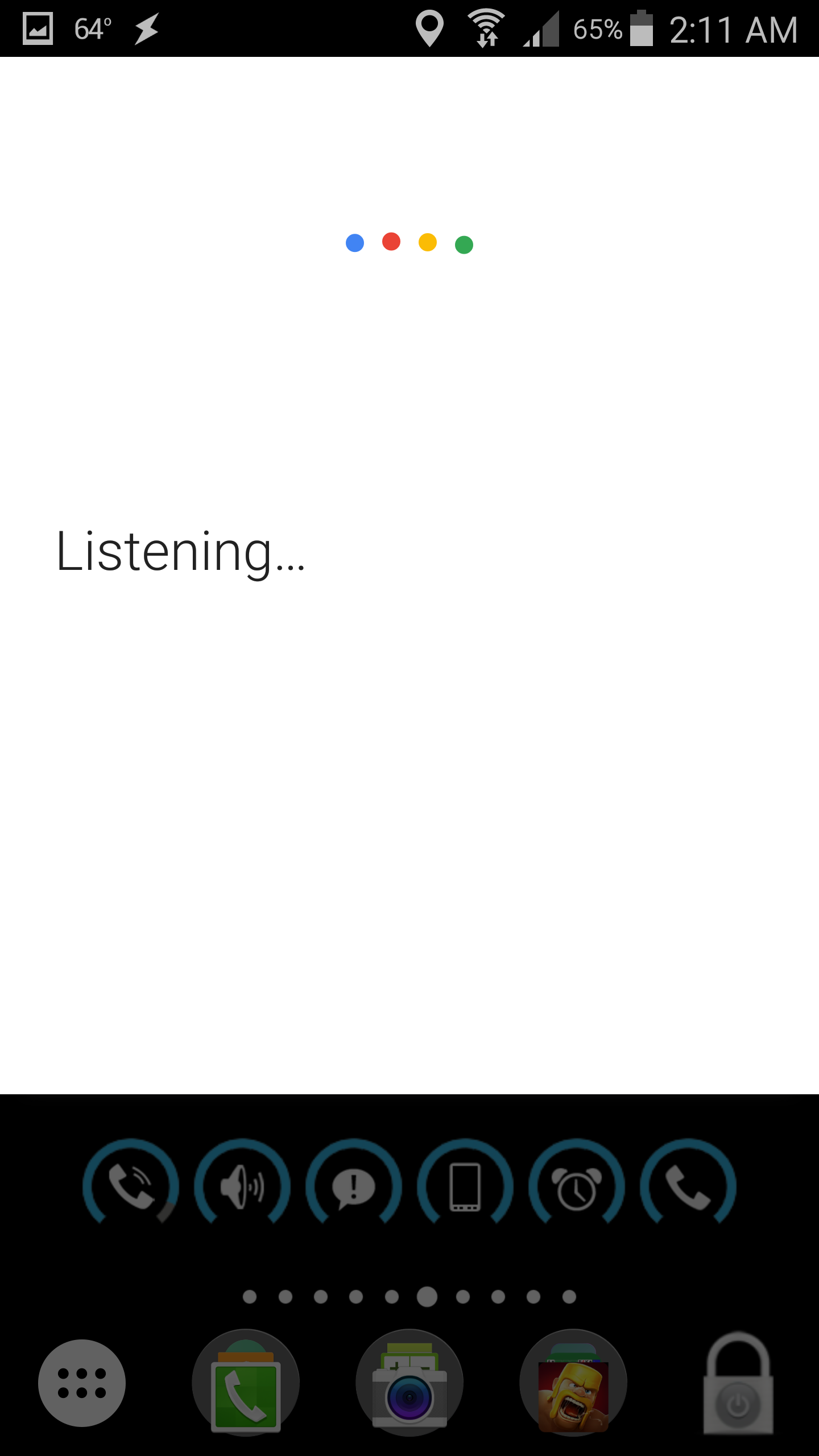

and this is what im getting instead sometimes:
Im trying to use AutoInput to detect this but its failing:
I have AutoVoice launching this every time I say "OK Google":
OK GOOGLE FAIL (330)
A1: Wait [ MS:0 Seconds:4 Minutes:0 Hours:0 Days:0 ]
A2: AutoInput UI Query [ Configuration:Text: Search...
Regex: true
Only Visible: true
Only Clickable: true Timeout (Seconds):20 ]
A3: Beep [ Frequency:120 Duration:1000 Amplitude:100 Stream:3 ]
A4: Say [ Text:Failure detected Engine:Voice:default:default Stream:3 Pitch:5 Speed:5 Respect Audio Focus:On Network:Off Continue Task Immediately:Off ]
A1: Wait [ MS:0 Seconds:4 Minutes:0 Hours:0 Days:0 ]
A2: AutoInput UI Query [ Configuration:Text: Search...
Regex: true
Only Visible: true
Only Clickable: true Timeout (Seconds):20 ]
A3: Beep [ Frequency:120 Duration:1000 Amplitude:100 Stream:3 ]
A4: Say [ Text:Failure detected Engine:Voice:default:default Stream:3 Pitch:5 Speed:5 Respect Audio Focus:On Network:Off Continue Task Immediately:Off ]
Why is this failing to see the "Search..."?
If I can get the above to work, Then Ill edit it use Tasker to launch "OK Google" directly, but it doesnt detect the shown screen can you advise why?
Thank you,
Logan
--
You received this message because you are subscribed to a topic in the Google Groups "Tasker" group.
To unsubscribe from this topic, visit https://groups.google.com/d/topic/tasker/hHz0LQtqRBc/unsubscribe.
To unsubscribe from this group and all its topics, send an email to tasker+unsubscribe@googlegroups.com.
Visit this group at https://groups.google.com/group/tasker.
For more options, visit https://groups.google.com/d/optout.
Logan Fury
Mar 15, 2018, 4:15:21 AM3/15/18
to tas...@googlegroups.com
Ive just come across this very involved thread: https://www.xda-developers.com/how-to-add-leftright-keyboard-cursors-to-the-nav-bar-during-text-input/
the process uses AutoInput to detect keyboards, so im going to try to strip out of the page what I need for what im doing.
Logan Fury
Mar 15, 2018, 5:53:48 AM3/15/18
to tas...@googlegroups.com
I DID IT!!! I DID IT!!! I DID IT!!!
I didnt get dizzy, pass out, OR fall over. Not even ONCE :D
OK so....the trick to detecting keyboard with AutoInput was via a Profile, not a Task, so, ive made 2 profiles and 2 tasks:
Profile 1, launches Task 1 which enables Profile 2 when "OK Google" is spoken to the phone.
Profile 2 then performs the AutoInput virtual keyboard present test, if its positive, its launches Task 2, which reports error detected and auto launches OK Googles voice command screen:
Profile 1 Step 1
Profile: AV:OK GOOGLE FAIL (331)
Event: AutoVoice Recognized [ Configuration:Easy Commands: ok google ]
Enter: OK GOOGLE Error ON (334)
A1: Profile Status [ Name:*Set Moon Image Set:On ]
Event: AutoVoice Recognized [ Configuration:Easy Commands: ok google ]
Enter: OK GOOGLE Error ON (334)
A1: Profile Status [ Name:*Set Moon Image Set:On ]
Task 1 Step 2
OK GOOGLE Error ON (334)
A1: Profile Status [ Name:AI:OK GOOGLE ERROR Set:On ]
A1: Profile Status [ Name:AI:OK GOOGLE ERROR Set:On ]
Profile 2 Step 3
Profile: AI:OK GOOGLE ERROR (335)
Event: AutoInput UI Action [ Configuration:Action Types: Input Element Focused,Input Element Focus Lost ]
Enter: OK GOOGLE ERROR (336)
A1: If [ %aifocus ~ true ]
A2: Beep [ Frequency:420 Duration:1000 Amplitude:100 Stream:3 ]
A3: Say [ Text:Failure detected Engine:Voice:default:default Stream:3 Pitch:5 Speed:5 Respect Audio Focus:On Network:Off Continue Task Immediately:Off ]
A4: Launch App [ App:OK Google Data: Exclude From Recent Apps:Off Always Start New Copy:Off ]
A5: End If
A6: Wait [ MS:0 Seconds:4 Minutes:0 Hours:0 Days:0 ]
A7: Profile Status [ Name:AI:OK GOOGLE ERROR Set:Off ]
Event: AutoInput UI Action [ Configuration:Action Types: Input Element Focused,Input Element Focus Lost ]
Enter: OK GOOGLE ERROR (336)
A1: If [ %aifocus ~ true ]
A2: Beep [ Frequency:420 Duration:1000 Amplitude:100 Stream:3 ]
A3: Say [ Text:Failure detected Engine:Voice:default:default Stream:3 Pitch:5 Speed:5 Respect Audio Focus:On Network:Off Continue Task Immediately:Off ]
A4: Launch App [ App:OK Google Data: Exclude From Recent Apps:Off Always Start New Copy:Off ]
A5: End If
A6: Wait [ MS:0 Seconds:4 Minutes:0 Hours:0 Days:0 ]
A7: Profile Status [ Name:AI:OK GOOGLE ERROR Set:Off ]
Task 2 Step 4 final
OK GOOGLE ERROR (336)
A1: If [ %aifocus ~ true ]
A2: Beep [ Frequency:420 Duration:1000 Amplitude:100 Stream:3 ]
A3: Say [ Text:Failure detected Engine:Voice:default:default Stream:3 Pitch:5 Speed:5 Respect Audio Focus:On Network:Off Continue Task Immediately:Off ]
A4: Launch App [ App:OK Google Data: Exclude From Recent Apps:Off Always Start New Copy:Off ]
A5: End If
A6: Wait [ MS:0 Seconds:4 Minutes:0 Hours:0 Days:0 ]
A7: Profile Status [ Name:AI:OK GOOGLE ERROR Set:Off ]
A1: If [ %aifocus ~ true ]
A2: Beep [ Frequency:420 Duration:1000 Amplitude:100 Stream:3 ]
A3: Say [ Text:Failure detected Engine:Voice:default:default Stream:3 Pitch:5 Speed:5 Respect Audio Focus:On Network:Off Continue Task Immediately:Off ]
A4: Launch App [ App:OK Google Data: Exclude From Recent Apps:Off Always Start New Copy:Off ]
A5: End If
A6: Wait [ MS:0 Seconds:4 Minutes:0 Hours:0 Days:0 ]
A7: Profile Status [ Name:AI:OK GOOGLE ERROR Set:Off ]
I had to sit in front of my phone and bark out "OK Google" for 10 minutes before it errored and proved the set of Profiles and Tasks to be working but it seems to be problem free!
Whatcha guys think :)
Logan Fury
Mar 15, 2018, 6:26:11 AM3/15/18
to tas...@googlegroups.com
Whoops one slight copy/paste error in my post!
While building this I had to use an existing profile as a placeholder hence that "*Set Moon Image" in the profile status. The correct Profile is:
Profile 1 Step 1
Profile: AV:OK GOOGLE FAIL (331)
Event: AutoVoice Recognized [ Configuration:Easy Commands: ok google ]
Enter: OK GOOGLE Error ON (334)
Event: AutoVoice Recognized [ Configuration:Easy Commands: ok google ]
Enter: OK GOOGLE Error ON (334)
A1: Profile Status [ Name:AI:OK GOOGLE ERROR Set:On ]
and the others remain as originally posted:
Task 1 Step 2
OK GOOGLE Error ON (334)
A1: Profile Status [ Name:AI:OK GOOGLE ERROR Set:On ]
A1: Profile Status [ Name:AI:OK GOOGLE ERROR Set:On ]
Profile 2 Step 3
Profile: AI:OK GOOGLE ERROR (335)
Event: AutoInput UI Action [ Configuration:Action Types: Input Element Focused,Input Element Focus Lost ]
Enter: OK GOOGLE ERROR (336)
A1: If [ %aifocus ~ true ]
A2: Beep [ Frequency:420 Duration:1000 Amplitude:100 Stream:3 ]
A3: Say [ Text:Failure detected Engine:Voice:default:default Stream:3 Pitch:5 Speed:5 Respect Audio Focus:On Network:Off Continue Task Immediately:Off ]
A4: Launch App [ App:OK Google Data: Exclude From Recent Apps:Off Always Start New Copy:Off ]
A5: End If
A6: Wait [ MS:0 Seconds:4 Minutes:0 Hours:0 Days:0 ]
A7: Profile Status [ Name:AI:OK GOOGLE ERROR Set:Off ]
Event: AutoInput UI Action [ Configuration:Action Types: Input Element Focused,Input Element Focus Lost ]
Enter: OK GOOGLE ERROR (336)
A1: If [ %aifocus ~ true ]
A2: Beep [ Frequency:420 Duration:1000 Amplitude:100 Stream:3 ]
A3: Say [ Text:Failure detected Engine:Voice:default:default Stream:3 Pitch:5 Speed:5 Respect Audio Focus:On Network:Off Continue Task Immediately:Off ]
A4: Launch App [ App:OK Google Data: Exclude From Recent Apps:Off Always Start New Copy:Off ]
A5: End If
A6: Wait [ MS:0 Seconds:4 Minutes:0 Hours:0 Days:0 ]
A7: Profile Status [ Name:AI:OK GOOGLE ERROR Set:Off ]
Task 2 Step 4 final
OK GOOGLE ERROR (336)
A1: If [ %aifocus ~ true ]
A2: Beep [ Frequency:420 Duration:1000 Amplitude:100 Stream:3 ]
A3: Say [ Text:Failure detected Engine:Voice:default:default Stream:3 Pitch:5 Speed:5 Respect Audio Focus:On Network:Off Continue Task Immediately:Off ]
A4: Launch App [ App:OK Google Data: Exclude From Recent Apps:Off Always Start New Copy:Off ]
A5: End If
A6: Wait [ MS:0 Seconds:4 Minutes:0 Hours:0 Days:0 ]
A7: Profile Status [ Name:AI:OK GOOGLE ERROR Set:Off ]
A1: If [ %aifocus ~ true ]
A2: Beep [ Frequency:420 Duration:1000 Amplitude:100 Stream:3 ]
A3: Say [ Text:Failure detected Engine:Voice:default:default Stream:3 Pitch:5 Speed:5 Respect Audio Focus:On Network:Off Continue Task Immediately:Off ]
A4: Launch App [ App:OK Google Data: Exclude From Recent Apps:Off Always Start New Copy:Off ]
A5: End If
A6: Wait [ MS:0 Seconds:4 Minutes:0 Hours:0 Days:0 ]
A7: Profile Status [ Name:AI:OK GOOGLE ERROR Set:Off ]
sorry for any confusion with the post of placeholder profile >.<
Logan Fury
Mar 15, 2018, 6:30:20 AM3/15/18
to tas...@googlegroups.com
Whoops one slight copy/paste error in my post!
While building this I had to use an existing profile as a placeholder hence that "*Set Moon Image" in the profile status. The correct Profile is:
Profile 1 Step 1
Profile: AV:OK GOOGLE FAIL (331)
Event: AutoVoice Recognized [ Configuration:Easy Commands: ok google ]
Enter: OK GOOGLE Error ON (334)
Event: AutoVoice Recognized [ Configuration:Easy Commands: ok google ]
Enter: OK GOOGLE Error ON (334)
A1: Profile Status [ Name:AI:OK GOOGLE ERROR Set:On ]
and the others remain as originally posted:
Task 1 Step 2
OK GOOGLE Error ON (334)
A1: Profile Status [ Name:AI:OK GOOGLE ERROR Set:On ]
A1: Profile Status [ Name:AI:OK GOOGLE ERROR Set:On ]
Profile 2 Step 3
Profile: AI:OK GOOGLE ERROR (335)
Event: AutoInput UI Action [ Configuration:Action Types: Input Element Focused,Input Element Focus Lost ]
Enter: OK GOOGLE ERROR (336)
A1: If [ %aifocus ~ true ]
A2: Beep [ Frequency:420 Duration:1000 Amplitude:100 Stream:3 ]
A3: Say [ Text:Failure detected Engine:Voice:default:default Stream:3 Pitch:5 Speed:5 Respect Audio Focus:On Network:Off Continue Task Immediately:Off ]
A4: Launch App [ App:OK Google Data: Exclude From Recent Apps:Off Always Start New Copy:Off ]
A5: End If
A6: Wait [ MS:0 Seconds:4 Minutes:0 Hours:0 Days:0 ]
A7: Profile Status [ Name:AI:OK GOOGLE ERROR Set:Off ]
Event: AutoInput UI Action [ Configuration:Action Types: Input Element Focused,Input Element Focus Lost ]
Enter: OK GOOGLE ERROR (336)
A1: If [ %aifocus ~ true ]
A2: Beep [ Frequency:420 Duration:1000 Amplitude:100 Stream:3 ]
A3: Say [ Text:Failure detected Engine:Voice:default:default Stream:3 Pitch:5 Speed:5 Respect Audio Focus:On Network:Off Continue Task Immediately:Off ]
A4: Launch App [ App:OK Google Data: Exclude From Recent Apps:Off Always Start New Copy:Off ]
A5: End If
A6: Wait [ MS:0 Seconds:4 Minutes:0 Hours:0 Days:0 ]
A7: Profile Status [ Name:AI:OK GOOGLE ERROR Set:Off ]
Task 2 Step 4 final
OK GOOGLE ERROR (336)
A1: If [ %aifocus ~ true ]
A2: Beep [ Frequency:420 Duration:1000 Amplitude:100 Stream:3 ]
A3: Say [ Text:Failure detected Engine:Voice:default:default Stream:3 Pitch:5 Speed:5 Respect Audio Focus:On Network:Off Continue Task Immediately:Off ]
A4: Launch App [ App:OK Google Data: Exclude From Recent Apps:Off Always Start New Copy:Off ]
A5: End If
A6: Wait [ MS:0 Seconds:4 Minutes:0 Hours:0 Days:0 ]
A7: Profile Status [ Name:AI:OK GOOGLE ERROR Set:Off ]
A1: If [ %aifocus ~ true ]
A2: Beep [ Frequency:420 Duration:1000 Amplitude:100 Stream:3 ]
A3: Say [ Text:Failure detected Engine:Voice:default:default Stream:3 Pitch:5 Speed:5 Respect Audio Focus:On Network:Off Continue Task Immediately:Off ]
A4: Launch App [ App:OK Google Data: Exclude From Recent Apps:Off Always Start New Copy:Off ]
A5: End If
A6: Wait [ MS:0 Seconds:4 Minutes:0 Hours:0 Days:0 ]
A7: Profile Status [ Name:AI:OK GOOGLE ERROR Set:Off ]
sorry for any confusion with the post of incomplete
Reply all
Reply to author
Forward
0 new messages