
Popup sms notifier made via tasker scene

Cathy Lansy
Popup sms notifier via tasker scene
in my previous posts, i have mentioned that it is not significant to make popup sms notifier via tasker scene, cause it could only display 1 sms message(latest or oldest) which is not capable to deal with multiple situations.
however, during these days, i did discover a workaround which could fix this problem.
after done with my instructions below, you will be able to check every incoming unread sms messages just within 1 scene by pressing "next" or "previous" button, of course you will still need to activate another scene to fulfill the reply job which gives you full sceen input layout.
wondering how?
no rush, please read on.
please excuse me if you feel it is sorta messy below. let us consider it is a nice testing for your DIY ability.
^_^!!.....
ultimate effect: (FYI)
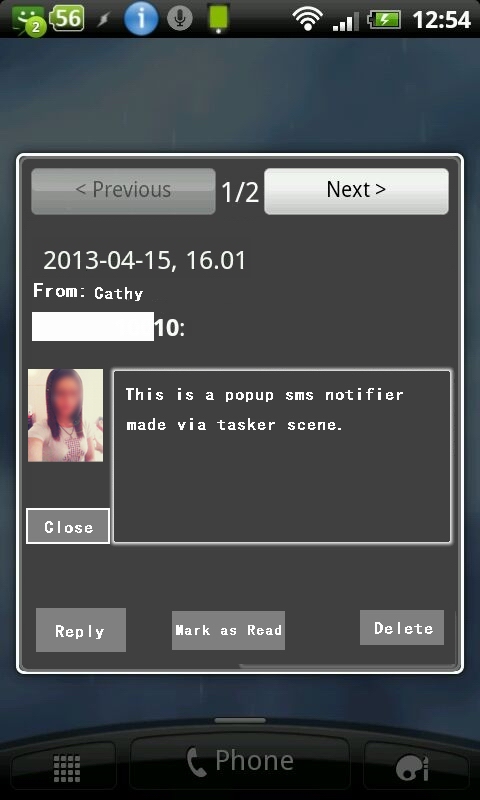
##############################################
profile 1: (popup sms notifier)
context: event-receive text, type: sms
task:
action: variable clear, name: %SMSBODY
action: variable set, name: %SMSJOIN1, to: %SMSRD
action: variable set, name: %SMSJOIN2, to: %SMSRT
action: variable set, name: %SMSJOIN3, to: %SMSRN
action: variable set, name: %SMSJOIN4, to: %SMSRF
action: variable set, name: %SMSJOIN5, to: %SMSRB
action: variable set, name: %SMSUNREAD, to: %SMSCOUNT+1, do maths checked
action: variable join, name: %SMSJOIN, joiner: ; to: %SMSDATA
action: variable set, name: %SMSPOPUP,to: %SMSUNREAD{%SMSDATA}, append checked
action: variable search replace, variable: %SMSPOPUP, search: %SMSUNREAD.\w+.\w+.\w+.\w+.\w+.\w+.\w+. store matches in: %SMSSHOW, ignore case, checked (in order to match the regex, the format should be like: 2{2013-3-15;13.30;Cat;2053959909},{........... )
aciton: variable split, name: %SMSSHOW, splitter: %SMSUNREAD{
aciton: variable split, name: %SMSSHOW2, splitter: }
aciton: variable split, name: %SMSSHOW21, splitter: ;
action: variable set, name: %SMSDATE, to: %SMSSHOW211
action: variable set, name: %SMSTIME, to: %SMSSHOW212
action: variable set, name: %SMSNAME, to: %SMSSHOW213
action: variable set, name: %SMSNUM, to: %SMSSHOW214
action: variable set, name: %SMSBODY, to: %SMSSHOW215
profile 2:
context: variable value, name: %SMSBODY, OP: is set
task:
action: show scene, name: Popup sms notifier, display as: dialog, dim behind heavy, show exit button uncheck, continue task immediately, checked
action: misc-test,type: contact photo url, data: %SMSRF, store result in %CONTACTPHOTO
action: scene-element image, scene name: Popup sms notifier, element: Image1, image: %CONTACTPHOTO
In tasker variable tab, creat 2 global variables:
variable name: %SMSCOUNT, to: 0
variable name: %SMSINDEX, to: 1
(scene)
close button task:
tap:
action: scene-destroy scene, name: Popup sms notifier
action: variable clear, name: %SMSBODY
(scene)
next button task:
tap:
action: variable set, name: %SMSPOSITION, to: %SMSINDEX+1, do maths, checked
action: variable search replace, variable: %SMSPOPUP, search: %SMSPOSITION.\w+.\w+.\w+.\w+.\w+.\w+.\w+. store matches in: %SMSSHOW, ignore case, checked, if %SMSPOSITION !~ 1
aciton: variable split, name: %SMSSHOW, splitter: %SMSUNREAD{
aciton: variable split, name: %SMSSHOW2, splitter: }
aciton: variable split, name: %SMSSHOW21, splitter: ;
action: variable set, name: %SMSDATE, to: %SMSSHOW211
action: variable set, name: %SMSTIME, to: %SMSSHOW212
action: variable set, name: %SMSNAME, to: %SMSSHOW213
action: variable set, name: %SMSNUM, to: %SMSSHOW214
action: variable set, name: %SMSBODY, to: %SMSSHOW215
(scene)
previous button task:
tap:
action: variable set, name: %SMSREWIND, to: %SMSPOSITION-1, do maths, checked
action: variable search replace, variable: %SMSPOPUP, search: %SMSREWIND.\w+.\w+.\w+.\w+.\w+.\w+.\w+. store matches in: %SMSSHOW, ignore case, checked
aciton: variable split, name: %SMSSHOW, splitter: %SMSUNREAD{
aciton: variable split, name: %SMSSHOW2, splitter: }
aciton: variable split, name: %SMSSHOW21, splitter: ;
action: variable set, name: %SMSDATE, to: %SMSSHOW211
action: variable set, name: %SMSTIME, to: %SMSSHOW212
action: variable set, name: %SMSNAME, to: %SMSSHOW213
action: variable set, name: %SMSNUM, to: %SMSSHOW214
action: variable set, name: %SMSBODY, to: %SMSSHOW215
(scene)
mark as read button:
####please refer to my blog to see the previous relevant posts to get the python sl4a script content. http://taskerfans.blogspot.com
(scene)
delet button:
####please refer to my blog to see the previous relevant posts to get the python sl4a script content. http://taskerfans.blogspot.com
(scene)
reply button:
tap:
action: show scene, name: Popup reply, display as dialog dim heavy, show exit button uncheck, continue task immediately, checked
(scene 2)
send button:
tap:
action: phone-send sms, number: %SMSNUM, message: %newval
profile 3:
context: unread text, invert
task:
action: variable clear, name: %SMSPOPUP
action: variable clear, name: %SMSUNREAD
Profile 4: (Kill scene) ## Kill the scene once it got hidden in background, which means you no longer need it.
Context: unread text
Context: display off
Task:
Action: wait 5 minutes
Action: scene-element test, type: status, store result in % ELEMENTTEST, If %PACTIVE ~ kill scene
Action: destroy scene, name: Popup sms notifier, if % ELEMENTTEST ~ hidden
action: variable clear, name: % ELEMENTTEST
Tasker scene 1: (Popup sms notifier)
you may now add an image element to the any position you prefer within the scene, you may pick a picture as the default image if the sender doesn't have a contact photo in the contacts database.
previous, next, close, mark as read, delete, reply, buttons.
and the message body text viewer( you better choose text editor element instead, cause it could give you the drawable ability to pull up and down to see the full message if it is pretty long enough.)
Tasker scene 2: (Popup reply)
it could much easier to create this scene since you have got skillful of creating the 1st one. so, i guess i don't need to say too much about how to.

Bob Hansen
Cathy Lansy
Cathy

Jason Tira
Jason Tira
On Tuesday, May 21, 2013 6:27:21 AM UTC-5, Cathy Lansy wrote:
Cathy Lansy
Jason Tira
I have it "working", but right now my reply is simply opening the default messaging app, and I don't have the previous and next message buttons working. Your example is a great lesson.
I am interested in seeing your reply scene just to see what you made it look like.