
App Notification Alarm
250 views
Skip to first unread message

Graeme King
May 12, 2021, 11:58:41 AM5/12/21
to Tasker
HI All,
In tasker I want a certain app notification to trigger a task like text to speech.
The app in question triggers a notification which appears on my phone. But i want it to trigger Tasker to set off a task and really make a fuss about the event occurring.
I've played around and cannot get it to work. Everytime the app sends a notification, Tasker does nothing.
Please could I get some help? thanks.

João Dias
May 12, 2021, 1:47:27 PM5/12/21
to tas...@googlegroups.com
Can you please export your profile's description (not xml) so I can take a look? Long-click the profile in Tasker->export description Thanks in advance
 Join
Join
Graeme King
May 13, 2021, 5:20:07 AM5/13/21
to tas...@googlegroups.com
Hello João Dias,
Thank you for your email.
As it turns out when i deleted any text in the profile and just selected the app in UI notifications it started to work as i intended.
However, two things i want it to do.
1. Make the text to speech as loud as possible.
2. I want it to continuously repeat until I acknowledge the alarm and turn it off.
Is this possible?
The app notifies me of issues with livestock in an aquariumenvironment so if the notification occurs I want to be woken up or annoyed until I acknowledge.
Many thanks
Graeme
<TaskerData sr="" dvi="1" tv="5.12.18">
<Profile sr="prof14" ve="2">
<cdate>1620896691513</cdate>
<edate>1620896717446</edate>
<flags>8</flags>
<id>14</id>
<mid0>3</mid0>
<Event sr="con0" ve="2">
<code>461</code>
<pri>0</pri>
<App sr="arg0">
<appClass>com.zoontek.rnbootsplash.RNBootSplashActivity</appClass>
<appPkg>com.neptunesystems.apexfusion</appPkg>
<label>APEX Fusion</label>
</App>
<Str sr="arg1" ve="3"/>
<Str sr="arg2" ve="3"/>
<Str sr="arg3" ve="3"/>
<Str sr="arg4" ve="3"/>
<Str sr="arg5" ve="3"/>
<Str sr="arg6" ve="3"/>
<Int sr="arg7" val="0"/>
</Event>
</Profile>
<Project sr="proj0" ve="2">
<cdate>1620831701796</cdate>
<mdate>1620896691513</mdate>
<name>Base</name>
<pids>14</pids>
<tids>3</tids>
<Img sr="icon" ve="2">
<nme>mw_action_home</nme>
</Img>
</Project>
<Task sr="task3">
<cdate>1620831911518</cdate>
<edate>1620896717446</edate>
<id>3</id>
<nme>Alarm</nme>
<pri>100</pri>
<Action sr="act0" ve="7">
<code>559</code>
<Str sr="arg0" ve="3">Apex Alarm</Str>
<Str sr="arg1" ve="3">default:default</Str>
<Int sr="arg2" val="3"/>
<Int sr="arg3" val="5"/>
<Int sr="arg4" val="5"/>
<Int sr="arg5" val="1"/>
<Int sr="arg6" val="0"/>
<Int sr="arg7" val="0"/>
</Action>
</Task>
</TaskerData>
--
You received this message because you are subscribed to a topic in the Google Groups "Tasker" group.
To unsubscribe from this topic, visit https://groups.google.com/d/topic/tasker/gIQfvpZkaLc/unsubscribe.
To unsubscribe from this group and all its topics, send an email to tasker+un...@googlegroups.com.
To view this discussion on the web visit https://groups.google.com/d/msgid/tasker/CAG6Z%2BFcUboix%2BiZNAxC7xM9yHSu9%3D9f%3DmO8OB3%2BzrHvC2Hqn6A%40mail.gmail.com.
João Dias
May 13, 2021, 5:43:36 AM5/13/21
to tas...@googlegroups.com
Hi! To do that you can:
- Set the Media Volume before using the Say action
- Set variable %Alerting to 1 at the start of that task, and in that task do a Goto to the say action if %Alerting is still 1. Then in a notification make it clear variable %Alerting if the notification is clicked :)
Hope this helps!
You received this message because you are subscribed to the Google Groups "Tasker" group.
To unsubscribe from this group and stop receiving emails from it, send an email to tasker+un...@googlegroups.com.
To view this discussion on the web visit https://groups.google.com/d/msgid/tasker/CA%2B9gG7widE5gqtZAR8tKkhXqAQtCO0g97JD-ULkisUA2rY57jw%40mail.gmail.com.
Graeme King
May 13, 2021, 5:55:47 AM5/13/21
to tas...@googlegroups.com
Hi,
I do apologise, I only installed your app yesterday, I’m not familiar with the commands.
1. Within the task, I can see options to increase the pitch and speed. I cannot see where I can adjust the media volume?
2. Would you be able to guide me through this? Step by step? I’m unfamiliar with how this all works, i.e where the variable goes and where I do a ‘goto’ etc.
How would I get the notification to clear the variable?
Sorry for so many questions, I need to learn!
Thanks,
Graeme
To view this discussion on the web visit https://groups.google.com/d/msgid/tasker/CAG6Z%2BFeyZ9eFW%3DypfqsuooqsJuXu6y-hT%2BQ57atRizJatpo%2BSQ%40mail.gmail.com.
Graeme King
May 14, 2021, 3:29:36 AM5/14/21
to tas...@googlegroups.com
Hi João,
Are you able to provide step by step instructions or point me in the right direction in terms of a detailed guide?
Many thanks
Graeme

Marta Hintz
May 17, 2021, 8:25:19 PM5/17/21
to Tasker
suggest you take a look at tasker basic how to as you have the exact commands to do this. :-) Like anything, it requires a little input from the user not the dev ;-)
Show us what you have and this forum will be happy to help you with it. Export the description, but not the xml as you did above. No human reads that well.
To get you started:
Graeme King
May 20, 2021, 8:56:22 PM5/20/21
to tas...@googlegroups.com
Hi
I've followed the steps to make the task repeat.
I however cannot work out how to get tasker to present me with a notification i can click on to clear the variable.
Can someone help?
Thanks
Graeme
To view this discussion on the web visit https://groups.google.com/d/msgid/tasker/79e10fcd-4831-4419-86bf-182002282bc3n%40googlegroups.com.
João Dias
May 21, 2021, 4:49:41 AM5/21/21
to tas...@googlegroups.com
Hi.
You should add an action to the Notify action and there use the Variable Clear action. Hope this helps!
To view this discussion on the web visit https://groups.google.com/d/msgid/tasker/CA%2B9gG7xVQ5U0Xxi5Dr1JmFaNF0vxjDyQNK_ayzw1hmz8D8uUPw%40mail.gmail.com.
Graeme King
May 21, 2021, 5:10:20 AM5/21/21
to tas...@googlegroups.com
Hello,
At the moment, when the profile is activated the alarm task keeps repeating, loudly as I want.
But I can’t stop it. I have to kill the tasker app to get it to stop.
The notify task appears on the phone, I’ve added the clear variable if the %alerting is set to 1.
However, there is no button or way for me to acknowledge the notify command and stop the task.
Thanks,
Graeme
To view this discussion on the web visit https://groups.google.com/d/msgid/tasker/CAG6Z%2BFdSTy0nrs3ChTdC38BNQkdj8%3DUBWgmv_oijfSkEbsSLZw%40mail.gmail.com.
Graeme King
May 21, 2021, 5:56:08 AM5/21/21
to tas...@googlegroups.com
The alarm action works fine.
But i cant stop it.
I cant seem to get the notification click to work.
I just want to acknowledge the notification and then have it change the variable and stop.
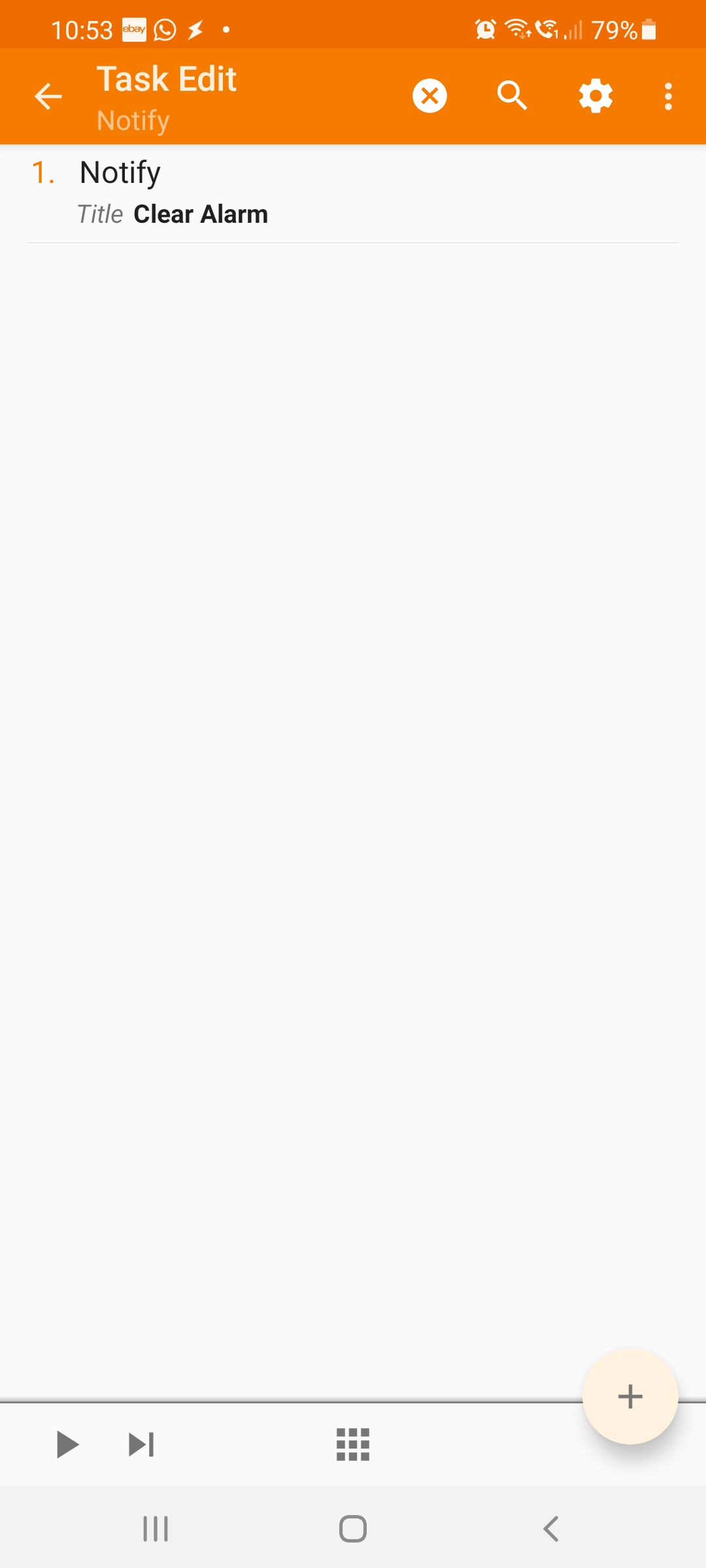
Here's some screenshots.


Graeme King
May 21, 2021, 1:23:14 PM5/21/21
to tas...@googlegroups.com
HI All,
I purchased this app to solve a very specific problem. It would appear that with the right knowhow the app is capable but I am really struggling to understand what’s required. I’m not a developer either!!!
So, I’ve managed to create a profile for the application in question (Apex Fusion).
I've managed to create a task which:
Sets a variable to 1
Media volume to 15
Says 'Apex Alarm' if the variable %Alerting is set to 1.
Goto action number 1 if the variable is still 1.
This task works fine. i.e it keeps repeating...
However, it keeps going and I have to force the app to shut down to clear it.
I appreciate that I need to factor in a notification click command and a notify command and somewhere I need to do a variable clear to turn the task off.
But I’ve been spending hours on this and cannot get it to work.
All I need is a button or something I can click to turn the task off when I’m ready to acknowledge.
I do hope someone can help.
Thanks,
Graeme
<backup.xml>
Marta Hintz
May 21, 2021, 8:53:11 PM5/21/21
to Tasker
You will find that the more specific you are, the more specific your answers will be, no can read your mind and we are definitely NOT developers either. - no worries it's a learning curve. :-)
first it helps to see what you are doing - so export your DESCRIPTION here, not the xml. It is actually readable :-)
As a suggestion:
look for a Stop action in tasker - that stops the task.
in your goto - instead of using a number, create the label on the action you want to goto. i,e Fusion Alarm
then in your goto action, select the Action Label (you will see it there) . This will help you if you need to expand your task, and also when you go back it will be obvious why you used a goto & where your goto is pointing too.
keep going.... You can do it!
Graeme King
May 23, 2021, 7:15:04 PM5/23/21
to tas...@googlegroups.com
Hi,
I'm happy to work through a detailed guide but i cant seem to find documentation which makes it clear what steps i need to take to get the app to do what I've described.
Getting tasker to present me with a way to clear the alarm (variable) seems to be the issue.
As i explained before, the current task just keeps going and i have to kill the app to stop it.
Everything I've tried which seems logical doesn't work.
I'd be happy to pay someone to help me as i just need to get this working.
Thanks,
Graeme
To view this discussion on the web visit https://groups.google.com/d/msgid/tasker/561e6235-4313-496a-8907-8d51df02018an%40googlegroups.com.
Graeme King
May 23, 2021, 7:20:41 PM5/23/21
to tas...@googlegroups.com
Hi,
Does this description file help?
Thanks
Graeme
On Sat, 22 May 2021, 01:53 Marta Hintz, <lar...@gmail.com> wrote:
To view this discussion on the web visit https://groups.google.com/d/msgid/tasker/561e6235-4313-496a-8907-8d51df02018an%40googlegroups.com.
Marta Hintz
May 24, 2021, 7:53:34 PM5/24/21
to Tasker
It seems like in your notify action
Notify (6)
A1: Notify [ Title:Alarm Text: Icon:null Number:0 Permanent:Off Priority:3 Repeat Alert:Off LED Colour:Red LED Rate:0 Sound File: Vibration Pattern: Category: ]
you should add an action of Stop & then in the task add your task name - Alarm (you should find it in the magnifying glass)
see if that works.
Graeme King
May 25, 2021, 7:22:08 AM5/25/21
to tas...@googlegroups.com
Hi Marta,
I’ve done that.
When the alarm task goes off nothing appears on the phone, i.e no notification or anything.
There is nowhere to click or acknowledge the task to stop it.
I still have to go into the app in android and force the app to stop.
Graeme
To view this discussion on the web visit https://groups.google.com/d/msgid/tasker/72ec512a-90da-4a65-9d33-677e75c7a34en%40googlegroups.com.
Reply all
Reply to author
Forward
0 new messages