
Tasker issue with "Orientation Face Down"
834 views
Skip to first unread message

Justin Powell
Jan 11, 2019, 10:00:19 AM1/11/19
to Tasker
I have a big of a strange issue. I have a profile that I'm using called Flip to Shh... essentially when Tasker detects that that the phone is "Orientation Face Down" it activates DND and performs a beep. When it is no longer "Orientation Face Down" there is a different beep to indicate it is no longer in DND Mode.
The issue I'm running into is that sometime between 24-48 hours, the Flip to Shh profile stops working. Tasker appears to no longer be checking for "Orientation Face Down" and doesn't execute the appropriate tasks when that condition is met. The rest of my tasker profiles work fine with no issues during this period.
The only way for me to solve this is every 24-48 hours when it stops working, is go into Tasker and disable/re-enable a random profile which makes the Checkmark appear at the top. Once I tap the checkmark, Orientation detection starts working again and all works as expeted.
Is there a setting or something I'm missing that should allow this detection to continue past 24-48 hours? I have a Galaxy Note 8, with all battery optimizations disabled as recommended.
Thanks for the help!

Robert Ryan
Jan 11, 2019, 10:11:20 AM1/11/19
to tas...@googlegroups.com
--
You received this message because you are subscribed to the Google Groups "Tasker" group.
To unsubscribe from this group and stop receiving emails from it, send an email to tasker+un...@googlegroups.com.
Visit this group at https://groups.google.com/group/tasker.
For more options, visit https://groups.google.com/d/optout.
Justin Powell
Jan 11, 2019, 10:27:44 AM1/11/19
to Tasker
Thank you for the details! I have gone in and confirmed that these were previously set as identified. In addition to the following, tasker is flagged in settings as an unmonitored app (from the second link you posted).
Are there any other suggestions? The part I find odd is that it takes 24-48 hours for the period to happen--- if it were being killed or "optimized" I would expect the issue to occur much sooner than that.
- CONFIRMED ACTIVE - make sure Tasker is enabled
- CONFIRMED ACTIVE - enable foreground notification in Tasker settings
- CONFIRMED ALWAYS - enable the "Use reliable alarms" option
- CONFIRMED DISABLED - Disable battery optimization for the apps
- CONFIRMED ALLOW BACKGROUND ACTIVITY - Make sure the Android Settings -> Apps -> Tasker -> Battery -> Background activity option is enabled (this setting may be somewhere else on different OEMs, but it's a very important setting that might be disabled by default on some devices)
- CONFIRMED ACCELEROMETER YES - If you want to use features while the screen is off make sure that the options in Preferences -> Monitor -> Display Off Monitoring are enabled for the conditions you want.
- CONFIRMED - Make sure that you disable any "battery saving" apps like Greenify, etc
- CONFIRMED - On Sasmung devices go to Android Settings -> Device Maintenance -> Battery -> Unmonitored apps -> add Tasker and all AutoApps
Robert Ryan
Jan 11, 2019, 10:56:51 AM1/11/19
to tas...@googlegroups.com
Justin Powell
Jan 11, 2019, 2:07:31 PM1/11/19
to Tasker
Tasker: 5.6
Android: 8.0.0
Tasketnet.com: https://taskernet.com/shares/?user=AS35m8ne7oO4s%2BaDx%2FwlzjdFTfVMWstg1ay5AkpiNdrLoSXEZdFfw1IpXiyJCVLNW0yn&id=Project%3AFlip+To+Shhh#
I believe it was written by Joao.

João Dias
Jan 14, 2019, 5:26:04 AM1/14/19
to tas...@googlegroups.com
 Join
Join
Justin Powell
Jan 14, 2019, 10:25:52 AM1/14/19
to Tasker
Thanks João for the response. Happy to help any way I can. Is there a way to install the beta directly from Google Play so I can test? Unfortunately my device is corporate managed via Intune and will not allow me to install "untrusted" apks.
João Dias
Jan 14, 2019, 1:52:31 PM1/14/19
to tas...@googlegroups.com
João Dias
Justin Powell
Jan 18, 2019, 10:23:39 AM1/18/19
to Tasker
Upgraded to Beta this morning... will begin testing and let you know the results in a few days. Thanks!
Justin Powell
Jan 21, 2019, 8:53:16 AM1/21/19
to Tasker
Hey Joao, after a few days of testing, I am experiencing the same issue with the. Beta as I was with the release version. After 24-48 hours, either data is no longer able to be read by Tasker, or Tasker is no longer interpreting the information from the accelerameter.
Tasker Beta Version: 5.6.5b
Any help to fix would be appreciated. In the interim is there a way I can force Tasker to reload a specific program ever X hours? I. E. The same thing as turning off and back on a program and then pressing the checkmark.
Thanks!
Justin Powell
Jan 24, 2019, 11:17:19 AM1/24/19
to Tasker
Any update regarding this or any potential workaround I can implement?

Marta Hintz
Jan 24, 2019, 12:07:14 PM1/24/19
to Tasker
I have a note 9 and had a note 8. I have not found orientation to not work as expected. I use it daily and it's always on. Other than checking if tasker is going to sleep or something else is interfering with it by checking the log files. I also have found that increasing the # of maximum tasks cued and also keep unchecked the reduce reduces. All of these are in the tasker preferences.
Justin Powell
Jan 25, 2019, 11:16:34 AM1/25/19
to Tasker
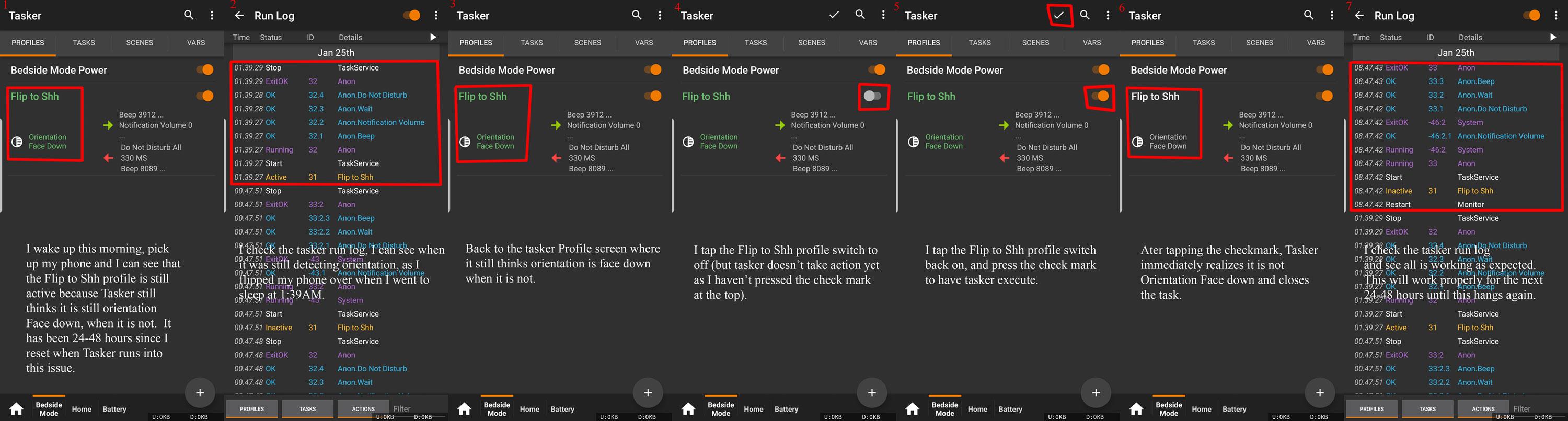
To prevent any confusion I have created an image with screenshots and the run log to show what tasker is doing and how I manually fix ever 24-48 hours. If anyone knows how to resolve tasker losing the ability to detect orientation, or a workaround to execute steps 4 and 5 automatically on it's own I would appreciate it. Thanks. This is happening with the release and beta versions of tasker.
João Dias
Jan 29, 2019, 6:23:23 AM1/29/19
to tas...@googlegroups.com
Justin Powell
Jan 29, 2019, 3:51:45 PM1/29/19
to Tasker
Thanks João, that is one of the first things I did when installing tasker. Any other recommendations or things I can check/test?
Screenshot attached for reference:

Marta Hintz
Jan 29, 2019, 9:10:45 PM1/29/19
to Tasker
You don't have use reduced resources checked? In preferences?
Justin Powell
Jan 30, 2019, 12:29:25 AM1/30/19
to Tasker
I do have "Reduce Resource Usage" Checked within Tasker -> Preferences -> Misc.
You're saying it should not be checked? I will give it a try, thank you. I am unchecking now to see if it makes a difference with tasker's ability to detect the face down orientation after 24-48 hours and will report back.
João Dias
Jan 30, 2019, 4:11:54 AM1/30/19
to tas...@googlegroups.com
joaomgcd
Jan 31, 2019, 4:16:50 AM1/31/19
to Tasker
Ok, I may have something!
Can you please try this version? https://drive.google.com/file/d/1Ylh_yIG5dFtcBzWOjKs__TMDu9hZQWjd/view?usp=sharing
Justin Powell
Jan 31, 2019, 4:51:05 PM1/31/19
to Tasker
Hey João, unfortunately my device is corporate managed via Intune and will not allow me to install "untrusted" apks, but I am running your Beta off Google Play. If it gets updated there it will allow the update.
Side Note: I am roughly 40 hours in after making the change of "unchecking" Reduce Resource Usage Checked within Tasker -> Preferences -> Misc and my issue has not yet resurfaced on the current beta. I will wait another day or so to see if anything happens and provide an update.
João Dias
Feb 1, 2019, 5:37:16 AM2/1/19
to tas...@googlegroups.com
Ok, I actually updated the beta on Google Play now, so you can try that out :)
--
Justin Powell
Feb 1, 2019, 12:30:14 PM2/1/19
to Tasker
Hey João,
At this point, I am 60 hours in after making the change of "unchecking" [Reduce Resource Usage within Tasker -> Preferences -> Misc] and my issue has not yet resurfaced. By disabling, it appears to have addressed the issue so far (it's never gone this long without hanging). The question is now, *should* it work Reduce Resource Usage is Enabled?
How would you like me to test? Do you want to re-ENABLE [Reduce Resource Usage within Tasker -> Preferences -> Misc], update to the new beta, and then report the results?
Let me know and I'll make it happen! :)
Justin Powell
Feb 1, 2019, 10:29:30 PM2/1/19
to Tasker
I should have known, as soon as I said it appeared as if it were operating correctly, after around 68 hours it stopped detecting orientation--- even with Reduce Resource Usage "unchecked."
I am moving forward with updating to the latest beta, I will re-check Reduce Resource Usage within Tasker -> Preferences -> Misc and see how it goes. If that fails, I'll uncheck it and try again. Will keep you posted. Thanks!
Justin Powell
Feb 3, 2019, 3:11:26 PM2/3/19
to Tasker
Ok here's an update running on the latest beta from google play:
1. With [Reduce Resource Usage within Tasker -> Preferences -> Misc] Enabled, it failed somewhere around 36 hours.
2. With [Reduce Resource Usage within Tasker -> Preferences -> Misc] Disabled, I am testing now.

Stefan
Feb 4, 2019, 4:52:29 AM2/4/19
to Tasker
Can you wait a while like half an hour to see if it suddenly works again? I've got a similar issue and at least sometimes there's suddenly in the run log an entry for Monitor Start and my profile works again (in my case it's one with a time context and some profiles with other contexts that stopped working)
Stefan
Feb 4, 2019, 5:09:27 AM2/4/19
to Tasker
It might also require longer than half an hour. But keep using the mobile in this time. It might require that a bunch of other profiles are triggered in the meantime - I'm not sure, what makes Tasker's monitor start again.
Justin Powell
Feb 4, 2019, 7:55:47 AM2/4/19
to Tasker
In my experience once it stops monitoring, it's stopped for good without manual intervention. The longest I've waited is probably 10-12 hours and when didn't correct itself, I go into Tasker and turn on/off a profile which makes the check mark appear at the top of the screen. Once I tap the check mark it then reloads and the monitor comes back online.
Stefan
Feb 4, 2019, 8:57:03 AM2/4/19
to Tasker
For me turning off/on a profile and then tapping on the check mark doesn't make it work again.
João Dias
Feb 4, 2019, 9:56:10 AM2/4/19
to tas...@googlegroups.com
Thanks. Let me know how it works with the new beta...
On Mon, Feb 4, 2019 at 1:57 PM Stefan <s.hoc...@gmail.com> wrote:
For me turning off/on a profile and then tapping on the check mark doesn't make it work again.
Justin Powell
Feb 7, 2019, 8:53:19 AM2/7/19
to Tasker
Ok João here are my results with the new beta:
1. With [Reduce Resource Usage within Tasker -> Preferences -> Misc] Enabled, it failed somewhere around 36 hours.
2. With [Reduce Resource Usage within Tasker -> Preferences -> Misc] Disabled, it failed somewhere around 48-60 hours.
Let me know if there is anything more I can do to help address this--- I would really like to get it solved permanently. Also if you have any suggestions or workarounds I could implement to have it restart the monitor automatically every 12 hours or something I would be interested. Thanks for your help!
João Dias
Feb 11, 2019, 5:15:48 AM2/11/19
to tas...@googlegroups.com
Thanks Justin. I forget, were you having the same issue with the non-beta?
Justin Powell
Feb 11, 2019, 11:39:32 AM2/11/19
to Tasker
Hey João,
The issue is happening with BOTH the release version (non-beta) and the current beta.
João Dias
Feb 13, 2019, 11:22:48 AM2/13/19
to tas...@googlegroups.com
Thanks again Justin. I'll keep trying to make it better...
Stefan
Feb 13, 2019, 3:42:18 PM2/13/19
to Tasker
Since when are you using this profile and when did the issue since then always happen or just recently?
João Dias
Feb 14, 2019, 6:27:44 AM2/14/19
to tas...@googlegroups.com
Ok, I may actually have another fix! Can you please try this version? https://drive.google.com/file/d/1dga37xNkIf1QBfTuTSxKTWn11y41EelQ/view?usp=sharing
On Wed, Feb 13, 2019 at 8:42 PM Stefan <s.hoc...@gmail.com> wrote:
Since when are you using this profile and when did the issue since then always happen or just recently?
Justin Powell
Feb 15, 2019, 8:10:53 AM2/15/19
to Tasker
Hey Joao, I'm unable to install apks due to my corporate policy.
Will you please confirm this beta is the one currently on google play so I can test?
Thanks!
João Dias
Feb 15, 2019, 8:25:40 AM2/15/19
to tas...@googlegroups.com
Sorry, this one's not on Google Play yet! Can you try when it's out in beta please?
Justin Powell
Feb 15, 2019, 8:28:28 AM2/15/19
to Tasker
Hey Joao, I'm in the Google Play beta, this is how I've installed in the past.
Please let me know when you've pushed to Tasker Beta on Google Play and I will test ASAP. Thanks!
João Dias
Feb 15, 2019, 8:35:31 AM2/15/19
to tas...@googlegroups.com
Justin Powell
Mar 5, 2019, 9:29:07 AM3/5/19
to Tasker
I've seen a couple new betas post in the last 2 weeks or so and I've tested them with this. The same issue still occurs. Any other ideas or a workaround? Maybe something that can auto-restart the "monitor" at a set time each day as that is what seems to be failing.
João Dias
Mar 5, 2019, 10:36:02 AM3/5/19
to tas...@googlegroups.com
What if you use the Set Tasker Pref action with the Reliable Alarms option? set it to Never , wait 5 seconds, then set it to Always. That should restart the monitor...
Justin Powell
Mar 5, 2019, 10:49:25 AM3/5/19
to Tasker
Cheers Joao, thanks for the potential workaround:
I've created a task to run every 6 hours to refresh the monitor:
Task:
1. Set Tasker Pref -> Use Reliable Alarms Value Never
2. Wait -> 5 Seconds
3. Set Tasker Pref -> Use Reliable Alarms Value Always
We'll see how it plays out!
Regards,
Justin
Reply all
Reply to author
Forward
0 new messages