
Send Intent / Activity

Thom Little
A1: Send Intent [ Action:android.settings.ACTION_NOTIFICATION_LISTENER_SETTINGS Cat:None Mime Type: Data: Extra: Extra: Extra: Package: Class: Target:Activity ]

Jay M
https://developer.android.com/reference/android/provider/Settings.html
--
You received this message because you are subscribed to the Google Groups "Tasker" group.
To unsubscribe from this group and stop receiving emails from it, send an email to tasker+un...@googlegroups.com.
Visit this group at https://groups.google.com/group/tasker.
For more options, visit https://groups.google.com/d/optout.
Jay M ︻芫══一
Thom Little
Jay M
Motorola might use a different intent you should be able to figure out what it is with a logcat. I had to do this with my Android TV.
Which ones didnt work il try them on my phone.
--
You received this message because you are subscribed to the Google Groups "Tasker" group.
To unsubscribe from this group and stop receiving emails from it, send an email to tasker+un...@googlegroups.com.
Visit this group at https://groups.google.com/group/tasker.
For more options, visit https://groups.google.com/d/optout.
Thom Little
devB (734)
A1: Send Intent [ Action:android.settings.ACTION_AIRPLANE_MODE_SETTINGS
Cat:None Mime Type: Data: Extra: Extra: Extra: Package: Class: Target:Activity
]
A2: Wait [ MS:0 Seconds:6 Minutes:0 Hours:0 Days:0 ]
A3: Send Intent [ Action:android.settings.ACTION_DISPLAY_SETTINGS Cat:None Mime
Type: Data: Extra: Extra: Extra: Package: Class: Target:Activity ]
A4: Wait [ MS:0 Seconds:6 Minutes:0 Hours:0 Days:0 ]
A5: Send Intent [ Action:android.settings.ACTION_DREAM_SETTINGS Cat:None Mime
Type: Data: Extra: Extra: Extra: Package: Class: Target:Activity ]
A6: Wait [ MS:0 Seconds:6 Minutes:0 Hours:0 Days:0 ]
A7: Send Intent [ Action:android.settings.ACTION_INTERNAL_STORAGE_SETTINGS
Cat:None Mime Type: Data: Extra: Extra: Extra: Package: Class: Target:Activity
]
A8: Wait [ MS:0 Seconds:6 Minutes:0 Hours:0 Days:0 ]
A9: Send Intent [ Action:android.settings.ACTION_MEMORY_CARD_SETTINGS Cat:None
Mime Type: Data: Extra: Extra: Extra: Package: Class: Target:Activity ]
A10: Wait [ MS:0 Seconds:6 Minutes:0 Hours:0 Days:0 ]
<Works>
A11: Send Intent [
Action:android.settings.ACTION_NOTIFICATION_LISTENER_SETTINGS Cat:None Mime
Type: Data: Extra: Extra: Extra: Package: Class: Target:Activity ]
A12: Wait [ MS:0 Seconds:6 Minutes:0 Hours:0 Days:0 ]
A13: Send Intent [
Action:android.settings.ACTION_NOTIFICATION_POLICY_ACCESS_SETTINGS Cat:None
Mime Type: Data: Extra: Extra: Extra: Package: Class: Target:Activity ]
A14: Wait [ MS:0 Seconds:6 Minutes:0 Hours:0 Days:0 ]
<Works>
A15: Send Intent [ Action:android.settings.ACTION_PRINT_SETTINGS Cat:None Mime
Type: Data: Extra: Extra: Extra: Package: Class: Target:Activity ]
A16: Wait [ MS:0 Seconds:6 Minutes:0 Hours:0 Days:0 ]
A17: Send Intent [ Action:android.settings.ACTION_SECURITY_SETTINGS Cat:None
Mime Type: Data: Extra: Extra: Extra: Package: Class: Target:Activity ]
A18: Wait [ MS:0 Seconds:6 Minutes:0 Hours:0 Days:0 ]
A19: Send Intent [ Action:android.settings.ACTION_SOUND_SETTINGS Cat:None Mime
Type: Data: Extra: Extra: Extra: Package: Class: Target:Activity ]
A20: Wait [ MS:0 Seconds:6 Minutes:0 Hours:0 Days:0 ]
A21: Send Intent [ Action:android.settings.ACTION_WIFI_IP_SETTINGS Cat:None
Mime Type: Data: Extra: Extra: Extra: Package: Class: Target:Activity ]
A22: Wait [ MS:0 Seconds:6 Minutes:0 Hours:0 Days:0 ]
A23: Send Intent [ Action:android.settings.ACTION_WIFI_SETTINGS Cat:None Mime
Type: Data: Extra: Extra: Extra: Package: Class: Target:Activity ]
A24: Wait [ MS:0 Seconds:6 Minutes:0 Hours:0 Days:0 ]
A25: Send Intent [ Action:android.settings.ACTION_WIRELESS_SETTINGS Cat:None
Mime Type: Data: Extra: Extra: Extra: Package: Class: Target:Activity ]
Jay M
--
You received this message because you are subscribed to the Google Groups "Tasker" group.
To unsubscribe from this group and stop receiving emails from it, send an email to tasker+un...@googlegroups.com.
Visit this group at https://groups.google.com/group/tasker.
For more options, visit https://groups.google.com/d/optout.
Thom Little
Jay M
weird i can see it :/ anyways change a3 to android.settings.DISPLAY_SETTINGS
--
You received this message because you are subscribed to the Google Groups "Tasker" group.
To unsubscribe from this group and stop receiving emails from it, send an email to tasker+un...@googlegroups.com.
Visit this group at https://groups.google.com/group/tasker.
For more options, visit https://groups.google.com/d/optout.
Thom Little
devB (734)
A1: Send Intent [ Action:android.settings.AIRPLANE_MODE_SETTINGS Cat:None Mime
Type: Data: Extra: Extra: Extra: Package: Class: Target:Activity ]
A2: Wait [ MS:0 Seconds:6 Minutes:0 Hours:0 Days:0 ]
A3: Send Intent [ Action:android.settings.DISPLAY_SETTINGS Cat:None Mime Type:
Data: Extra: Extra: Extra: Package: Class: Target:Activity ]
A4: Wait [ MS:0 Seconds:6 Minutes:0 Hours:0 Days:0 ]
A5: Send Intent [ Action:android.settings.DREAM_SETTINGS Cat:None Mime Type:
Data: Extra: Extra: Extra: Package: Class: Target:Activity ]
A6: Wait [ MS:0 Seconds:6 Minutes:0 Hours:0 Days:0 ]
A7: Send Intent [ Action:android.settings.INTERNAL_STORAGE_SETTINGS Cat:None
Mime Type: Data: Extra: Extra: Extra: Package: Class: Target:Activity ]
A8: Wait [ MS:0 Seconds:6 Minutes:0 Hours:0 Days:0 ]
A9: Send Intent [ Action:android.settings.MEMORY_CARD_SETTINGS Cat:None Mime
Type: Data: Extra: Extra: Extra: Package: Class: Target:Activity ]
A10: Wait [ MS:0 Seconds:6 Minutes:0 Hours:0 Days:0 ]
A11: Send Intent [
Action:android.settings.ACTION_NOTIFICATION_LISTENER_SETTINGS Cat:None Mime
Type: Data: Extra: Extra: Extra: Package: Class: Target:Activity ]
A12: Wait [ MS:0 Seconds:6 Minutes:0 Hours:0 Days:0 ]
A13: Send Intent [ Action:android.settings.NOTIFICATION_POLICY_ACCESS_SETTINGS
Cat:None Mime Type: Data: Extra: Extra: Extra: Package: Class: Target:Activity
]
A14: Wait [ MS:0 Seconds:6 Minutes:0 Hours:0 Days:0 ]
A15: Send Intent [ Action:android.settings.ACTION_PRINT_SETTINGS Cat:None Mime
Type: Data: Extra: Extra: Extra: Package: Class: Target:Activity ]
A16: Wait [ MS:0 Seconds:6 Minutes:0 Hours:0 Days:0 ]
A17: Send Intent [ Action:android.settings.SECURITY_SETTINGS Cat:None Mime
Type: Data: Extra: Extra: Extra: Package: Class: Target:Activity ]
A18: Wait [ MS:0 Seconds:6 Minutes:0 Hours:0 Days:0 ]
A19: Send Intent [ Action:android.settings.SOUND_SETTINGS Cat:None Mime Type:
Data: Extra: Extra: Extra: Package: Class: Target:Activity ]
A20: Wait [ MS:0 Seconds:6 Minutes:0 Hours:0 Days:0 ]
A21: Send Intent [ Action:android.settings.WIFI_IP_SETTINGS Cat:None Mime Type:
Data: Extra: Extra: Extra: Package: Class: Target:Activity ]
A22: Wait [ MS:0 Seconds:6 Minutes:0 Hours:0 Days:0 ]
A23: Send Intent [ Action:android.settings.WIFI_SETTINGS Cat:None Mime Type:
Data: Extra: Extra: Extra: Package: Class: Target:Activity ]
A24: Wait [ MS:0 Seconds:6 Minutes:0 Hours:0 Days:0 ]
A25: Send Intent [ Action:android.settings.WIRELESS_SETTINGS Cat:None Mime Type: Data: Extra: Extra: Extra: Package: Class: Target:Activity ]

Pent
Tasker action.
Pent
Pent
I think all of these except Notification Listener and Print settings already have a dedicated
Tasker action.
... and I just added those 2 for next update.
Pent
Thom Little
devA (99)
A1: Variable Set [ Name:%string
To:AIRPLANE_MODE_SETTINGS,APN_SETTINGS,XXXX_ACTION_APPLICATION_DETAILS_SETTINGS,XXXX_ACTIONAPPLICATION_DEVELOPMENT_SETTINGS,APPLICATION_SETTINGS,BATTERY_SAVER_SETTINGS,BLUETOOTH_SETTINGS,CAPTIONING_SETTINGS,CAST_SETTINGS,DATA_ROAMING_SETTINGS,DEVICE_INFO_SETTINGS,DATE_SETTINGS,DISPLAY_SETTINGS,DREAM_SETTINGS,HARD_KEYBOARD_SETTINGS,HOME_SETTINGS,XXXX_ACTION_IGNORE_BACKGROUND_DATA_RESTRICTIONS_SETTINGS,IGNORE_BATTERY_OPTIMIZATION_SETTINGS,INPUT_METHOD_SETTINGS,INPUT_METHOD_SUBTYPE_SETTINGS,INTERNAL_STORAGE_SETTINGS,LOCALE_SETTINGS,LOCATION_SOURCE_SETTINGS,MANAGE_ALL_APPLICATIONS_SETTINGS,MANAGE_APPLICATIONS_SETTINGS,MANAGE_DEFAULT_APPS_SETTINGS,XXXX_ACTION_MANAGE_OVERLAY_PERMISSION,XXXX_ACTION_MANAGE_WRITE_SETTINGS,MEMORY_CARD_SETTINGS,NETWORK_OPERATOR_SETTINGS,ACTION_NFC_PAYMENT_SETTINGS,NFC_SETTINGS,NFCSHARING_SETTINGS,ACTION_NOTIFICATION_LISTENER_SETTINGS,NOTIFICATION_POLICY_ACCESS_SETTINGS,ACTION_PRINT_SETTINGS,PRIVACY_SETTINGS,XXXX_ACTION_QUICK_LAUNCH_SETTINGS,XXXX_ACTION_REQUEST_IGNORE_BATTERY_OPTIMIZATIONS,XXXX_ACTION_SEARCH_SETTINGS,SECURITY_SETTINGS,SETTINGS,SHOW_REGULATORY_INFO,SOUND_SETTINGS,SYNC_SETTINGS,USAGE_ACCESS_SETTINGS,USER_DICTIONARY_SETTINGS,XXXX_ACTION_VOICE_CONTROL_AIRPLANE_MODE,XXXX_ACTION_VOICE_CONTROL_BATTERY_SAVER_MODE,VOICE_CONTROL_DO_NOT_DISTURB_MODE,VOICE_INPUT_SETTINGS,VPN_SETTINGS,VR_LISTENER_SETTINGS,WEBVIEW_SETTINGS,WIFI_IP_SETTINGS,WIFI_SETTINGS,WIRELESS_SETTINGS,
Recurse Variables:Off Do Maths:Off Append:Off ]
A2: Variable Split [ Name:%string Splitter:, Delete Base:Off ]
A3: For [ Variable:%str Items:%string(1:57) ]
A4: Send Intent [ Action:android.settings.%str Cat:None Mime Type: Data: Extra:
Extra: Extra: Package: Class: Target:Activity ]
A5: Wait [ MS:0 Seconds:1 Minutes:0 Hours:0 Days:0 ]
A6: Flash [ Text:%str Long:On ]
A7: Wait [ MS:0 Seconds:5 Minutes:0 Hours:0 Days:0 ]
A8: End For
... Thom
Jay M
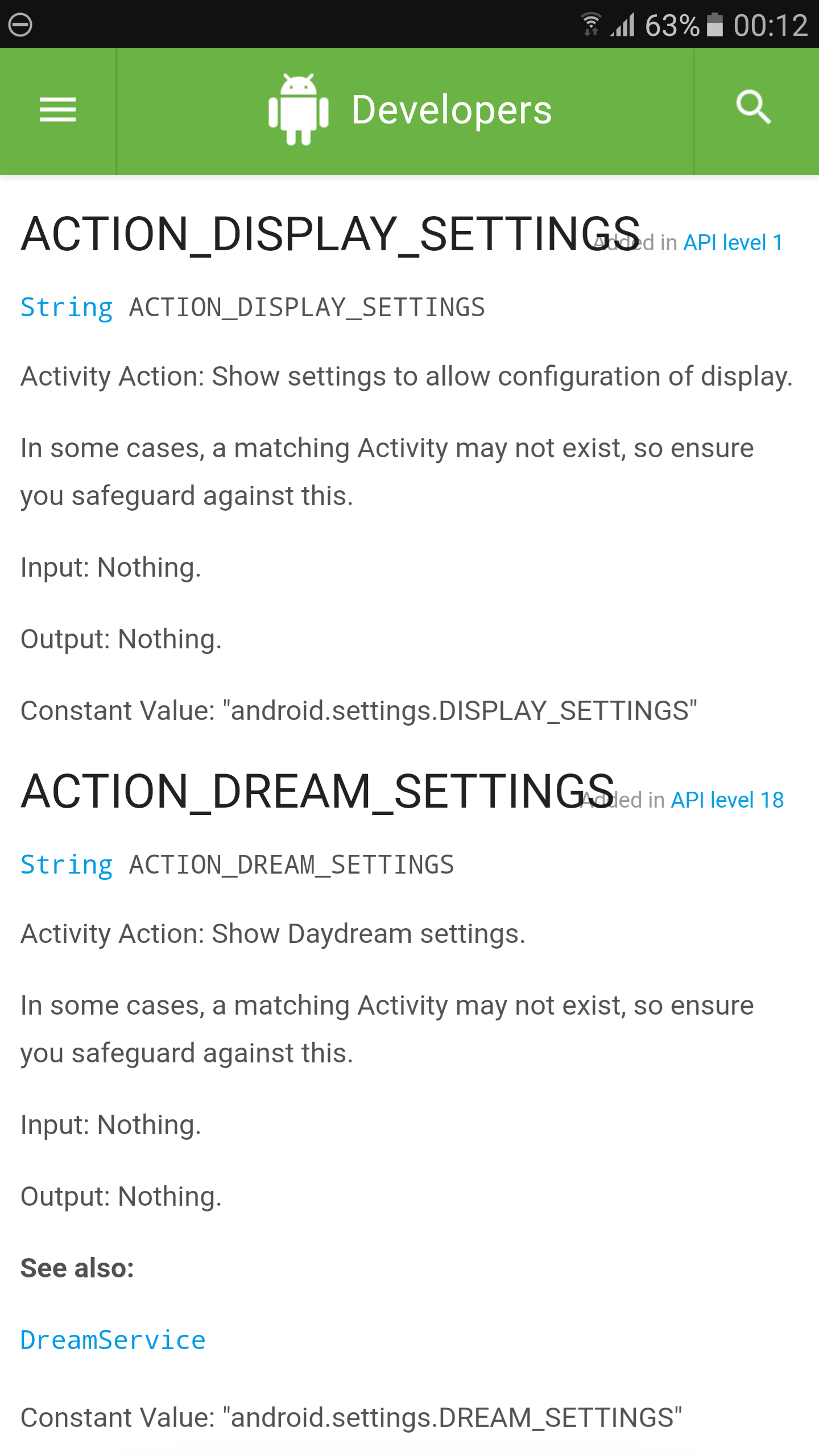
nice strange how the screenshot didnt show up though but anyways yeah i dont really know what the difference is between the name in all capitals
ACTION_DISPLAY_SETTINGS
and the constant value
android.settings.DISPLAY_SETTINGS
Hope Pent can confirm or correct me if im wrong as im still learning but from what i understand all capitals is just the name of the String and the constant value is the value of that String. So in Java code it would look something like the line of code below. This is because constants should be declared final and static and be class variables there names should also be in capitals (Java Syntax) and the constant value should be prefixed with the package name of the class the constant is defined in so it is unique.
public static final String ACTION_DISPLAY_SETTINGS = "android.settings.DISPLAY_SETTINGS";
--
You received this message because you are subscribed to the Google Groups "Tasker" group.
To unsubscribe from this group and stop receiving emails from it, send an email to tasker+un...@googlegroups.com.
Visit this group at https://groups.google.com/group/tasker.
For more options, visit https://groups.google.com/d/optout.
Thom Little

Raul SC
I take this thread, since you mention the update again, to ask if there is an approximate date forecast for the beta.
Thom Little
Jay M
Its not just a case of removing a word you need to use the exact constant value from the developer site in Taskers action field. The String name wont work and the constant value is prefixed with the package name and it might not always the same as the String name even without the prefix so check the ones that failed and make sure the constant value is correct. Ignore the String in the developer documentation just read it as a rough description of what will happen when you call that intent.
Just to make it clear heres another 1 if you put android.intent.action.DIAL in the action field it should open the dialer if you where to put just ACTION_DIAL or even android.intent.action.ACTION_DIAL (notice ACTION_DIAL is the String) it wont do anything because the constant value is wrong.
FWIW if you put tel:4444 in the data field it will open the dialer with that number filled in.
--
You received this message because you are subscribed to the Google Groups "Tasker" group.
To unsubscribe from this group and stop receiving emails from it, send an email to tasker+un...@googlegroups.com.
Visit this group at https://groups.google.com/group/tasker.
For more options, visit https://groups.google.com/d/optout.