SMS Forwarding

74 views
Skip to first unread message

SMKI

unread,
Nov 23, 2017, 6:00:20 AM11/23/17
to Tasker
My previous working profile of having Tasker forward the SMS I get from nor...@ftr.com when I get a voicemail at my home phone is now sending 6 texts to my spouse.

Event > Received Text
Type: Any; Sender: blank; Content: *notification*

Task > Send SMS
Number: xxx-xxx-xxxx; Message: %SMSRD, %SMSRT, %SMSRB, sent by Tasker;
Stored in Messaging App: unchecked

I have an LG V20 running Android 7.0.

I get this error using the current version of Tasker.

I tried rolling back to the previous version and still get 6 texts sent.

I tried following the suggestions below and it didn't seem to help:

A:1 if %LastReplyTime > %TIMES - 3 <== last reply was less than 3 seconds ago
A:2 Flash Skipped
A:3 Else
A:4 Send SMS [ Number:XXXXXXXXXX Message:%SMSRN at %SMSRF sent message: %SMSRB Store In Messaging App:On ]
A:5 Variable Set %LastReplyTime to %TIMES
A:6 Flash [ Text:SMS Forwarded Long:Off ]
A:7 End If

https://groups.google.com/forum/m/#!topic/tasker/PDuVaBT-d8k

Any other suggestions?

Rich D

unread,
Nov 23, 2017, 7:47:11 AM11/23/17
to Tasker Google Groups Post

Any other suggestions?
The best place to start is with the run  log.  Could you enable it and post the relevant results.

Rich D

unread,
Nov 23, 2017, 7:47:11 AM11/23/17
to Tasker Google Groups Post
Menu / more / runlog

SMKI

unread,
Nov 23, 2017, 8:50:04 AM11/23/17
to Tasker
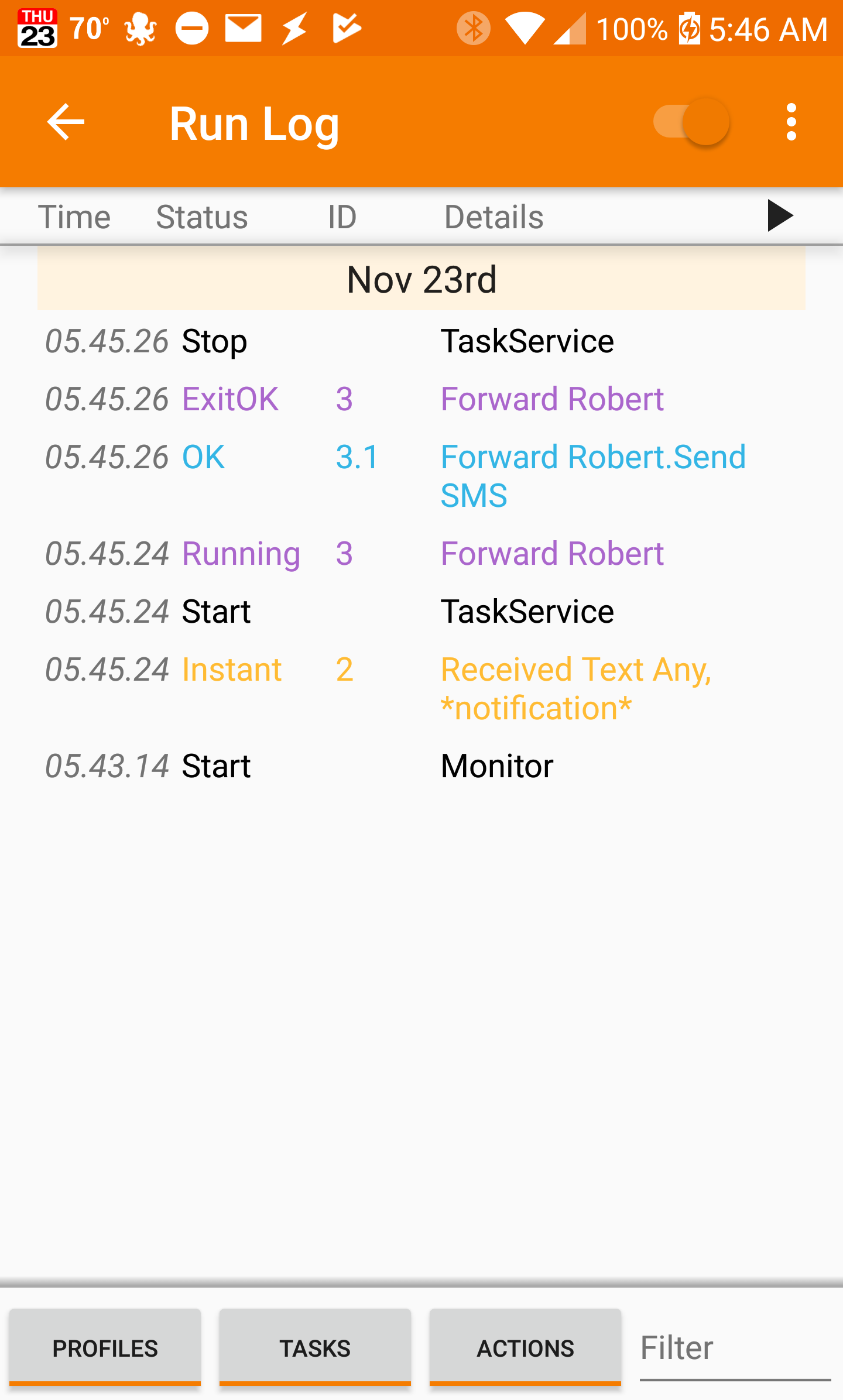
Here is a screenshot of the run log.

Capture+_2017-11-23-05-46-53.png

Rich D

unread,
Nov 23, 2017, 9:17:30 AM11/23/17
to Tasker Google Groups Post

Here is a screenshot of the run log.


To be clear.  This is the entire log for the event (it only show a one activation)

And this sent multiple text messages. ?

SMKI

unread,
Nov 23, 2017, 9:22:21 AM11/23/17
to Tasker
Yes, this is the log for one event which is somehow sending out 6 SMS messages.

I'm using Yaata for my default text messaging app. But I tried it with the stock Google messages app and got the same result. My phone didn't come with the stock LG messaging app, but I could try and sideload it if needed.

Rich D

unread,
Nov 23, 2017, 9:56:15 AM11/23/17
to Tasker Google Groups Post
Could you try making a test task that simply sends a text message with a simple text string. Use the play button in the task edit screen and not a profile to trigger the task.

You could also try setting the
 Stored in Messaging App:  
To yes. 

SMKI

unread,
Nov 24, 2017, 1:24:58 AM11/24/17
to Tasker
I did as you requested. See attached screenshot.
Capture+_2017-11-23-22-21-30.png

Rich D

unread,
Nov 24, 2017, 8:46:47 AM11/24/17
to Tasker Google Groups Post


I did as you requested. See attached screenshot.


Did it send multiple texts?


When posting for help always include a copy of the latest profile/ task descriptions.


To post your profile or task here...  Long press on the profile or task name / ( 3 dot menu with 4.0+ ) export / export "DESCRIPTION" to clipboard (not XML)

Any linked tasks will be exported with the profile they are linked to..

To be able to export, The beginner mode needs to be off and the profile needs to be named by you (Not the Tasker listed name.  Tasker will list your profile with the context name if you have not given it one).


It looks like you are still using a profile to trigger the task. Use the play button in the task sit screen instead. 


Di

SMKI

unread,
Nov 24, 2017, 8:23:57 PM11/24/17
to Tasker
The last action I took was to go into the task and hit the play button. It actually didn't sent any texts. So does that mean I didn't follow your directions correctly?

Here is the profile and the task:


Profile: Notification (2)
Event: Received Text [ Type:Any Sender:* Content:*notification* ]
Enter: Forward Robert (3)
A1: Send SMS [ Number:xxxxxxxxxx Message:%SMSRB Store In Messaging App:On ]

SMKI

unread,
Nov 24, 2017, 8:30:48 PM11/24/17
to Tasker
Sorry about the confusing on my part. I created a test task (below) to send a simple SMS as you asked. It was received one time.

Text Robert (5)
A1: Send SMS [ Number:XXXXXXXXXX Message:Hello! Store In Messaging App:On ]

Rich D

unread,
Nov 24, 2017, 9:10:54 PM11/24/17
to Tasker Google Groups Post

Sorry about the confusing on my part. I created a test task (below) to send a simple SMS as you asked. It was received one time.

Text Robert (5)
        A1: Send SMS [ Number:XXXXXXXXXX  Message:Hello! Store In Messaging App:On ]

Ok, now try using this task with the profile and see if you get multiple texts. 

SMKI

unread,
Nov 26, 2017, 2:27:14 PM11/26/17
to Tasker
Success! I used the new Task with the Profile and it's working, only sending one text.

What's next? I still want to be able to forward the original text date, time and message body.

Profile: Notification (2)
Event: Received Text [ Type:Any Sender:* Content:*new voicemail message* ]
Enter: Text Robert (5)
A1: Send SMS [ Number:XXXXXXXXXX Message:Call 1-844-387-5200 to listen to your new voicemail message. Store In Messaging App:On ]

Rich D

unread,
Nov 26, 2017, 8:59:58 PM11/26/17
to Tasker Google Groups Post

What's next? I still want to be able to forward the original text date, time and message body.

Try putting those back in. I suspect it is sending a separate message for each separate piece of data. If that is the case then try a different separator instead of the comma try a dash of a pipe. 
Reply all
Reply to author
Forward
0 new messages