
Re: Can't import profiles from tasker wiki xml file
3,858 views
Skip to first unread message

RudeboyX
Apr 18, 2013, 10:53:38 AM4/18/13
to tas...@googlegroups.com
The majority of the Wiki profiles were made using the pre 4.0+ Tasker, so I expect they aren't compatible.
Regards
RBX
On Thursday, 18 April 2013 15:41:29 UTC+1, Evan Hendra wrote:
Regards
RBX
On Thursday, 18 April 2013 15:41:29 UTC+1, Evan Hendra wrote:
I downloaded a file from tasker wikiand have the error trying to import the profile.Photos attached hope can make the error clear.Anyone experiencing the same problem with me?Hoping this issue will be solved as soon as possible. Because I am really hooked into tasker.

Evan Hendra
Apr 19, 2013, 7:01:16 PM4/19/13
to tas...@googlegroups.com
On Thursday, April 18, 2013 9:53:38 PM UTC+7, RudeboyX wrote:
The majority of the Wiki profiles were made using the pre 4.0+ Tasker, so I expect they aren't compatible.
Regards
RBX
Do you know a step by step tutorial to create a profile using tasker to emulate wifi disconnected?
Because if it is not compatible, then all of the profiles must be rebuild?
Thanks!

Bob Hansen
Apr 20, 2013, 12:24:57 AM4/20/13
to tas...@googlegroups.com
Many of the Wiki profiles do still work in Tasker 4.0. Which profile were you downloading and installing? Let me see if I can get it working for you.
Evan Hendra
Apr 20, 2013, 4:19:45 AM4/20/13
to tas...@googlegroups.com
Sorry for late reply dredd and bob. Thanks for responding to this thread, and by the way the xml file I want to run on my phone is linked below. http://tasker.wikidot.com/wifidisconnection
Hope any of you can help me import it to my phone, and maybe brief me on how to do that generally (cause I noticed other interesting profiles at the wiki)
Thanks so much
Regards,
Evan Hendra
Bob Hansen
Apr 20, 2013, 9:14:11 AM4/20/13
to tas...@googlegroups.com
I downloaded and installed the profile with no problems. I suspect the problem is in how you downloand it.
Let's be sure you downloaded it correctly. In the Tasker Wiki, you need to long press the link and from the popup menu select "Save Link as". Then copy the downloaded file Lock.prj.xml to the Tasker\Project folder. Next in tasker, long press the "Main" project tab and select Import from the popup menu.
It can be confusing because you can import projects, profiles, tasks, and scenes and each type of import is done differently.
This profile is pretty simple. It's defined like this
Profile: Disconnected Wifi (80)
State: Not Wifi Connected [ SSID:* MAC:* IP:* ]
State: Variable Value [ Name:%WIFI Op:Matches Value:on ]
Enter: Wifi Off After Delay (78)
Abort Existing Task
A1: Wait [ MS:0 Seconds:59 Minutes:0 Hours:0 Days:0 ]
A2: WiFi [ Set:Off ]
If you still have problems, I can walk you through the steps to enter these things into Tasker. Let me know.
Evan Hendra
Apr 21, 2013, 1:13:26 PM4/21/13
to tas...@googlegroups.com
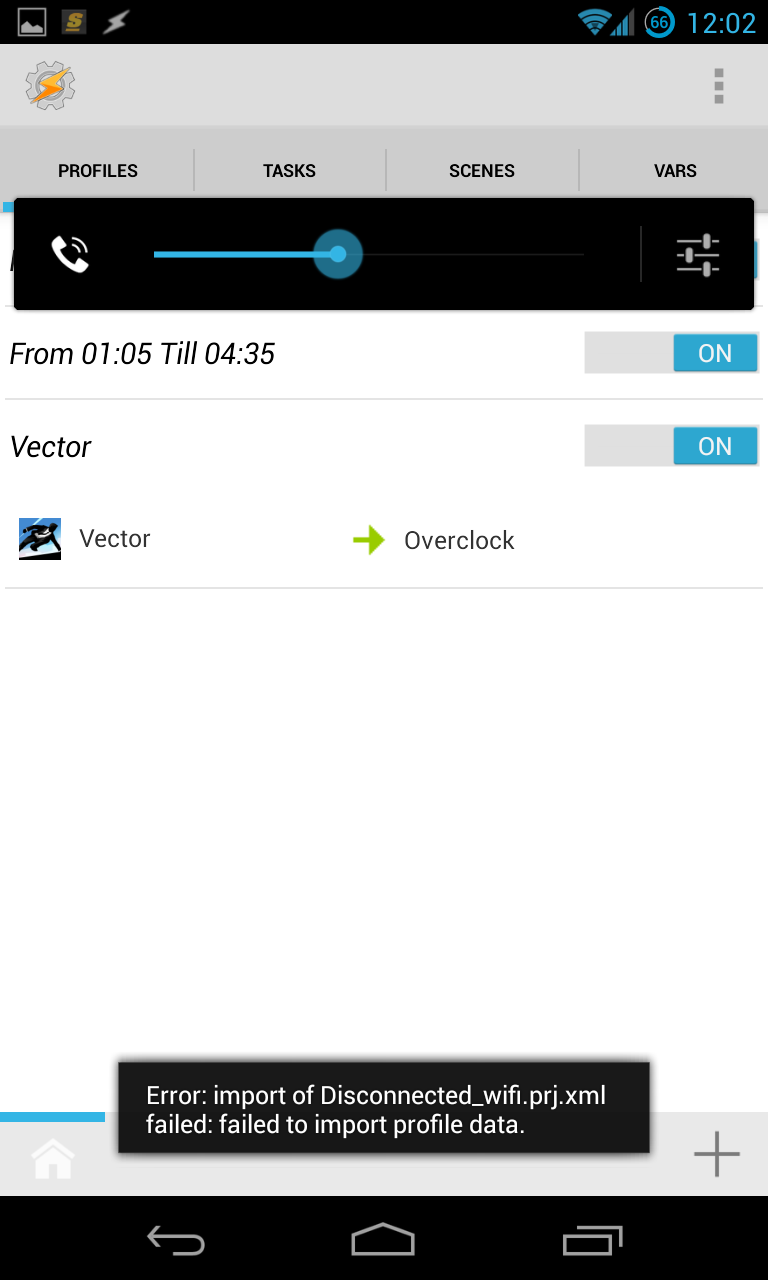
Thanks again for response, but I tried to do so and get some little bit problem. The link I downloaded through chrome was prf.xml, not prj.xml
I renamed it and it was detected through tasker, but still can't import.
Here are the screenshots I took.(attachments)
Hope you can help me. Thank you very very much.
Regards, Evan Hendra
Bob Hansen
Apr 21, 2013, 2:26:46 PM4/21/13
to tas...@googlegroups.com
In Tasker you can export and import Project (prj), Profile (prf), Task (tsk), and Scene (scn). They each have a different extension in the file name. Changing the extension will cause tasker to fail to import the file. So please upload with the original name.
Evan Hendra
Apr 21, 2013, 2:32:44 PM4/21/13
to tas...@googlegroups.com
In the original name, which is prf.xml, Tasker won't detect any of them and I literally don't know why


Message has been deleted
0 new messages