
Tasker...help "wait until"
1,853 views
Skip to first unread message

nettech_gt
Feb 13, 2013, 1:27:01 PM2/13/13
to tas...@googlegroups.com
I have a profile that will disconnect my BT headset when I get home.
(Wifi near) However if I'm on a call, I want to have the task wait until
I'm no longer on a call or GrooveIP call. But I need some help with the
wait until part. The task triggers regardless if I'm on a call or not.
THANX!

BossMan
Feb 13, 2013, 1:55:15 PM2/13/13
to tas...@googlegroups.com
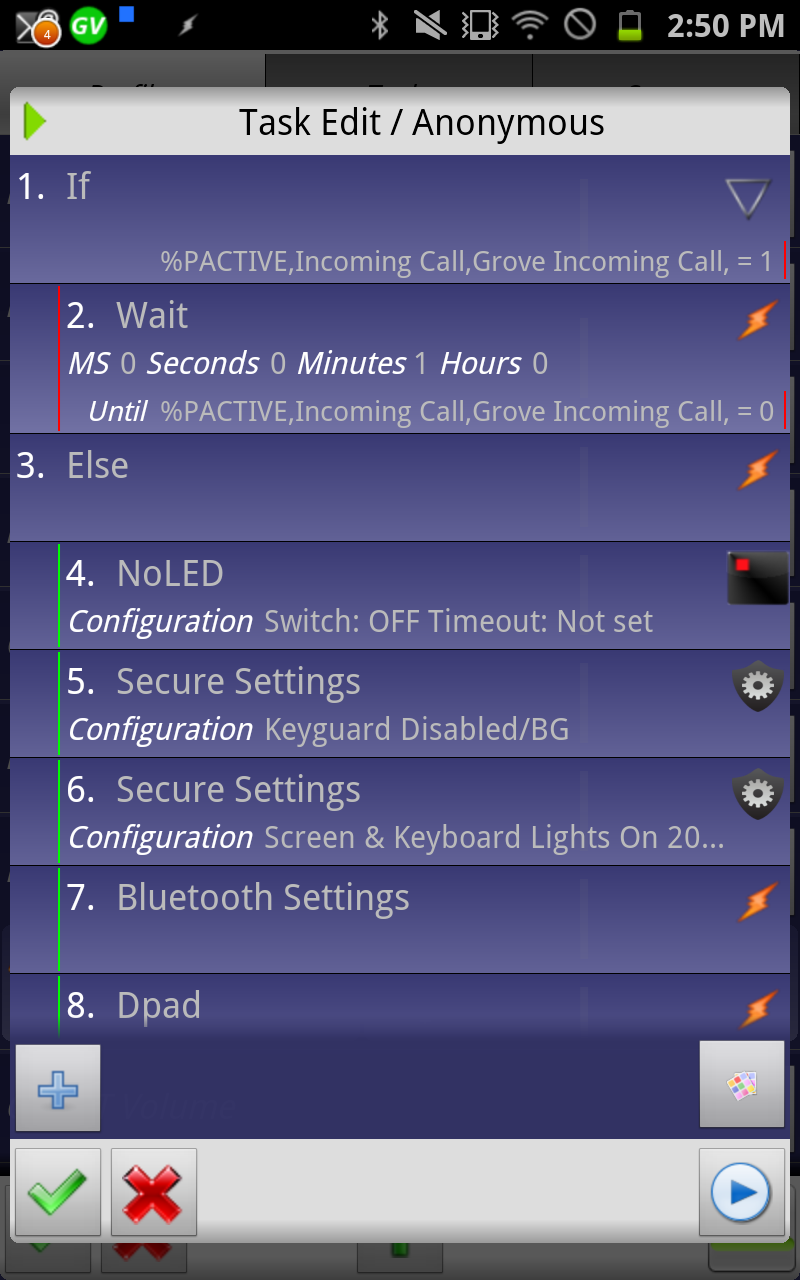
See this:
Correct your condition for Wait action - I think it should be %PACTIVE matches *ProfileA*/*ProfileB*
Also, get rid of the if/else completely and use Wait Unitl only - after all, you want to execute all your actions once the call is over, right?
Also, get rid of the if/else completely and use Wait Unitl only - after all, you want to execute all your actions once the call is over, right?
A.

Brad Minion
Feb 20, 2013, 2:05:34 PM2/20/13
to tas...@googlegroups.com
Don't know if this is the problem but don't you need asterisks around the profile names in the Wait "IF" statement? "%PACTIVE ~ *Incoming Call*/*Groove Incoming Call*". I don't think the IF will ever be true without them.
--
You received this message because you are subscribed to the Google Groups "Tasker" group.
To unsubscribe from this group and stop receiving emails from it, send an email to tasker+un...@googlegroups.com.
For more options, visit https://groups.google.com/groups/opt_out.
nettech_gt
Feb 20, 2013, 2:19:07 PM2/20/13
to tas...@googlegroups.com
I added the * but I get the same results.

Matt R
Feb 20, 2013, 2:28:44 PM2/20/13
to tas...@googlegroups.com
Export the descriptions of the relevant task(s)/profile(s) by long-pressing the task or profile name and selecting export -> description to clipboard and paste it in a reply here.
Matt
nettech_gt
Feb 20, 2013, 2:34:54 PM2/20/13
to tas...@googlegroups.com
Profile: Disconnect BT Headset (22)
Event: K9 Email Received [ From:* Subject:test Receiving Account:* ]
Enter: Anon (23)
A1: Wait Until [ MS:0 Seconds:10 Minutes:0 Hours:0 Days:0 ] If [ %PACTIVE ~ *Incoming Call*/*Groove Incoming Call* ]
A2: Secure Settings [ Configuration:Keyguard Disabled/BG Package:com.intangibleobject.securesettings.plugin Name:Secure Settings ]
A3: Secure Settings [ Configuration:Screen & Keyboard Lights On
20 Seconds Package:com.intangibleobject.securesettings.plugin Name:Secure Settings ]
A4: Bluetooth Settings
A5: Dpad [ Button:Down Repeat Times:6 ]
A6: Dpad [ Button:Press Repeat Times:2 ]
A7: Go Home [ Page:0 ]
A8: Wait [ MS:0 Seconds:5 Minutes:0 Hours:0 Days:0 ]
A9: Secure Settings [ Configuration:Keyguard Enabled Package:com.intangibleobject.securesettings.plugin Name:Secure Settings ]
Event: K9 Email Received [ From:* Subject:test Receiving Account:* ]
Enter: Anon (23)
A1: Wait Until [ MS:0 Seconds:10 Minutes:0 Hours:0 Days:0 ] If [ %PACTIVE ~ *Incoming Call*/*Groove Incoming Call* ]
A2: Secure Settings [ Configuration:Keyguard Disabled/BG Package:com.intangibleobject.securesettings.plugin Name:Secure Settings ]
A3: Secure Settings [ Configuration:Screen & Keyboard Lights On
20 Seconds Package:com.intangibleobject.securesettings.plugin Name:Secure Settings ]
A4: Bluetooth Settings
A5: Dpad [ Button:Down Repeat Times:6 ]
A6: Dpad [ Button:Press Repeat Times:2 ]
A7: Go Home [ Page:0 ]
A8: Wait [ MS:0 Seconds:5 Minutes:0 Hours:0 Days:0 ]
A9: Secure Settings [ Configuration:Keyguard Enabled Package:com.intangibleobject.securesettings.plugin Name:Secure Settings ]

bdanders
Feb 20, 2013, 2:48:08 PM2/20/13
to tas...@googlegroups.com
Seems like you would want to wait until %PACTIVE does NOT match those profiles. The way you have it it is going to wait until you are on a call to run the rest of the task, instead of waiting for you to hang up.
nettech_gt
Feb 20, 2013, 3:00:54 PM2/20/13
to tas...@googlegroups.com
That makes sense! However I still get the same results...
Matt R
Feb 20, 2013, 3:08:13 PM2/20/13
to tas...@googlegroups.com
Look at the run log (menu button -> more -> run log) to see what's happening and to check if the incoming call profiles are activating and deactivating as you expect too.
Matt
bdanders
Feb 20, 2013, 3:09:52 PM2/20/13
to tas...@googlegroups.com
You do actually have profiles named "Incoming Call" and "Groove Incoming Call" that go active when they should, right? Have you tried flashing %PACTIVE to verify that they are in fact in there? Check carefully for typos. You really shouldn't need to have both of them in there if they are named that since they both contain "Incoming Call". Just wait until %PACTIVE !~ *Incoming Call*.
nettech_gt
Feb 20, 2013, 3:30:23 PM2/20/13
to tas...@googlegroups.com
Yes, my incoming call profile is activating and deactivating as expected.
nettech_gt
Feb 20, 2013, 3:32:37 PM2/20/13
to tas...@googlegroups.com
Removing the "Groove Incoming call" did it! THANX!
THANX to everyone who posted I really appreciate it.
PS: I posted this question on XDA Developers and no one responded.
THANX to everyone who posted I really appreciate it.
PS: I posted this question on XDA Developers and no one responded.
bdanders
Feb 20, 2013, 4:00:49 PM2/20/13
to tas...@googlegroups.com
You could also try %PACTIVE ~ !*Incoming Call*/*Groove Incoming Call*
Possible that by doing "doesn't match" with the OR separator it was processing it such that PACTIVE must only not match one or the other and not both. Basically you would have to be on a call and on a groove call at the same time for that to be false. By changing it to "matches" !somestuff/someotherstuff you are forcing it to match niether somestuff nor someotherstuff. And now I think I've confused myself.
Possible that by doing "doesn't match" with the OR separator it was processing it such that PACTIVE must only not match one or the other and not both. Basically you would have to be on a call and on a groove call at the same time for that to be false. By changing it to "matches" !somestuff/someotherstuff you are forcing it to match niether somestuff nor someotherstuff. And now I think I've confused myself.



Michael Yeager
Feb 21, 2013, 10:55:09 PM2/21/13
to tas...@googlegroups.com
I did this by monitoring the state of the phone (ringing, offhook or idle) and using the context of phone = idle to actually trigger the task. As long as I was home and not on a call, Bluetooth got disconnected.
Reply all
Reply to author
Forward
0 new messages