
Android 10 and location mode/accuracy
2,192 views
Skip to first unread message

Edwin van Geelen
Oct 24, 2019, 4:31:48 AM10/24/19
to Tasker
Hi,
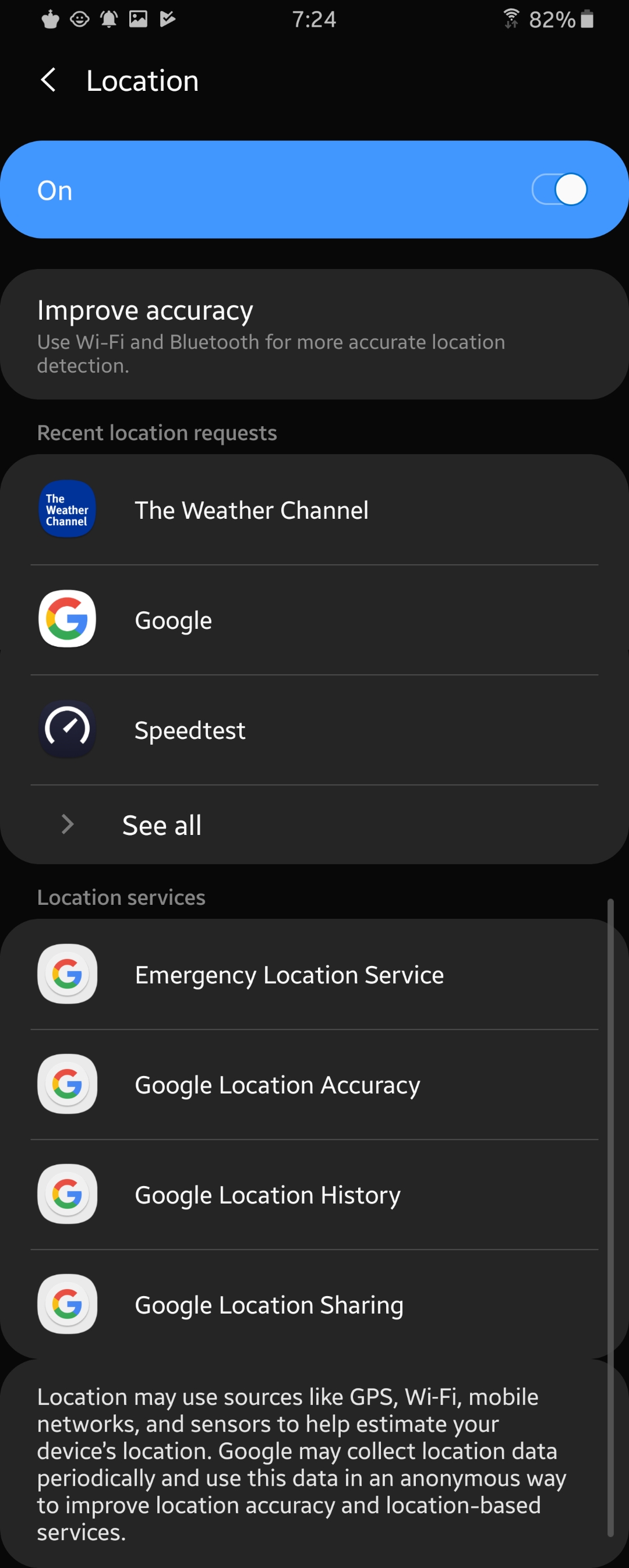
Location mode in Tasker still gives me a choice of off/device only/battery saving/high accuracy. However, in Android 9+ settings I can only choose Google Location Accuracy on or off.
There is a currently acknowledged feature request for this issue (https://tasker.helprace.com/i477-location-mode-action-broken-on-android-9), but I was wondering whether the Location Mode setting still has any effect. I'm gessing probably not (the new Google Location Accuracy setting doesn't change), but has anyone noticed differences?
Also, with this new Google Location Accuracy setting, is there still a difference between Get Location Net or GPS? Maybe on Android 9+ we could just get one Get Location action, or a choice of accuracy High or Regular in order to be more in line with the location settings option.
Best, Edwin

Manis
Oct 24, 2019, 8:50:08 AM10/24/19
to Tasker
on 9, you can select a battery saving mode if you go into settings. from quick settings, you can only turn it on or off.
I am on 10 and now have only on or off.
--
You received this message because you are subscribed to the Google Groups "Tasker" group.
To unsubscribe from this group and stop receiving emails from it, send an email to tasker+un...@googlegroups.com.
To view this discussion on the web visit https://groups.google.com/d/msgid/tasker/abed4532-27b0-48a4-8068-5d5963644be5%40googlegroups.com.

Robert Ryan
Oct 24, 2019, 9:17:42 AM10/24/19
to tas...@googlegroups.com
On October 24, 2019 2:31:58 AM Edwin van Geelen <edw...@gmail.com> wrote:
I was wondering whether the Location Mode setting still has any effect.
On my Samsung S9, setting Location Mode off will disable location services. Setting Location Mode to any other value will enable location services.
Also, with this new Google Location Accuracy setting, is there still a difference between Get Location Net or GPS?
Yes there is still a difference. A Net location does not wait for information from GPS satellites. Therefore it returns quicker but is less accurate. In addition, you can get a Net location in situations where you are blocked from GPS.
GPS waits for that information, so is slow but accurate.
Robert Ryan
Oct 24, 2019, 9:29:40 AM10/24/19
to tas...@googlegroups.com
On October 24, 2019 6:49:54 AM Manis <manivannan....@gmail.com> wrote:
on 9, you can select a battery saving mode if you go into settings. from quick settings, you can only turn it on or off.
See screenshot. I am on Android 9. Where exactly is the switch for Battery Saving Mode?

João Dias
Oct 24, 2019, 10:09:57 AM10/24/19
to tas...@googlegroups.com
I think on Android 9 and 10 these are the correspondences to Android 8:
- 8: Off > 9, 10: Off
- 8: Battery Saver > 9,10: No correspondence
- 8: Device Only > 9,10: Location On, Google Location Accuracy Off
- 8: High Accuracy > 9,10: Location On, Google Location Accuracy On
Unfortunately I haven't found a way to toggle Google Location Accuracy programmatically so that I can at least make it work correctly for Device Only and High Accuracy modes :(
 Join
Join
Manis
Oct 24, 2019, 11:03:19 AM10/24/19
to Tasker
I have a toggle right below the on/off toggle. But I'm on a custom ROM.
--
You received this message because you are subscribed to the Google Groups "Tasker" group.
To unsubscribe from this group and stop receiving emails from it, send an email to tasker+un...@googlegroups.com.
To view this discussion on the web visit https://groups.google.com/d/msgid/tasker/16dfdf47358.27fe.558997d9ea49a12c5d90790601ab7599%40gmail.com.
Edwin van Geelen
Nov 4, 2019, 6:40:00 AM11/4/19
to Tasker
I've tried all four settings on Android 10. Only Off works, by correctly switching location off.
All the others switch location on again, but have no effect on the accuracy setting.
Reply all
Reply to author
Forward
0 new messages