
Can "tasker" press an app button instead of my finger
6,665 views
Skip to first unread message

Kamika Magie
Nov 20, 2014, 6:57:43 PM11/20/14
to tas...@googlegroups.com
Hi,
I use the application "live mobile", When I launch this app, 6 buttons appear on the screen of the smartphone then I press one button to start an action (launch at the same time music and light).
I would like to know how I can set "taker" to press this button on my screen instead of my finger? May be it's not possible, I'm ready to hear it ): , even more I'll be happy looking for another solution (:
Here is a picture of the application "live mobile" with one of the six button I would like "tasker" press for me with the condition I choose.
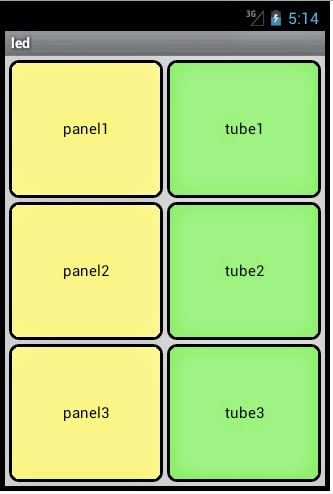
If some one want to understand my final goal: The application "live mobile" allow me to create button to launch at the same time music and light of my stage show. I create a button for each scene of my show. The problem is during the show I can't be actor and have a look on my smarphone. So I would like to have the smartphone in my pocket and press the button lock screen to make tasker launch lauch one after one the different scene.
Sorry, I sent this subject 3 days ago with a bad explication, so I changed it, I hope this one is OK.

Marta Hintz
Nov 20, 2014, 7:05:57 PM11/20/14
to tas...@googlegroups.com
Please check out autoinput plugins. I

Jay M
Nov 20, 2014, 7:06:16 PM11/20/14
to tas...@googlegroups.com
Look on Gplay for the Tasker plugin auto input or see the Tasker action input tap. (requires root) search this group for how to use it.
--
You received this message because you are subscribed to the Google Groups "Tasker" group.
To unsubscribe from this group and stop receiving emails from it, send an email to tasker+un...@googlegroups.com.
Visit this group at http://groups.google.com/group/tasker.
For more options, visit https://groups.google.com/d/optout.
Marta Hintz
Nov 20, 2014, 7:07:36 PM11/20/14
to tas...@googlegroups.com
I think auto input will do the trick of you don't have root. Check it out. If you have root, then tasker can with input tap.
Kamika Magie
Nov 21, 2014, 4:43:54 PM11/21/14
to tas...@googlegroups.com
Thanks a lot, my english is quite poor and my knowlege in tasker no much better.
My system is rooted so I dealt with input tap.
Autoinput plugin look very interesting, may be faster than inputap. If I can't find a way to explain tasker how to tap a different button each time I turn the screen on, I may try with this plugin!
I feel very happy, thank for your help
My system is rooted so I dealt with input tap.
Autoinput plugin look very interesting, may be faster than inputap. If I can't find a way to explain tasker how to tap a different button each time I turn the screen on, I may try with this plugin!
I feel very happy, thank for your help
Kamika Magie
Nov 21, 2014, 4:44:08 PM11/21/14
to tas...@googlegroups.com
Wonderfull! my phone is rooted it works very well! with your idea of input tap, I find a detailed explanation here: https://www.youtube.com/watch?v=F4h95ArBcRQ How wonderful when I turn my screen on, Tasker tap for me the button of my app, I felt amazed!
Next step is to find a way to explain tasker how to tap a different button each time I turn the screen on? I edit the different action for the different place "tasker" need to tap, but I don't know how to make "tasker" go to next action each time I press turn screen on. Keep on climbing stairway to heaven (:

easiuser
Nov 21, 2014, 5:51:19 PM11/21/14
to tas...@googlegroups.com
Indexing should be relatively easy. Global variables maintain thier values even through reboots.
Use input tap for a button position based on the value of a global variable and increment the variable. The task would look something like this:
input tap button A if %INDEX = 0
input tap button B if %INDEX = 1
input tap button C if %INDEX = 2
...
Variable Add %INDEX value 1 wraparound X (last value you want %INDEX to be + 1)
Kamika Magie
Nov 21, 2014, 8:22:00 PM11/21/14
to tas...@googlegroups.com
Thank you for the information.
After some try (fail) i just wanna explain what I tried:Create a new task: "button for the show"
Add inside Script/Run shell
In Command I wrote "input tap button 80 140" (position)
tick "use root" box
click on if and wrote "%INDEX"(variable)/seclect operator "eq"/"0" (value)
... the 6 one is:
"input tap button 300 1240"
%INDEX/eq/5
Finaly I create in this task:
"variable" and "variable add"
"%INDEX"(Name) value "1" wrap around "6"
In profile I create: "Event", "Display on" add task: "button for the show"
Here are my 3 hours work on tasker... but no result for the moment.
easiuser
Nov 22, 2014, 8:39:04 AM11/22/14
to tas...@googlegroups.com
It would be helpful if you posted your profile here. You need to have beginner mode off and your profile should have a name that you gave it. Long press the profile, tap the menu and export as DESCRIPTION to the clipboard and paste here.
You should have one profile (display on) and one task (button for the show). The task will have 6 input tap actions and 1 variable add action.
Kamika Magie
Nov 23, 2014, 4:07:23 PM11/23/14
to tas...@googlegroups.com
Hello,
Here is the result for the export (I did the task for 3 buttons only):
Profile: Show Light Sound (7)
Event: Display On
Enter: Button for the show (6)
A1: Run Shell [ Command:input tap 80 180 Timeout (Seconds):0 Use Root:On Store Output In: Store Errors In: Store Result In: ] If [ %index eq 0 ]
A2: Run Shell [ Command:input tap 80 400 Timeout (Seconds):0 Use Root:On Store Output In: Store Errors In: Store Result In: ] If [ %index eq 1 ]
A3: Run Shell [ Command:input tap 80 1200 Timeout (Seconds):0 Use Root:On Store Output In: Store Errors In: Store Result In: ] If [ %index eq 2 ]
A4: Variable Add [ Name:%index Value:1 Wrap Around:3 ]
Event: Display On
Enter: Button for the show (6)
A1: Run Shell [ Command:input tap 80 180 Timeout (Seconds):0 Use Root:On Store Output In: Store Errors In: Store Result In: ] If [ %index eq 0 ]
A2: Run Shell [ Command:input tap 80 400 Timeout (Seconds):0 Use Root:On Store Output In: Store Errors In: Store Result In: ] If [ %index eq 1 ]
A3: Run Shell [ Command:input tap 80 1200 Timeout (Seconds):0 Use Root:On Store Output In: Store Errors In: Store Result In: ] If [ %index eq 2 ]
A4: Variable Add [ Name:%index Value:1 Wrap Around:3 ]
Kamika Magie
Nov 23, 2014, 4:48:21 PM11/23/14
to tas...@googlegroups.com
ARRFFF! I didn't know variable were case sensitive! Now it works very well! I really would like to thank you a lot! Hope I can do a magic show for you if you come in france, or by skype (kamika.magicien)! Jay and Marta, you are also welcome!
easiuser
Nov 23, 2014, 11:23:01 PM11/23/14
to tas...@googlegroups.com
Glad you got it to work. Variables are case sensitive but more importantly, a variable with a capital letter is "glogal", making it accessible to all tasks and it will maintain it's value after the task has finished.
Reply all
Reply to author
Forward
0 new messages