
Web View local HTML/JavaScript document with url query

Jeremy Harris
I originally started the thread above, assuming I would need to perform these calculations with native Tasker actions. My approach has changed significantly and is not very relevant to the topic of that thread anymore.
The source for my approach and files came from here:
http://www.aphayes.pwp.blueyonder.co.uk/sun_moon.html
TL;DR
A JavaScript embedded html document displays it's calculated results as direct calls to functions of .js files in the /library directory instead of printing a variable or returning JSON.
My end goal is to edit a locally saved html document to set JavaScript variables that I can access in Tasker. I want to do something like:
setLocal ( mooonset, "+hmstring(mrs[1])+" )
I want to do this by opening a Web View element, setting the source to File and specifying the absolute path to the file and also using a URL query on this local file, with "Access Phone" checked (to enable JavaScript). I want to use the Page Loaded event to run a task that can use the variables that I created in the edited html document. And once I get this working, I want to use Create Scene instead of Show Scene, so that the Web View isn't actually displayed.
Is any of this possible?
From the userguide: Web View
Parameter: Allow Phone Access
If checked, the content in the WebView is allowed access to local device files, data stores, and can run JavaScript, including Tasker's JavaScript Interface functions.
This is a very powerful feature, since it allows a WebView to present a complex and highly functional interface, but should only be enabled if you entirely trust the source of the specified content.
Note that references to local files must be absolute (include the directory) even when the WebView source is specified as a file e.g. /sdcard/myfiles/scripts.js
.....................
I have a webpage document with embedded JavaScript saved in the Tasker directory "/storage/emulated/0/Tasker/JavaScript/sun_moon.html" that accepts a URL query string to load some JavaScript variables and refers to several .js files and a style sheet stored in "/storage/emulated/0/Tasker/JavaScript/library"
How can i load this local html document with a query string? This is what the string looks like:
?Place='%LocCity'&Lat=%LocLatLon1&Long=%LocLatLon2&TZ=-5&TZname='EST'
I can add this string to the end of the (internet) URL specified in the Web View element, if I set the source to URL and everything works properly. But I want this to be run locally. If i add the string to the path and switch the source to File, then this does not work...because the query string is considered part of the filename.
Is it possible to open this html query locally in a Web View?
From the userguide:
Introduction
Tasker supports running JavaScript code in tasks or WebView scene elements. Most Tasker actions can be accessed direct from the JavaScript. JSON and XMLHTTPRequest are also directly available from the JavaScript code.
....Embedded in HTML
WebView elements allow specification of mixed HTML and JS for the element content.
<H1 onClick="setWifi( false )">ClickMeToTurnOffWifi</H1>
This allows a single WebView to present a complete user-interface.
Local Variables
In JavaScript(let) actions, local variables (all lower case, e.g. %myvar) are directly accessible in the JavaScript without the % sign (e.g. myvar). If the script changes the value, the new value is transparently used by subsequent actions in the task.
The values of new (all lower case) variables declared in JavaScript (with the var keyword) are also available to subsequent actions, with the exception of those which are chain-declared e.g. var one = 'aval', two = 'bval';
In JavaScript embedded in HTML, the functions local and setLocal must be used to access variables local to the scene hosting the WebView.
....setLocal
setLocal( str varName, str newValue )
Set the value of a Tasker scene-local user variable. Variable names should not be prefixed with %.
This function is only for use by JavaScript embedded in HTML and accessed via a WebView scene element.
....................
The webpage uses the .js files in the /library directory to calculate rise and set times for Sun and Moon, and displays those values by calling functions in those files directly:
document.write(" Moon sets at "+hmstring(mrs[1])+" "+TZname+"<br>");
My end goal is to edit this locally saved html document to set variables that I can access in Tasker. I want to do something like:
setLocal ( mooonset, "+hmstring(mrs[1])+" )
I want to do this by opening a Web View element, setting the source to File and specifying the absolute path to the file, using a query, with "Access Phone" checked. I want to use the Page Loaded event to run a task that can use the variables that I created in the edited html document. And once I get this working, I want to use Create Scene instead of Show Scene, so that the Web View isn't actually displayed.
Is any of this possible?
Jeremy Harris
I'm still at step one.
How can i load this local html document with a query string?
I tried using the Copy action to dynamically rename the html file to include the entire query. This was a step in the right direction, as Web View can now open the queried html document. The obstacle now is that the page is not displayed with the results of the JavaScript.
I can test that the method of renaming the file works by opening it in a my browser (A11 below). The page appears correctly for my time and location, as seen in the first picture...the results of the JavaScript is everything in the blue box.
If I uncheck "Access Phone" in the scene, then the page is opened with the message to turn on JavaScript, as seen in the second picture...as expected.
When I check that box, the page is opened in the same style as before, without the warning to enable JavaScript...so I'm pretty sure the webpage recognizes that JavaScript is enabled. But it is not displaying the results of the JavaScript... so I'm thinking that the code is not being run.
Test Sun_Moon (249)
A1: Variable Set [ Name:%space To: Do Maths:Off Append:Off ]
A2: Perform Task [ Name:LOC Convert Priority:%priority+1 Parameter 1 (%par1): Parameter 2 (%par2): Return Value Variable: Stop:Off ]
A3: Variable Split [ Name:%LocLatLon Splitter:%space Delete Base:Off ]
A4: Variable Set [ Name:%query To:?Place='%LocCity'&Lat=%LocLatLon1&Long=%LocLatLon2&TZ=-5&TZname='EST' Do Maths:Off Append:Off ]
A5: Variable Set [ Name:%path To:/storage/emulated/0/Tasker/JavaScript/sun_moon.html Do Maths:Off Append:Off ]
A6: Variable Set [ Name:%tempfile To:%path%query Do Maths:Off Append:Off ]
A7: Copy File [ From:%path To:%tempfile Use Root:Off ]
A8: Show Scene [ Name:Sun_and_moon Display As:Activity, Full Window Horizontal Position:100 Vertical Position:100 Animation:System Show Exit Button:On Continue Task Immediately:On ]
A9: Wait [ MS:0 Seconds:10 Minutes:0 Hours:0 Days:0 ]
A10: Destroy Scene [ Name:Sun_and_moon ]
A11: [X] Launch App [ App:Chrome Data:file://%tempfile Exclude From Recent Apps:Off ]
A12: Delete File [ File:%tempfile Shred Level:0 Use Root:Off ]
Scene: Sun_and_moon
P:1062x1608 L:-1x-1
Element: WebView1/WebView
Geometry:
P:26,0 1034x1602 L:-1,-1 -1x-1
Content:
Mode: File
Source: %tempfile
Allow Phone Access: On
Self Handle Links: Off
App Cache API: Off
DB API: Off


Matt R
Matt
Jeremy Harris
Well, I haven't really got that far yet. I'm still trying to figure out a way to use a URL query string on this locally saved html file, opened in a Web View element.
Once I can do that, then I need to edit the html to create those variables...and no, I new that I needed to use setLocal, but i didnt realize that was a Tasker function, so I would not have prefixed with tk. Thank you for that!
Jeremy Harris
Since the "?" character is handled by http protocol, it must be opened in a browser in order to work properly. I can prove that works by using Launch App action with the query-named filename in the Data field. I thought the Web View element was like a browser, so I thought I had found a clever approach to accessing JavaScript variables that were embedded in the html document. But I think that Web View can only handle the "?" character for an actual URL...Not when "File" is the source.
I've been giving myself a crash course in html and JavaScript and on what the userguide had to say about it all. This is all very unfamiliar to me.
My plan was to edit the html document to declare variables that I can access in Tasker. I am not certain, but i think the syntax would be
tk.setLocal(str moonset,"+hmstring(mrs[1])+");
Where 'moonset' is the variable I'm creating and want access to in Tasker, and where 'hmstring'is a function of clock.js stored in the /library directory, and where 'mrs[1]' is the second element of an existing array already declared in the html. I'm not certain on the spacing, indents, and "+" characters. I think that this should set %moonset to mrs[1] formatted by hmstring.
But if I can't query the document first, then there's no point.
Matt R
Also, for later, I don't think the JavaScript will run when you create the scene. You have to do the show scene action. But you could always make it tiny and transparent. Or you may be able to do everything in a JavaScript action instead of a webview html file. I did this when I changed a text-length-in-pixels routine from a mixed html and JavaScript base to just JavaScript. But that will come later.
Matt
Jeremy Harris
Thanks Matt. Your advice is verymuch alleviated!
Okay, I've figured out how to query my local html document! Check this out... I'm certain that I tried this multiple times yesterday, but i must've done something different...
In the scene, use URL as the source (not File). Then point to the local file:
file:///<path to file>
So my method of dynamically renaming the [/sun_moon.html] file to include the query [/sun_html ?Place='%LocCity'&Lat=%LocLatLon1&Long=%LocLatLon2&TZ=-5&TZname='EST'] works! The task that i posted above is now working as I had intended it to last night. See screenshot.
Now, I think I can start playing with those variables and trying to get those to work!
Something odd that I noticed. If you look at the first picture attached to my second post on this thread...that is an example of how the page is displayed when working correctly. After getting this to work, I noticed that moon set times are missing...In fact, even when I run this online through the author's website, that information is missing??
Weird. I did mess around last night with my saved document, with exactly the moonset display. I don't understand why that would have anything to do with the results processed through the authors website though??
I deleted all of my saved copies of the html document, and the library of .js files and style sheet. I wiped Chrome cash and Tasker cache from app settings, wiped cache and dalvic from recovery, rebooted and let the rom settle.
I'll figure that out later I guess, but very pleased to figure out how to query my local doc!

Jeremy Harris
I need to keep researching JavaScript and studying the userguide for a bit. I've got the gist of how to set this variable, but not exactly the syntax or proper placement in the script.
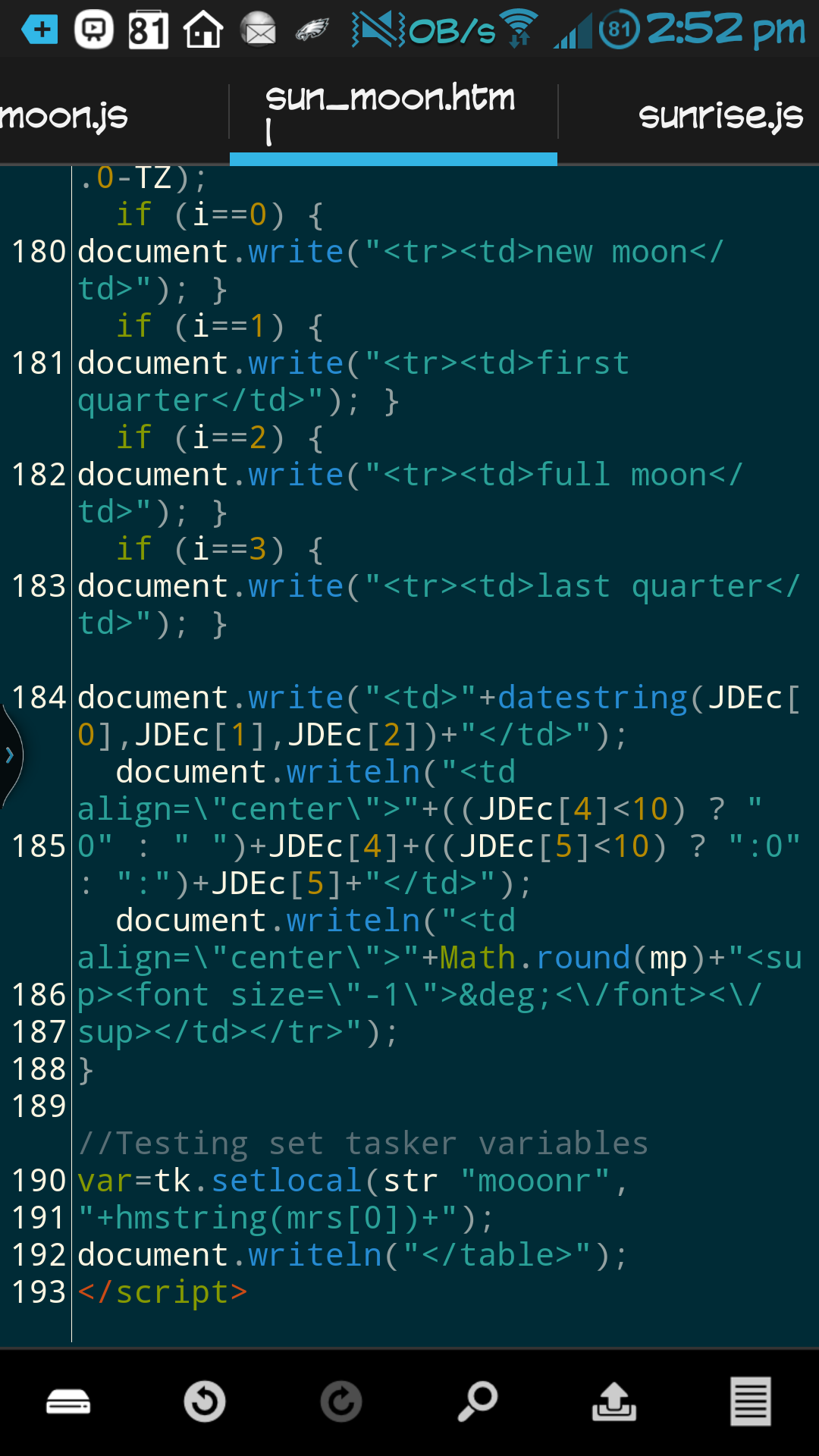
I'm using [URL="https://play.google.com/store/apps/details?id=com.aor.droidedit"] DroidEdit [/URL] to edit the code. My code is in the pic.
I'm trying to set mooonr in the html, and testing by running a Flash [%mooonr] action in the Page Loaded event tab. So far, no dice. But I'm encouraged.


Matt R
Matt
Jeremy Harris
Thanks! I'm feeling accomplished now...although this was just to get me information to use in a project I haven't started yet. Very happy to have overcome this challenge so far!
It bothers me that I can't edit posts here. There are several typos above, but this one might confuse people in the future:
In the scene, use URL as the source (not File). Then point to the local file:
I've been referencing "source" a few times when I meant to put "mode" when referring to URL/File. My source has always been a local file. I got the query to work by accessing the file with the URL mode.
There might be more than one instance of that typo, so please keep that in mind, if anyone tries to duplicate this!
Nice work!
Matt
--
You received this message because you are subscribed to a topic in the Google Groups "Tasker" group.
To unsubscribe from this topic, visit https://groups.google.com/d/topic/tasker/GP9JNlpWOlE/unsubscribe.
To unsubscribe from this group and all its topics, send an email to tasker+un...@googlegroups.com.
Visit this group at http://groups.google.com/group/tasker.
For more options, visit https://groups.google.com/d/optout.
Jeremy Harris
Also, for later, I don't think the JavaScript will run when you create the scene. You have to do the show scene action. But you could always make it tiny and transparent.
This was correct. The script won't run unless Show Scene is used. I made the scene tiny, transparent, and changed to Overlay... Self destructs after a second.
Working well.
Jeremy Harris
So, this has been working well on my device for some time and I've made this into a fairly complex project that takes that base information and calculates major/minor periods and makes a very detailed weather analysis to calculate hourly scores for fish/game activity. It had been working well and scores Jane been very accurate!
I can potentially make this a factory ready project to add to the wiki, or make an app to put on the store. So a friend has been testing this on his device, and the Web View element is not performing the JavaScript or even loading the html document.
His device is on Android 4.1.2 and mine is on 4.3....we are both using Tasker 4.6u2
I can't find any documentation on whether or not there is a minimum android version requirement for this feature to work.
Does anyone know if there is a minimum version requirement for either javascript, or Web View with the ability to perform embedded javascript? Or can point me to the docs?