
Screen-off profile not triggering in Pixel2
116 views
Skip to first unread message

Mike Yates
Jan 29, 2018, 6:10:50 AM1/29/18
to Tasker
I had an alarm set on my Nexus5 if I closed the screen (or it timed out) when I had Wifi and/or Mobile Data left on. The "task" sequence and conditions work just fine but the profile will not detect "display off".
Any ideas?
Any ideas?

Rich D
Jan 29, 2018, 6:13:53 AM1/29/18
to Tasker Google Groups Post
To post your profile or task here... Long press on the profile or task name / ( 3 dot menu with 4.0+ ) export / export "DESCRIPTION" to clipboard (not XML)
Any linked tasks will be exported with the profile they are linked to..
To be able to export, The beginner mode needs to be off and the profile needs to be named by you (Not the Tasker listed name. Tasker will list your profile with the context name if you have not given it one).
On Jan 29, 2018 6:11 AM, "Mike Yates" <mi...@fonehelp.co.uk> wrote:
I had an alarm set on my Nexus5 if I closed the screen (or it timed out) when I had Wifi and/or Mobile Data left on. The "task" sequence and conditions work just fine but the profile will not detect "display off".
Any ideas?
--
You received this message because you are subscribed to the Google Groups "Tasker" group.
To unsubscribe from this group and stop receiving emails from it, send an email to tasker+unsubscribe@googlegroups.com.
Visit this group at https://groups.google.com/group/tasker.
For more options, visit https://groups.google.com/d/optout.
Rich D
Jan 29, 2018, 6:21:46 AM1/29/18
to Tasker Google Groups Post
Have you tried making a profile with just a screen off context for testing?
Then check the Run log. menu /more /run log
Mike Yates
Jan 29, 2018, 6:34:19 AM1/29/18
to Tasker
Description:-
Profile: Left-on (2)
State: Display State [ Is:Off ]
Enter: Wifi and Data Alarm (3)
A1: Test Net [ Type:Mobile Data Enabled Data: Store Result In:%DATA ]
A2: Notify [ Title:Data left on at %TIME Text: Icon:hd_device_access_network_cell Number:0 Permanent:Off Priority:3 ] If [ %DATA ~ yes ]
A3: Notify [ Title:Wifi left on at %TIME Text: Icon:hd_device_access_network_wifi Number:0 Permanent:Off Priority:3 ] If [ %WIFI ~ On ]
A4: Write File [ File:Tasker/log.txt Text:Screen off at %DATE, %TIME, Data on: %DATA, Wifi: %WIFI Append:On Add Newline:On ]
A5: Vibrate [ Time:200 ] If [ %DATA ~ yes | %WIFI ~ on ]
A6: Say [ Text:Data left on Engine:Voice:com.google.android.tts:eng-gbr Stream:2 Pitch:5 Speed:5 Respect Audio Focus:On Network:Off Continue Task Immediately:Off ] If [ %DATA ~ yes ]
Profile: Left-on (2)
State: Display State [ Is:Off ]
Enter: Wifi and Data Alarm (3)
A1: Test Net [ Type:Mobile Data Enabled Data: Store Result In:%DATA ]
A2: Notify [ Title:Data left on at %TIME Text: Icon:hd_device_access_network_cell Number:0 Permanent:Off Priority:3 ] If [ %DATA ~ yes ]
A3: Notify [ Title:Wifi left on at %TIME Text: Icon:hd_device_access_network_wifi Number:0 Permanent:Off Priority:3 ] If [ %WIFI ~ On ]
A4: Write File [ File:Tasker/log.txt Text:Screen off at %DATE, %TIME, Data on: %DATA, Wifi: %WIFI Append:On Add Newline:On ]
A5: Vibrate [ Time:200 ] If [ %DATA ~ yes | %WIFI ~ on ]
A6: Say [ Text:Data left on Engine:Voice:com.google.android.tts:eng-gbr Stream:2 Pitch:5 Speed:5 Respect Audio Focus:On Network:Off Continue Task Immediately:Off ] If [ %DATA ~ yes ]
Mike Yates
Jan 29, 2018, 11:30:42 AM1/29/18
to Tasker
Well, Rich D, I have tried creating profiles which trigger by USB-connection, app-use and on a time.
None of them trigger at all. Nothing in the Run Log except TaskService starts and stops.
They each should run tasks with notifications which work OK on test.
I've enabled all permissions I can find.
Any ideas?
None of them trigger at all. Nothing in the Run Log except TaskService starts and stops.
They each should run tasks with notifications which work OK on test.
I've enabled all permissions I can find.
Any ideas?
Rich D
Jan 29, 2018, 7:04:39 PM1/29/18
to Tasker Google Groups Post
- Is this a new install and if so has any profile triggered since the install?-
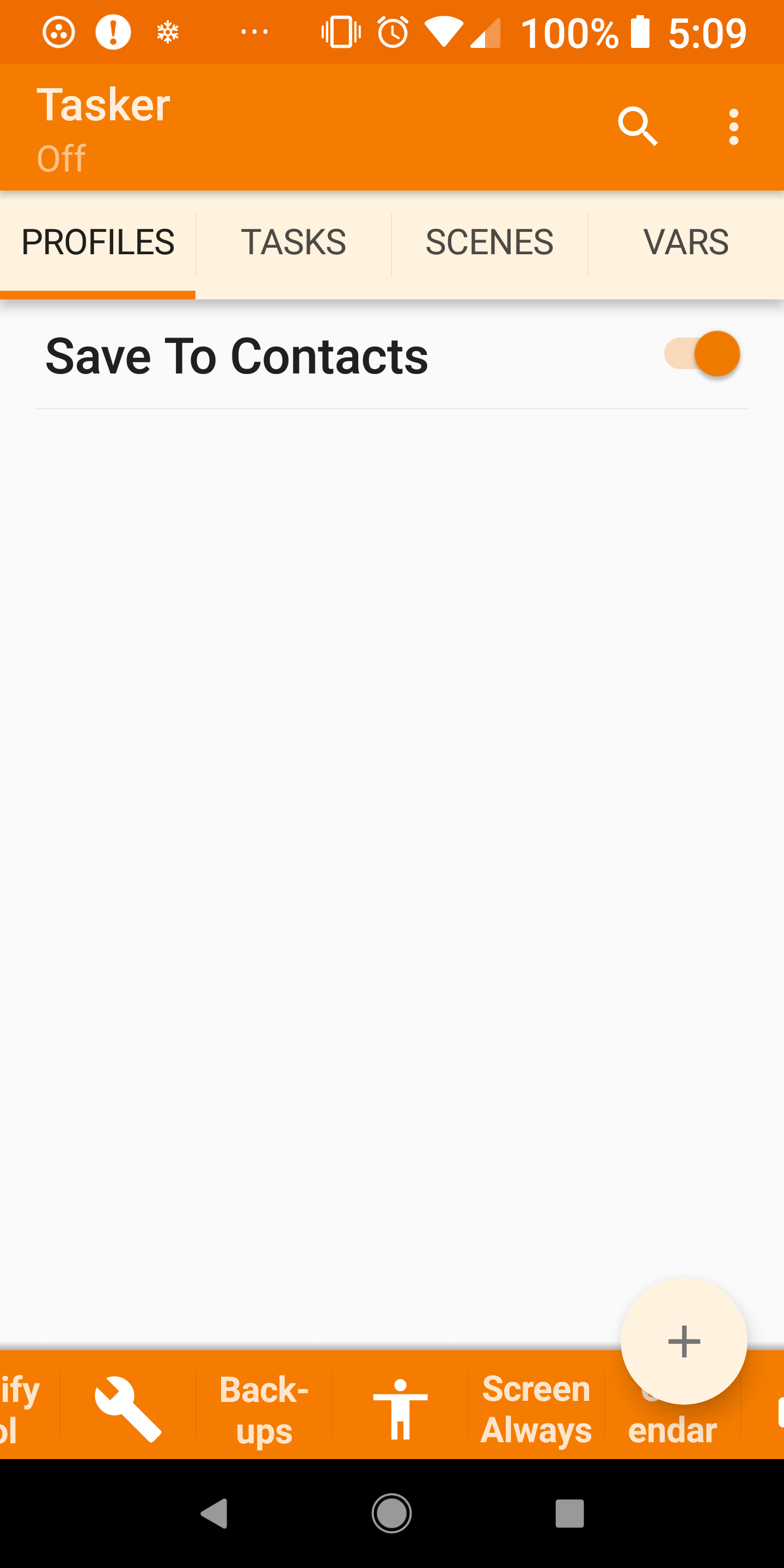
- check to see if Tasker is enabled. See screen shots. If it is not enabled you will see 'off' in the upper right corner under "tasker" and the overflow menu will have a option to enable.
Make sure you have backed all the way out of tasker with the back button to save changes.
Check these settings as well
Tasker new doze settings power managment.


Mike Yates
Jan 30, 2018, 5:05:01 AM1/30/18
to Tasker
Fixed!!
Main settings, Apps, Tasker, Battery Optimization, All Apps, Tasker, Don't Optimise.
It is then "Whitelisted" but I still can't get rid of the constant notification "Tasker is using battery".
At least the profiles all work now.
The menu did show "Disable Tasker" but there is no On/Off indicator in the phone version of Tasker.
I have not used the tablet version - your screenshots are amazing.
Main settings, Apps, Tasker, Battery Optimization, All Apps, Tasker, Don't Optimise.
It is then "Whitelisted" but I still can't get rid of the constant notification "Tasker is using battery".
At least the profiles all work now.
The menu did show "Disable Tasker" but there is no On/Off indicator in the phone version of Tasker.
I have not used the tablet version - your screenshots are amazing.
Rich D
Jan 30, 2018, 5:14:12 AM1/30/18
to Tasker Google Groups Post
The menu did show "Disable Tasker" but there is no On/Off indicator in the phone version of Tasker.
I have not used the tablet version - your screenshots are amazing.
Strange.. This is a screen shot of my pixel 2 xl

Mike Yates
Jan 30, 2018, 5:59:22 AM1/30/18
to Tasker
Well, even in landscape with "Beginner" off, I don't get "On" nor the options in the bottom bar in my 5" non-XL
Any ideas on the constant battery notification?
Rich D
Jan 30, 2018, 6:33:15 AM1/30/18
to Tasker Google Groups Post
Well, even in landscape with "Beginner" off, I don't get "On" nor the options in the bottom bar in my 5" non-XL
Just for clarification I do not get a 'on' text I just get the 'off' text.
Any ideas on the constant battery notification?
Sorry, no . I have the same notification. If you long press the notification, you can turn the notification off. Can you not
Mike Yates
Jan 30, 2018, 11:23:30 AM1/30/18
to Tasker
Ahhh, yes, of course!
Done
Done
Reply all
Reply to author
Forward
0 new messages