
Tasker Beta 4.2b10 (Android 4.0+)

Pent
I'm aware that there are some niggling bugs with minor aspects of scenes.
Unfortunately, I've noticed that I'm avoiding working on Tasker because
I'm sick of working on scenes, so I'm going to publish this beta series
as stable soon, bugs and all, so I can make a fresh start with other
things.
Pent
Cumulative To 4.2b10
- bugfix: UI lock applies also to Menu / More / Run An Action (prevent e.g. disable Tasker that way)
- bugfix: plugin state context: disabling profile while plugin active: enabling at a later date was causing immediate activation without first querying plugin
- bugfix: plugin: exception handling plugin completion codes
- bugfix: plugin actions: Continue On Error was not being respected for timeouts
- bugfix: plugin actions: added TaskerPlugin.hostSupportsOnFireVariableReplacement(Activity) for backwards compat with older Taskers
- bugfix: action Popup Task Buttons: bad link to help text
- beta: bugfix: scene with AB and tabs: hide/show was losing current tab
- beta: bugfix: userbackup.xml wasn't getting display metrics so moving to another device wasn't scaling scenes to new resolution
- beta: bugfix: using an element for scene name could cause crash on occasion
- beta: bugfix: app creation: scene without AB: soft keyboard was causing scene scrolling even when not necessary
- bugfix: action Variable Search Replace: was giving exception for undefined variables
- bugfix: export task description: Set Tasker Pref was failing to export with some pref types
- beta: bugfix: action edit: Set Tasker Pref: wasn't recording int values correctly

David Macias Hurtado

Joseph Richman

Jay M
Random Question: Anyone no the height of the Actionbar In Pixels? Google search says its 45 - 56 but that can't be right because looking at it on all my devices the only thing that changes is the width of the bar, to fill the screen obviously.
Jay M

Cptnodegard

RudeboyX
RBX
RudeboyX
| Portrait | 48 dp |
| Landscape | 40 dp |
| Tablet | 56 dp |
You can check the below link out for more info
http://petrnohejl.github.io/Android-Cheatsheet-For-Graphic-Designers
| RBX | |
Jay M
Real nice link a lot more usefull than what I found at Stack overflow cheers.
@ Andreas, Thanks for the tip :) Its mainly because I updated the gmail app and didn't even notice the 2 reply arrows were gone so I was just naturally pressing the arrow as I always did. I see now though they put reply/reply to all in a spinner in the actionbar. Good idea IMO those 2 arrows were confusing. My bad.
Jay M

Nuno Mendes
On slider you cant set the Min or Max values as a variable. As i said before, its extremly handy either for clocks, download assistants, and any kind of progress type of work.
Bug #6:
--- Video: www.youtube.com/watch?v=6znQcg3MUJE (Pressing sometimes a image, it stays forever with a blue surrounding untill u click another image on the scene, since b8 or before)
--- Image: https://dl.dropboxusercontent.com/u/18267742/Tasker/Screenshot_2013-10-26-15-41-06.png
Bug #7: On b9, now you dont have on the TextEdits the bluelish line u had that was stylish and helped knowing where to insert the text we wanted.
Bug #8: Images can not get an image from /data/ (maybe other root folders) as source, even with root acces.
Bug #9: The tasker file explorer can not access any root folder. E.G.: (/.../).

David Wang
I post the same bug on 4.2b9 "bug collect thread", but it nerver fixed for 4.2b10.
I use mobile Browser now. so it's inconvenient for me to post my thread link on 4.2b9 thread. You can search and get it. Hope it will be fixed in next beta.!
Pent
I post the same bug on 4.2b9 "bug collect thread", but it nerver fixed for 4.2b10.
I use mobile Browser now. so it's inconvenient for me to post my thread link on 4.2b9 thread. You can search and get it. Hope it will be fixed in next beta.!
You mean 'can't scroll menu items' I guess. I couldn't reproduce it. I'm also mystified by how your bottom + background looks,
it should just be a single-colour-shaded rectange. Perhaps the two things are related.
Pent

mrtur
https://play.google.com/store/apps/details?id=com.ivona.tts
not work. It only works once when disabling and enabling the program Tasker. IVONA TTS in other programs work very well.

Sean Williams
Activity bar icons not being bundled in apk, source Holo Dark icon pack.
Sean
David Wang
The bug happened in 4.2b9, 4.2b10.
Cptnodegard
Bug #2: When on a Task, full of actiong and you long press any action(seems to be any action ramdomly) the screen goes back up to the first action. (still, it keeps the action you long pressed selected)
Pent
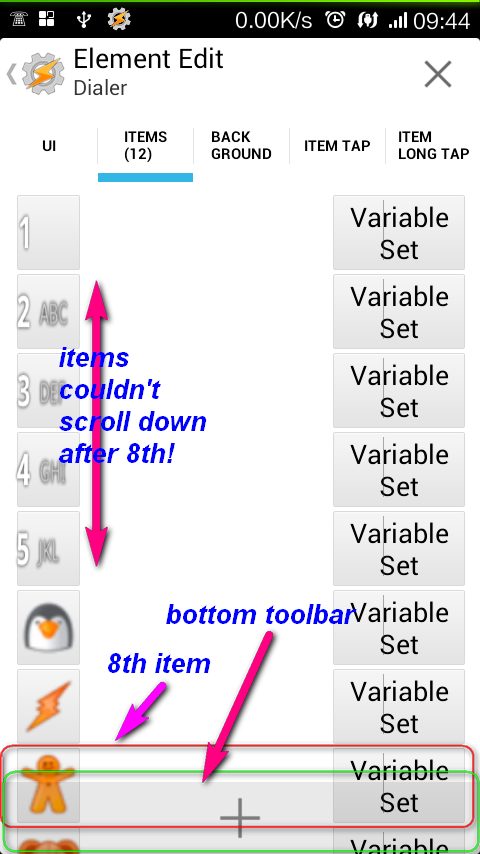
I want to edit the menu items(12 items, the 8th item override the action bar in bottom) in 'items' tab,but when I set menu element "Source -> Manual" in 'UI' tab, then the menu items couldn't scroll down after 8th items in edit mode.
The bug happened in 4.2b9, 4.2b10.The scene attached. You can test it to reproduce the bug.
I can't reproduce the bug with your scene.xml.
Pent
Pent
Bug #2: When on a Task, full of actiong and you long press any action(seems to be any action ramdomly) the screen goes back up to the first action. (still, it keeps the action you long pressed selected)I have this too, had it for many versions now.
I can't get it to happen, maybe OS specific.
There's also a bug where sometimes the task picker for creating a profile jumps back to default whenever you've scrolled to a specific item; not sure about the logic behind this bug, as it's not constant.
It's a bug in Android's popup window implementation somewhere. There's absolutely zero chance of them fixing
in the next 10 years if I submit a bug report.
Pent
Pent
Pure Android 4.3.1 for Nexus 4, IVONA TTS
https://play.google.com/store/apps/details?id=com.ivona.tts
not work. It only works once when disabling and enabling the program Tasker. IVONA TTS in other programs work very well.
You create a task with a Say action, press the Play button and it works once ?
Have you tried deselecting 'respect audio focus' in the say action ?
Pent

easiuser

Steve Mills
mrtur
Pent
Something I discovered. When you leave a voice settings in RAM
I didn't understand what you were demonstrating there or what you mean
by 'voice settings in RAM' ?
Pent
mrtur
Jay M
Does it happen with other TTS apps? Ivona doesn't work to good with Tasker anyway. Search this group and you will see what I mean.
Jay M
--
You received this message because you are subscribed to the Google Groups "Tasker" group.
To unsubscribe from this group and stop receiving emails from it, send an email to tasker+un...@googlegroups.com.
Visit this group at http://groups.google.com/group/tasker.
For more options, visit https://groups.google.com/groups/opt_out.
mrtur
Sean Williams
Variables inside a text edit box are not updated when the variable value changes within the scene.
Element Number picker will not accept 01,02,03 etc. as values (Trying to create a 24h clock)
Sean
David Wang
build.board: MSM8660_SURF
build.bootloader: unknown
build.brand: Xiaomi
build.cpu_abi: armeabi-v7a
build.cpu_abi2: armeabi
build.device: mione_plus
build.display: JZO54K
build.fingerprint: Xiaomi/mione_plus/mione_plus:4.1.2/JZO54K/3.9.27:user/release-keys
build.hardware: qcom
build.host: wcc-miui-ota-bd02.bj
build.id: JZO54K
build.manufacturer: Xiaomi
build.model: MI 1SC
build.product: mione_plus
build.radio: unknown
build.serial: 37506165
build.tags: release-keys
build.time: 1380255990000
build.type: user
build.user: builder
version.codename: REL
version.incremental: 3.9.27
version.release: 4.1.2
version.sdk_int: 16
Pent
only a range.
You can still use it as a 24hr clock. I will add a 'prefix zeros' option (how many depending
in the max value specified) to the todo list.
Pent
Pent
In order to make it much clear,
It was already clear, I just couldn't reproduce it.
I change the icon of the bottom items. In the picture attached, you can see 8th item across the bottom bar(the "toobar" in scene editor). And I couldn't scroll items down to edit items after 8th item.
I could reproduce it on my 4.1.2 phone, so I presume it's an Android difference (my other
device is 4.3). Will take a look.
Pent
Pent
I only hear problems about Ivona. Perhaps it's using a new API that Tasker isn't updated to, or vice-versa.
> If I going to settings->Language&Input->Text-to-speech output next and press back, back, back. TTS not work (movie nr1)
Anyway, I'll buy a copy of Ivona and see if I can reproduce it.
Pent
mrtur
RudeboyX
Hi Pent
Not sure if this is specific to the betas as I never noticed the state context before, but i've just tried the "Dock" context on my Asus transformer TF300T tablet and I get the following error "M: 18.20.21#M: error: DOCK_EVENT with unrecognized DOCK_STATE: 10". I expect there are many different kinds of docks for different devices and so not all docks will function with this context but I am willing to go out on a limb and say that the most common dock out there is the Asus Transformer keyboard dock, any chance you can look into getting this working with this dock context?
(additionally the Transformer dock can be detected by the "keyboard out" state when you open it up (its like a laptop) and when you close the dock the opposite keyboard state triggers. Maybe a combination of dock and keyboard data would be required to get the dock state context working properly with the Asus transformers)
Let me know if theres anything else I can provide to assist.
Regards
RBX
Sean Williams
Lets see if I can do better with this next one, I want to mention element boarders. Setting a Boarder Width to 1 produces a single pixel line to the left and top with nothing to the bottom and right. A setting of 2 creates a line of two pixels to the left and top with just one pixel to the bottom and right of the elements boarder... and so on.
I understand this has been the case for as long as I can remember, but as you're working on this stuff, is this an intentional feature or a bug?
Sean
Pent
Not sure if this is specific to the betas as I never noticed the state context before, but i've just tried the "Dock" context on my Asus transformer TF300T tablet and I get the following error "M: 18.20.21#M: error: DOCK_EVENT with unrecognized DOCK_STATE: 10". I expect there are many different kinds of docks for different devices and so not all docks will function with this context but I am willing to go out on a limb and say that the most common dock out there is the Asus Transformer keyboard dock, any chance you can look into getting this working with this dock context?
Sure, I'll add 10 in the 'other' category. Shame Google couldn't define a standard in Android for docking device classes, currently all the manufacturers are making their own up. Samsung keyboard is 9 for example.
Pent
Pent
Only IVONA dont work, others TTS work OK (google, Pico TTS, Svox)
Anyway, will purchase Ivona as I mentioned.
Pent
Sean Williams
If it helps, Ivona stopped working for me after the 4.2.x update on Nexus 4, I'm not sure whether ivona or Tasker were updated around the same time. However I do know it worked perfectly with Tasker on my nexus s stock jb 4.1
mrtur
RudeboyX
No doubt google will impliment a better API standard one day, but only when everyone is used to the current way. :-)
Regards
RBX
RudeboyX
RBX
Jay M
Ivonas currently free untill the end of beta testing,
Jay M
mrtur
Pent
which isn't true right at the start.
That's why disabling the monitor, forcing it to start up again, would fix the issue: it bridged the gap at the start due to slowing things down.
Presumably the different engines have different preparation times for synthesis too, causing better results for slower ones.
Pent

gary scarborough
Jay M
I got confused reading this Lol, Thanks for looking into it though, Ivona + Taskers = The BOMB!
Jay M
--

Pent
I got this out of the blue when launching Tasker. Haven't changed anything with my calendar contexts.
Mystery to me, seems like the calendar provider acting up.
Pent
Steve Rothkin
- Profile name and context
- Task name and step
- Detailed error description (e.g. return code/description from calendar provider).
That would make it easier for users to diagnose/debug on their own.
Pent
Perhaps in the future these error messages can include more detail like
- Profile name and context
- Task name and step
Passing the calling task name or responsible profile around the whole Tasker
code so as to include it in any error report is not feasable, sorry.
- Detailed error description (e.g. return code/description from calendar provider).
There is an error description, it just doesn't mean much to you. There is no code
involved to pass along.
Pent
Pent
I want to edit the menu items(12 items, the 8th item override the action bar in bottom) in 'items' tab,but when I set menu element "Source -> Manual" in 'UI' tab, then the menu items couldn't scroll down after 8th items in edit mode.
Think I fixed that one, was definitely dependent on Android version.
Pent
Pent
Variables inside a text edit box are not updated when the variable value changes within the scene.
That's intended, variable is replaced initially, then the variable is no longer in the box so cannot be
replaced.
What if you start with %Var = Red. EditText is 'Value is %Var', so when the box is shown it's
displayed 'Value is Red'. Now the user changes the contents of the box to 'Red is Value'
by typing. Where does %Var come into it now ? What I'm saying is that what you see in the
box on the screen has to be the 'actual' value of the text in the element, because the user
could change it at any time.
Pent
Nuno Mendes
Also, have u been seeing the update list of bugs ive been posting? the posts with Bug #1, bug #2, etc etc?:)

Wietse van Buitenen
I want to edit the menu items(12 items, the 8th item override the action bar in bottom) in 'items' tab,but when I set menu element "Source -> Manual" in 'UI' tab, then the menu items couldn't scroll down after 8th items in edit mode.
Think I fixed that one, was definitely dependent on Android version.
Pent
Jay M
I'm sure that i read that changing either the Height or Width parameter to 0 on the image element would make the pic keep the same aspect ratio. Can anyone confirm this or did I dream it :/ because it doesn't work for me.
Jay M
Pent
I'm sure that i read that changing either the Height or Width parameter to 0 on the image element would make the pic keep the same aspect ratio. Can anyone confirm this or did I dream it :/ because it doesn't work for me.
Should work, someone else found a bug, I fixed it, was reported as working now.
What exactly is going wrong.
Pent
Pent
- Number Picker hangswhen I set the height too small (blue lines are not visible) and then some.. and I try to change the value after showing the Scene, it hangs and Tasker FC's
Seems like we need a minimum NP height, thanks.
Pent
Pent
Hey Pent, when are you estimating to release b11? Im eager to see if I can finally can have my tasker UI speed back to normal :P (What was the problem?:o)
Depends what bugs come in.
Also, have u been seeing the update list of bugs ive been posting? the posts with Bug #1, bug #2, etc etc?:)
Yes, some of them are features requests, all of them are minor if I remember right. As I wrote at the top of
this thread, I'm not doing minor scene-related fixes anymore for this beta.
Pent
Pent
- the Plugin with Timeout <> None is still reproduciblea Flash directly after a Plugin with Timeout = 1sec doesn't show up..
How about 20 secs ?
Pent
Jay M
Maybe I'm just using it wrong the image I'm using is 339 x 339 so keeping the aspect ratio the same would cause it to keep square but still resize if I'm understanding this right.
https://www.youtube.com/watch?v=lnAUw4Vfon4&feature=youtube_gdata_player
Jay M
Steve Rothkin
Perhaps in the future these error messages can include more detail like
- Profile name and context
- Task name and step
Passing the calling task name or responsible profile around the whole Tasker
code so as to include it in any error report is not feasable, sorry.
As it is right now, if I see these errors when I go into tasker, often there isn't any contextual information that would tell me where to start looking. That's a problem.
- Detailed error description (e.g. return code/description from calendar provider).
There is an error description, it just doesn't mean much to you. There is no code
involved to pass along.
Nuno Mendes
If no major bugs come in how long you will take to release it? :)
Keep up the awsome work!:)
Wietse van Buitenen
Pent
As it is right now, if I see these errors when I go into tasker, often there isn't any contextual information that would tell me where to start looking.
That's a problem.
I'm not denying that some errors and warnings could be improved.
Pent
Pent
Maybe I'm just using it wrong the image I'm using is 339 x 339 so keeping the aspect ratio the same would cause it to keep square but still resize if I'm understanding this right.
https://www.youtube.com/watch?v=lnAUw4Vfon4&feature=youtube_gdata_player
Pent
Pent
Pent
Nuno Mendes
Good luck and good work! :)
Pent
I set Timeout to 20 secs and added a Notify after the Flash (so I couldn't miss it :) ), added a Tasker Widget to the Task on my homescreen but the Flash and Notify don't show up..
Which plugin is it ? (And is the current version from Play Store or another ?)
Does it happen with other plugins ?
Thanks for your help, since it doesn't trouble you ATM.
Pent
Pent
- I can't scroll in a JavaScriptlet by touching and scrolling in the code, this could be done on my SGS2 but not my Z1
It could be the same issue as the menu thing, hopefully fixed.
Pent
Pent
- List Item Drag Margin - On Right, Visiblesometimes it's show and sometimes not, haven't had the chance to try to reproduce it though..
Havn't seen that.
also, on my Z1 the right margin is really big compared to my SGS2.. it's 1/3 to 1/2 of my screenperhaps this is because of the resolution?
Yep, the extra high resolutions revealed a bug in the calculation for the width, fixed, thanks.
Pent
RudeboyX
On Friday, 25 October 2013 10:30:45 UTC+1, Pent wrote:
http://tasker.dinglisch.net/beta.html
I'm aware that there are some niggling bugs with minor aspects of scenes.
Unfortunately, I've noticed that I'm avoiding working on Tasker because
I'm sick of working on scenes, so I'm going to publish this beta series
as stable soon, bugs and all, so I can make a fresh start with other
things.
PentCumulative To 4.2b10
- bugfix: UI lock applies also to Menu / More / Run An Action (prevent e.g. disable Tasker that way)
- bugfix: plugin state context: disabling profile while plugin active: enabling at a later date was causing immediate activation without first querying plugin
- bugfix: plugin: exception handling plugin completion codes
- bugfix: plugin actions: Continue On Error was not being respected for timeouts
- bugfix: plugin actions: added TaskerPlugin.hostSupportsOnFireVariableReplacement(Activity) for backwards compat with older Taskers
- bugfix: action Popup Task Buttons: bad link to help text
- beta: bugfix: scene with AB and tabs: hide/show was losing current tab
- beta: bugfix: userbackup.xml wasn't getting display metrics so moving to another device wasn't scaling scenes to new resolution
- beta: bugfix: using an element for scene name could cause crash on occasion
- beta: bugfix: app creation: scene without AB: soft keyboard was causing scene scrolling even when not necessary
- bugfix: action Variable Search Replace: was giving exception for undefined variables
- bugfix: export task description: Set Tasker Pref was failing to export with some pref types
- beta: bugfix: action edit: Set Tasker Pref: wasn't recording int values correctly


Bob Hansen
Pent
Ive noticed with the betas that when the power cable removed, i get a power inserted event.
Hope you can reproduce the issue
Sorry, no.
Maybe check the Run Log to see nothing else is going on.
Pent
Wietse van Buitenen
RudeboyX
Pent
Thanks, I could reproduce it with that one, but not with my test plugin for some reason.
Fixed anyway, I think, thanks for persisting would have gotten a flood of complaints if
that had gone live.
Pent