
Clicking a link through Http get/post
793 views
Skip to first unread message

Wes Stacey
May 26, 2013, 10:35:45 PM5/26/13
to tas...@googlegroups.com
Is there anywhere where I can get a more in depth explanation of Http Get and Post?
I'm trying to access data from my thromostat from a website unfortunately i can't seem to get around the login screen. I think i have a work around but it involves me being able to click a link. is there anyway to use Get and Post to look at a website and click a link?
-Wes

Pent
May 27, 2013, 2:25:47 AM5/27/13
to Tasker
> Is there anywhere where I can get a more in depth explanation of Http Get and Post?
Wikipedia, Tasker action help.
> I'm trying to access data from my thromostat from a website unfortunately i can't seem to get around the >login screen. I think i have a work around but it involves me being able to click a link. is there anyway to use >Get and Post to look at a website and click a link?
then do a Get/Post with that URL.
It's probably not simple though.
Pent
Pent
May 27, 2013, 2:26:02 AM5/27/13
to Tasker
Sorry, meant %HTTPD.
Pent
Pent
Wes Stacey
May 27, 2013, 1:15:04 PM5/27/13
to tas...@googlegroups.com
Yeah not that simple. The link isn't a complete link. I'm guessing the security is going to be a pain.
The link has something like this (S(shuhdy26hdbfgbsg) as part of it unfortunately that piece times out after a while and I need a new a new one, once it times out it displays a page asking you to click a link and it takes you to a page with that new piece. Unfortunately that link is just the last piece and does have then new security piece in it.
Back to the old drawing board I guess.

Jenny Hawkins
May 27, 2013, 2:19:25 PM5/27/13
to tas...@googlegroups.com
You'll want to parse out the link and use it in the next http request. Look inside %HTTPD and hunt for features which always occur around the link. Then, just use them to strip out everything else with variable splits. If the first part of the link is constant, and unique in the page, that could help make it a pretty simple parse.
Wes Stacey
May 28, 2013, 9:19:20 AM5/28/13
to tas...@googlegroups.com
As i stated before, it's not that simple. The url in the link isn't complete. So i don't have the unique piece that i need. I'm beginning to think this may not be possible.
Wes Stacey
May 28, 2013, 2:27:42 PM5/28/13
to tas...@googlegroups.com
OK another work around, another issue.
If i send the url without the "unique" piece ex. https://www.alarm.com/pda/SeamlessSessionLost.aspx it will then redirect me to a new page with a Unique piece on the beginning.
Is there anyway i can get the URL that i get redirected to? Basically the actual url of the html code that i'm looking at?
-Wes
If i send the url without the "unique" piece ex. https://www.alarm.com/pda/SeamlessSessionLost.aspx it will then redirect me to a new page with a Unique piece on the beginning.
Is there anyway i can get the URL that i get redirected to? Basically the actual url of the html code that i'm looking at?
-Wes

Mitchell Greenfield
May 28, 2013, 7:58:17 PM5/28/13
to tas...@googlegroups.com
That unique piece is called a session Id. You need that.

TomL
May 29, 2013, 8:47:52 AM5/29/13
to tas...@googlegroups.com
It's possible to have Tasker do what you need. First a little lesson in HTTP return codes.
Normally, when a browser (or Tasker) makes a GET request to a web server for an url, if the server can serve up the page, it'll return an HTTP response code of 200 (meaning: "ok, here's the contents of the requested page in the HTTP response data") and in the same response, the HTTP response data will contain the contents of your page. Your browser checks the HTTP response code, reads in HTTP response data and renders it onscreen.
If the url you want happens to be configured as a redirect at the web server, then the web server'll return an HTTP response code of 302 (meaning: "you're getting redirected. look in the response header for the actual location") and in the same response, one of the HTTP response headers will contain a line like "location: http://some.host.com/this/is/the/real/url". Your browser checks the HTTP response code, looks at the HTTP response header for the new location, and quietly makes a new HTTP request to the new url.
So, what you have to do in Tasker is when you get the 302 response code is to check through the response headers for the location line. Look in the TAsker user guide: http://tasker.dinglisch.net/userguide/en/help/ah_index.html and search for the phrase "Returned header fields" ...
Also, I would suggest reading up a bit about how HTTP works:
I hope that helps.
Tom
Message has been deleted
Wes Stacey
May 30, 2013, 10:22:11 AM5/30/13
to tas...@googlegroups.com
Well blast, according to the header information, i'm not being actually being redirected...
I'm starting to wonder if this is possible.
The login information is being done through javascript so the standard https://username:pass...@www.alarm.com urls don't work.
All the links just show the last part, ex href="Thermostats.aspx" instead of giving me the whole URL.
There is nothing in the html code that gives me the session ID.
If i have a valid session ID the task gets the information successfully the issue comes when that session ID expires. If i go to a browser and get a new session ID and paste it to the task starts working again, butt hat sort of defeats the purpose.
Anyone have any ideas about how I could login through tasker?
thanks.
-Wes
I'm starting to wonder if this is possible.
The login information is being done through javascript so the standard https://username:pass...@www.alarm.com urls don't work.
All the links just show the last part, ex href="Thermostats.aspx" instead of giving me the whole URL.
There is nothing in the html code that gives me the session ID.
If i have a valid session ID the task gets the information successfully the issue comes when that session ID expires. If i go to a browser and get a new session ID and paste it to the task starts working again, butt hat sort of defeats the purpose.
Anyone have any ideas about how I could login through tasker?
thanks.
-Wes

Dave Fisher
May 30, 2013, 11:14:39 AM5/30/13
to tas...@googlegroups.com
When you goto https://www.alarm.com/pda/SeamlessSessionLost.aspx and get redirected, is the session ID also stored in a cookie ? If yes you should be able to extract that and construct the full URI yourself after the redirect, eg along the lines of
Wes Stacey
May 30, 2013, 11:16:29 AM5/30/13
to tas...@googlegroups.com, mob...@the-darkside.co.uk
And how do i look at the cookies?
On Thursday, May 30, 2013 10:14:39 AM UTC-5, Dave F wrote:
On Thursday, May 30, 2013 10:14:39 AM UTC-5, Dave F wrote:
When you goto https://www.alarm.com/pda/SeamlessSessionLost.aspx and get redirected, is the session ID also stored in a cookie ? If yes you should be able to extract that and construct the full URI yourself after the redirect, eg along the lines of
On 30 May 2013 15:22, Wes Stacey <wesstac...@gmail.com> wrote:
Well blast, according to the header information, i'm not being actually being redirected...
I'm starting to wonder if this is possible.
The login information is being done through javascript so the standard https://username:password@www.alarm.com urls don't work.
Wes Stacey
May 31, 2013, 9:22:31 AM5/31/13
to tas...@googlegroups.com, mob...@the-darkside.co.uk
Anyone?
Dave Fisher
May 31, 2013, 9:37:08 AM5/31/13
to tas...@googlegroups.com
Use the developer tools in Chrome to view the site when it loads, and see if it sets any cookies with the same SSID that you get in the URL:
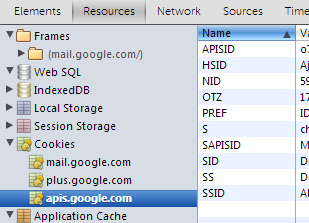
I've never tried using them in Tasker, but the User Guide says: The Cookies paramter is of the form: name1=valuu1;name2=value2 but I am not clear if thats for setting a cookie to send to the server, or what you get back from the server. I assume its the former, so I guess you'll have to extract it from the HTTP response header, see: http://en.wikipedia.org/wiki/HTTP_Cookie#Implementation
Jenny Hawkins
May 31, 2013, 11:57:14 AM5/31/13
to tas...@googlegroups.com
As Dave suspected, tasker will send cookies given to it from the server. It doesn't handle them by itself, though. Generally, when you first contract a website, it will pass you cookies in the headers. Loop through the header array for any that set cookies and put them in the cookie field for the next GET or POST. I usually have to put a random cookie in the first GET, like g=t, to get the site to send cookies. Keep checking for new cookies each time you talk to the site, and append any new ones to the ones you already have.
Wes Stacey
May 31, 2013, 12:07:23 PM5/31/13
to tas...@googlegroups.com, mob...@the-darkside.co.uk
Unfortunately this didn't work, none of the cookies display the needed information either.
I did FINALLY find a work around that does however.
Here are the things I found that led me to the solution.
1. While I can select the "Keep me Logged in" check box when I login with a browser there is no way for http Get action to do so, so when the valid session ID expires even if i were to get a hold of another session ID using various redircting tricks it was still going to ask me to login again when i tried to use it. So most of the workarounds i was attempting to use above were going to throw me into a dead end even if I could get them to get me a new ID.
2. Browsers worked because i could select the "Keep me Logged in" and even if that id expired it would give me a new one every time (it would require me to click a link but even the page that displayed the link showed the valid id). Unfortunately that required me to manually copy that new ID and place it in my tasker task.
So my work around taking into account both of these things was to "create" my own browser in tasker, using the Webview element in a scene. I created a scene that was basically just a web view element with the url "Https://www.alarm.com/pda/default.aspx" the first time it displayed it asked me to login so i did making sure to check the "Keep Me Logged In" check box. Now whenever i launch the scene i get taken to the alarm systems page each time with a new session id. In the "Page Loaded" tab of the webview element i simply set the url that is loaded into a variable which is complete with the new session ID and also set a variable "%Loaded" to 1.
In the task i simply launch the scene (clicking "continue immediately") and then directly after that put a wait until action and wait until %Loaded =1 with a check every 50 ms. And boom i then have all the information i need to do all my http gets and gather all the information.
Now the main downside to this is that when the task launches the scene pops up momentarily and it will wake up the device if it is a sleep so i only have it run every 2 hours. but considering how difficult it has been to get to a working version of this i think it is a very good trade off.
Thanks for your help everyone.
-Wes
I did FINALLY find a work around that does however.
Here are the things I found that led me to the solution.
1. While I can select the "Keep me Logged in" check box when I login with a browser there is no way for http Get action to do so, so when the valid session ID expires even if i were to get a hold of another session ID using various redircting tricks it was still going to ask me to login again when i tried to use it. So most of the workarounds i was attempting to use above were going to throw me into a dead end even if I could get them to get me a new ID.
2. Browsers worked because i could select the "Keep me Logged in" and even if that id expired it would give me a new one every time (it would require me to click a link but even the page that displayed the link showed the valid id). Unfortunately that required me to manually copy that new ID and place it in my tasker task.
So my work around taking into account both of these things was to "create" my own browser in tasker, using the Webview element in a scene. I created a scene that was basically just a web view element with the url "Https://www.alarm.com/pda/default.aspx" the first time it displayed it asked me to login so i did making sure to check the "Keep Me Logged In" check box. Now whenever i launch the scene i get taken to the alarm systems page each time with a new session id. In the "Page Loaded" tab of the webview element i simply set the url that is loaded into a variable which is complete with the new session ID and also set a variable "%Loaded" to 1.
In the task i simply launch the scene (clicking "continue immediately") and then directly after that put a wait until action and wait until %Loaded =1 with a check every 50 ms. And boom i then have all the information i need to do all my http gets and gather all the information.
Now the main downside to this is that when the task launches the scene pops up momentarily and it will wake up the device if it is a sleep so i only have it run every 2 hours. but considering how difficult it has been to get to a working version of this i think it is a very good trade off.
Thanks for your help everyone.
-Wes

Matt R
May 31, 2013, 1:32:56 PM5/31/13
to tas...@googlegroups.com
If you no longer need to actually do anything with the scene, you could set the webview to hidden and show the scene as a overlay (not blocking). As long as the rest of the scene is transparent, you won't see anything on the screen and it won't even interfere with you interacting with the device.
Matt
Message has been deleted
Wes Stacey
May 31, 2013, 2:11:20 PM5/31/13
to tas...@googlegroups.com
wow that took are of both issues, Nothing showing up on screen and no waking.
Thanks Matt.
Thanks Matt.
TomL
Jun 3, 2013, 8:41:49 AM6/3/13
to tas...@googlegroups.com
Wow, great job! Congrats on getting it working!
Tom

Adam W
Apr 22, 2015, 10:18:05 PM4/22/15
to tas...@googlegroups.com
Thank you Tom!!!!!!!
Reply all
Reply to author
Forward
0 new messages