Activating Tasker with Motion detector intent.

Norman Mc Parland

Brandon Horwath
Really, you just want a 'shake' profile activated so set your sensitivity to max or somewhere between so the event recognizes. The just have your enter task perform the say action. While the intent action is cool (perhaps why it was included in the tutorial?) it doesn't seem necessary to achieve what you want here.
Best to eliminate it for now and avoid confusion when just starting out. They'll be plenty of more confusing issues just around the next task, eliminate whatever you can now to learn easily.
Try it without the intent, does the task work?
If you're still having difficulty, post here.
To export a profile/task as description:
1) Disable beginner mode.
Go to menu > preferences > UI tab > Beginner mode and uncheck it.
2) A profile/task must be named to export
Long press on the profile that you want to name and a menu bar should appear at the top of the screen.
Select the "A" icon to open a dialog to name the profile.
Note: You can change tasker's profile creation sequence to request a profile name when creating a profile with:
menu > preferences > UI > scroll down to Main Screen section and find 'Ask For New Profile Name' and check it.
For tasks in a scene, you can apply a named task in an element task by selecting the desired element and label, then the round arrow on lower left corner of the action edit screen.
3) Post the Tasker description of the profile or task that you are having trouble with.
To do that you long press on the profile name (or task name) and then go to menu > export > description to clipboard (don't select export XML). Then paste the clipboard contexts into a post.
Norman Mc Parland
Go to menu > preferences > UI tab > Beginner mode and uncheck it.

Jay M
(I noticed on the video that, after he had typed "org.jastzrab.move.ACTION_GLOBAL_BROADCAST" and moved to the next step, that the statement now displayed extra words after the statement
org.jastzrab.move.ACTION_GLOBAL_BROADCAST, None, None, " * " This does not happen with mine ??
I had a quick look at the video... Are you saying you dont see the Cat Spinners? If so you might be in beginner mode ( You can confirm this by closing tasker and opening it again if your in beginner mode you wont see a tab called Vars after the scene tab) What Brandon said will switch to advanced mode and you should see those Spinners and the vars tab should also appear.
Jay M
--
You received this message because you are subscribed to the Google Groups "Tasker" group.
To unsubscribe from this group and stop receiving emails from it, send an email to tasker+un...@googlegroups.com.
Visit this group at http://groups.google.com/group/tasker.
For more options, visit https://groups.google.com/d/optout.
Norman Mc Parland
Jay M
That doesnt sound right :/ anyways glad to hear that's sorted now.
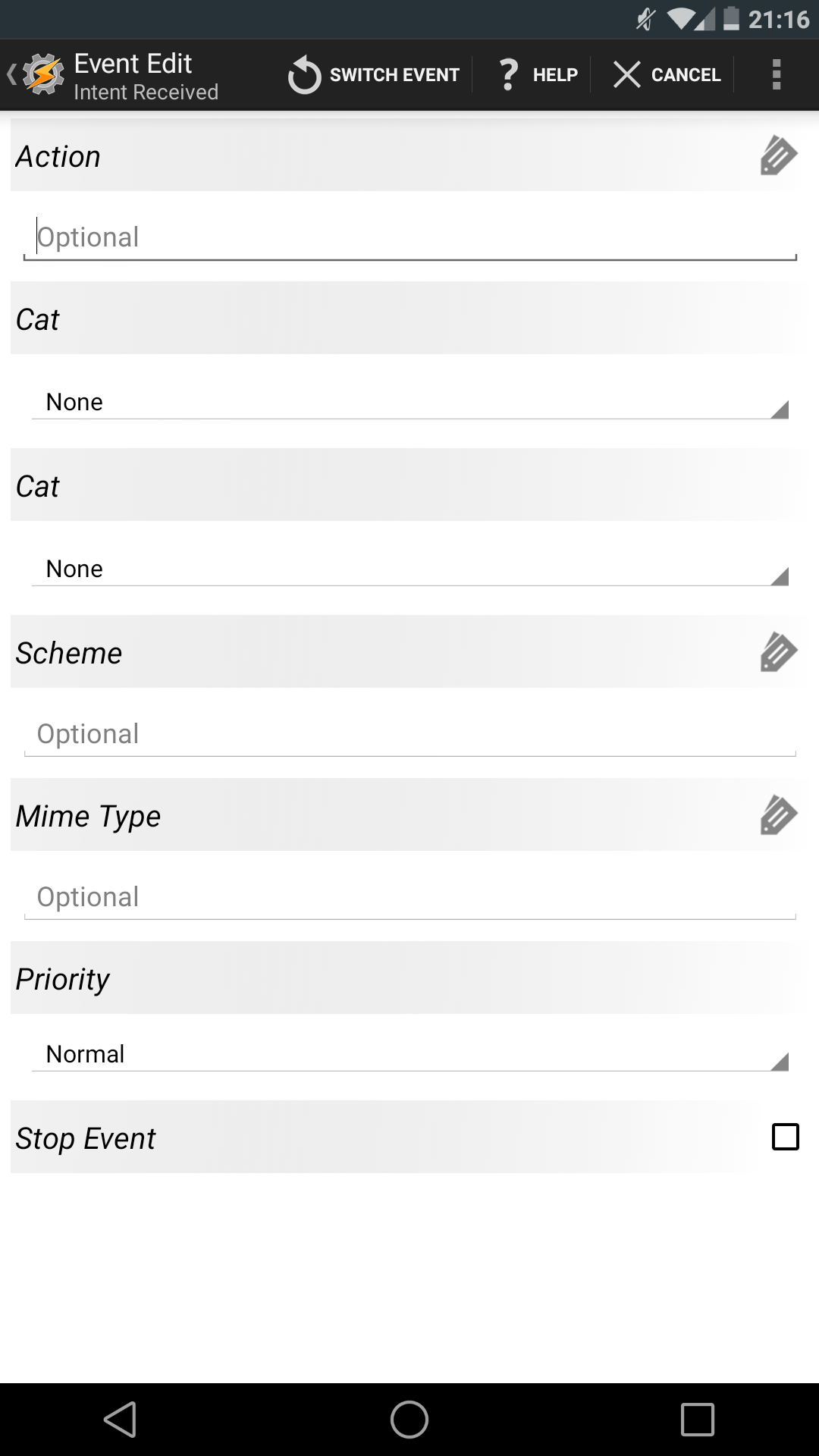
You should see these (see screenshot) were it says none these are called spinners. They show whats selected and if you tap on it you will see more choices.
I couldnt understand this line.
Also I still do to get those extra "None, None, "*, "
Jay M
--
Norman Mc Parland
On Saturday, 12 July 2014 10:45:48 UTC-7, Norman Mc Parland wrote:
Jay M
Nope he didnt in the video.
Jay M
--
Norman Mc Parland
On Saturday, 12 July 2014 10:45:48 UTC-7, Norman Mc Parland wrote:
Jay M
Yeah
Jay M
--
Brandon Horwath
Ah, yes. My apologies. I understood 'movement detector' not what was meant by 'motion detector'.
Sorry for the confusion.
You want tasker to recognize the 'motion detected' intent, gotcha.
Norman Mc Parland
On Saturday, 12 July 2014 10:45:48 UTC-7, Norman Mc Parland wrote:
Norman Mc Parland
Jay M
Just found that app and it has a price tag im bout 80% sure last tym i saw it it was free, IIRC once an apps published as free it cant be changed to paid (dev could disable features and make them available with in app purchases though) So i think whats happened is it has been uploaded again with a different name and package name and the free version has been scrapped.
That would explain the change in the Intent anyway.
Jay M
Norman Mc Parland
Brandon Horwath
Correct.